Turn Any Product Link Into 12 Meta Ad Creatives (Copy-Paste Prompt Pack)
Use the prompts on your real offer
Generate these ad angles for your product
Skip the blank prompt box. Paste your product page and ADEN'S LAB applies the angles to your offer, images, headlines, and copy.
Free to try No prompt writing

Here’s the deal: If you’re running Meta ads and struggling to keep up with creative production, you’re losing money. Your product page already has everything you need to generate 12 ad variations fast, cutting down on wasted time and budget. The problem? Doing it manually is too slow, especially when creative fatigue drives up costs and tanks performance.
Key takeaways:
- Creative fatigue increases CPMs and lowers ROAS if ads aren’t refreshed regularly.
- Manual workflows take too long, leading to wasted spend and missed opportunities.
- Your product page (images, reviews, benefits) can be repurposed into high-performing ads.
Solution: Use systems like Aden’s Lab to automate Meta ad production. Drop in a product link, and it generates 12 Meta-ready ads in 90 seconds. This approach eliminates bottlenecks, keeps your campaigns fresh, and helps you scale effectively.
The ULTIMATE Guide to using AI to make Facebook Ads (Full Step-by-Step Walkthrough)
Put the playbook to work
Apply this playbook to your page
Paste your website and the Lab will turn the strategy you are reading into a ready-to-test ads.
Free to try No prompt writing
Why Manual Creative Production Kills Your Momentum
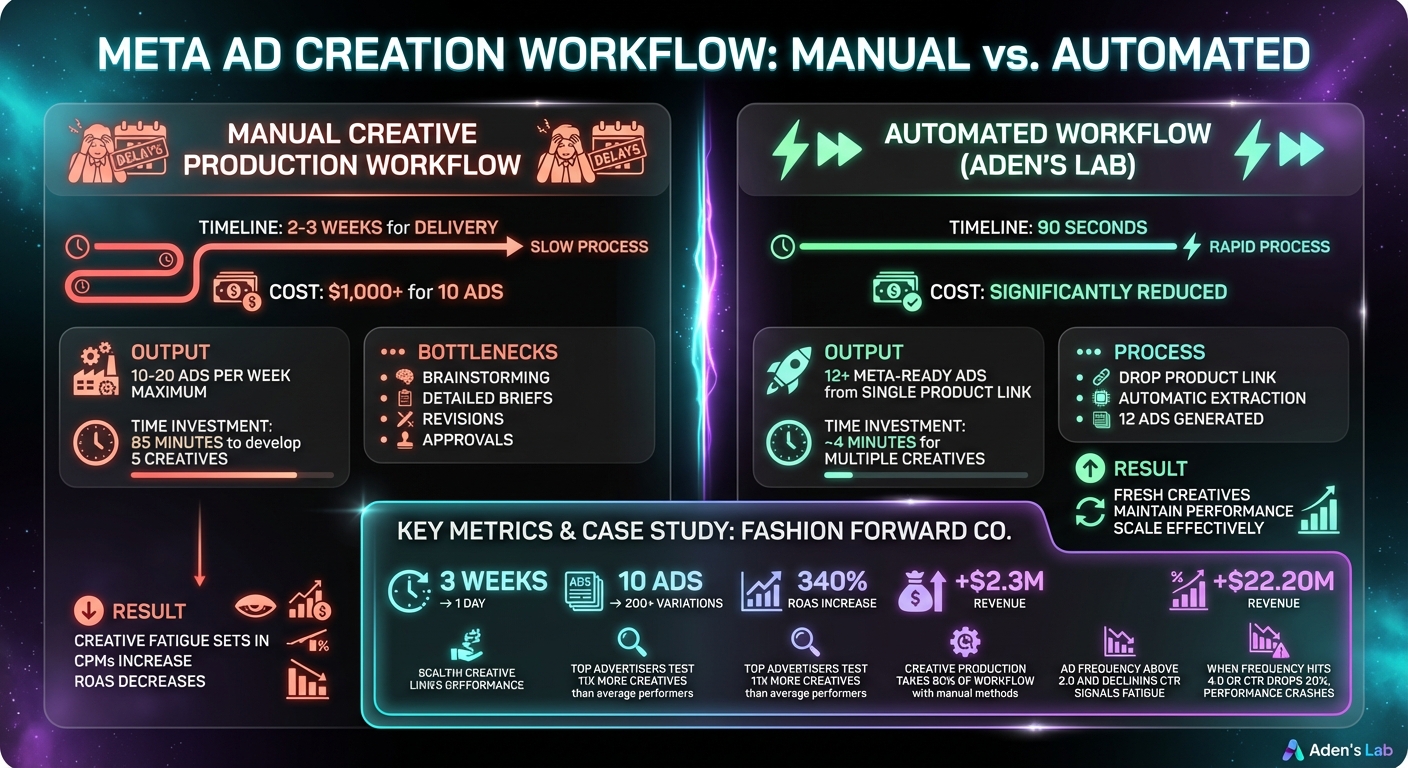
Manual vs Automated Meta Ad Creative Production Comparison
Spending six figures a month on Meta ads? Every single day without fresh creatives is money slipping through your fingers. The problem isn’t that manual workflows produce bad ads - they’re just painfully slow. By the time you get 10 new creatives ready to launch, your outdated ads have already driven up your CPAs and drained your budget.
Think about it: traditional agencies charge over $1,000 for 10 ads, and they take two weeks to deliver. That’s not just expensive - it’s a strategic nightmare. While you’re stuck waiting for revisions and approvals, your competitors are testing fresh ideas, finding what works, and scaling up. Meanwhile, you’re stuck running the same worn-out creatives because there’s nothing new to replace them. This delay doesn’t just cost you time - it amplifies ad fatigue, which eats away at your results.
Creative Fatigue Drains Your Budget Faster Than Bad Targeting
Here’s something many advertisers overlook: creative fatigue is inevitable. When your audience keeps seeing the same headline or image, engagement drops, and click-through rates plummet. Meta’s algorithm notices this decline and starts charging you more for the same reach. Your CPMs climb, and your ROAS takes a nosedive - even if your targeting and budget stay the same.
Once ad frequency climbs above 2 and CTR starts to slip, you’re already overspending. By the time Meta flags your campaign with the “Creative Fatigue” label, your cost-per-result has likely doubled. That means you’ve already wasted a significant chunk of your budget before getting the warning.
"Creative fatigue is not a maybe. It is a guarantee. The only question is whether you see it early and refresh your ads or ignore the signs and let your results crash." - Ivan Teh, Founder, Advisible
Manual Workflows Create Expensive Delays
The real financial hit isn’t just the designer’s fee - it’s the lost time. Every week spent waiting on revisions is a week you’re not testing or scaling winning ads. Take Fashion Forward Co., for example. They ditched their traditional agency and switched to an automated system. The result? They went from waiting three weeks for 10 ads to generating over 200 variations in a single day. That speed boost led to a 340% increase in ROAS and an extra $2.3M in revenue.
Manual workflows bog you down with endless brainstorming, detailed briefs, and constant back-and-forth feedback. By the time your campaign finally goes live, market trends may have shifted, and what seemed fresh is already outdated. Worse yet, you’re still paying for underperforming ads because there’s nothing better to replace them with. Speed isn’t just nice to have - it’s the key to staying ahead. The only way to avoid falling behind is to eliminate manual bottlenecks and adopt an AI-driven system that delivers fresh creatives on demand.
How to Pull Winning Creative Assets From Any Product Link
Your product page is a treasure trove of proven creative elements. Instead of spending hours brainstorming headlines or searching for stock images, you can tap into the messaging, visuals, and proof points already on the page - the very elements that convinced customers to buy. Starting with a product URL means you're not guessing what might work; you're using what already works. These elements have been tested and proven to drive conversions, making them ideal for repurposing into paid ads. By focusing on these ready-made assets, you can speed up the creative process and create ads that resonate.
What to Extract From the Product Page
Here’s a straightforward way to pull the most impactful elements from your product page:
- Visuals: Start with hero images, product-in-use shots, and before-and-after transformations. These visuals grab attention and provide instant proof of your product’s value. If the page includes demo videos or unboxing clips, extract the first 1–2 seconds as high-energy hooks.
- Copy: Look for bold claims or questions at the top of the page - these make strong hooks. Prioritize benefit-focused statements that emphasize outcomes, like "Keeps you cool all day without irritation" instead of just listing features like "Made with organic cotton." Narratives that highlight the product's purpose or address customer pain points are also key.
- Social proof: Use customer reviews, star ratings, and quantified claims like "9 out of 10 users noticed results in 7 days." These elements build trust and make your ads feel more like genuine recommendations.
- Offer details: Capture your primary call to action (e.g., "Shop Now" or "Get 20% Off"), pricing details, and the specific landing page URL. Meta suggests keeping ad titles under 25 characters and body text under 90 characters for the best results, so focus on short, impactful copy.
Here’s a quick summary of the key elements to extract:
| Element Category | What to Extract | Why It Matters |
|---|---|---|
| Visuals | Hero images, demo videos, product-in-use shots | Grabs attention and demonstrates product use |
| Copy | Hooks, benefit statements, problem-solution narratives | Communicates value and addresses customer needs |
| Proof | Reviews, star ratings, testimonials | Builds trust and reduces hesitation |
| Action | CTA buttons, pricing, landing page URL | Encourages clicks and conversions |
How to Organize Assets for Consistent Ad Output
Once you’ve gathered your assets, organize them into modular components: Hook, Angle, Proof, and CTA. This setup allows you to mix and match elements, creating numerous ad variations while maintaining brand consistency. For instance, you could pair a "before and after" image with a scarcity-driven hook and a testimonial, or use the same image with a benefit-focused headline and pricing offer.
Make sure to categorize visuals by placement format - use 9:16 for Stories and Reels and 1:1 for Feed ads. This ensures your creatives look native to their placements and maintain a cohesive appearance across Meta’s platforms. For copy, separate "hooks" from "frames" so you can test different psychological triggers effectively.
A structured system like this dramatically speeds up ad creation. While manual workflows might take 85 minutes to develop five creatives, this method cuts it down to about 4 minutes. That kind of efficiency is a game-changer when testing at scale.
12 Copy-Paste Prompts to Generate Meta Ad Creatives
These templates are designed to tap into buyer psychology, transforming your product link into a variety of ad creatives. Each one focuses on specific aspects of your product page - like benefits, proof points, or objections - and turns them into ads tailored for different stages of the sales funnel. The idea is to provide Meta’s algorithm with diverse concepts to test, rather than just tweaking fonts or colors.
With Aden's Lab, you skip the hassle of setting up manual prompts. Simply input your product link, and it generates high-performing ads automatically. Below are examples of prompts you’d typically have to configure manually - but with Aden's Lab, the process is seamless.
Prompt 1: Benefit-Driven Static Ads
Prompt Template:
"You are a Meta Ads copywriter. Using this product URL [INSERT LINK], create 3 benefit-driven static ad variations for cold traffic. Each ad should lead with the single biggest product advantage in the first sentence. Use a 1:1 aspect ratio for Feed placement. Keep primary text under 125 characters. Pair the hero image with a headline that hooks viewers in under 2 seconds. Format the output as: Headline | Primary Text | Visual Description."
For cold audiences, you need to grab attention quickly. Keeping text under 125 characters ensures it displays properly on mobile, while the 2-second hook matches how users scroll through their feeds. Aden's Lab handles all of this automatically, delivering ready-to-launch creatives.
Prompt 2: Testimonial and Social Proof Ads
Prompt Template:
"You are a performance marketing analyst. Using this product URL [INSERT LINK], automatically pull the most impactful customer testimonials and create testimonial-based ads for mid-funnel audiences. Each ad should feature a real customer quote, star rating, and a trust-building headline. Use a 4:5 aspect ratio for Feed. Include a quantified claim (e.g., '9 out of 10 users saw results in 7 days') if available on the page. Format the output as: Customer Quote | Headline | Visual Layout."
These ads are ideal for audiences already familiar with your brand but not fully convinced. Authentic testimonials and trust-building headlines can provide the reassurance they need to take the next step . Aden's Lab converts your input into ready-to-use creatives in no time.
Prompt 3: Urgency and Scarcity Ads
Prompt Template:
"You are a direct response copywriter. Using this product URL [INSERT LINK], automatically generate 3 urgency-driven ads that convert hesitant buyers instantly. Each ad should include a time-sensitive element: limited inventory, expiring discount, or countdown timer. Use a 9:16 aspect ratio for Stories and Reels. Keep the hook in the first 3 seconds of the visual. Format the output as: Hook | Urgency Element | CTA."
These ads work by creating a sense of urgency, encouraging hesitant buyers to act quickly. However, the urgency must be genuine - fake countdowns or vague claims can harm your credibility. Use real offer details from your product page to maintain trust .
Prompt 4: Comparison and Value Stack Ads
Prompt Template:
"You are a performance marketing strategist. Using this product URL [INSERT LINK], instantly produce 3 comparison/value stack ads that clearly showcase benefits and pricing. Each ad should either compare the product to an alternative or stack 3+ benefits together. Use a 1:1 aspect ratio for Feed. Include pricing, key differentiators, and a clear CTA. Format the output as: Comparison Angle | Benefit Stack | Visual Layout."
These ads target buyers who are still weighing their options. They’re likely comparing products, reading reviews, and looking for logical reasons to choose yours. A clear comparison or a well-presented benefit stack can provide the push they need to click .
| Ad Type | Funnel Stage | Primary Goal | Best Placement |
|---|---|---|---|
| Benefit-Driven | Top of Funnel (Cold) | Hook viewers and highlight main advantage | Feed (1:1) |
| Testimonial/Social Proof | Mid-Funnel (Warm) | Build trust and credibility | Feed (4:5) |
| Urgency/Scarcity | Bottom of Funnel (Hot) | Push hesitant buyers to convert | Stories/Reels (9:16) |
| Comparison/Value Stack | Consideration/Logic | Provide logical justification for purchase | Feed (1:1) |
When Manual Prompting Stops Working at Scale
Why Prompts Break Down as Volume Increases
The prompts mentioned earlier? They work - up to a point. They’ll help you create solid ads, but when you’re producing 50+ creatives every week, the cracks start to show. Scaling at this level requires constant updates, and without automation, keeping performance steady at high spend levels becomes nearly impossible.
Picture this: you’re increasing ad spend from $5,000 to $50,000 per day. To keep up, you need a steady rotation of fresh creatives because ad fatigue sets in fast. Once your ad frequency hits 4.0 or your CTR drops by 20%, performance takes a hit. At this scale, you’re not just running a handful of prompts anymore - you’re juggling dozens. Each product link requires manual adjustments, tailored angles, and specific instructions for different formats like Feed, Stories, and Reels. What used to take 10 minutes now stretches into a 2-3 day process for every batch.
The cost of falling behind is steep. Teams have spent over $10,000 a week on underperforming ads simply because they couldn’t generate fresh creatives quickly enough. While manual prompts might work for smaller campaigns, they become a bottleneck when scaling. Creative production starts eating up 80% of your workflow, leaving little time for optimizing campaigns. Top advertisers test 11x more creatives than average performers, but with manual prompting, you’re capped at 10-20 ads per week. Beyond that, you’re forced to choose between maintaining creative velocity or focusing on other performance drivers.
This is where the need for full automation becomes impossible to ignore.
How Aden's Lab Removes the Manual Work Completely
Aden's Lab takes the heavy lifting out of the equation. Drop in a product link, and the system does the rest: it scrapes the page, extracts key benefits and social proof, and delivers 12+ Meta-ready static ads in just 90 seconds.
Think of it as the difference between running a creative assembly line and crafting each ad by hand. When you’re aiming for 50 variations a week to keep Meta’s algorithm happy and maintain creative diversity across formats like Feed, Stories, and Reels, automation isn’t just helpful - it’s essential. Aden's Lab transforms a single product link into a high-volume output, allowing you to focus on media buying instead of getting bogged down in creative production. This approach ensures you meet the weekly refresh cadence Meta rewards, all without the manual workload that can stall your momentum.
Conclusion
The challenges holding back your ad performance aren’t exactly groundbreaking - they’re the same obstacles marketers have faced for years. When you’re spending $50,000+ daily, the real bottleneck isn’t budget, targeting, or audience size. It’s creative fatigue. Your product link already has everything you need to succeed: high-quality images, benefit-driven copy, customer reviews, pricing details, and urgency triggers. These elements align perfectly with buyer intent, delivering click-through rates 2-3x higher than generic stock content.
But here’s the catch: manual processes can’t keep up when you need 50+ creative variations each week just to keep Meta’s algorithm interested. At that volume, you’re stuck choosing between producing more creatives or optimizing your campaigns. Neither is a good option when your competitors are testing 11 times more creatives than you are.
That’s where Aden’s Lab steps in. It takes any product link and turns it into 12 ready-to-launch static Meta ads in just 90 seconds. Drop your link, get your ads, and start scaling. It’s the difference between spending the bulk of your time churning out creatives and focusing on scaling the winners.
After managing millions in Meta ad spend, one thing is clear: creative speed is the deciding factor. The brands scaling Meta ads past The brands breaking past $100,000 per day aren’t winning because of the prettiest ads.00,000 per day aren’t winning because of the prettiest ads. They’re winning because they test, iterate, and refresh faster than anyone else. At high spend levels, automation isn’t just helpful - it’s non-negotiable. That’s why a tool like Aden’s Lab can completely change the game for your creative strategy.
FAQs
What’s the fastest way to spot creative fatigue in my Meta ads?
Tracking key metrics is the fastest way to spot creative fatigue in your Meta ads. Pay close attention to a drop in click-through rates (CTR), a rise in cost-per-click (CPC) or cost-per-result, and a higher ad frequency. These shifts suggest your audience is getting tired of seeing the same ad repeatedly, leading to reduced engagement. Make it a habit to monitor these metrics in your ad manager to address fatigue before it seriously impacts your ad performance.
Which parts of a product page make the best Meta ad creatives?
When crafting Meta ad creatives, the standout sections of a product page are those that showcase the product’s key features and benefits in a visually appealing manner. Prioritize high-quality product images, prominently display the brand name, and include contextual usage shots that quickly convey a story. Images with depth, clever use of negative space, or storytelling elements can catch the eye and encourage interaction - making these aspects especially effective for ad campaigns.
How often should I refresh creatives when scaling spend?
When increasing your Meta ad spend, it’s crucial to refresh your creatives regularly to keep performance steady and prevent ad fatigue. Many advertisers aim to update or test new creatives every 3–7 days, especially during rapid scaling. Keep an eye out for warning signs like dropping engagement rates or rising costs - these often signal it’s time for a refresh. Consistently updating your creatives ensures your ads remain effective as you expand your audience and raise your budgets.
Your next ad batch starts here
Finish with a ready-to-test ad batch
Paste your website to generate static creatives. Drop the link → get ads in about 90 seconds → upload them to Meta → scale.
Free to try No prompt writing