AI Meta Ads Generator: Create Facebook and Instagram Ad-Creatives From Any Product Link
Try the workflow instead of comparing it
See what an AI ad generator makes from your product
Paste your product page and get a complete Meta ad batch—creative concepts, images, headlines, and copy—without another tool stack.
Free to try No prompt writing

The AI Meta Ads Generator solves one of the biggest problems in Meta advertising: producing enough ads to keep campaigns effective. Instead of spending weeks and thousands of dollars on manual ad design, this tool produces Meta ads on autopilot, creating ready-to-launch Facebook and Instagram creatives in under 90 seconds. Just drop in a product link, and it generates multiple ad variations using data from your product page, including images, benefits, and reviews.
Why It Matters:
- Meta campaigns demand constant ad updates to avoid performance drops due to ad fatigue.
- Static ads are still highly effective, often outperforming videos in click-through rates (CTR) and cost-efficiency.
- Traditional ad production is slow and expensive, costing $1,000+ for 10 ads and taking weeks to deliver.
Key Features:
- Fast Ad Creation: Generate 10–20 ads in less than 2 minutes.
- Cost-Effective: Plans start at $59/month, with ads costing as little as $0.90 each.
- High Volume: Produce over 100 ads daily to scale campaigns without delays.
- Proven Performance: Users report up to 520% CTR boosts and significant cost savings.
How It Works:
- Pick a Plan: Choose from three pricing tiers based on your ad volume needs.
- Input Product Link: The AI pulls images, copy, and details directly from your product page.
- Download Ads: Receive optimized ad files in multiple formats for Facebook and Instagram.
- Upload & Test: Launch ads in Meta Ads Manager and monitor performance.
By automating ad production, this tool eliminates creative bottlenecks, reduces costs, and ensures campaigns stay competitive in Meta's fast-paced environment.
The ULTIMATE Guide to using AI to make Facebook Ads (Full Step-by-Step Walkthrough)
Put the playbook to work
Apply this playbook to your page
Paste your website and the Lab will turn the strategy you are reading into a ready-to-test ads.
Free to try No prompt writing
How AI Fixes the Ad Production Problem
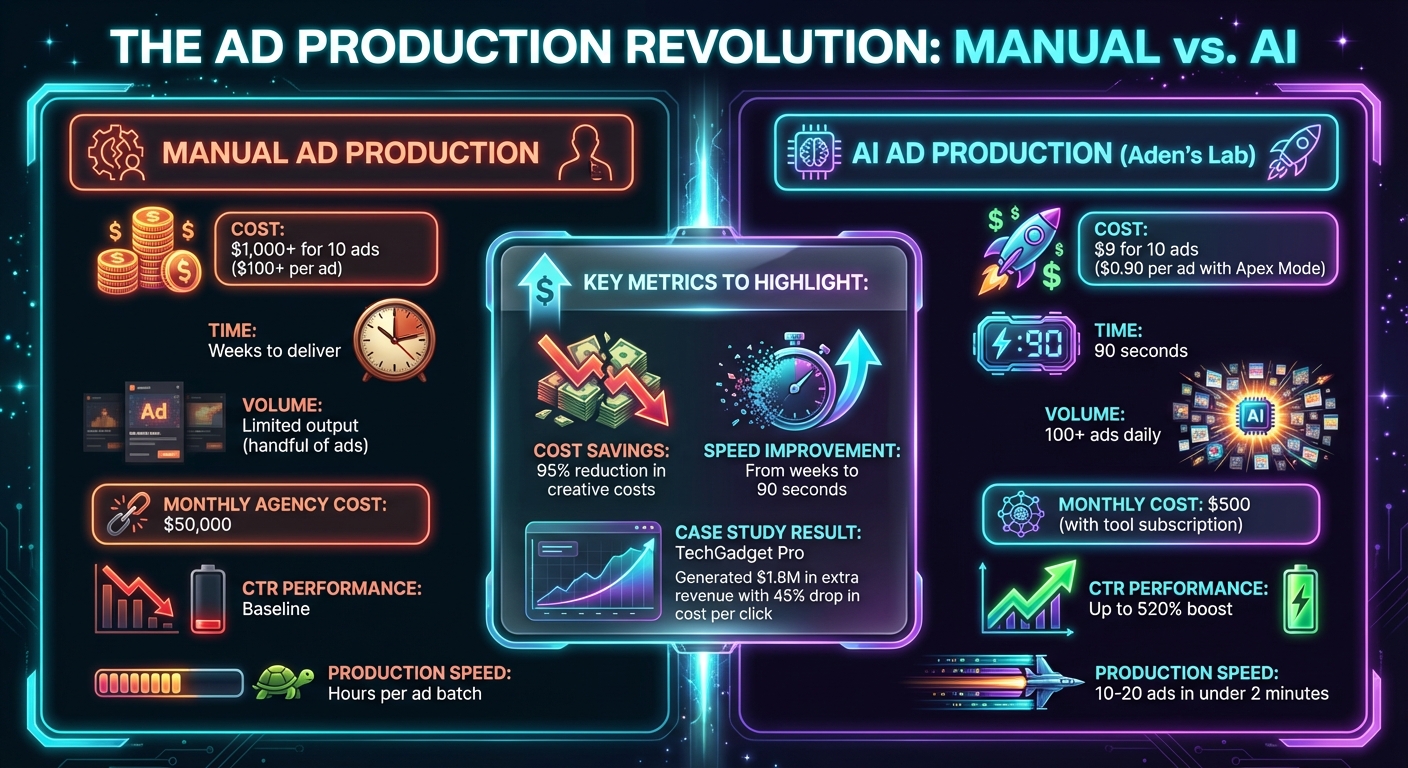
AI vs Manual Ad Production: Cost and Performance Comparison
Manual ad production can drag down campaign performance, but AI is flipping the script. The transition from traditional methods to AI-powered ad creation isn’t just about speeding things up - it’s about rethinking the entire process. Instead of relying on designers to interpret briefs, tweak layouts, and resize assets, AI steps in to analyze your product page and churn out ads that are ready to launch in just minutes. Say goodbye to endless revisions and production delays.
This streamlined, hands-off approach allows for high-volume ad creation at a pace that manual methods simply can’t match.
From Product Link to Ready Ads in Minutes
Here’s how it works: drop in your product link, and the AI takes care of the rest. It automatically pulls images, reviews, key benefits, and positioning - no need to draft a brief or explain your offer. Using extensive ad data, the system generates hooks, headlines, and layouts designed to convert.
All of this happens in just 90 seconds. And when your click-through rate (CTR) starts slipping? No problem. You can whip up a new batch of 10–20 ads instantly, upload them to Meta Ads Manager, and keep testing before your cost-per-thousand impressions (CPMs) climb any higher.
With this fast, data-driven workflow, AI ad creation consistently outperforms manual methods.
Why Automated Ads Beat Manual Design
Manual design often relies on subjective judgment, but AI takes a different route - it leans on proven, data-backed strategies to maximize clicks and conversions. The focus shifts from aesthetics to performance.
Take March 2023, for example. Mike Rodriguez, Growth Director at TechGadget Pro, made a bold move by cutting his company’s $50,000 monthly spend on creative agencies down to just $500 by switching to AI ad generation. The results? A staggering 520% boost in CTR, $1.8 million in extra revenue, and a 45% drop in cost per click. Rodriguez summed it up perfectly:
"We went from spending $50k/month on creative agencies to $500/month on ADEN'S LAB. The AI understands our tech audience better than any human designer ever could."
The cost savings are hard to ignore. Traditional agencies charge over $1,000 for just 10 ads, while AI can produce the same for only $9 - a 95% cut in creative costs. This freed-up budget can then be funneled into testing new ideas, scaling successful campaigns faster, and combating creative fatigue. With the ability to produce over 100 ads daily instead of waiting weeks for a handful, you’re no longer held back by production limits. The only bottleneck? How quickly you can test.
How to Use the AI Meta Ads Generator
Creating ads with the AI Meta Ads Generator is quick and straightforward. From setup to launch, here’s how you can get your campaigns rolling in just four steps.
Step 1: Pick Your Plan
Signing up is a breeze - just enter your email, create a password, and verify through the link sent to your inbox. You can start with a free trial that includes five ad credits, no credit card required.
Here’s a breakdown of the plans:
- Lift Off ($59/month): Get 30 ads at $1.97 each - perfect for early testing and saving on the typical $50-per-ad designer costs.
- Hyperstream ($89/month): Receive 50 ads at $1.78 each, ideal for keeping your campaigns fresh and avoiding creative fatigue.
- Apex Mode ($179/month): Unlock 200 ads at just $0.90 each, giving you the volume needed to scale high-budget campaigns.
All plans come with instant downloads, full commercial rights, no watermarks, and the flexibility to cancel anytime. Choose the plan that fits your needs and let the AI handle the hard work.
Step 2: Drop in Your Product Link
Enter your product URL and click "generate." The AI will instantly pull product images, descriptions, prices, features, and positioning directly from your page.
In under a minute, you’ll get 10–20 custom ad variations. These ads include Meta-compliant visuals, headlines, and copy tailored to your product. The system uses proven techniques like attention-grabbing hooks, urgency-driven angles, and benefit-focused messaging to create ads that stand out - no generic templates here.
Step 3: Download Your Ads
Your ads will be ready in multiple formats - square (1:1), vertical (4:5), and story (9:16) - all optimized for Facebook and Instagram feeds, stories, and reels. Each batch includes a mix of templates like product showcases, lifestyle imagery, and urgency-based designs.
You’ll receive a downloadable ZIP file with PNG/JPG images, primary text, headlines, and CTA buttons. For testing, pick a few ads with different hooks, such as one focused on benefits, another on urgency, and one leveraging social proof. Avoid launching all 20 ads at once, as it can confuse Meta’s algorithm. Instead, match your ad’s messaging to your landing page for better click-through rates (CTR). Thumbnails that grab attention and align with your landing page are key to success.
Step 4: Upload to Meta Ads Manager
Start by choosing your campaign objective, such as sales or traffic. Set up your ad set with Advantage+ audience targeting - there’s no need to create custom audiences at this stage. Upload your ad images from the ZIP file and paste the primary text, headline, and CTA into the appropriate fields.
Enable Advantage+ creative optimizations to let Meta’s AI test up to five headline and text combinations for you. Launch your campaign with daily budgets ranging from $10 to $50 per variant, and let Meta’s algorithm handle the heavy lifting.
Once your ads are live, monitor metrics like CTR and cost per click. When performance starts to drop, generate a new batch of ads and repeat the process. The cycle is simple: launch, test, scale the winners, and replace the underperformers. This approach keeps your campaigns running efficiently and effectively.
How to Scale Meta Campaigns with High-Volume Ad Production
Why You Need More Ads to Scale
If you're spending around $1,000 a day on Meta ads, 10–15 solid creatives might do the trick. But as your budget grows, those same ads can lose their effectiveness fast. This happens because of something called creative fatigue. Essentially, when your audience keeps seeing the same ad, it leads to lower click-through rates (CTR) and higher acquisition costs.
From campaigns with over $100 million in spend, I've seen CTRs drop by 40–50% in just 7–10 days if fresh ad variants aren’t introduced. Once your frequency caps out, your reach stagnates, and costs skyrocket.
The solution? You need volume. A steady flow of new creatives keeps your audience engaged and prevents fatigue. For example, with Aden's Lab, you can simply provide a link, and they’ll deliver the volume of ads needed to match the demands of high-budget campaigns.
Here’s a real-world example: In a campaign scaling from $10,000 to $100,000 daily spend, we initially relied on 15 manually designed ads. Within two weeks, CTR dropped by 35%. When we switched to producing over 100 ad variants, we maintained a 2.5× return on ad spend (ROAS) and saw customer lifetime value increase by 2–3×.
At this level of spending, producing ads at scale isn’t optional. It’s the key to keeping your campaigns growing while avoiding cost spikes and performance plateaus.
Testing and Iterating at High Volume
Generating a large number of creatives is just the first step. The next challenge is testing them effectively. Scaling campaigns requires constant experimentation - not just minor tweaks like changing fonts or colors, but introducing ads with entirely different psychological angles. Think about creating ads that highlight benefits, urgency, or social proof, and let Meta’s algorithm figure out which ones resonate most.
A good approach is to launch 20–50 ads simultaneously, each with unique hooks and visuals. After 48–72 hours, pause the bottom 30% that underperform and focus on scaling the top 20%. This cycle - launching, pausing, and scaling - works best when you can produce ads faster than you consume them. While manual design can take hours, automating Meta ad production with tools like Aden's Lab can generate 50+ ads in minutes, making this process much more efficient.
Keeping your ad rotation fresh is critical. A good rule of thumb is to blend 70% proven winners with 30% new tests each week. This strategy ensures you’re maximizing what already works while exploring new opportunities. By maintaining a frequency below 2.5 and rotating creatives regularly, we’ve seen ROAS stay above 3×, even with daily budgets as high as $200,000. The ability to quickly produce and test ads is what keeps campaigns profitable and growing at scale.
Mistakes That Kill Meta Ad Performance
Testing Too Few Ad Variants
Running fewer than five ad variants in a campaign can quickly drive up your cost per acquisition. Why? Because Meta's algorithm might latch onto an early "winner" before it collects enough data, leaving other variants underfunded and unable to show their potential. This often results in scaling a creative that’s not actually the best performer.
Here’s the kicker: 56% of ad outcomes are tied directly to the creative itself. Yet, many advertisers waste time tweaking minor details - like a button’s color or font size - when they should be testing entirely different concepts.
A better approach? Start with variety. Launch 5–10 ad variants that feature distinct hooks, visuals, and messaging. Once you identify what works, you can fine-tune the details. Another tip: set aside 10–20% of your ad budget for testing. For example, if your monthly budget is $10,000, allocate $1,000–$2,000 for testing. This can help you uncover the creative that drives results. Tools like Aden's Lab make this process easier by generating dozens of unique ad creatives in minutes, saving you time and enabling efficient testing.
This focus on variety also helps you address the next big challenge: creative fatigue.
Letting Creative Fatigue Kill Your CTR
Creative fatigue is one of those problems that sneaks up on you. Over time, you might notice your click-through rates (CTR) dipping and your cost per click (CPC) creeping up. If your ad frequency is climbing, that’s a clear sign your audience is tuning out.
Here’s the reality: after seeing an ad four times, conversions can drop by 45%, and Meta’s algorithm will start reducing delivery. Even high-performing ads can see a 20–30% drop in engagement week-over-week as they approach the end of their lifecycle. For most campaigns, this means you’ll need fresh creative every 2–4 weeks - or even sooner if you’re spending heavily.
Instead of waiting for performance to tank, keep a steady flow of new ads ready to go. With Aden's Lab, you can quickly generate fresh, high-volume static ads, ensuring you stay ahead of creative fatigue and maintain audience engagement.
But even the best creative won’t perform if your ad and landing page aren’t working together.
Mismatching Your Ad and Landing Page
When there’s a disconnect between your ad and its landing page, you risk losing trust - and conversions. Whether it’s a mismatch in color, tone, or messaging, this inconsistency can double your bounce rates and drive up acquisition costs. If clicks don’t lead to conversions, your cost per acquisition will inevitably rise.
The solution? Align your ads and landing pages seamlessly. Aden's Lab simplifies this by pulling visuals, copy, and messaging directly from your product or landing page. This ensures your ads feel like a natural extension of your landing page, creating a smoother and more reliable user experience.
Conclusion: Drop a Link, Get Ads, Scale Faster
Here’s the bottom line: speeding up creative production can completely change the game for your Meta ad performance.
After managing $100M in Meta ad spend, one thing is crystal clear - brands that succeed aren’t just smart; they’re fast. The ability to quickly test, tweak, and refresh ads before they lose their impact is what separates growing businesses from those stuck in place.
Manual workflows? They’ll only get you a handful of ad variations - far too few to keep up with Meta’s ever-changing algorithms. That’s where Aden’s Lab steps in. With just a single product link, it can churn out dozens of static ads in minutes. No prompts, no design expertise required. Just drop your link, download the ads, and upload them to Meta Ads Manager.
And the results speak for themselves. More creative options mean lower Customer Acquisition Costs (CAC) and higher Return on Ad Spend (ROAS). Take Fashion Forward Co., for example. By ditching their three-week agency cycle for AI-generated ads, they created over 200 ad variants in a single day. The payoff? A 340% increase in ROAS and $2.3M in additional revenue. Similarly, TechGadget Pro slashed their creative budget from $50,000 a month to just $500 while boosting their Click-Through Rate (CTR) by 520%. These aren’t just numbers - they’re proof that breaking through the creative bottleneck works.
Automation isn’t just helpful - it’s essential if you want to outpace manual processes. Meta’s algorithm thrives on ad variety and volume, and Aden’s Lab delivers both for a fraction of the cost. At just $0.90 per ad with the Apex Mode plan, you’re essentially replacing an entire creative team while maintaining the speed needed to keep campaigns profitable.
Why wait weeks for new ads? Drop your link, grab your ads, and leave slow, manual workflows behind.
FAQs
What product pages work best with this tool?
The tool delivers optimal results when used with product pages that showcase the product’s main features and visuals clearly. Because it automatically creates high-performing ads straight from the page, strong imagery and clear details are essential - no need for prompts or manual adjustments.
Are the ads generated Meta-compliant?
Yes, ads from Aden’s Lab are designed to align perfectly with Meta's advertising standards. They comply with Facebook and Instagram's guidelines and are crafted to deliver high performance and drive conversions - ready to go without requiring any additional tweaks.
How often should I rotate new ad creatives to avoid fatigue?
To keep your ads performing well and avoid ad fatigue, it's a good idea to refresh your creatives every 1 to 2 weeks. The specific timing can vary based on factors like the size of your campaign and how broad your audience is. Regularly updating your ads ensures they stay fresh and continue to capture your audience's attention.
Your next ad batch starts here
Finish with a ready-to-test ad batch
Paste your website to generate static creatives. Drop the link → get ads in about 90 seconds → upload them to Meta → scale.
Free to try No prompt writing