How to Improve Meta Ad Conversion Rate From Click to Purchase
Turn the strategy into creatives
Create Meta ads for your product
Paste your product page. ADEN'S LAB turns the offer, audience, and positioning into complete ready-to-use Meta static ads.
Free to try No prompt writing

Clicks alone won’t grow your revenue - conversions will. In 2026, the difference between profitable and wasteful Meta Ads often comes down to how well you convert clicks into purchases. Here’s the key takeaway: better conversion rates mean lower costs per acquisition (CPA) and higher returns on ad spend (ROAS). This guide covers practical ways to fix common drop-off points, optimize your ads and landing pages, and scale campaigns efficiently.
Quick Tips:
- Track Accurately: Use both Meta Pixel and Conversions API to ensure 85–95% conversion tracking.
- Fix Drop-Offs: Analyze your funnel to identify where users abandon (e.g., slow pages, checkout friction).
- Refresh Ads: Prevent ad fatigue by updating creatives every 2–4 weeks.
- Leverage AI Tools: Platforms like ADEN's LAB generate static ads quickly, cutting costs and boosting scalability.
- Optimize Landing Pages: Match ad messaging to landing pages, improve mobile usability, and reduce form fields.
- Scale Smartly: Use Advantage+ campaigns, A/B test consistently, and increase budgets gradually.
Each step builds toward campaigns that turn clicks into revenue while keeping costs under control.
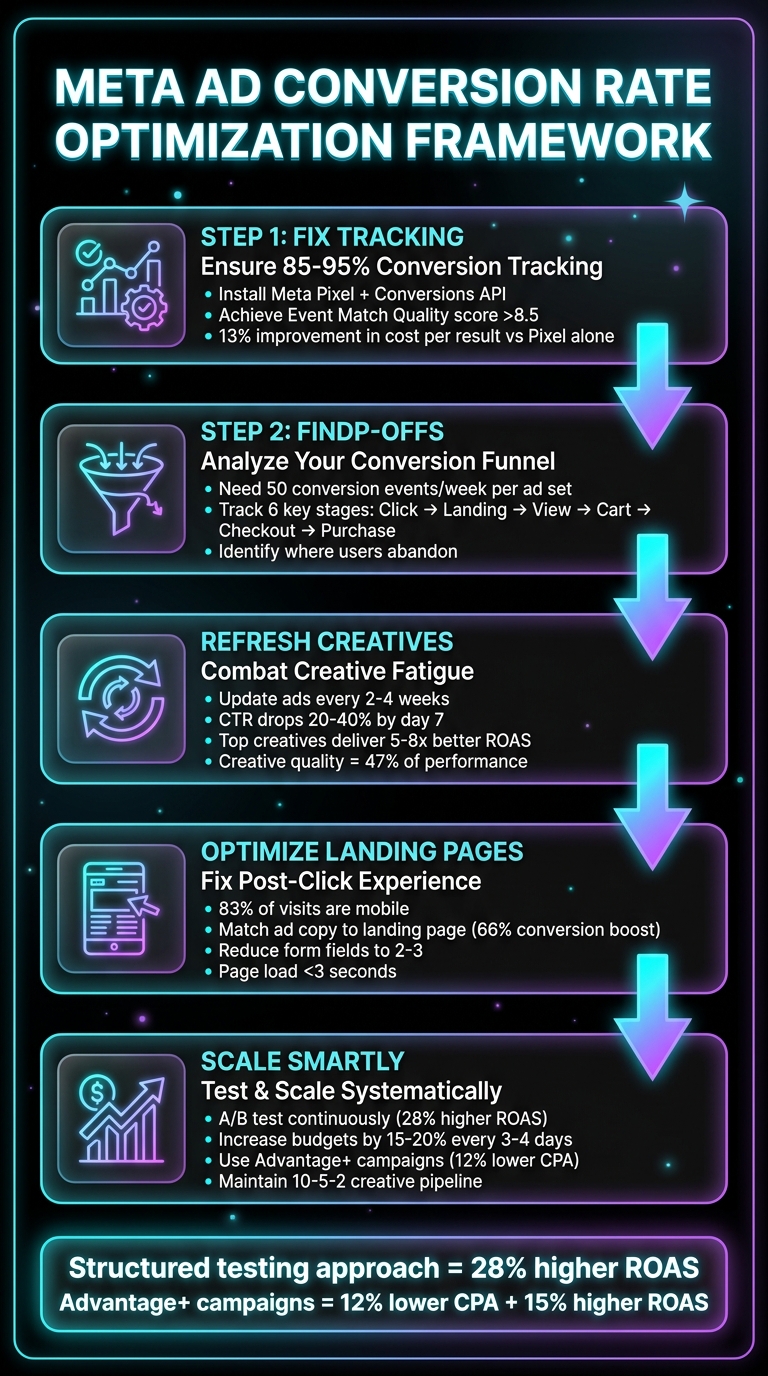
5-Step Framework to Improve Meta Ad Conversion Rates
The EXACT System to Scale Facebook Ads Profitably (2026)
Put the playbook to work
Apply this playbook to your page
Paste your website and the Lab will turn the strategy you are reading into a ready-to-test ads.
Free to try No prompt writing
Finding Where Users Drop Off in Your Conversion Funnel
If you're aiming to fix conversion issues, the first step is figuring out exactly where users are falling off. Skipping this step and diving straight into creative testing or budget adjustments is a common mistake - and often leads to frustration when nothing changes. In fact, tracking problems are frequently the root cause of poor Meta campaign performance, not creative or audience issues.
"Across every underperforming account we've onboarded, tracking issues are one of the most common root causes. Not bad creative, not wrong audiences. The algorithm was working with bad data." - 27Five
Each stage of your funnel, from ad click to purchase, can reveal its own set of challenges. For example, if you’re seeing a lot of clicks but few landing page views, slow page load times might be the culprit. Or, if users are adding items to their cart but not completing checkout, you might need to address friction points like shipping costs or payment options. Pinpointing these drop-off points allows you to focus your energy where it matters most. But first, you need to ensure your Meta Pixel and Conversions API are tracking every step correctly.
Check Your Tracking Setup with Meta Pixel and Conversions API
Start by confirming that both the Meta Pixel and Conversions API (CAPI) are installed and functioning properly. As of 2026, relying on the Pixel alone captures only 60–70% of conversions, while combining it with CAPI boosts match rates to 85–95%. That difference has a direct impact on how Meta’s algorithm optimizes your campaigns.
Here’s how to verify your setup:
- Use the Meta Pixel Helper Chrome extension to ensure browser-side events are firing.
- Check the Test Events tool in Events Manager to confirm server-side data from CAPI is being captured.
- Make sure both systems are recording the same standard events: PageView, ViewContent, AddToCart, InitiateCheckout, AddPaymentInfo, and Purchase.
Event deduplication is key. Both Pixel and CAPI need to send identical event IDs (like an order ID) and matching event names to avoid double-counting conversions. Without this, your ROAS could be inflated, misleading both you and Meta’s algorithm. Also, keep an eye on your Event Match Quality (EMQ) score - it should be at least 6.0, but aim for above 8.5. You can improve this score by passing hashed data like email, phone numbers, and Facebook Click IDs.
Running both Pixel and CAPI together can lead to a 13% improvement in cost per result compared to using Pixel alone.
Review Key Metrics to Find Performance Gaps
Once your tracking is in order, it’s time to dive into your data. Analyze how users move through your funnel to identify exactly where they’re dropping off. For instance, if your click-through rates (CTR) are strong but conversions are low, your landing page might not align with what your ad promised.
| Funnel Stage | Key Metric | What a Gap Means |
|---|---|---|
| Ad Click | CTR | Poor creative or audience mismatch |
| Landing Page | Landing Page View vs. Link Click | Slow load times (over 3 seconds) |
| Product View | ViewContent | Ad doesn’t match page content |
| Cart Addition | AddToCart Rate | Pricing or product-market fit issues |
| Checkout | Checkout Abandonment Rate | Friction from shipping costs or limited payment options |
| Purchase | ROAS / CPA | Final profitability measure |
Meta’s algorithm needs around 50 conversion events per week per ad set to exit the learning phase and optimize effectively. If you’re not hitting that threshold, your campaigns will struggle no matter how good your creative is. Also, double-check your attribution window settings. For most e-commerce products, a 7-day click window works well, but for high-consideration items like furniture or electronics, extending to 28 days might be better.
Spot Creative Fatigue Using Performance Data
With accurate tracking and a clear understanding of your funnel, you can start addressing creative fatigue - a common issue that drains ad performance. On Meta, ads often lose their effectiveness quickly. Within 3–5 days of delivery, performance can start to dip. By day 7, CTRs might drop by 20–40%, and by day 14, frequency often exceeds 3.0 while CPA spikes by 25–50%.
To spot early signs of fatigue, watch for:
- Declining CTR
- Rising CPA
- Increasing frequency
For prospecting campaigns, fatigue typically sets in when frequency reaches 2.5–3.5. Retargeting campaigns, on the other hand, can sustain higher frequencies of 4.0–6.0+ before performance begins to degrade. A 10% drop in CTR over 7 days signals it’s time for a creative refresh, and a 20% drop over 14 days demands immediate action.
For video ads, keep an eye on the hook rate - the percentage of users watching the first 3 seconds. A drop of 15–25% from your baseline suggests the opening isn’t grabbing attention anymore. Don’t wait for performance to tank completely. Conduct weekly performance audits, especially on Mondays, and after any budget increase of 20% or more, as higher spending can speed up audience fatigue.
Building Better Ad Creatives with AI Tools
After pinpointing where users drop off and ensuring your tracking setup is reliable, the next hurdle is producing enough engaging ad creatives to keep campaigns fresh by automating Meta ad production. Traditional design methods often can't keep up with the fast-paced nature of Meta ads, which tend to have short lifespans. AI-powered platforms like ADEN's LAB tackle this problem by creating eye-catching static ads in just minutes. This aligns with the earlier discussion on creative fatigue, offering a way to refresh and test ads quickly using data-driven insights.
Generate Ads Based on Buyer Psychology with AI
ADEN's LAB specializes in crafting static Meta ads for Facebook and Instagram, embedding principles of buyer psychology like urgency, social proof, and benefit-focused messaging. These ads are tailored to your brand's unique visual style, tone, and format - all without the need for lengthy creative briefs. Simply provide a product or landing page link, and the platform delivers ready-to-use ads in just 90 seconds.
Designed specifically for Meta's ad delivery system, this tool focuses on static ad formats, which remain among the most scalable and cost-effective options. Instead of waiting days for traditional designers who charge $30–$50 per ad, you can generate multiple variations instantly and use performance data to guide your decisions. Whether you're running e-commerce, SaaS, or lead generation campaigns, this rapid production capability allows you to explore fresh angles, update creatives, and scale campaigns more effectively.
Fight Creative Fatigue with High-Volume Ad Production
Creative fatigue can derail campaign performance if ads aren't updated regularly. The solution? Produce more ads. With ADEN's LAB, you can generate dozens - or even hundreds - of variations each month. This ensures you can rotate creatives before they lose their effectiveness, test different messaging strategies simultaneously, and keep your campaigns in Meta's optimal performance phase.
This high-output production also enables robust A/B testing across various buyer psychology principles, visual styles, and messaging frameworks. By having a scalable creative engine at your disposal, you can continuously refine your campaigns and achieve better results over time.
ADEN's LAB Pricing Breakdown
By cutting down on design costs and production time, ADEN's LAB supports efficient campaign scaling. It offers three pricing tiers designed to accommodate different budgets and growth needs. Each plan includes full commercial usage rights, instant downloads, and no long-term commitments.
| Plan | Monthly Cost | Ads Included | Cost Per Ad | Best For |
|---|---|---|---|---|
| Lift Off | $59/mo | 30 ads | $1.97 | Early-stage founders and small businesses testing AI-generated Meta ads without hiring designers |
| Hyperstream | $89/mo | 50 ads | $1.78 (save 9.6%) | E-commerce, SaaS, and lead gen brands needing a steady flow of creatives to combat fatigue and scale efficiently |
| Apex Mode | $179/mo | 200 ads | $0.90 (save 54.3%) | High-spend advertisers, agencies, and media buyers running aggressive creative testing and scaling campaigns |
For comparison, traditional designers charge $30–$50 per static ad, often taking several days to deliver. With ADEN's LAB, you can produce ads in just 90 seconds for as little as $0.90 per ad with the Apex Mode plan. This not only slashes costs but also eliminates the need for a full creative team, giving you the ability to outpace competitors and maintain fresh, impactful campaigns effortlessly.
Improving Your Targeting and Audience Setup
Once you've got a library of fresh ad creatives ready, the next step is to make sure those ads reach the right people - specifically, those who are ready to buy. This often involves refining your interest-based audiences to ensure you aren't targeting too broadly. Poor targeting wastes money on people who aren’t likely to convert, while a well-thought-out audience setup ensures your budget focuses on users who match your ideal customers. Meta’s data tools can help refine your audience, and once your campaigns stabilize, you can test different approaches to improve results. The goal? To connect your new creatives with buyers who are ready to engage.
Create Lookalike Audiences from Your Best Customers
After updating your creative assets, the next move is to pair them with audiences that mirror your top buyers. This is where Lookalike Audiences come in. They work by identifying new users who share traits with your existing customers. But here’s the catch: the quality of your results depends heavily on the seed audience you use. A clean, focused list of 1,000–5,000 high-value customers will always outperform a larger, unfiltered list of 30,000 mixed buyers. For the best results, focus on:
- Repeat buyers
- Customers in the top 20% by lifetime value
- Recent buyers from the last 90 days
On the flip side, avoid including one-time discount shoppers, refund requesters, or those who’ve complained to support. These lower-quality profiles can throw off your targeting.
If you want to take it up a notch, Value-based Lookalikes can help. By including a "value" column in your customer list (e.g., total purchase amount or lifetime value), Meta’s algorithm will prioritize finding high spenders over bargain hunters. This approach can boost ROAS by 15–30% compared to standard Lookalikes. Start with a 1% Lookalike (roughly 2.7 million users in the U.S.) for precise targeting, and once you see positive results, scale up to 3–5%. Make sure to refresh your seed audience regularly so the algorithm continues targeting users who reflect your current best customers.
Use Dynamic Creative Optimization with Static Assets
Dynamic Creative Optimization (DCO) is a powerful tool that tests various combinations of your ad assets - images, headlines, text, and call-to-action buttons - and automatically serves the best-performing versions to users. You can upload up to 10 images or videos, 5 headlines, 5 text variations, and 5 CTAs, and Meta’s algorithm will handle the rest based on user behavior. This strategy works particularly well with static ads from ADEN's LAB, as it allows you to generate multiple variations quickly, giving the algorithm more options to test.
To get the most out of DCO, ensure all your assets work well together in any combination. Keep headlines under 40 characters, highlight the benefit in the first 125 characters of your primary text, and experiment with different CTAs like "Shop Now" or "Learn More" to see what resonates best. Campaigns with 10–20 variations tend to outperform those with only a few options, as the algorithm has more material to fine-tune the messaging for each audience segment. Fine-tuning these combinations will also help you identify and exclude underperforming audience segments.
Exclude Low-Quality Audiences and Test Following the Learning Phase
Not all clicks are created equal. Use Meta’s breakdown reports to pinpoint segments that click on your ads but fail to convert - these could include specific age groups, placements like Instagram Reels that drain budget without delivering results, or devices with high bounce rates. Exclude recent purchasers (from the last 30–90 days) from prospecting campaigns to avoid wasting money on users who’ve already bought. If your ad frequency climbs above 3–4, it’s a sign your audience is saturated, and users may be ignoring your ads.
Once your campaigns exit the learning phase, try testing broad targeting against your Lookalike Audiences. In some 2026 tests, broad targeting delivered a 113% ROAS compared to 76% for Lookalikes, partly because Lookalikes often come with higher CPMs - up to 45% more. The trade-off? Broad targeting requires highly engaging creatives to filter the right buyers from a larger pool. To make this work, consolidate your budget into fewer ad sets, ensuring each one hits the 50-conversion weekly threshold. Spreading your budget too thin across small audiences can hurt performance.
Next, we’ll dive into how to enhance your post-click experience on landing pages.
Fixing Your Landing Pages and Post-Click Experience
Getting a click is just the beginning. Once you've refined your ad creatives and identified drop-off points, the next step is ensuring your landing page smoothly guides users from click to conversion. If your landing page doesn't meet user expectations - or makes the process too complicated - they'll leave before taking action. Often, the landing page itself becomes the bottleneck, with issues like mismatched messaging, slow load times, or poor mobile usability derailing momentum. Fixing these problems can lead to major improvements. For example, a test by KlientBoost showed that simply aligning the ad and landing page messaging boosted conversions by 66% - without changing the offer or targeting. Your post-click experience should feel like a natural extension of the ad, not a jarring interruption.
Match Your Ad Copy to Your Landing Page
When users click on an ad, they expect to see exactly what was promised. If your ad says "Start 7 days free" but the landing page headline reads "Try our premium plan," you've created unnecessary friction that could drive users away. To avoid this, align three key elements: the keyword or interest triggering the ad, proven Meta ad copy frameworks, and the landing page headline. Consistency in style and tone across these layers helps maintain a seamless experience.
Consider this example: in 2026, Pipedrive ran an ad for "Best Email Marketing Platform" targeting searches for "email marketing software." But the landing page headline focused on "CRM for sales teams" - a disconnect that likely cost them conversions. On the other hand, if your ad mentions specific offers like 40% off or "Get a quote in 60 seconds," make sure these details are immediately visible on the landing page, above the fold. Avoid clutter by sticking to a single, focused call-to-action. Research shows that adding multiple competing offers can slash conversion rates by 266%.
Even Meta's algorithm takes post-click engagement into account. If users quickly bounce because of mismatched messaging, your ad could be flagged as irrelevant, leading to higher costs or reduced visibility.
Once your messaging and design are aligned, the next priority is optimizing the mobile experience.
Improve Mobile Checkout and Reduce Form Fields
With 83% of landing page visits now coming from mobile devices, your checkout process must work flawlessly on smaller screens. Yet mobile conversion rates lag behind desktop - 1.8% versus 3.9% - mostly due to friction points like tiny buttons, slow load times, or long forms. Simplify the process by limiting form fields to just 2–3 essentials. Typing on a small screen is tricky, so make it as easy as possible. For users who prefer it, include "click-to-call" buttons for completing purchases over the phone.
Page speed is equally critical. A 1-second delay in load time can lower conversions by 7%, and 53% of mobile users will leave a site that takes more than 3 seconds to load. Optimize your page by compressing images, removing unnecessary elements, and ensuring files are lightweight. Design buttons to be at least 44x44 pixels for easy tapping, and use fonts sized 16px or larger for readability.
Trust signals - like security badges, customer reviews, or guarantees - should appear early in the mobile experience, ideally near the call-to-action. For example, in 2019, ooba, a finance company, achieved a 35.57% conversion rate by placing their lead generation form prominently at the top of the page, making the desired action clear from the start.
Use UGC-Style Static Ads to Build Trust
Ads styled like user-generated content (UGC) resonate well with cold audiences. These ads, which mimic organic social media posts, feel more genuine and help build trust faster than polished product shots. Pairing UGC-style static ads from ADEN's LAB with landing pages that reinforce this authenticity creates a smoother path to conversion. Instead of generic text reviews, use real screenshots of Google reviews or social media comments, complete with the reviewer's name and profile image, to enhance credibility.
"A well-written headline aligns with the ad, email, or social media post that led the visitor to the page. If there's a disconnect... users may lose trust and exit the page." - Leadpages
If your ad highlights a customer testimonial or a before-and-after transformation, your landing page should reflect that same narrative. This consistency reassures users they’re in the right place and reinforces the value of your offer. By combining these strategies, you can build trust and strengthen the entire conversion process.
Scaling Your Campaigns for Consistent Results
After optimizing your landing pages and aligning the post-click experience, the next hurdle is keeping performance steady as you increase your ad spend with AI budget allocation. Scaling isn’t just about throwing more money into the mix - it’s about smart testing, regular updates to your creative assets, and leveraging Meta’s automation tools effectively. Without a clear plan, your campaigns can quickly fall into the learning phase or suffer from creative fatigue, which can drive up costs and hurt conversion rates. The secret? Pairing high-volume ad creation with data-backed decisions to keep campaigns profitable over the long haul.
Run A/B Tests with AI-Generated Ads
Once your creative assets are ready and your landing pages are polished, it’s time to refine your performance through structured A/B testing. Start by testing the concept or angle (this has the biggest impact), then focus on the hook (the first three seconds), followed by format (video versus static), and finally tweak smaller elements like CTA buttons. The best-performing creatives can deliver 5–8x better ROAS compared to the weakest ones, with creative quality accounting for 47% of performance variability on Meta.
For clean data, use ABO (ad set budget optimization) to run controlled A/B tests. Once you find a winning ad, move it into an Advantage+ campaign, which scales it using Meta’s algorithms. When testing AI-generated ads from ADEN's LAB, isolate one variable at a time - like changing the background or headline - so you know exactly what’s driving the results. For instance, in December 2025, a furniture client working with Synergist Digital Media tested AI-generated backgrounds for product shots, leading to a 23% boost in conversion rates compared to standard white backgrounds.
Set clear kill criteria to avoid wasting your budget. Stop tests if ROAS drops by 15% or CPA rises by 20% within the first week. Advertisers who use a structured testing approach achieve 28% higher ROAS than those who test randomly. Follow a 10-5-2 pipeline: keep 10 concepts in ideation, 5 in production, and 2 ready to launch at any given time.
Track Learning Phase and Refresh Ads Weekly
Meta’s algorithm requires 50 optimization events within 7 days to stabilize your campaign’s performance. Big changes - like increasing budgets by more than 20%, shifting targeting, or adjusting bid strategies - can reset the learning phase and disrupt results. To avoid this, calculate your daily budget using this formula: (Target CPA x 50) / 7.
Creative fatigue can set in every 2–4 weeks, so refreshing your ads regularly is critical. High-volume production from ADEN's LAB makes it easier to generate new static ads each month and keep campaigns fresh. Watch for signs of fatigue: act if CPA exceeds 1.5x your target for three consecutive days or if your frequency surpasses 2.5.
"Creative quality accounts for 47% of ad performance variability." - RedClaw Performance Team
When scaling, increase budgets gradually - by 15–20% every 3–4 days - to avoid pushing your campaign back into the learning phase. Keep your testing and scaling campaigns separate to ensure stable campaigns remain unaffected by new experiments.
Combine Advantage+ Campaigns with First-Party Data
Advantage+ Shopping Campaigns (ASC) simplify scaling by merging prospecting and retargeting into one AI-driven campaign. These campaigns handle audience targeting, placement, and creative testing automatically. Advertisers using ASC report an average 12% lower CPA and a 15% higher ROAS compared to traditional manual campaigns. First-party data plays a crucial role here, feeding Meta’s AI with accurate signals to predict user behavior better than manual interest targeting.
To maximize results, cap your budget for existing customers at 25–30%. This prevents the AI from over-focusing on retargeting and ensures more of your budget goes toward acquiring new customers. Launch Advantage+ campaigns with 20–50 creative variants from ADEN's LAB to give the AI plenty of options to identify winning combinations. A DTC brand in 2024 used first-party data to sync events like "Purchase_Accessories" with Meta, leading to a 27% increase in ROAS and a 19% drop in CPA.
Implementing the Conversions API (CAPI) is a must as cookie tracking continues to decline. CAPI ensures Meta’s AI receives clean, server-side data for optimization. Use the 5x CPA testing rule: allocate a budget equal to five times your target CPA for each new creative. If it doesn’t convert at target levels, drop it; if it does, move it to your scaling campaign. Scale gradually by increasing daily budgets by no more than 20% per week to keep campaigns stable and avoid re-entering the learning phase.
Summary: How to Improve Meta Ad Conversion Rates
Boosting your Meta ad conversion rates involves focusing on five key areas: tracking accuracy, creative output, precise targeting, landing page performance, and ongoing testing. Start by ensuring your Meta Pixel and Conversions API are working correctly to provide the algorithm with clean, reliable data. Dive into your metrics to identify drop-off points - whether it's due to outdated creatives, audience mismatches, or issues with the post-click experience. These elements work together to create a seamless path from ad click to conversion.
High-quality creatives are essential, as top-performing ads can deliver up to 5–8x better ROAS. Tools like ADEN's LAB can help you produce dozens of fresh static ads each month, keeping your campaigns dynamic and competitive through frequent testing.
For targeting, create lookalike audiences based on your best customers and exclude lower-quality segments. Ensure your ad copy matches your landing page headlines, streamline mobile checkouts, and use UGC-style ads to build trust before users even click.
When scaling, take a structured approach: follow a pre-launch ad testing checklist, update creatives every 2–4 weeks, and refine strategies based on performance data. Advertisers who adopt a disciplined testing process can see up to 28% higher ROAS. These steps lay the groundwork for campaigns that consistently deliver strong results.
FAQs
How do I know if Pixel and CAPI are set up correctly?
To make sure your Pixel and Conversions API (CAPI) are functioning as they should, follow these steps:
- Test events: Use Meta's Event Manager to confirm that your data is being received without issues.
- Install both Pixel and CAPI: This dual setup provides redundancy and improves match rates.
- Review your Event Match Quality score: Aim for a score of 6.0 or higher to ensure optimal data tracking.
- Verify key parameters: Double-check that important details like email, phone, and
fbpare being passed accurately. - Watch for deduplication: Make sure you're avoiding double-counting conversions by properly managing event deduplication.
These steps will help you ensure your setup is reliable and your data tracking remains accurate.
What’s the fastest way to find my biggest funnel drop-off?
The fastest way to figure out where users are falling out of your funnel is by conducting a funnel analysis. This method lets you track how users move through each step of your conversion process, clearly showing where most of them drop off.
Platforms like Amplitude make this easier by tracking user actions and calculating drop-off rates. With this data, you can zero in on the specific stage that needs attention to boost your conversions.
When should I refresh Meta ad creatives to avoid fatigue?
Keep an eye on your Meta ad performance metrics, especially click-through rates (CTR) and conversion rates. If you notice these numbers dropping, it’s a clear sign your audience may be losing interest. This often happens when people see the same ads too many times or when the content no longer resonates.
To stay ahead, monitor your metrics consistently. When signs of fatigue - like lower engagement or reduced responsiveness - start to show, it’s time to update your creatives. Regular refreshes can help keep your audience engaged and your campaign results on track.
Your next ad batch starts here
Finish with a ready-to-test ad batch
Paste your website to generate static creatives. Drop the link → get ads in about 90 seconds → upload them to Meta → scale.
Free to try No prompt writing