AI Tools for E-commerce Meta Ads: Shopify Product Page to Ad Creative Workflow
Try the workflow instead of comparing it
See what an AI ad generator makes from your product
Paste your product page and get a complete Meta ad batch—creative concepts, images, headlines, and copy—without another tool stack.
Free to try No prompt writing

If you’re spending heavily on Meta ads and struggling to keep up with the demand for new ads, AI tools can solve this problem. Instead of waiting weeks for designers or agencies, you can now turn Shopify product pages into ready-to-launch Meta ads in under 2 minutes. Here’s what you need to know:
- The Problem: Traditional workflows are slow and expensive, causing ad fatigue, higher CPAs, and lower ROAS. (Learn how to analyze CPA for Meta ads to identify these leaks.)
- The Solution: AI tools automate ad production, generating hundreds of ad variations quickly and affordably.
- Why It Works: Meta’s algorithm thrives on ad variety. AI helps you test multiple angles faster and scale ad spend efficiently.
- Key Features:
- Pulls product data (images, titles, prices) directly from Shopify.
- Creates static Meta ads optimized for performance.
- Costs as low as $0.90 per ad compared to $50–$500 from agencies.
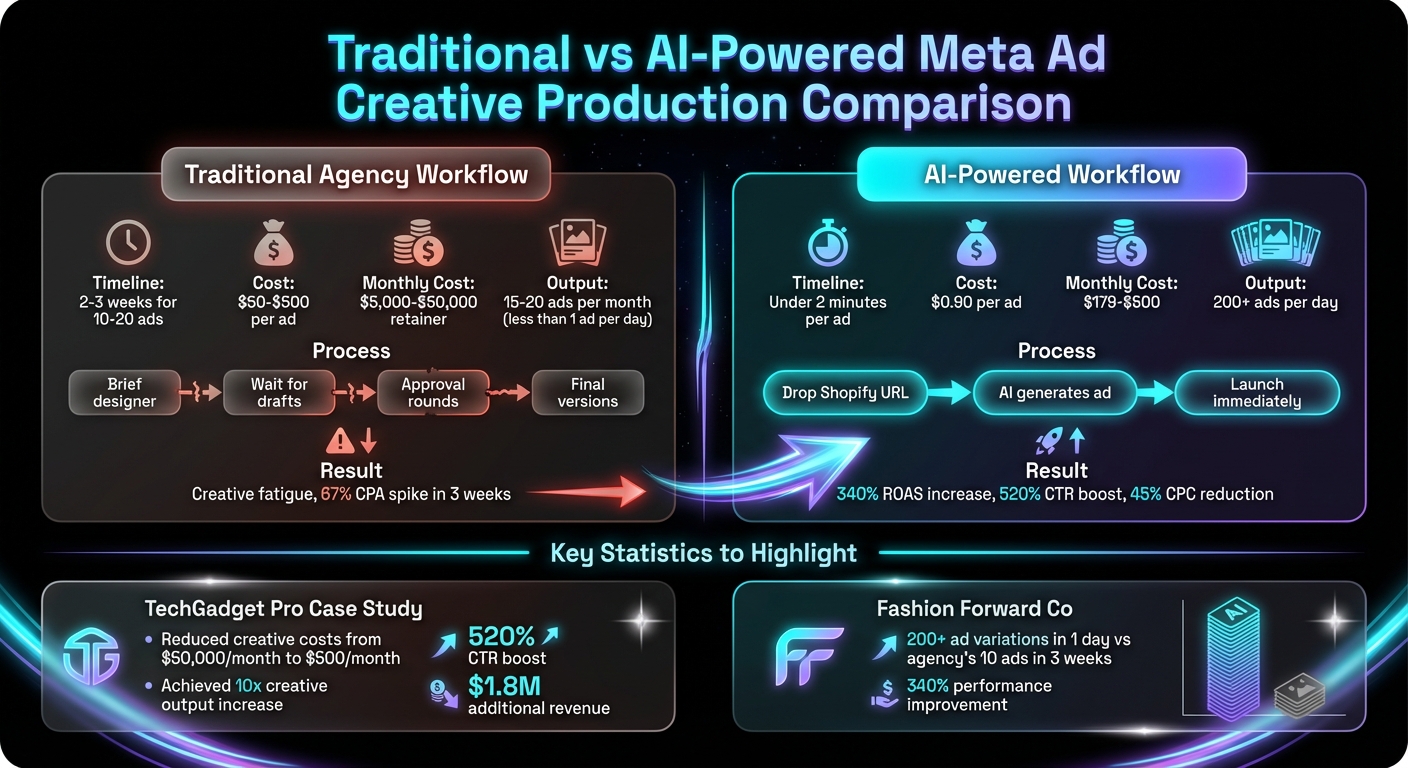
Traditional vs AI-Powered Meta Ad Creative Production Comparison
How to Create Ads for Shopify Products with Ai

Put the playbook to work
Apply this playbook to your page
Paste your website and the Lab will turn the strategy you are reading into a ready-to-test ads.
Free to try No prompt writing
Why Creative Production Limits Meta Ad Scaling

The speed at which you produce creative assets is the real roadblock to scaling Meta ad campaigns. Meta’s algorithm thrives on variety, and if you’re recycling the same few ads, your campaigns will eventually plateau. Let’s look at how slow creative production impacts your performance.
What Slow Creative Workflows Actually Cost You
Traditional creative workflows are painfully slow. You brief a designer, wait days for drafts, go through rounds of approvals, and then wait again for the final versions. If you’re producing just 10 ads every two weeks, that’s not enough when your monthly Meta ad spend jumps from $10,000 to $30,000 or even $50,000.
In high-spend scenarios, even the best-performing ads lose their effectiveness in just a few days. While your audience grows tired of seeing the same message, you’re stuck waiting for the next batch of creatives. Agencies on a $5,000 retainer might only deliver 15 to 20 ads a month - that’s less than one new ad per day. This pace makes it nearly impossible to keep up with creative fatigue.
How Creative Fatigue Kills Your CPAs
When people see the same ad over and over, they stop paying attention. Click-through rates plummet, CPMs climb, and your cost per acquisition (CPA) soars. For example, one brand saw their CPAs spike by 67% in just three weeks because their agency could only deliver around 10 new ads in that time. When they switched to an AI-powered workflow capable of creating over 200 ad variations in a single day, their return on ad spend (ROAS) shot up by 340%. This shows how critical it is to consistently scale winning creatives across your campaigns.
Why Automation Fixes the Bottleneck
Automation removes the delays that come with manual creative production. Instead of waiting weeks for a handful of ads, automation lets you generate dozens - or even hundreds - of ready-to-launch creatives in a fraction of the time. The goal isn’t to sacrifice quality for speed; it’s to create enough variety for Meta’s algorithm to identify what works best.
For instance, TechGadget Pro swapped their $50,000 monthly spend on creative agencies for an AI-driven workflow that cost just $500 per month. The result? A tenfold increase in creative output, a 520% boost in click-through rates, and a 45% reduction in cost per click.
Automation also eliminates the back-and-forth. Tools like Aden’s Lab can pull product data directly from your Shopify page and generate static Meta ads in minutes - no prompts, no manual edits. This speed allows you to test far more creative variations, giving Meta’s algorithm the fresh data it needs to optimize for lower CPAs and higher ROAS.
How Shopify Product Data Feeds Meta Ad Campaigns
Your Shopify store holds the essential data - like titles, images, prices, descriptions, and stock status - that powers Meta ad campaigns. When this information flows seamlessly into Meta's ad system, it ensures your ads reach the right audience with the right products at the right time. If the data is outdated or inaccurate, it can lead to wasted ad spend, promoting items that are out of stock or prices that don’t align with your landing page.
Product Data Meta Relies On
Meta pulls specific data points from your Shopify store to optimize ads. Product images are front and center, appearing in dynamic product ads and catalog campaigns. Titles and descriptions help Meta understand your products and match them with the right audience. Accurate prices are crucial, as mismatches between your ad and landing page can kill conversion rates instantly. Availability status ensures you’re not advertising items that are out of stock.
Meta also uses additional data like customer emails and ZIP codes to refine targeting and improve ad relevance. A higher Event Match Quality (EMQ) score means better targeting accuracy. AI tools can even extract extra elements - such as customer reviews, social proof, and specific product benefits - to create ad variations tailored to different audience segments.
Catalog Feeds and the Conversions API
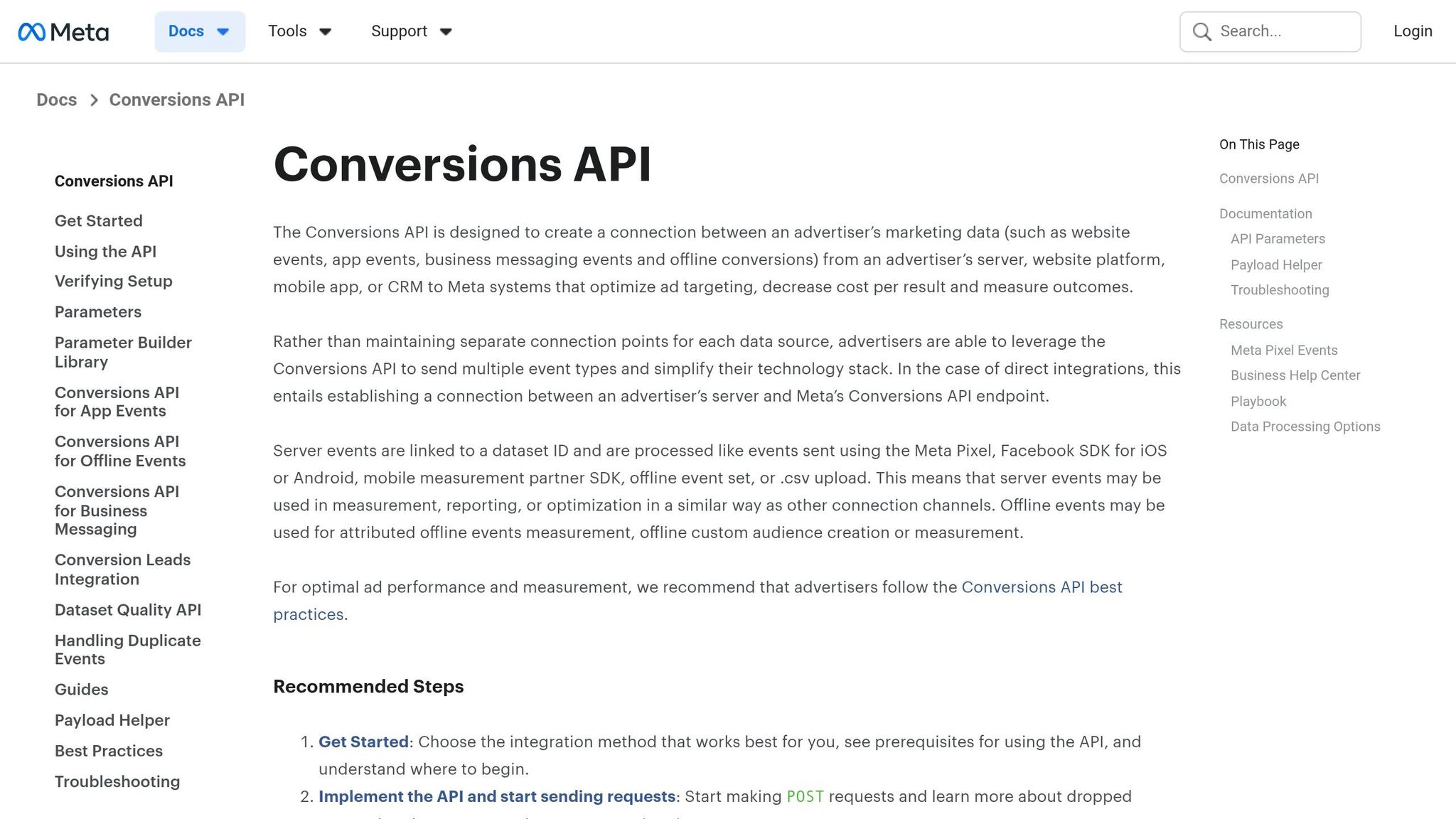
Meta relies on structured feeds to keep your product data up to date. The catalog feed acts as the connection between Shopify and Meta. This file contains all your product attributes - like SKUs, images, prices, and stock status. Meta updates its system daily using this feed. However, for stores with fast-changing inventory, daily updates may not be enough.
This is where the Conversions API (CAPI) becomes essential. CAPI sends event data - such as purchases, add-to-carts, and page views - directly from your Shopify server to Meta. Unlike browser-based tracking, CAPI bypasses issues caused by ad blockers or iOS privacy changes. When combined with the Meta Pixel, you create a hybrid tracking system that captures more conversions and provides cleaner data for Meta to optimize against. Just remember to deduplicate events to avoid double-counting purchases.
Real-Time Syncing and Dynamic Ads
Real-time syncing allows your ads to reflect changes in your Shopify store instantly. Unlike standard catalog feeds, which update every 24–48 hours, real-time syncing ensures that price changes, inventory updates, and new product launches are reflected in your ads as they happen.
Dynamic ads take advantage of this synced data to automatically display products that users have interacted with on your site. For example, if someone browses a pair of sneakers but doesn’t buy, they might later see those same sneakers in their Instagram feed. This real-time connection is especially critical for stores with high ad budgets, as it prevents wasted spend on outdated or irrelevant ads. Tools like Aden’s Lab use this data flow to produce hundreds of Meta ads on autopilot that stay up-to-date with your store data.
| Data Point | Impact on Meta Ad Performance |
|---|---|
| Product Availability | Avoids spending on out-of-stock items and builds customer trust. |
| Price & Discounts | Ensures ad content aligns with landing pages to reduce bounce rates. |
| Product Images | Drives Dynamic Product Ads with appealing, relevant visuals. |
| Customer Identifiers | Boosts Event Match Quality for accurate attribution and lookalike audiences. |
| Behavioral Data | Enables precise retargeting based on user actions like product views. |
AI Tools That Turn Shopify Pages Into Meta Ads
Product Page to Ad Creative in Under 2 Minutes
The old way of creating ad campaigns was painfully slow. You’d send a product link to a designer, wait for briefs, mockups, and revisions, and by the time you had a few ad concepts ready - often weeks later - your competitors might already be running several tested iterations.
AI tools built for e-commerce completely change the game. All it takes is a Shopify product URL. The system automatically pulls product images, titles, reviews, and pricing - no need for manual uploads. In just about 90 seconds, the AI analyzes the page, highlights the most appealing features and benefits, and generates fully formatted ad creatives. These include Meta ad copy, image layouts, and calls-to-action, all tailored to Meta’s ad requirements and ready for immediate upload to Ads Manager.
With platforms like Aden's Lab, you simply drop in your product link, and the tool does the rest. It extracts the data that aligns with Meta’s algorithm, skipping the need for detailed prompts or explanations. What you get are static ads that look feed-native and require no additional tweaking.
This rapid process is a game-changer, especially if you’re spending heavily on ads. For example, if you’re running $10,000 a day on Meta, waiting two weeks for new creatives can mean sticking with underperforming ads while your metrics sink. With automated tools, you can test fresh ideas the same day they come to mind.
This speed is one reason static ad formats have become the go-to for e-commerce - they’re quick, effective, and cost-efficient.
Why Static Ads Work Best for E-commerce
While video ads can grab attention, they’re expensive and slow to produce. Similarly, dynamic ads require templates, rules, and setup time. Static image ads, on the other hand, are the backbone of Meta campaigns for e-commerce. They’re fast to create, easy to test, and simple to scale.
In under two minutes, you can produce a single static ad and launch multiple creative angles at once. Often, all it takes is a clean product image, a bold headline, a clear benefit, and a strong call-to-action to drive clicks and conversions. AI tools, trained on extensive ad performance data, know how to craft ads that blend seamlessly into users’ feeds, making them feel less like ads and more like natural content.
The cost advantage is striking. Traditional agencies might charge $100 to $500 per ad, but Aden's Lab can produce ads for as little as $0.90 each. A subscription at $179/month gets you 200 ads. When you’re testing dozens of creative angles every week, those savings add up fast.
With their quick turnaround and affordability, static ads are perfectly suited for rapid, data-driven testing.
How AI Accelerates Creative Testing
Creative testing often slows down the process of scaling Meta ad campaigns. While targeting and budget management have become largely automated, finding new, winning creatives remains a challenge. AI changes this by making it faster and easier to generate a variety of ad concepts.
Imagine producing 20 unique headline variations in just 10 minutes. Each one can focus on a different angle - highlighting benefits, addressing objections, or using social proof. You launch them all at once, and within 48 hours, Meta’s algorithm identifies the top performers. From there, you pause the weaker ads, scale the winners, and generate another batch to keep the momentum going.
This speed doesn’t just allow for more testing; it also helps combat ad fatigue and rising CPAs. Consider TechGadget Pro, which cut its monthly creative costs from $50,000 (with an agency) to $500 by using AI-generated ads. This shift led to a 520% increase in click-through rates and $1.8 million in additional revenue. The success wasn’t because the AI was “smarter” than a human designer - it was because it enabled rapid testing of far more variations in the same amount of time.
"ADEN'S LAB created 200+ ad variations in one day. Our previous agency took 3 weeks for 10 ads. The AI-created ads outperformed our human-created ones by 340%." - Sarah Chen, CMO, Fashion Forward Co.
Aden's Lab is built for this kind of workflow. Instead of spending weeks perfecting a single ad, you can generate dozens of variations, test them all, and iterate quickly. The platform handles the production side, leaving you free to focus on strategy - an essential advantage to keep your campaigns ahead of the competition.
Common Mistakes in Shopify-to-Meta Ad Workflows
Running Ads for Out-of-Stock Products
Sending potential customers to product pages for items that are out of stock is a surefire way to waste ad spend. Imagine clicking on an ad, getting excited about a product, only to find out it’s unavailable. Most people will close the tab and head straight to a competitor. And here’s the kicker: 69% of online shoppers will abandon their purchase and shop elsewhere when faced with an out-of-stock item. Even worse, 42% of first-time visitors won’t return after encountering a stockout. That’s not just one lost sale - it’s potentially losing a long-term customer.
Meta’s ad system adds another layer of complexity. If even one product in your catalog is out of stock, Meta might flag your campaign or pause your ad sets entirely. This can derail well-performing campaigns while you scramble to identify and fix the issue.
The solution? Stay on top of your inventory. Regularly check Commerce Manager → Catalog → Data Sources and filter for products marked as in stock. If you’re using Shopify collections for dynamic ads, set up smart collections with a condition like “Inventory stock is greater than 0” to automatically exclude unavailable products. For businesses that frequently restock, adding pre-order options or “Notify Me” buttons can help capture demand without wasting ad dollars.
A great example of proactive inventory management is Obsidian Piercing. In December 2025, they implemented Prediko’s inventory management system to receive daily stock alerts and streamline purchase orders. The result? A 200% increase in best-seller revenue by avoiding stockouts altogether. The takeaway here is clear: managing inventory effectively doesn’t just improve operations - it directly impacts your ad performance.
But inventory management is just one piece of the puzzle. Another major factor? Keeping your ad creatives fresh.
Not Producing Enough Fresh Creatives
Having products in stock is essential, but ensuring your ads remain engaging is just as critical. Running the same creative for too long leads to ad fatigue, which drives up costs and kills performance. The answer? Volume. You need to consistently test new ideas - different hooks, layouts, and angles - to keep your campaigns competitive.
If you’re only launching one or two new ads each month, you’re not testing enough. It’s like taking a single shot in a game and hoping it lands while your competitors are taking dozens. Meta’s algorithm thrives on variety. The more creatives you test, the faster it finds winners, giving you a competitive edge.
For example, if you’re spending $10,000 per day on Meta ads, waiting weeks for an agency to deliver a handful of creatives can be a costly mistake. At that scale, you should aim to produce at least 30 new ads per month. It’s not about creating “perfect” ads - it’s about producing enough options to quickly cut underperformers and scale what works.
Tools like Aden’s Lab make this process easier. By simply inputting a Shopify product link, you can generate conversion-ready static ads in just 90 seconds. On their Apex Mode plan, you can create 200 ads for $179 - far less than what most agencies charge for a single ad. This kind of volume lets you stay ahead of ad fatigue, test aggressively, and maintain profitability as you scale.
While fresh creatives are crucial, tailoring your message to different customer segments is just as important.
Treating All Customers the Same
Not all customers are at the same stage in their buying journey, and treating them as if they are can hurt your ad performance. Showing the same ad to someone who’s never heard of your brand and to someone who’s already bought from you three times is a missed opportunity - one group needs convincing, while the other might be ready for an upsell.
For example, a first-time visitor might respond better to an ad that introduces your brand, while someone who abandoned their cart yesterday could be swayed by a message emphasizing urgency. Similarly, a loyal customer who’s spent $500 with you should see different products than someone who’s never purchased. Ignoring these nuances means lower conversion rates and wasted ad spend.
Meta’s tools make segmentation easy. You can create custom audiences based on behaviors, purchase history, or customer value, or build interest-based audiences. This allows you to target groups like cart abandoners, past purchasers, or high-value customers with tailored messaging. But many advertisers skip this step, often because it feels overwhelming or because they don’t have enough creatives to support multiple segments.
Automation can solve this problem. When you’re able to produce a high volume of ads quickly, creating personalized campaigns for different segments becomes manageable. For instance, you can run benefit-focused ads for cold audiences, urgency-driven ads for cart abandoners, and upsell offers for repeat customers - all without needing a large design team or waiting weeks for revisions.
Conclusion
The truth is, you can't scale Meta ads effectively if you’re stuck waiting on creative assets. If your competitors are pumping out dozens of ad variations while you're stuck waiting weeks for just a few, you're already losing ground. The real bottleneck isn’t your budget or targeting - it’s the speed at which you can produce ad creatives.
That’s where automating your Shopify-to-Meta workflow makes all the difference. Imagine turning a product link into a live ad in just 90 seconds. This lets you test multiple angles, identify winning creatives faster, and avoid the dreaded creative fatigue. Static ads, in particular, shine in e-commerce because they’re predictable and easy to refine. Tools like Aden's Lab, for example, simplify this process at a cost of just $0.90 per ad with the Apex Mode plan.
If you’re spending $10,000 a day on Meta ads but only testing a handful of creatives each month, you’re leaving both opportunities and profits on the table. Brands producing 100+ ads monthly aren’t just testing more - they’re learning faster, adapting more efficiently, and staying profitable even as costs per acquisition (CPAs) climb.
Automation doesn’t replace solid marketing strategy - it complements it by removing the barriers that slow you down. Your product pages already have all the ingredients for high-performing ads: images, benefits, reviews, and positioning. The real question is, are you using that data effectively, or are you wasting time recreating it manually?
Rapid creative production is the key to scaling profitably. The brands that test the most variations the fastest gain the upper hand. A seamless process - drop a link, generate ads, and launch on Meta - gives you a serious edge over the competition. Automating your Shopify-to-Meta workflow isn’t just helpful; it’s essential to staying ahead in the game.
FAQs
How many new Meta ads should I launch each week?
When planning ad creatives, the ideal number largely depends on your budget and overall strategy. For bigger campaigns, a good rule of thumb is to create fresh ad creatives daily, which typically means producing around five new ad sets each week. This approach helps counteract creative fatigue and ensures your campaign performance stays strong.
Rather than sticking to a fixed number, focus on consistently testing and updating your ads. This flexibility allows you to keep your campaigns effective, whether you're scaling up or fine-tuning for better results.
What Shopify data needs to be accurate to avoid wasted ad spend?
To make sure you’re not throwing money away, it’s crucial that Shopify tracks completed orders and revenue accurately. Shopify only records completed checkouts, so having reliable data is key to avoiding inflated sales figures or misleading ad performance metrics. Since standard client-side tracking can sometimes lose valuable data, switching to server-side tracking can help ensure your conversion numbers are spot-on. Also, double-check that Shopify’s data aligns with Meta’s reporting - any inconsistencies could lead to poor decisions for your ad strategy.
Do I need the Meta Pixel and Conversions API together?
Using both the Meta Pixel and Conversions API is strongly advised. Why? The Pixel by itself faces challenges like browser privacy updates, ad blockers, and iOS restrictions, which can limit its effectiveness. On the other hand, the Conversions API operates server-to-server, sidestepping these issues to deliver more precise tracking. When used together, they complement each other by ensuring cleaner data through event deduplication and offering a fuller view of conversions. This combination can significantly enhance ad performance.
Your next ad batch starts here
Finish with a ready-to-test ad batch
Paste your website to generate static creatives. Drop the link → get ads in about 90 seconds → upload them to Meta → scale.
Free to try No prompt writing