How Early-Stage AI Startups Win Meta Ads Without Big Budgets or Creative Teams
Turn the strategy into creatives
Create Meta ads for your product
Paste your product page. ADEN'S LAB turns the offer, audience, and positioning into complete ready-to-use Meta static ads.
Free to try No prompt writing

Struggling to make Meta ads work without a big budget? Here's the secret: Speed and volume matter more than expensive designs or massive ad spend. Early-stage startups succeed by quickly testing multiple ad variations, using Meta's algorithm to optimize performance, and cutting underperforming ads fast. This requires a disciplined approach to A/B testing Meta ads to identify winners early.
Key Takeaways:
- Start Small: Spend $10–$20 per day to test ads without overspending.
- Broad Targeting Works Best: Avoid over-targeting. Let Meta's algorithm find the right audience.
- Static Ads First: Simple image-based ads are faster and cheaper to produce than videos.
- Automate Ad Creation: Tools like Aden's Lab can generate dozens of ads in minutes at a fraction of traditional design costs.
- Monitor Metrics: Focus on ROAS (aim for 2x+) and analyze your CPA effectively. Pause ads that underperform after spending $100.
Bottom Line: Winning on Meta doesn’t require a huge budget. It’s about testing fast, iterating often, and letting data guide your decisions. The faster you adapt, the better your results.
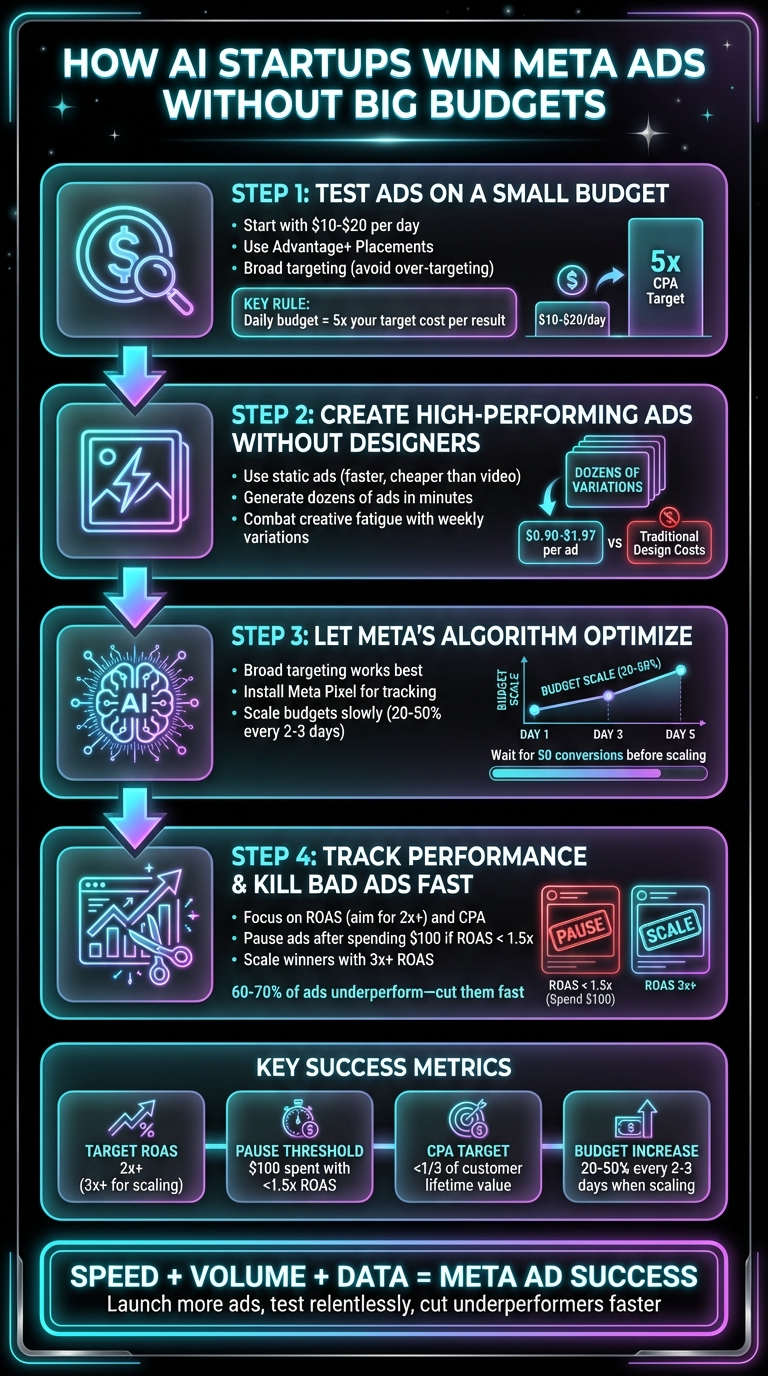
4-Step Meta Ads Strategy for AI Startups on Small Budgets
The Ultimate Starter Guide to Running Successful Meta Ads in 2025!
Put the playbook to work
Apply this playbook to your page
Paste your website and the Lab will turn the strategy you are reading into a ready-to-test ads.
Free to try No prompt writing
Step 1: Test Ads on a Small Budget
Starting with a small budget is the key to running effective Meta ads without breaking the bank.
Use Advantage+ Placements to Stretch Your Budget
Advantage+ Placements allow Meta's algorithm to choose where your ads perform best - whether that's Facebook feeds, Instagram stories, Messenger, or the Audience Network. This feature reallocates your budget in real time, directing it to the most cost-effective and high-performing placements. When you manually select placements, you're essentially guessing. With Advantage+, you’re letting Meta's system handle the guesswork and find the most efficient path to results.
For startups, this approach is especially useful. It keeps costs low and speeds up optimization. By gathering data across multiple placements, the algorithm can exit the "learning phase" faster, even with a limited budget. The more data the system collects, the better it optimizes. This means your $10 or $20 daily budget can deliver more value compared to locking into a single placement.
This automated method lays the groundwork for smarter budget testing.
Start Small: $10–$20 Per Day
A daily budget of $10–$20 per ad set is ideal for collecting enough data without overspending. If you’re aiming for a specific cost per result - like $2 per lead - you should allocate at least five times that amount as your daily budget. For example, hitting a $2 cost-per-lead goal requires a minimum of $10 per day. Anything less, and Meta’s system may struggle to spend your budget effectively.
Keeping your budget small also minimizes risk. If an ad underperforms, a lower daily spend limits your losses. Imagine launching with $100 per day only to realize your creative isn’t working - you’d burn through a week’s budget before catching the issue. A smaller budget forces you to monitor performance more closely, which is exactly what early-stage startups need to be doing.
Once you’ve optimized your budget, you can focus on scaling to reach more people. Using an AI budget method can help you scale faster while maintaining efficiency.
Avoid Over-Targeting Your Audience
It’s tempting to narrow your audience with multiple filters to feel more precise, but this often backfires. Meta’s algorithm thrives on volume to optimize effectively. When you over-target, the system struggles to gather enough conversion data to exit the learning phase - especially if you’re working with a $10–$20 daily budget. Plus, hyper-targeting often increases your Cost Per Mille (CPM) because you’re competing with other advertisers chasing the same small audience.
Instead, broad targeting tends to work better. Choose interest-based audiences - like "SaaS tools" or "marketing software" - and let Meta’s machine learning figure out who’s most likely to convert. The algorithm can uncover patterns you’d never notice on your own, such as which users are more active at specific times or which devices lead to higher conversions. Over-targeting stifles this discovery process and often drives up your costs without improving results.
Step 2: Create High-Performing Ads Without Designers
Once you've fine-tuned your ad spend, it's time to address one of the biggest hurdles for startups: creating ad creatives. Many founders get stuck here. They’ve nailed down their budget and targeting, but producing the actual ads feels like an overwhelming, expensive, and time-consuming process. This delay can slow down testing and hurt campaign efficiency.
Why Static Ads Are Ideal for Testing
Static ads - simple images combined with text overlays - are perfect for early-stage testing. For one, they load faster than videos, which is a big deal since over 80% of Meta users browse on mobile devices. Faster loading times mean fewer people drop off before seeing your message. Plus, static ads are much quicker and cheaper to produce. While videos require scripting, filming, editing, and rounds of feedback, static ads can be created, tested, and swapped out in just a few hours.
The real advantage? Speed. When you’re testing different messages - like whether "Save 10 hours per week" resonates more than "Cut support costs by 60%" - static ads allow you to pivot quickly. If one version outperforms another, you can tweak the text and relaunch almost immediately, all without the hefty costs or delays of video production.
Generate Dozens of Ads in Minutes
Traditional ad creation workflows - writing briefs, waiting on designers, reviewing drafts, and requesting revisions - can drag on for weeks. Aden's Lab changes the game. Simply input your website link, and in under 90 seconds, you’ll have ready-to-launch static ads for Meta platforms. No complicated prompts, no endless back-and-forth with designers. The system pulls key details - like your product's value proposition, visuals, and benefits - straight from your website and formats them for Facebook and Instagram.
This is a game-changer for AI startups. Your website already contains the messaging you need, including product screenshots, customer outcomes, and measurable benefits. Instead of translating all that into a design brief and hoping a designer gets it right, Aden's Lab uses what’s already working on your site. At just $1.97 per ad with the Lift Off plan, you’re paying a fraction of what traditional designers would charge. This lets you test far more ad variations without blowing your budget. Plus, the speed of production means you can quickly phase out underperforming ads and keep your campaigns fresh.
Combat Creative Fatigue with New Variations
As mentioned earlier, creative fatigue can kill your ad performance when users see the same ad too many times. The solution? Regularly rotating in fresh ad variations every week or two. Aden's Lab makes this process seamless. You can generate 10–15 new variations every Monday morning, replace underperforming ads from the previous week, and launch the updated creatives. Meta’s algorithm then tests the new ads alongside your current winners, ensuring your campaigns stay optimized.
With the Apex Mode plan, you can produce up to 200 ads per month - more than most startups create in an entire year. And at just $0.90 per ad, you’re not only saving money but also maintaining a steady stream of fresh content to keep your audience engaged. No design team or AI tools required, no budget headaches - just consistent, high-performing campaigns.
Step 3: Let Meta's Algorithm Optimize for You
Once you've created a variety of fresh ads, it's time to step back and let Meta's algorithm do the heavy lifting. Many startups make the mistake of over-targeting, thinking that narrowing their audience will drive better results. However, Meta's algorithm performs best when it has access to broader data, allowing it to find unexpected conversion opportunities. This wider scope sets your campaign up for better optimization down the line.
Use Broad Targeting
Instead of zeroing in on specific niche interests, start with a broader audience - like targeting people aged 25–45 across the United States. This approach gives Meta's algorithm the room it needs to analyze user behavior and uncover trends you might not expect. For instance, while you might think your AI product is perfect for tech-savvy marketers in their 30s, the algorithm might find that small business owners in their 40s are converting at a higher rate. Surprises like this can make a big difference in your campaign's success.
Meta also includes a feature called Advantage+ Audience Expansion by default for new campaigns. This tool automatically expands your targeting to include users who are statistically more likely to take action. Think of it as a smart autopilot that works within your initial parameters to maximize results.
Once your audience is set, the next step is to ensure your tracking tools are in place.
Install the Meta Pixel
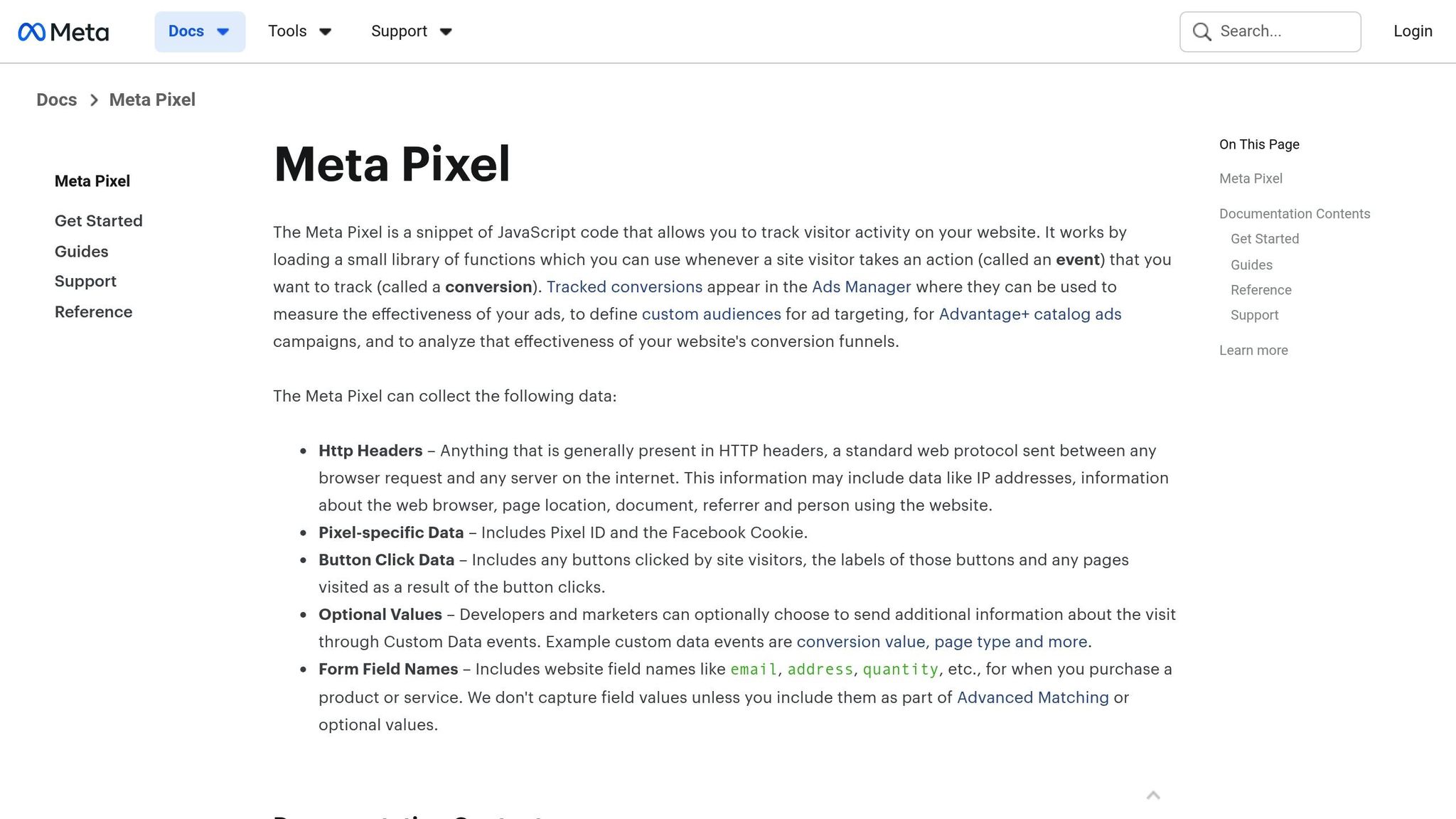
The Meta Pixel is a must-have for tracking user behavior on your website. This small piece of code collects data on actions like clicks, sign-ups, or purchases, helping the algorithm optimize your ads based on actual conversions rather than surface-level metrics like impressions. For AI startups, setting up specific conversion events - like “Sign Up,” “Start Free Trial,” or “Lead” - is crucial. These events act as clear signals for the algorithm, showing which users are most likely to become paying customers.
One common mistake is skipping the configuration of conversion events or failing to verify the Pixel’s functionality. Use Meta’s Pixel Helper tool to confirm everything is working correctly. Without this, you risk wasting ad dollars on campaigns that don’t deliver meaningful results.
Scale Budgets Slowly
With broad targeting and Pixel tracking in place, you can start scaling your budget - but do it carefully. Once your campaign exits the learning phase (usually after around 50 conversions within 7 days), you’re ready to increase spending. However, avoid drastic jumps. Instead, raise your daily budget by 20–50% every 2–3 days and keep a close eye on your return on ad spend (ROAS). Implementing ad scheduling strategies can further protect your ROAS by focusing spend on peak performance hours.
For example, if you’re spending $20 per day with a 3:1 ROAS, you could increase your budget to $24–$30 per day and monitor performance for 48 hours. If your ROAS drops below roughly 2:1, pause further budget increases until performance stabilizes. For startups with higher customer lifetime value, a lower initial ROAS (around 1.5:1) might still make sense, as long-term customer retention can offset a lower upfront return.
Step 4: Track Performance and Kill Bad Ads Fast
Once your ads are live and Meta's algorithm starts doing its thing, the heavy lifting begins: monitoring your campaign's performance and cutting out the dead weight. A common mistake startups make is holding on to underperforming ads, hoping they'll somehow turn around. Spoiler alert - they usually don't. The secret? Focus on the right metrics and act quickly when an ad isn't delivering.
Focus on ROAS and CPA
There are two metrics you need to keep an eye on: return on ad spend (ROAS) and cost per acquisition (CPA). ROAS measures how much revenue your ads bring in for every dollar spent. For example, if you spend $100 and earn $500, your ROAS is 5x. CPA, on the other hand, is the total ad spend divided by the number of customers acquired. So, if you spend $100 and gain 2 customers, your CPA is $50.
To keep these metrics front and center in Meta Ads Manager, customize your columns. Go to "Customize Columns" and add ROAS and CPA from the Performance section. For scaling, aim for a ROAS above 2x and ensure your CPA is well below your customer lifetime value (ideally less than one-third). These benchmarks give you clear insight into what's working and what needs to go.
Cut Underperforming Ads After $100
If an ad spends $100 and doesn't hit at least a 1.5x ROAS, pause it immediately. A 1.5x ROAS barely covers your costs, leaving no room for profit. Anything lower means you're actively losing money. Data from campaigns with over $100M in spend shows that around 60–70% of ads fall short of this threshold early on. If you don't pause those ads, you risk wasting about 30% of your budget - money that could be fueling better-performing campaigns.
By the time an ad has spent $100 (or generated about 50 conversions), you have enough data to decide whether it’s worth keeping. Check your Ads Manager daily or every other day, and don’t hesitate to cut the underperformers. This habit of regularly pausing weak ads is what separates businesses that scale from those that burn through their budgets.
Scale the Winners
When an ad hits a ROAS above 3x and its CPA aligns with your business goals, it’s time to ramp things up. Start by duplicating the successful ad set and testing small tweaks - try a new hook, adjust the call-to-action, or update the visuals. For example, one AI tool startup tested 20 static ads at $15 per day and found a winner with the headline "Automate Your Workflow in 60 Seconds." This ad achieved a 4x ROAS with a $25 CPA after spending $100. They duplicated it, tested five new hooks, and gradually increased the budget by 20% daily, scaling to $100 per day. The result? An 8x ROAS and $10,000 in weekly revenue - all by building on what worked.
When an ad delivers consistently strong results, replicate its success while reallocating budget from weaker performers. Often, top ads can achieve even higher ROAS with small adjustments, driving the growth your business needs. By balancing the elimination of weak ads with the amplification of strong ones, you create a system that maximizes your ad spend and fuels sustained growth.
Conclusion: How Startups Win on Meta
Succeeding on Meta without a hefty budget boils down to three key things: speed, volume, and data. By using broad targeting and Advantage+ placements, you can let Meta's algorithm handle the heavy lifting of optimization. The real focus should be on testing creative content quickly and cutting underperforming ads without hesitation.
For most startups, the biggest hurdle isn't the budget or targeting - it’s producing enough creative content. If you’re only able to launch a few ads each month, you’re essentially betting everything on those limited options. But when you’re able to roll out dozens - or even hundreds - of ads, you’re stacking the odds in your favor. That’s the game changer. Tools like Aden's Lab can accelerate the creative process, allowing startups to generate high-performing static ads in minutes. Just drop in a product link, and you’re ready to test - no design team required. This eliminates the slowest part of the workflow, enabling you to keep pace with Meta’s algorithm.
Once your creative production is streamlined, Meta’s algorithm will do the rest. It identifies winners and underperformers, allocating more budget to the ads that work. Your role is to track metrics like ROAS and CPA, pause the ads that aren’t delivering, and scale up the ones that are. The startups that grow the fastest are those that launch more ads, test relentlessly, and cut underperformers faster than anyone else.
You don’t need a huge budget to win on Meta. What you need is a system that allows for rapid creative production and smart, data-driven decisions. That’s how startups outpace the competition on Meta.
FAQs
How many conversions do I need before Meta can optimize reliably?
Most experts recommend aiming for 30 to 50 conversions per ad set to allow Meta's algorithm to function effectively. Hitting this range gives the system enough data to fine-tune its adjustments and optimize performance.
What should I do if I can’t track purchases (only leads or trials)?
If tracking purchases isn’t an option, shift your focus to improving lead or trial conversions. Broader attribution models can offer a clearer picture of performance, helping you make more informed decisions. Alternatively, explore offline tracking methods to bridge any data gaps. These approaches can still drive better outcomes, even without direct purchase data.
How do I know if low ROAS is a creative problem or an offer problem?
If your Return on Ad Spend (ROAS) is underperforming, the root cause often lies in one of two areas: the creative or the offer.
When your ad fails to capture attention or generate clicks - indicated by a low click-through rate (CTR) or high cost per thousand impressions (CPM) - the problem is likely with the creative. On the other hand, if your engagement metrics are solid but conversions are still lagging, it's a sign the offer might be the issue. This could mean the value proposition isn't compelling enough, or the landing page isn't doing its job effectively.
Your next ad batch starts here
Finish with a ready-to-test ad batch
Paste your website to generate static creatives. Drop the link → get ads in about 90 seconds → upload them to Meta → scale.
Free to try No prompt writing