How to Exclude Buyers, Warm Traffic, and Overlap in Meta Ads
Turn the strategy into creatives
Create Meta ads for your product
Paste your product page. ADEN'S LAB turns the offer, audience, and positioning into complete ready-to-use Meta static ads.
Free to try No prompt writing

Running Meta ads without proper audience exclusions and segmentation wastes money and reduces performance. Here's how to fix it:
- Exclude Past Buyers: Prevent showing ads to recent buyers by using customer lists or Meta Pixel data. This avoids paying for repeat conversions and improves New Customer ROAS by up to 20%.
- Segment Warm Traffic: Divide warm audiences into middle-of-funnel (MOFU) and bottom-of-funnel (BOFU) groups. MOFU focuses on trust-building, while BOFU targets high-intent users ready to convert.
- Reduce Audience Overlap: Use Meta's Audience Overlap Tool to identify and minimize internal competition, which can increase CPMs by 32%.
- Use Tiered Campaigns: Separate audiences into interest-based cold audiences, warm, and hot tiers. Apply exclusions to ensure each campaign targets the right group with tailored messaging.
These strategies help lower costs, improve algorithm performance, and maximize ad effectiveness. Keep audience data updated, monitor overlap regularly, optimize ad scheduling to reduce waste, and align your campaigns with user intent to make the most of your ad spend.
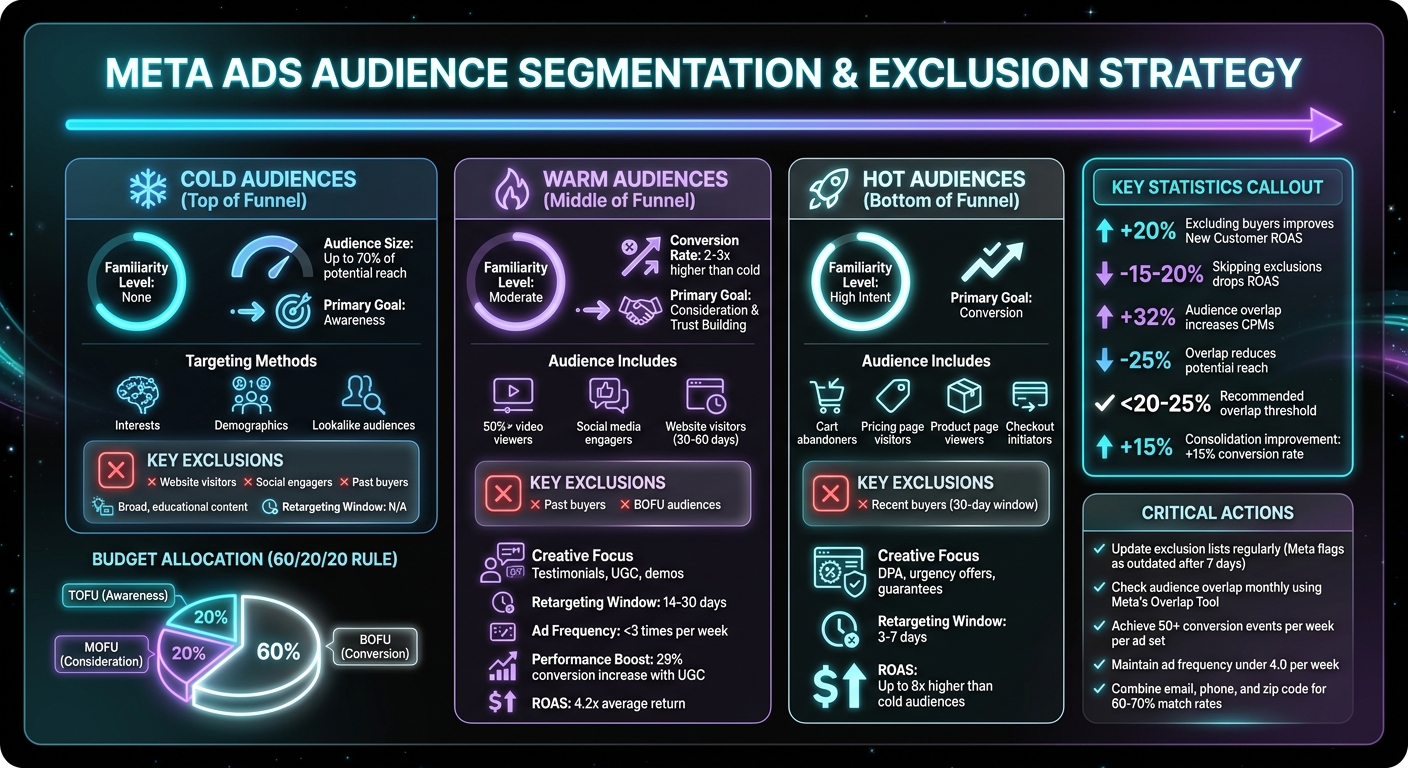
Meta Ads Audience Funnel Segmentation Strategy Guide
How to Exclude Audiences in Facebook Ads (Updated 2025 Strategy)
Put the playbook to work
Apply this playbook to your page
Paste your website and the Lab will turn the strategy you are reading into a ready-to-test ads.
Free to try No prompt writing
Why You Should Exclude Past Buyers from Prospecting Campaigns
Running prospecting campaigns without excluding past buyers can end up costing you more than you think. Here's why: Meta's algorithm is programmed to target people most likely to convert. Often, that ends up being someone who has already purchased from you. This creates what’s known as a "retention tax" - you’re essentially paying for conversions that might have happened on their own. The result? Inflated ROAS (Return on Ad Spend) numbers, but no real boost in revenue. In fact, skipping this step can cause your New Customer ROAS to drop by 15–20%.
"You don't want to pay to show an ad to someone who bought yesterday (unless you have a rapid upsell)." – Kiril Ivanov, Performance Marketing Specialist, adsmanagement.co
But it doesn’t stop at wasted spend. There’s also the issue of ad fatigue. Imagine showing a "10% off your first order" ad to someone who’s already a loyal customer. It doesn’t just waste money - it can hurt your brand’s reputation and even invite negative feedback. Prospecting campaigns are meant for new audiences, not existing customers. Mixing these groups confuses your messaging and disrupts Meta’s learning process.
The fix is simple: exclude past buyers from your prospecting campaigns. This ensures your budget is focused on attracting new customers, keeps your funnel clean, and prevents campaigns from competing against each other.
How to Identify Buyers in Your Audience
To make this work, you’ll need to accurately identify past buyers. Meta offers two main tools for this: Customer Lists and Website Custom Audiences, both of which track buyers but in slightly different ways.
Customer Lists are one of the most reliable options. You can upload a CSV file from your CRM containing customer data like emails, phone numbers, or both. Since this method doesn’t rely on browser cookies, it remains effective even with iOS tracking restrictions. Meta hashes the data for privacy and matches it to user profiles, with match rates typically landing around 60–70%. Including multiple identifiers - like email, phone number, and zip code - can improve accuracy.
To create a Customer List audience, go to Audiences in Meta Ads Manager. Select Create audience > Custom audience > Customer list, upload your file, and map the data fields. Keep in mind, Meta flags lists as "Outdated" if they’re not updated within seven days, so make it a habit to refresh your uploads regularly.
Website Custom Audiences, on the other hand, rely on the Meta Pixel to track users who trigger a "Purchase" event on your site. To set this up, choose Custom audience > Website, pick your Pixel, set the event to Purchase, and define a retention window (e.g., 180 days). This approach is great for real-time tracking, but pixel data may lose accuracy within seven days on iOS devices due to Apple’s privacy changes.
Once you’ve created these audiences, apply them at the Ad Set level of your prospecting campaigns. Use the Exclude option in the Audience section to remove your "Purchasers" or "Customer List" audience from being targeted.
What You Gain by Excluding Buyers
Excluding past buyers delivers three key benefits: lower costs, better algorithm performance, and an improved customer experience.
First, you reduce wasted impressions and help Meta’s algorithm focus on finding new customers. By excluding buyers, the algorithm shifts to exploring untapped inventory, improving its ability to identify patterns among cold prospects. This leads to a lower cost per acquisition and better campaign efficiency.
"Excluding certain audiences from certain campaigns leads to better results... This reduces wasted impressions and lowers your costs over time." – seniorprise.com
Second, you enhance the customer experience. Existing buyers don’t need to see offers meant for new customers. Instead, you can engage them with tailored retention campaigns featuring upsells, cross-sells, or loyalty rewards.
In short, excluding past buyers ensures your prospecting campaigns stay focused on acquiring new customers, while retention efforts can be more personalized and effective. This separation keeps your funnel organized and maximizes the impact of your ad spend.
How to Segment Warm Traffic by Funnel Stage
Warm traffic isn’t a one-size-fits-all group. Someone who casually watches a short video is worlds apart from someone who abandons their cart. Treating these audiences the same can waste your budget and confuse Meta's algorithm. The smart move? Segment warm traffic into middle-of-funnel (MOFU) and bottom-of-funnel (BOFU) stages. This ensures your messaging aligns with where prospects are in their decision-making process.
"The magic happens in between - in the mid-funnel. This is where attention becomes consideration." – LeadEnforce
Warm audiences are 2–3 times more likely to convert than cold ones. Plus, retargeting campaigns typically deliver a 4.2x return on ad spend (ROAS), making them a standout strategy in a full-funnel approach. If you lump all warm traffic together, your message becomes diluted, and your campaigns lose focus. Instead, pinpoint who’s still evaluating and who’s ready to buy. By serving tailored creative to each group, you’ll make better use of your ad spend with AI tools for Meta Ads and avoid unnecessary competition between campaigns.
What Counts as Warm Traffic
Warm traffic consists of people who’ve interacted with your brand but haven’t taken the plunge to convert yet. Think website visitors, social media engagers, video viewers, and email subscribers. The trick is to separate these users by their intent level to guide them down the funnel effectively.
Middle-of-funnel (MOFU) audiences are in the consideration phase. They know about your brand but aren’t ready to commit. This group includes people who’ve watched at least 50% of your video content, engaged with your Facebook or Instagram posts, or visited your website in the last 30–60 days but haven’t explored high-intent pages. These users need trust, education, and social proof to move forward.
Bottom-of-funnel (BOFU) audiences are showing clear signs of buying intent. They’ve visited key pages like pricing, product details, or contact forms. Actions like adding items to their cart, initiating checkout, or being active email subscribers indicate they’re nearly ready to convert. These users just need a final push to seal the deal.
To keep your campaigns effective, exclude BOFU audiences and recent buyers from MOFU campaigns. This strategy prevents overlap and ensures Meta’s algorithm focuses on the right goals for each audience segment.
Now that you’ve defined MOFU and BOFU audiences, it’s time to customize campaigns for each group.
Setting Up Campaigns for Middle and Bottom-of-Funnel Audiences
Tailoring your campaigns to MOFU and BOFU audiences is key. MOFU campaigns aim to build trust and address concerns, while BOFU campaigns focus on driving immediate conversions.
For MOFU campaigns, use creative that builds credibility, like customer testimonials, case study highlights, or "how-it-works" videos. User-generated content (UGC) can boost conversion rates by 29% compared to brand-produced ads. Set retargeting windows to 14–30 days for video viewers and general site visitors. Keep ad frequency below three times a week to avoid fatigue, and refresh your creatives every two to four weeks. You can also introduce "middle offers" like interactive quizzes, mini-challenges, or gated reports to reduce commitment barriers and nudge users closer to conversion.
For BOFU campaigns, focus on Dynamic Product Ads (DPA) that show users the exact products they viewed. Pair these with urgency-driven messaging, such as limited-time discounts, free shipping, or money-back guarantees. Use shorter retargeting windows - 3–7 days for high-intent actions like "Initiate Checkout". This approach eliminates friction and gives users a compelling reason to complete their purchase.
"Retargeting isn't about reminding people what they looked at. It's about giving them a reason to come back and buy. The product reminder is the least persuasive ad in your retargeting stack because the user has already seen the product and chose not to buy." – 27Five
A common budget strategy is the 60/20/20 rule: allocate 60% to BOFU (conversion), 20% to MOFU (consideration), and 20% to TOFU (awareness). This ensures you invest most heavily in high-intent audiences while maintaining a steady flow of prospects through the funnel. Finally, aim for each ad set to hit around 50 conversion events per week. This helps exit Meta’s "Learning Limited" phase, allowing the algorithm to optimize ad delivery.
| Funnel Stage | Audience State | Primary Goal | Creative Types | Retargeting Window |
|---|---|---|---|---|
| MOFU (Consideration) | Warm, evaluating | Educate, build trust, differentiate | Testimonials, UGC, demos, comparison content | 14–30 days |
| BOFU (Conversion) | Hot, ready to act | Convert, overcome objections | DPA, urgency offers, guarantees, direct CTAs | 3–7 days |
How to Reduce Audience Overlap in Meta Ads Manager
Reducing audience overlap is a crucial step in managing your Meta ad optimization effectively. Overlap happens when multiple ad sets target the same group of people, leading to internal competition in Meta's auction system. This competition can drive up CPMs by an average of 32% and shrink your potential reach by as much as 25%.
"Audience overlap is one of the 'invisible traps' of Facebook advertising that you - the advertisers - need to understand and address from the beginning to avoid wasting your budget." – Optimal Agency
By identifying and addressing overlap, you can ensure your campaigns work in harmony rather than against each other. Meta offers tools to help detect and manage this issue, and with regular checks and adjustments, you can avoid unnecessary budget waste.
How to Use the Audience Overlap Tool
Meta Ads Manager includes a built-in tool to identify overlap between audiences. To use it, select up to five audiences under Audiences, then choose Show Audience Overlap from the Actions menu. This will display a Venn diagram along with the overlap rate.
The tool provides the number of overlapping users and the Overlap Rate %, which shows how much of one audience also belongs to another. For example, if you compare a lookalike audience to your past purchasers, you might find that part of your prospecting budget is targeting users who have already converted.
Keep in mind that overlap measurements are directional. If a small audience is selected first, it might show 100% overlap with a larger audience. However, if the larger audience is selected first, the overlap may appear much smaller, such as 5%. The tool requires audiences to have at least 10,000 accounts to display data, and overlaps smaller than 1,000 users won't appear due to privacy considerations.
For smaller audiences, the overlap tool may not work. Instead, analyze Reach and Frequency in your ad reports. A high frequency without a corresponding increase in reach can indicate that the same users are being targeted repeatedly across different ad sets.
An overlap exceeding 20–25% is a warning sign. To avoid problems, check for overlap at least once a month or before launching major campaigns.
Once you've identified overlap, you can take steps to streamline your ad sets and reduce competition.
Methods to Reduce Overlap Between Ad Sets
After identifying audience overlap, use these strategies to refine your campaigns and eliminate redundancy.
- Strategic Exclusions: Exclude warm and hot audiences, such as website visitors, engagers, and past purchasers, from prospecting campaigns. If you're using a lookalike audience, exclude the source audience. For instance, if you have a 1% lookalike of past purchasers, make sure to exclude those purchasers from the same ad set.
- Consolidation: If two audiences overlap by more than 30%, combine them into a single ad set. For example, instead of running separate ad sets for 1%, 2%, and 3% lookalikes, create one 0–3% lookalike. This approach minimizes internal bidding conflicts and gives Meta's algorithm more data to optimize. Consolidation can improve conversion rates by up to 15%.
- Narrow Targeting: Use "And" logic to create a more specific audience. For example, instead of targeting "Fitness" and "Yoga" in separate ad sets, combine them into one that targets users interested in both. This reduces overlap and sharpens your targeting.
- Frequency Caps: When overlap is unavoidable, such as during a broad brand awareness campaign, set frequency caps to limit how often the same user sees your ads. For example, you could cap impressions at three per user every seven days to avoid ad fatigue.
- Creative Differentiation: If overlapping audiences are unavoidable, use distinct ad creatives for each group. Implementing proven Meta ad copy frameworks can further help differentiate these messages. This allows users to engage with the message that resonates most, creating natural segmentation.
| Strategy | When to Use It | Impact |
|---|---|---|
| Exclusions | Funnel separation (e.g., prospecting vs. retargeting) | Ensures budget focuses on new users |
| Consolidation | Overlap exceeds 30% | Reduces competition and improves algorithm performance |
| Narrow Targeting | Broad interest groups with partial overlap | Creates more precise audience segments |
| Frequency Caps | Brand awareness or unavoidable overlap | Prevents ad fatigue and wasted impressions |
| Creative Differentiation | Large overlapping segments | Encourages users to self-select based on messaging |
Setting Up a Tiered Exclusion Strategy
When it comes to audience overlap and funnel segmentation, a tiered exclusion strategy takes things a step further. By dividing your audience based on their familiarity with your brand, this method ensures that each group gets messaging tailored to where they are in the funnel. It also helps you avoid wasting your ad budget on users who have already moved forward in their journey. Without this strategy, Meta's algorithm might prioritize past purchasers, inflating your ROAS numbers without actually driving new revenue.
The approach is simple: create three audience tiers - cold, warm, and hot - and apply exclusions to each. Cold audiences get awareness campaigns, warm audiences see consideration messaging, and hot audiences are targeted with conversion-focused offers. By excluding higher-intent groups from lower-tier campaigns, you make sure your ads reach fresh prospects instead of repeatedly targeting the same users.
Defining Cold, Warm, and Hot Audiences
This strategy categorizes audiences based on how much they've interacted with your brand.
- Cold audiences: These are people who’ve never engaged with your brand before. They make up a large portion - up to 70% - of your potential reach. Target them using interests, demographics, or lookalike audiences with the goal of building awareness.
- Warm audiences: This group includes users who’ve already shown some interest, like visiting your website, watching a video, or engaging with your social media. The focus here is on nurturing their interest and building trust.
- Hot audiences: These are high-intent users who’ve taken actions like adding items to their cart, filling out a form, or even making a purchase. Ads for this group aim to drive conversions and encourage repeat business. Campaigns targeting these users often deliver a ROAS up to 8 times higher than those aimed at cold audiences.
Here’s a quick breakdown of each tier:
| Audience Tier | Familiarity | Primary Goal | Key Exclusions |
|---|---|---|---|
| Cold (TOF) | None | Awareness | Website visitors, social engagers, past buyers |
| Warm (MOF) | Moderate | Consideration | Past buyers |
| Hot (BOF) | High | Conversion | Recent buyers (e.g., 30-day window) |
How to Implement Tiered Campaigns with Exclusions
To put this strategy into action, start by creating custom audiences in Meta Ads Manager. Under the Audiences tab, build an audience labeled "Purchasers – 180D" using both Pixel data and CRM uploads. To get the best match rates (aiming for 60% or higher), include multiple identifiers like email, phone number, and name. Additionally, create audiences for website visitors (30 days), social media engagers (30 days), and cart abandoners (7 days).
Here’s how exclusions work at each campaign level:
- Cold campaigns: Exclude both warm and hot audiences to ensure your ads reach entirely new prospects.
- Warm campaigns: Exclude past purchasers so the focus stays on users who are familiar with your brand but haven’t converted yet.
- Hot campaigns: Target users who’ve abandoned their cart or shown strong intent, but exclude recent buyers (typically within the last 30 days) to avoid redundant spending.
For consumable products, consider using 30- or 60-day exclusion windows instead of "all-time" exclusions. This allows past buyers to re-enter your funnel when they’re ready to buy again.
If you’re using Advantage+ Shopping Campaigns, note that they don’t allow ad-set level exclusions. Instead, head to Advertising Settings in Business Manager, upload your customer list, and set the Existing Customer Budget Cap to 0% if your goal is to focus solely on acquiring new customers.
Brands that skip these exclusion layers often see their New Customer ROAS drop because Meta’s algorithm tends to favor past purchasers who might have bought without any ad at all. To keep your campaigns efficient, monitor metrics like New Customer CAC and limit retargeting frequency to under 4.0 per week to avoid ad fatigue.
Common Mistakes in Audience Exclusions and Overlap Management
Managing audience data effectively is critical, but even the most experienced marketers can slip up. Two common missteps include relying on outdated or incomplete audience lists and applying overly restrictive exclusions. These errors can drain your budget, reduce campaign performance, and create unnecessary hurdles. The good news? They’re fixable with the right strategies.
Using Outdated or Incomplete Audience Data
Failing to update exclusion lists regularly can wreak havoc on your campaigns. Imagine this: top-of-funnel ads meant for new prospects end up targeting people who’ve already purchased, while warm audiences get hit with messaging meant for cold traffic. This kind of mismatch not only wastes impressions but also muddles your overall strategy.
There’s another downside to stale lists - internal competition. If you’re not managing audience overlap, you could face bidding conflicts that drive up costs. In fact, advertisers dealing with unmanaged overlap see CPMs rise by an average of 32% and may lose up to 25% of their potential reach.
To sidestep these pitfalls, automate your data updates. Use CRM integrations and pixel tracking to ensure your exclusion lists refresh in real time as users move through your funnel. Combining tools like behavioral data, pixel tracking, and customer lists creates more complete exclusion segments. Also, make it a habit to review audience overlap metrics regularly. Even well-optimized campaigns can drift over time, and consistent syncing helps keep your exclusions sharp.
Over-Restricting Your Target Audiences
While outdated data can hurt your campaigns, narrowing your audience too much can be just as damaging. Over-restricting your target audience often results in fewer impressions, longer learning phases, and higher costs. This is particularly risky for cold audiences, which can make up as much as 70% of your total reach potential.
The key is finding a balance between precision and reach. Start with broad exclusions to eliminate obvious mismatches, like excluding past purchasers from prospecting campaigns. Only tighten your exclusions after collecting enough data to support a narrower focus. Keep an eye on your reach and frequency metrics - if impressions drop suddenly, it’s a sign your audience might be too restricted.
To further refine your strategy, use Meta’s Audience Overlap Tool. This tool helps identify intersections between lookalike and custom audiences, allowing you to apply exclusions at the ad-set level instead of imposing blanket restrictions across all campaigns. By doing so, you can avoid unnecessary competition and maintain a healthy campaign reach.
Using ADEN'S LAB with Audience Targeting Strategies

Once you've segmented your audiences and set exclusions, the next step is crafting dynamic, tailored ad creatives. ADEN'S LAB makes this process faster and more efficient by generating static Meta ads in just 90 seconds from a product link. This allows you to quickly create unique ad sets for each audience segment.
Creating Ads for Different Audience Segments
Meta's Andromeda engine is incredibly fast, processing candidate ads 10,000 times quicker. However, it also means that even small changes - like tweaking a background color or headline - might not register as distinct. That’s why it’s crucial to develop completely unique creative concepts tailored to each stage of your funnel. Aim to generate 15–20 distinct ad ideas per set to provide Meta's AI with enough data to work effectively.
Your messaging should also align with audience intent:
- Cold audiences: Broad, educational content to raise awareness.
- Warm audiences: Social proof like testimonials to build trust.
- Hot audiences: Urgency-driven offers to encourage immediate action.
"Creatives with different motivational appeals reach new audience segments 89% of the time."
By delivering targeted messages, you ensure each segment gets content that resonates with their specific needs and stage in the funnel.
Scaling Ad Production Without Creating Overlap
Producing a high volume of ads is only effective if they’re visually diverse. Meta's AI tends to group similar ads, so it's essential to avoid overlap. With ADEN'S LAB, you can generate hundreds of unique ads every month, ensuring fresh content for every stage of your funnel.
To maintain diversity, use entirely different creative approaches for each set. For example:
- One ad set might feature a technical breakdown.
- Another could showcase lifestyle imagery.
- A third might highlight customer testimonials.
Incorporating a mix of formats - like static images, carousels, and varied aspect ratios - can also help prevent your ads from competing against one another.
"Advertisers using Advantage+ Creative can test up to 150 creative combinations simultaneously."
This approach keeps your campaigns dynamic, reduces creative fatigue, and ensures overlapping audiences aren’t repeatedly shown the same visuals. By scaling production this way, you can minimize wasted efforts and consistently improve ad performance.
Conclusion
Managing your audience effectively in Meta Ads hinges on three key strategies: excluding past buyers from prospecting campaigns, segmenting warm traffic by their position in the funnel, and reducing audience overlap. When done right, these steps help you avoid wasting ad spend on people who’ve already converted, deliver tailored messaging to each audience segment, and prevent your ad sets from competing against each other in Meta’s auction system.
The impact of these practices is clear in the numbers. Brands that neglect proper exclusion layers often experience a 15–20% drop in their new customer ROAS. Additionally, keeping audience overlap under 30% helps avoid internal bidding conflicts that drive up costs. These aren’t just small tweaks - they’re the difference between scaling profitably and bleeding unnecessary ad dollars.
"Exclusion preserves the integrity of each campaign step." - seniorprise.com
This highlights the importance of a structured exclusion strategy. Using a tiered system to separate cold, warm, and hot audiences ensures Meta’s algorithm focuses on finding new customers. Incorporating tools like ADEN'S LAB to quickly generate distinct static ads supports this approach by aligning creative output with your segmentation, without causing overlap or audience fatigue.
Ultimately, the goal is more than just refined targeting - it’s about maximizing ROI. That means making sure every dollar you spend reaches the right person, at the right time, with the right message. To stay on track, regularly review your exclusion lists, check audience overlap monthly, and scale your creative production to match your segmentation strategy.
FAQs
How long should I exclude past buyers?
When setting exclusion periods, there's no one-size-fits-all approach - it depends on your sales cycle and overall goals. A good starting point is to exclude customers right after they make a purchase. This prevents unnecessary ad spend targeting people who’ve just bought from you. Keep them excluded until the timing feels right for a potential repurchase. A common benchmark? Anywhere from 30 to 90 days, depending on how often your product is typically bought and the buying habits of your customers.
What events define MOFU vs BOFU warm traffic?
MOFU (Middle of Funnel) warm traffic includes people who’ve already shown interest in your brand. Maybe they’ve visited your website or interacted with your content, but they’re not quite ready to commit yet. These users often need a little more convincing, like additional information or reassurance, before they take the next step.
On the other hand, BOFU (Bottom of Funnel) warm traffic refers to those who are highly engaged and very close to making a decision. These users are primed for action - whether it’s making a purchase or signing up - and are typically targeted with campaigns designed to drive conversions.
When should I consolidate overlapping ad sets?
When your ad sets target similar audiences, they can end up competing against each other in the same auction. This internal competition often drives up costs and lowers efficiency. To avoid this, it’s a good idea to consolidate overlapping ad sets.
By merging or excluding overlapping audiences, you can reduce competition, bring down CPMs, and improve overall campaign performance. Meta’s Audience Overlap tool is a handy resource for identifying where these overlaps occur. Use it to analyze your audience data and make adjustments that streamline your campaigns.
Your next ad batch starts here
Finish with a ready-to-test ad batch
Paste your website to generate static creatives. Drop the link → get ads in about 90 seconds → upload them to Meta → scale.
Free to try No prompt writing