Audience Exclusions for Meta Ads: How to Cut Waste Without Killing Scale
Turn the strategy into creatives
Create Meta ads for your product
Paste your product page. ADEN'S LAB turns the offer, audience, and positioning into complete ready-to-use Meta static ads.
Free to try No prompt writing

Audience exclusions in Meta Ads are a simple yet effective way to maximize your ad spend. By blocking specific groups - like recent buyers or low-intent visitors - you can reduce wasted budget by 18–24% without impacting conversions. The key is balance: exclude the right people while keeping your audience large enough for Meta’s algorithm to optimize.
Key Takeaways:
- Why It Matters: Without exclusions, Meta often targets past buyers, inflating ROAS without driving real growth.
- How It Works: Use Custom Audiences (based on CRM or Pixel data) and account-level controls to exclude groups like recent purchasers, employees, or support page visitors.
- Best Practices:
- Exclude recent buyers (30–90 days for e-commerce, 180 days for subscriptions).
- Avoid low-intent traffic (e.g., visitors to support or careers pages).
- Use layered exclusions to prevent audience overlap in retargeting campaigns.
- Pro Tips:
- Keep your CRM lists updated monthly for accurate exclusions.
- Ensure your prospecting audience stays above 500,000 people to avoid delivery issues.
- Test exclusions with A/B testing to measure impact on CPA and ROAS.
A well-structured exclusion strategy helps you focus on new customers while cutting wasted impressions. Let’s dive into the details.
How to Exclude Audiences in Facebook Ads (Updated 2025 Strategy)
Put the playbook to work
Apply this playbook to your page
Paste your website and the Lab will turn the strategy you are reading into a ready-to-test ads.
Free to try No prompt writing
How Audience Exclusions Work in Meta Ads
An audience exclusion tells Meta to avoid showing your ad to specific users. While targeting settings define who to reach, exclusions set limits on that reach. Without exclusions, Meta's algorithm often prioritizes the easiest conversions - like past buyers who were already likely to purchase - rather than seeking out new customers. This behavior can skew your results, as explained here:
"The algorithm will always take the path of least resistance. Often, the easiest conversion is a past purchaser who was going to buy anyway. This inflates your reported ROAS while contributing zero incremental revenue." - Koro
Types of Audience Exclusions
Meta Ads Manager offers two primary types of exclusions. Custom Audiences rely on first-party data, making them a precise tool for prospecting campaigns. These audiences are highly dependable because they’re built on data you control. On the other hand, detailed targeting exclusions - previously used to filter by interests or behaviors - were largely removed by Meta as of March 31, 2025. Now, most exclusion work revolves around Custom Audiences and account-level settings.
| Exclusion Type | Application | Best Use Case |
|---|---|---|
| Custom Audience | Ad set level | Excluding recent buyers or email subscribers |
| Account Controls | Account level | Setting global rules - e.g., employees, age limits, location filters |
| Budget Caps (ASC) | Account level | Capping spend on existing customers in Advantage+ Shopping |
How Exclusions Interact with Meta's Targeting Features
The way exclusions function depends on the campaign type. In standard manual campaigns, exclusions at the ad set level act as strict boundaries that the algorithm cannot bypass. For Advantage+ Shopping Campaigns (ASC), you can use the "Existing Customer Budget Cap" to limit spending on known customers.
A key distinction is that while many targeting inputs are treated as suggestions by Meta’s AI, excluded Custom Audiences are treated as non-negotiable rules. This makes them a reliable tool for ensuring your ads reach the right people while avoiding the wrong ones.
Building a Clean Exclusion Framework
Organizing exclusions into tiers helps streamline targeting and reduce Customer Acquisition Cost (CAC) without limiting your reach. Here’s how you can structure it:
- Tier 1: Global exclusions, such as employees or users with open support tickets, who should never see your ads.
- Tier 2: Funnel-stage exclusions to separate prospecting from retargeting efforts.
- Tier 3: Granular exclusions tailored to specific offers or ad creatives.
To simplify application across campaigns, maintain a saved exclusion library with audiences like "Purchasers – 90 days", "All Site Visitors – 30 days", and "Full Customer List." Regularly update CRM-based lists - aim for at least once a month - to ensure new buyers are included. This approach keeps your campaigns efficient and aligned with your goals.
Exclusion Strategies That Cut Waste Without Shrinking Scale
By using a precise exclusion strategy, you can address inefficiencies in your campaigns without sacrificing their reach. In fact, excluding the right audiences can cut wasted prospecting spend by 18–24% while maintaining conversion volume. The secret lies in being selective - removing unqualified audiences instead of making broad cuts.
Excluding Existing Customers and Recent Buyers
One of the most effective ways to optimize your ad spend is by excluding people who have already purchased from you. To do this, leverage a Website Custom Audience built on the "Purchase" event from your Meta Pixel or Conversions API (CAPI), or upload your CRM list directly. For e-commerce brands, a 30–90 day exclusion window is typically ideal. Subscription-based businesses or those with frequent repeat purchases, like supplement brands, might benefit from extending this to 180 days.
If you're only uploading email addresses, expect a match rate of around 40–55%. Adding phone numbers can improve that by 10–18 percentage points. For the best results, include as much information as possible in your uploads - email, phone, first and last name, zip code, and country.
"Exclusion audiences on Meta ads prevent your ad spend from being wasted on people who have already purchased... properly configuring these exclusions is one of the highest-ROI optimizations available." - MHI Media
Using CAPI allows you to exclude users in real time immediately after a purchase, ensuring your data stays accurate. If you're running Advantage+ Shopping Campaigns, you'll need to set the "Existing Customer Budget Cap" in your account settings, as this is the only exclusion tool available for ASC campaigns.
Once you've excluded existing customers, the next step is to filter out low-intent traffic.
Finding and Excluding Low-Intent Traffic
Not every site visitor is worth targeting. For example, visitors landing on support, careers, or contact pages often have little purchase intent. Serving ads to these users wastes your budget. To avoid this, use your Meta Pixel to create Custom Audiences from these specific URLs and exclude them at the ad set level.
For visitors who bounce quickly, session duration can act as a helpful filter. Since Meta doesn’t allow direct exclusion of "bounced" users, you can create a Custom Audience of visitors who spent less than 5 seconds on your landing page and exclude them from prospecting campaigns. While this approach isn’t perfect, it helps weed out accidental clicks.
"In today's highly competitive digital ad space, showing your message to the right people is just half the battle - keeping it away from the wrong people is the other." - Tanmay Ratnaparkhe, Co-founder, Predis.ai
Keep an eye on your prospecting audience size. Avoid narrowing it below 500,000 people for a single country, and treat 200,000 as a hard minimum to prevent delivery issues. If exclusions shrink your audience too much, consider consolidating ad sets instead of downgrading your conversion event to "Link Clicks."
Once you've filtered out low-intent visitors, focus on structuring your retargeting efforts to avoid inefficiencies like audience overlap.
Structuring Retargeting Funnels with Exclusions
Audience overlap is a common and costly mistake in retargeting. When the same user appears in multiple ad sets, your campaigns end up bidding against each other. This drives up CPMs and skews performance data. The solution? Use sequential exclusion layering, where each funnel tier excludes audiences from the tier above it.
| Retargeting Tier | Segment | Exclusion Logic | Creative Focus |
|---|---|---|---|
| Tier 1: High-Intent | 0–7 days (Cart/Checkout) | Exclude Purchasers | Urgency, testimonials, objection removal |
| Tier 2: Mid-Intent | 7–30 days (Product Views) | Exclude Tier 1 + Purchasers | Social proof, offer differentiation |
| Tier 3: Awareness | 30–90 days (Page Engagers) | Exclude Tier 2 + Purchasers | Brand recognition, educational content |
For high-intent segments like cart abandoners, a 7-day window works best. For most conversion-focused retargeting, 14 days is the sweet spot. Also, monitor retargeting frequency - if it exceeds 4.0 over a 7-day period, refresh your creative to avoid ad fatigue.
Apply global "Never Show" exclusions across all tiers. This includes recent purchasers, employees, and users with open support tickets. These exclusions ensure your campaigns remain efficient while preserving your prospecting audience size. By layering exclusions thoughtfully, you can maintain scale while optimizing performance.
Step-by-Step: Setting Up Exclusions in Meta Ads Manager
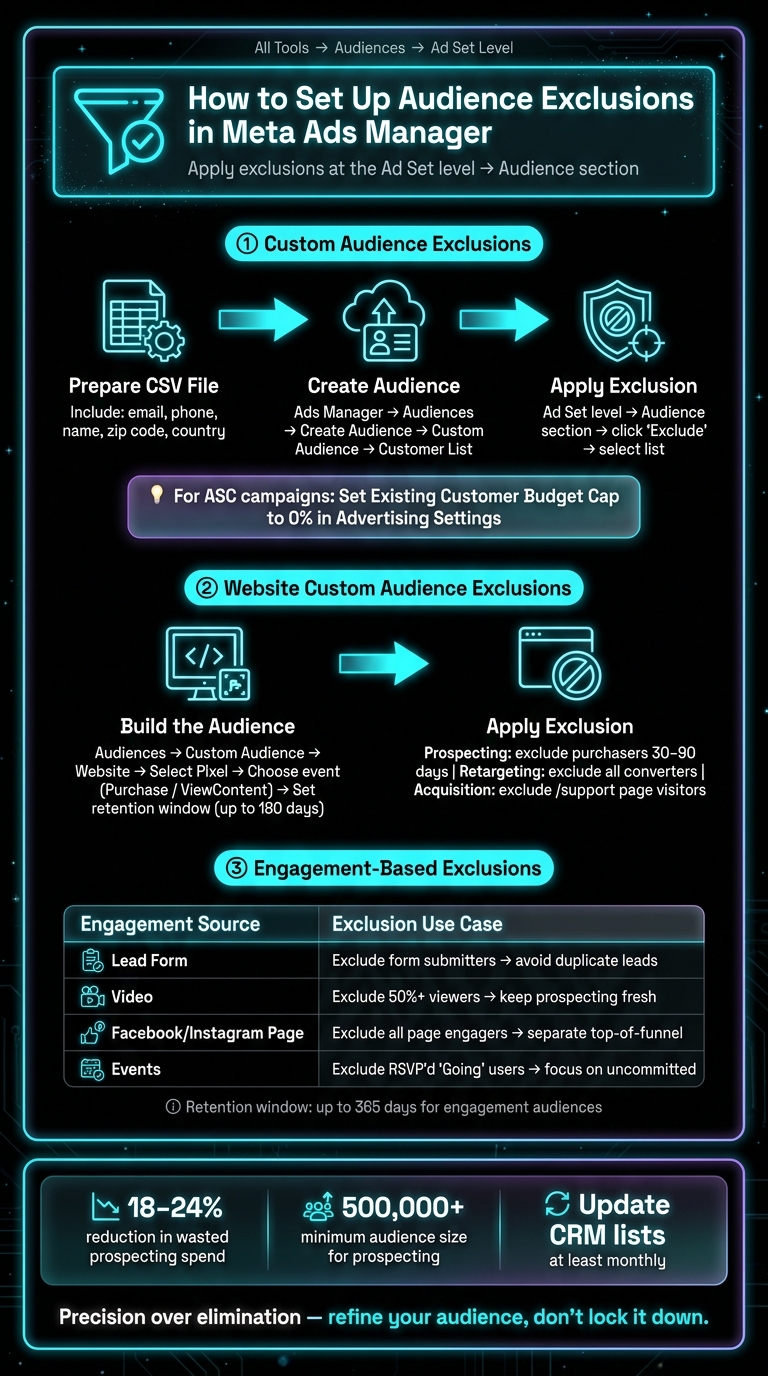
Meta Ads Audience Exclusion Framework: Cut Waste Without Killing Scale
Exclusions in Meta Ads Manager are applied at the ad set level within the Audience section. These settings allow you to fine-tune your targeting strategy, ensuring your ads reach the right people while avoiding wasted budget. This is a critical component of scaling Meta ads with AI budget allocation to maximize efficiency. Before excluding anyone, you’ll first need to create your audience. Navigate to All Tools > Audiences to build and save your exclusion audiences, which you can then apply when configuring your ad sets. Here’s how to set up exclusions based on audience type.
Setting Up Custom Audience Exclusions
Custom audience exclusions rely on your own customer data - like a CRM export - to block existing contacts from seeing your ads. This prevents spending on users who have already converted.
- Prepare your customer file: Export your customer list as a CSV file. Include identifiers like email, phone number, name, zip code, and country to improve matching accuracy.
- Create the audience: In Ads Manager, go to Audiences > Create Audience > Custom Audience > Customer List. Upload your CSV and map the columns to the appropriate identifiers. Meta will hash the data for security before processing.
- Apply the exclusion: At the ad set level, go to the Audience section, select "Exclude", and choose your newly created customer list. Regularly update your list to keep it accurate and ensure recent buyers are excluded.
Tip: For Meta Advantage+ Shopping Campaigns, define your customer list in Advertising Settings and set the Existing Customer Budget Cap to 0%.
Next, you can use website data to refine your exclusions further.
Setting Up Website Custom Audience Exclusions
Website-based exclusions help you avoid targeting users who didn’t convert, ensuring your budget is directed toward more promising prospects. By using Pixel data, you can filter out users based on their activity on your site.
- Build the audience: Navigate to Audiences > Create Audience > Custom Audience > Website. Select your Pixel, choose an event like "Purchase" or "ViewContent", and set a retention window (up to 180 days for website events).
- Apply the exclusion: In the ad set's Audience section, click "Exclude" and select the website custom audience. For prospecting campaigns, exclude purchasers from the past 30–90 days. For retargeting, exclude anyone who has already converted. To avoid spending on support page visitors, create an audience based on URLs containing
/supportand exclude it from acquisition campaigns.
Finally, use engagement-based exclusions to keep your top-of-funnel audience focused.
Setting Up Engagement-Based Exclusions
Engagement exclusions are based on actions users take on Facebook or Instagram rather than on your website. These are particularly effective for maintaining clean top-of-funnel audiences and focusing your prospecting budget on new users.
To create an engagement exclusion, go to Audiences > Create Audience > Custom Audience and select a Meta Source like Lead Form, Video, Facebook Page, or Instagram Account. Define the behavior you want to exclude. For example, you can exclude users who submitted a lead form to avoid duplicate leads.
| Engagement Source | Exclusion Use Case | Goal |
|---|---|---|
| Lead Form | Exclude people who submitted form | Avoid duplicate leads |
| Video | Exclude people who watched 50%+ | Keep prospecting ads fresh |
| Facebook/Instagram Page | Exclude all page engagers | Separate top-of-funnel audiences |
| Events | Exclude people who RSVP’d "Going" | Focus on uncommitted users |
Engagement audiences can have retention windows of up to 365 days, which is longer than website-based audiences. Apply these exclusions in the ad set's Audience section using the "Exclude" button.
Keeping Scale Intact While Using Exclusions
Exclusions can be a powerful tool, but only if your campaigns remain functional. Shrinking your audience too much leaves Meta's algorithm with insufficient data to work with, which can stall campaigns in the learning phase or cause under-delivery. The key is precision - avoid broad restrictions that limit campaign effectiveness.
Avoiding Over-Segmentation
Every exclusion you add reduces your audience size. For prospecting campaigns, aim for an estimated reach of at least 500,000 people in a single country. Falling below this threshold limits the algorithm's ability to optimize, and dropping under 50,000 almost guarantees delivery issues.
A helpful strategy is the "Master Exclusion" approach. Instead of applying different exclusions across multiple ad sets, consolidate them into a single, standardized list that you apply across all relevant campaigns. This minimizes budget fragmentation and prevents internal auction competition. If your ad sets overlap by more than 60%, consolidating them often yields better results than using exclusions to separate them.
Avoid locking in permanent exclusions. Instead, reintroduce past visitors using rolling windows of 30–60 days. This approach creates room for ongoing testing and adjustments.
Testing and Adjusting Exclusions Over Time
Begin with broad targeting and add exclusions only when performance data supports the decision. Start with essentials like excluding recent purchasers or your CRM list. Gradually layer in behavioral exclusions as you gather actionable insights. Overcomplicating exclusions without clear evidence can lead to performance drops.
Use Meta's A/B testing tool to compare "Exclusion vs. No Exclusion" setups. This eliminates auction overlap and gives you a clear picture of how exclusions impact your CPA. Review your audience performance monthly, flagging any ad sets where CPA trends more than 25% above your target for two consecutive 14-day periods. When done correctly, a well-structured exclusion strategy can deliver a 10–20% boost in incremental ROAS.
Track key metrics to gauge the success of your exclusion strategy. For example:
- Your New Customer CAC should stabilize or decline over time.
- Aim for an exclusion match rate above 60%, which ensures Meta can match your CRM list to real users. Uploading email, phone number, and physical address together improves match rates.
- Watch your prospecting CPM - a downward trend signals better audience quality.
| Metric | What to Watch For | Target |
|---|---|---|
| New Customer CAC | Should stabilize or decrease after exclusions | Trending down |
| Exclusion Match Rate | Higher match rate ensures broader exclusion data | > 60% |
| Prospecting CPM | Lower CPM signals better audience quality | Decreasing over time |
| Retargeting Frequency | High frequency indicates audience fatigue | < 4.0 per week |
Pairing Exclusions with Ad Creative Testing
Once your exclusion strategy is optimized, combining it with scaling winning creatives can amplify your campaign results. Exclusions define who sees your ads, while creative testing determines what they see. Together, these elements can drive better performance.
When exclusions keep your prospecting audience focused on genuinely new users, creative tests provide more accurate results. You’re not skewing data with repeat buyers or previously converted leads. Static ads work especially well here - they’re quick to produce, easy to iterate, and effective across broad audiences. Tools like ADEN's LAB can help you generate scalable static ad variations, allowing you to test different messages, offers, and angles across larger, cleaner audience pools. The faster you identify what converts, the more efficiently you can scale. Exclusions help reduce wasted impressions, while creative testing reveals the winning strategies to grow your campaign.
Key Takeaways: Smarter Audience Exclusions in Meta Ads
Audience exclusions are a powerful yet often overlooked tool in Meta Ads. When used wisely, they help ensure your budget isn’t wasted on people who’ve already converted, aren’t ready to make a purchase, or don’t fit into a specific stage of your sales funnel. Research suggests that a well-planned exclusion strategy can cut wasted prospecting spend by 18–24% on average, all without reducing conversion volume.
But here’s the catch: it’s all about balance. Excluding too many people can shrink your audience below the 500,000-person threshold Meta’s algorithm needs to function effectively. The objective is to refine your audience, not lock it down completely.
"The goal of exclusion is precision, not elimination. Use it to refine your audience, not to build an impenetrable fortress that no one can enter." – RentAdsAccount
To make exclusions work, stick to a few key practices. First, keep your CRM lists updated - at least monthly - or set them to sync automatically. This ensures new buyers don’t keep seeing acquisition ads. And if your product is something customers might buy again, avoid using "all time" exclusions. Customers who haven’t purchased in over two years could still be valuable to re-engage.
Exclusions should go hand-in-hand with regular performance reviews and creative testing. This is a core component of Meta ad optimization for long-term success. This combination can transform a well-targeted audience into a high-performing one. Brands that neglect thorough exclusion strategies often experience a 15–20% drop in New Customer ROAS. By implementing precise exclusions, you’re making sure every ad dollar contributes to meaningful growth. It’s all about finding that sweet spot between precision and scalability.
FAQs
How do I choose the right exclusion window for my product?
When deciding on an exclusion window, consider how long someone remains a non-incremental buyer. For most products, a 30–90 day exclusion period works well, with 90 days being a good starting point. If you're working with subscription-based brands, you can stretch this window to 180 days to avoid targeting current subscribers.
For site visitors, a shorter window of 14–30 days is more appropriate. However, if you're running dedicated retargeting campaigns, be careful not to over-exclude, as this could limit your reach unnecessarily.
What should I do if exclusions make my audience too small to deliver?
If your exclusions narrow your audience too much, it can lead to issues like under-delivery, extended learning phases, or inconsistent optimization. To avoid this, check the estimated audience size during ad set setup. Aim for an audience of at least 500,000 people in a single country.
Be cautious with exclusions - overly broad criteria or extended time windows can create problems. Instead, consider using shorter time frames, such as 30–60 days, which often work better. Also, keep in mind that very small lists typically have little effect on performance.
How can I tell if exclusions are improving incremental results (not just ROAS)?
To measure whether exclusions are driving incremental results (not just improving ROAS), focus on tracking New Customer CAC or New Customer ROAS. These metrics should either hold steady or show improvement. Additionally, confirm that the lift is coming from fresh, untargeted users by keeping retargeting frequency below 4.0 over a 7-day period. It's also essential to verify your tracking accuracy - compare reported conversions with your CRM or database. Inaccurate tracking can artificially boost ROAS without reflecting actual incremental growth.
Your next ad batch starts here
Finish with a ready-to-test ad batch
Paste your website to generate static creatives. Drop the link → get ads in about 90 seconds → upload them to Meta → scale.
Free to try No prompt writing