Custom Audience Build Sheet for Meta Ads: Source, Window, and Exclusion Rules
Turn the strategy into creatives
Create Meta ads for your product
Paste your product page. ADEN'S LAB turns the offer, audience, and positioning into complete ready-to-use Meta static ads.
Free to try No prompt writing

Custom audiences in Meta Ads are the key to reaching the right people at the right time. By using first-party data like Pixel events, CRM lists, and in-app actions, you can lower costs and improve conversions. This strategy is essential in 2026, as privacy changes limit traditional targeting methods. Here’s what you need to know:
- Audience Sources: Use data from website visits (via Pixel/CAPI), app activity, CRM lists, video views, and lead forms to build targeted segments.
- Retention Windows: Shorter windows (e.g., 7 days) target high-intent users, while longer windows (e.g., 30–180 days) work for broader engagement.
- Exclusions: Avoid wasting budget by excluding recent purchasers, current leads, and existing customers.
- Best Practices: Segment audiences by funnel stage (cold, warm, hot), manage overlap, and use clear naming conventions to stay organized.
Custom audiences make your ad spend more efficient by focusing on users already engaged with your brand. Use this guide to structure your campaigns effectively and stay competitive in a privacy-focused ad landscape.
How to Use Facebook Ads Custom Audiences (Step-by-Step Guide for 2026)
Put the playbook to work
Apply this playbook to your page
Paste your website and the Lab will turn the strategy you are reading into a ready-to-test ads.
Free to try No prompt writing
Custom Audience Sources
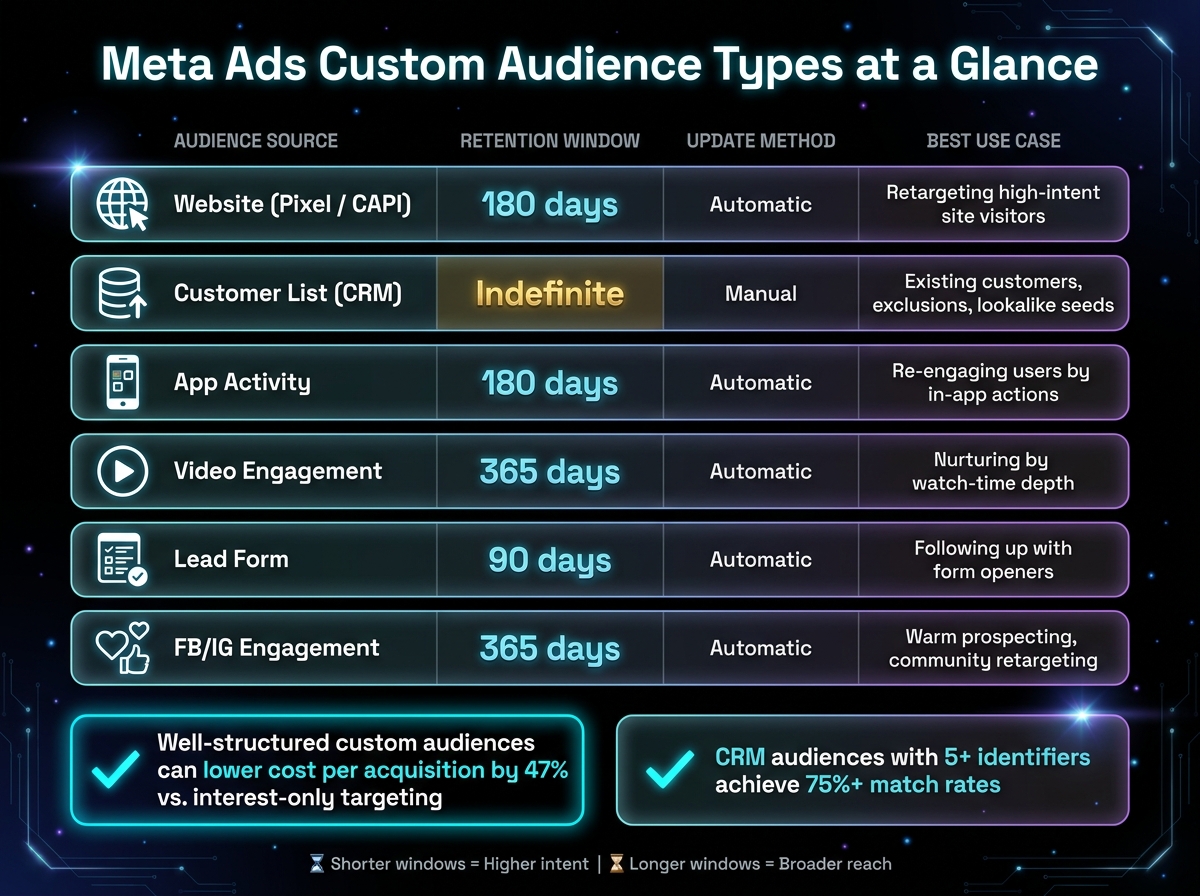
Meta Ads Custom Audience Types: Sources, Windows & Best Use Cases
When it comes to fine-tuning your ad campaigns, choosing the right data source is everything. Meta offers five main sources for building custom audiences, each suited to capturing different levels of user intent. The key to success? Picking the right one to create a targeted, effective campaign. Once your audiences are set, you can scale Meta ads with AI budget allocation to maximize efficiency.
Website Visitors
Website Custom Audiences (WCA) rely on data from the Meta Pixel and Conversions API (CAPI). These audiences can be segmented based on user behavior. For example, targeting "Cart Abandoners (7 days)" is far more impactful than going after "All Visitors (90 days)." High-intent groups, like cart abandoners, often deliver 8–15x ROAS. When setting up a WCA, use the prefill option to pull in up to 180 days of historical site activity from the moment the audience is created. With iOS 14.5 limiting pixel tracking accuracy, combining CAPI with your pixel ensures these audiences remain reliable - even for users who opt out of tracking.
App Activity Users
For businesses with mobile apps, the Facebook SDK or App Events API allows you to create audiences based on specific in-app actions. These could include purchases, sign-ups, or custom milestones. Like website audiences, these have a 180-day retention limit. To maximize effectiveness, focus on specific actions - targeting users who made an in-app purchase in the last 14 days is far more actionable than targeting everyone who simply opened the app.
Customer Lists and CRM Data
Uploading CRM data gives you unmatched control over your audience. Meta uses hashed identifiers like emails and phone numbers to match your data with active profiles. Match rates typically range from 30% to 60%, but including multiple identifiers - such as email, phone number, name, city, and ZIP code - can boost this to over 75%. Before uploading, clean your data by normalizing email formats (convert to lowercase) and including country codes for phone numbers. While CRM audiences don’t expire, they need manual updates to stay relevant. For high-volume e-commerce, refresh weekly; for others, monthly updates are usually enough to maintain lists like "Recent Purchasers".
Engagement Audiences from Facebook and Instagram
These audiences are built from interactions on Facebook and Instagram, such as likes, comments, shares, and profile visits. They’re perfect for targeting users familiar with your brand but who haven’t yet visited your website - ideal for mid-funnel campaigns. With a retention window of 365 days, these audiences are great for longer-term nurturing strategies. However, keep in mind that as of September 2, 2025, Meta began flagging audiences that suggest sensitive attributes (e.g., health or financial conditions), so keep your segments broad and focused on behaviors.
Video Viewers and Lead Form Interactions
Video viewer audiences let you segment users based on how much of a video they watched - 3 seconds, 25%, 50%, 75%, or 95%. Those who watched 75–95% have shown strong interest and are ideal for direct-response ads. Meanwhile, 3-second viewers are better suited for awareness campaigns. Lead form audiences work differently, allowing you to target users who opened a form but didn’t submit it. This group is highly valuable for follow-ups with simplified offers. Lead form audiences have a 90-day retention limit, so act quickly. Both audience types update automatically.
| Audience Source | Retention | Update | Best Use Case |
|---|---|---|---|
| Website (Pixel/CAPI) | 180 days | Automatic | Retargeting high-intent site visitors |
| Customer List (CRM) | Indefinite | Manual | Existing customers, exclusions, lookalike seeds |
| App Activity | 180 days | Automatic | Re-engaging users by in-app actions |
| Video Engagement | 365 days | Automatic | Nurturing by watch-time depth |
| Lead Form | 90 days | Automatic | Following up with form openers |
| FB/IG Engagement | 365 days | Automatic | Warm prospecting, community retargeting |
Audience Window Settings
When you’ve chosen your audience source, the next step is to decide on a retention window. This window determines how long users remain in your audience pool. Picking the right duration depends on your campaign goals and the user’s intent. Shorter windows focus on high-intent users but limit audience size, while longer windows broaden your reach but may dilute urgency. It’s essential to align the retention window with where your audience is in their buying journey.
Short Windows for High-Intent Retargeting
If your goal is to target users who are ready to act, a 7-day window is ideal - especially for cart abandoners. These users are still actively considering a purchase and are more likely to convert with the right messaging.
"A 7-day cart abandoner is much more likely to convert than a 60-day cart abandoner - the former is still actively shopping while the latter has likely either purchased elsewhere or moved on." - Benly.ai
For this group, use creatives that focus on urgency and action, like testimonials, objection-handling messages, or limited-time offers. This approach often yields impressive results, with retargeting campaigns for 7-day cart abandoners achieving ROAS (Return on Ad Spend) of 8–15x.
Medium Windows for Consideration Campaigns
A 15–30 day retention window works well for users who are still in the decision-making phase. These users might have browsed your product pages or checked pricing details but weren’t ready to commit. This timeframe is especially effective for B2B, subscription services, or high-ticket items where the buying process takes longer.
In this stage, your creative should focus on trust-building. Use case studies, comparison charts, or free demo offers to nurture interest without pressuring users to buy immediately. This softer approach helps move prospects closer to conversion over time.
Long Windows for Broader Remarketing
For a wider audience, such as blog readers or casual browsers, a 60–180 day window allows you to re-engage users who haven’t interacted recently. This strategy is ideal for building brand awareness and staying top-of-mind. However, keep in mind that audience performance declines over time. For example, a retargeting campaign that starts with a 3x ROAS in week one may drop to 1.5x by week six as the most engaged users convert or lose interest.
In this stage, focus on educational content, storytelling, and awareness-driven creatives. Use reach-optimized bidding to maximize visibility. While this approach is valuable for maintaining a presence, it’s best used as a secondary tactic rather than the core of your retargeting efforts.
| Retargeting Tier | Retention Window | Intent Level | Recommended Creative |
|---|---|---|---|
| High-Intent | 0–7 days | Very High | Testimonials, "Finish Your Order" |
| Mid-Intent | 7–30 days | Moderate | Social proof, Free demos |
| Awareness | 30–180 days | Low | Educational content, Storytelling |
Exclusion Rules for Cleaner Targeting
Once you've set your retention windows, the next step is to apply exclusions. This ensures you're not wasting ad spend on users who have already converted. Without exclusions, you risk showing ads to people who have already purchased, completed a conversion, or are deep in your funnel. As the Adligator Team explains:
"Without proper exclusions, you waste money by showing awareness ads to ready-to-buy users or conversion ads to previous customers."
Campaigns with well-planned exclusions can lower the cost per acquisition by 47% compared to interest-only targeting. That kind of efficiency can make the difference between a campaign that scales successfully and one that drains your budget. Here's how to fine-tune your targeting by excluding specific user groups.
Excluding Recent Purchasers
One of the easiest and most effective exclusions is for recent purchasers. By using your pixel's Purchase event, you can create a Recent Purchasers audience with a standard 30-day retention window. Exclude this group from both prospecting and retargeting campaigns to avoid spending money on people who just bought from you.
Keep in mind, pixel-based audiences have a 180-day expiration period. For customers who purchased more than six months ago, you'll need to complement your pixel data with an updated CRM list to maintain accuracy.
Excluding Current Leads and Existing Customers
To exclude current leads and customers, you'll need to update your CRM audience regularly. Unlike pixel-based audiences, which expire, a CRM list provides a permanent exclusion option. This makes it a reliable method for ensuring existing customers are not targeted in acquisition campaigns.
However, match rates can vary. To improve accuracy, include multiple identifiers in your upload file, such as email, phone number, name, city, and ZIP code. For businesses with high sales volumes, aim to refresh your CRM list weekly. Otherwise, monthly updates should suffice to keep exclusions current.
For leads, use Facebook or Instagram Lead Form submissions to build an exclusion audience. These audiences automatically update and retain users for up to 90 days, making them a low-maintenance way to exclude recent form submitters from lead-generation campaigns .
Managing Overlapping Remarketing Segments
Audience overlap can quietly drain your budget. When two ad sets target the same users, they compete in Meta's ad auction, which drives up costs. If you notice overlap exceeding 30% between segments, consider narrowing exclusions or merging overlapping groups.
A tiered exclusion structure can help avoid this issue:
| Funnel Stage | Target Audience | Key Exclusions |
|---|---|---|
| TOFU (Awareness) | Lookalikes, Broad Interests | All customers, all leads, MOFU/BOFU segments |
| MOFU (Consideration) | Site Visitors (30–60 days), Video Viewers | Existing customers, recent leads, BOFU segments |
| BOFU (Conversion) | Cart Abandoners, Pricing Page Visitors | Existing customers, recent purchasers (30 days) |
For Lookalike campaigns, always exclude the seed audience used to create the Lookalike, typically your customer list. Failing to do so means you'll waste prospecting budget on people who are already customers. Use the Audience Overlap tool in Ads Manager (Audiences > Actions > Show Audience Overlap) to spot conflicts before they impact your campaign.
Finally, a clear naming convention for your exclusion audiences can save time and reduce errors. Labels like EXCL_Purchasers_30d or EXCL_Leads_90d make it easy to identify each audience's purpose during campaign setup.
How to Build and Structure Your Custom Audience Sheet
A custom audience build sheet helps you keep track of each audience's target data, duration, and exclusions. This approach avoids overlap and ensures your segments remain relevant, much like using Meta Ads automation to maintain performance at scale. Here’s how to structure your sheet for clarity and consistency.
Fields to Include in an Audience Build Sheet
Each row in your sheet should represent a single audience. Make sure to include the following fields:
| Field | Description | Example Value |
|---|---|---|
| Audience Name | A label that includes the source, retention window, and date | BOF_Website_AddToCart_30D_ExclPurchasers_Jan2026 |
| Source | The origin of the audience data | Website (Meta Pixel / CAPI) |
| Retention Window | The duration users remain in the audience | 30 days |
| Inclusion Criteria | The event or action that qualifies a user for the audience | event = AddToCart |
| Exclusion Criteria | Audiences to exclude from this segment | event = Purchase (last 30 days) |
| Funnel Stage | The audience’s position in the buyer journey | Hot / Bottom of Funnel |
| Campaign Goal | The primary objective for this audience | Conversion / Sales |
When naming your audiences, always include the retention window. For instance, a label like WCA_CartAbandoners_7d instantly tells you that this audience focuses on a short retention period with high intent. This simple step reduces the risk of accidentally targeting users with outdated intent.
For CRM-based audiences, it’s helpful to add a Match Rate column. Match rates, which reflect how well your uploaded customer data matches platform users, usually fall between 30% and 60%. However, adding multiple identifiers - such as email, phone number, name, city, and ZIP code - can boost that rate to over 75%. Tracking match rates in your sheet makes it easier to spot and address any data quality issues.
Audience Planning Comparison Table
Use the table below to compare audience types and plan for regular updates and maintenance:
| Audience Type | Data Source | Max Retention | Recommended Window | Maintenance |
|---|---|---|---|---|
| Website Custom Audience | Meta Pixel / CAPI | 180 days | 7–30 days | Audit Pixel/CAPI monthly |
| Customer List (CRM) | Manual Upload / API | Indefinite | N/A - refresh monthly | Re-upload weekly to monthly |
| Video Engagement | On-platform views | 365 days | 30–90 days | No action needed |
| Lead Form Engagement | Lead Ad interactions | 90 days | 7–14 days | No action needed |
| FB/IG Page Engagement | Profile/post interaction | 365 days | 30–60 days | No action needed |
| App Activity | App SDK events | 180 days | 7–30 days | Audit SDK events quarterly |
CRM audiences are particularly useful for long-term exclusions, such as ensuring current customers aren’t targeted with acquisition campaigns. Since these audiences don’t expire, they offer flexibility for managing exclusions over extended periods.
"While a custom audience based on your customer list may not have a 100% match rate, the nice thing is that there is no expiration date on the audience. Someone who signed up two years ago could still be on the list." - Jon Loomer, Founder, Jon Loomer Digital
Best Practices for Custom Audience Setup
These tips can help fine-tune your custom audience setup, ensuring every segment works effectively and aligns with your campaign objectives.
Separating Cold, Warm, and Hot Audiences
Not all audiences should be treated the same. Someone who briefly watched a video and someone who left items in their cart are at very different points in their journey. By segmenting your audiences based on funnel stages, you can deliver more relevant messaging and make better use of your budget by using AI tools for Meta ads.
| Funnel Stage | Audience Source | Retention Window | Primary Goal |
|---|---|---|---|
| Cold (TOFU) | Lookalikes (1–3%), Broad | N/A | Awareness & Reach |
| Warm (MOFU) | Site Visitors, Video Viewers (50%+) | 14–60 days | Consideration & Nurture |
| Hot (BOFU) | Cart Abandoners, Pricing Page Visitors | 1–7 days | Conversion & Sales |
For cold audiences, use lookalikes based on your highest lifetime value customers instead of your full customer list. Warm audiences benefit from educational content or social proof that builds trust, while hot audiences respond well to urgency-driven offers. Retargeting those familiar with your brand often leads to 2–5x higher conversion rates compared to cold targeting.
By segmenting audiences this way, you create a foundation for precise targeting. Overlap management and consistent naming then ensure everything stays organized and effective.
Avoiding Audience Overlap
Audience overlap can waste your budget and dilute campaign results. Use Meta's Audience Overlap tool to identify overlaps, and apply exclusion rules to keep your segments distinct. If overlap exceeds 30%, consider merging those audiences into one ad set or adjusting your exclusions, as discussed in the Managing Overlapping Remarketing Segments section. Structuring your custom audiences well can lead to a 47% lower cost per acquisition compared to relying solely on interest-based targeting.
Once exclusions are set, a clear naming strategy makes it easier to monitor and optimize your audiences. This organization is crucial when you begin to scale winning creatives across your account.
Using Consistent Naming and Retention Logic
A structured naming system is key to keeping your audience segmentation clear and manageable.
"When every list is called 'Website visitors,' you'll confuse yourself." - Vincent, Founder, Chipper
Avoid vague names. Instead, use a format like [Source]_[Segment]_[Window]_[Exclusions]_[Date]. For example: WCA_CartAbandoners_7d_ExclPurch_Jan2026. This approach provides instant clarity about an audience without needing to open it. Combine this with consistent retention logic: shorter windows (1–7 days) for high-intent actions and longer ones (60–180 days) for top-of-funnel behaviors.
Since Meta limits ad accounts to 500 custom audiences, a clear naming system also helps you identify and archive outdated audiences before hitting that limit.
Custom Audience Review Checklist
Before you hit "launch" on a campaign, make sure to run through these three essential checks:
Validating Source Tracking
Head to Events Manager and double-check that your Meta Pixel or Conversions API (CAPI) is firing correctly, especially for high-value actions like AddToCart and Purchase. Silent tracking issues can creep in without warning, so make it a habit to audit this monthly to keep your retargeting pools healthy.
For uploaded customer lists, pay close attention to the status icons. A check icon means all identifiers are mapped correctly, while an exclamation point signals something needs fixing before the list can be used. If a list hasn’t been updated in over 7 days, Meta might flag it as "Outdated", which can hurt delivery. Also, ensure that new audiences progress from Populating to Ready in Ads Manager before you activate them. These checks will help align your tracking with your campaign objectives and analyze CPA for Meta Ads more effectively.
Matching Windows to Campaign Goals
Take a moment to match each audience’s retention window to the campaign’s purpose. For instance, cart abandoners stuck in a 30-day window are likely wasting your budget - they belong in a 1–7 day window when their purchase intent is still fresh. On the flip side, blog readers in a 7-day window will likely be too few to deliver results consistently. A 60-day window works better for this type of engagement.
| Objective | Audience Segment | Recommended Window |
|---|---|---|
| Urgent retargeting | Cart/Checkout Abandoners | 1–3 days |
| Active retargeting | Product Page Viewers | 7–14 days |
| Consideration | Pricing Page Visitors | 30 days |
| Nurturing | Blog/Content Readers | 60 days |
| Re-engagement | Past Visitors or Engagers | 90–180 days |
If you notice performance dropping, revisit the retention window to ensure it still matches the audience’s intent. Adjusting the window or refreshing your creative can help bring things back on track. If performance remains stagnant, consider A/B testing Meta ads to identify more effective audience and creative combinations.
Checking Exclusions and Audience Size
Lastly, review your exclusions and audience sizes to avoid delivery issues. After exclusions, each audience should still have at least 1,000 matched users. Anything smaller may lead to inconsistent results. For CRM-based exclusions, aim to increase match rates by uploading additional identifiers like phone numbers alongside emails.
Also, check for overlap between audience segments. If two segments share more than 30% overlap after exclusions, consider tightening their definitions or merging them into one ad set to prevent them from competing against each other. Keeping overlap low ensures your campaigns run more efficiently.
Conclusion: Building Smarter Custom Audiences for Meta Ads
Custom audience success hinges on three key elements working together: the right source, an appropriate window, and thoughtful exclusions. When these components align, your ads reach people with genuine interest at the right time, minimizing wasted ad spend.
Well-organized custom audiences can reduce acquisition costs by 47% and increase conversion rates by 2–5x by focusing on users who are already engaged. This highlights just how crucial precision is in crafting an audience strategy. By carefully managing sources, windows, and exclusions, you not only improve ad performance but also make campaign management more efficient. You can even automate ad creation to scale your efforts further.
"If you are still relying on interest-based targeting as your primary Facebook Ads strategy, you are already behind." - Adligator Team
As privacy laws evolve and cookies become less reliable, first-party data will be indispensable by 2026. To stay ahead, focus on maintaining your first-party data through regular list updates, pixel audits, and refreshed exclusions.
FAQs
When should I use Pixel/CAPI vs a CRM list for custom audiences?
Pixel/CAPI (Conversions API) is perfect for retargeting audiences with high intent, such as people who visited your website in the past 7–30 days. Pixel data shines when it comes to dynamic retargeting, helping you tailor ads based on user behavior. Meanwhile, CAPI steps in to improve data accuracy, especially in environments where privacy concerns are a priority.
On the other hand, CRM lists are the go-to option for building long-term audience strategies. These lists work well for targeting existing customers or high-value audience segments. They’re especially effective for prospecting, creating lookalike audiences, and running broader campaigns. Plus, CRM lists tend to have higher match rates and are more adaptable to privacy-related changes.
How do I pick the best retention window for my campaign goal?
To pick the right retention window, think about your campaign goals and what your audience intends to do. If you're focusing on high-intent actions like purchases or sign-ups, a shorter window - around 7 to 30 days - is ideal for reaching users who are ready to act quickly. On the other hand, if your campaign is centered on building awareness or encouraging less immediate actions, a longer window - 60 to 180 days - is a better fit. Use shorter windows for retargeting efforts, while longer windows are more effective for expanding your reach.
What exclusions should I always add to prevent wasted spend?
To make the most of your ad budget, it’s important to exclude audiences that are less likely to convert or could lead to inefficiencies. Here are some common groups to consider excluding:
- People who have already converted or purchased: There's no need to spend money targeting individuals who have already taken the desired action.
- Broad or irrelevant audiences: If an audience doesn’t align with your campaign goals, it’s better to leave them out.
- Specific segments like competitors or unrelated interests: These groups are unlikely to engage meaningfully with your ads.
By narrowing your focus to high-potential audiences, you can allocate your budget more effectively and boost your campaign’s overall performance.
Your next ad batch starts here
Finish with a ready-to-test ad batch
Paste your website to generate static creatives. Drop the link → get ads in about 90 seconds → upload them to Meta → scale.
Free to try No prompt writing