Meta Cost Caps Explained: When to Raise Them and When to Hold
Turn the strategy into creatives
Create Meta ads for your product
Paste your product page. ADEN'S LAB turns the offer, audience, and positioning into complete ready-to-use Meta static ads.
Free to try No prompt writing

Running Meta ads can be costly without proper cost control. Meta cost caps let you set a target average cost per result, ensuring that your campaigns stay within budget while optimizing performance. Here’s what you need to know:
- What are cost caps? They aim to keep the average Cost Per Acquisition (CPA) at or below your target. Meta’s algorithm adjusts bids dynamically to achieve this.
- When to hold: Keep the cap steady if CPA is stable, results are consistent, and the campaign is spending most of its budget.
- When to adjust: Increase the cap if underdelivery occurs (e.g., spending less than 70% of the budget) or during high-competition periods like Black Friday.
- Key strategy: Start with a cost cap slightly above your target CPA (10–20% higher) to give Meta’s algorithm flexibility to optimize.
Pro Tip: Avoid frequent changes to your cost cap, as this can reset the learning phase and disrupt performance. Use historical data to make informed adjustments.
Cost caps are a practical way to balance efficiency and scalability in your Meta ad campaigns. Let’s dive deeper into how and when to use them effectively.
All the Truth About Meta Ads Cost Caps & Bid Caps After the New UI Change!
Put the playbook to work
Apply this playbook to your page
Paste your website and the Lab will turn the strategy you are reading into a ready-to-test ads.
Free to try No prompt writing
Meta Cost Caps: Purpose and How They Fit Into Performance Marketing
In Meta's ad auction, every impression goes through a competitive process. The platform uses a Total Value formula, which blends your bid, estimated action rates, and ad quality, to determine which ads secure placements. Cost caps allow you to control the bid portion of this equation, guiding Meta on how aggressively to compete based on what a conversion is worth to your business. This approach helps performance marketers maintain CPA (cost per acquisition) stability while scaling campaigns. It’s a balance of control and automation that helps you manage performance more effectively.
How Meta Cost Caps Work
A cost cap doesn't set a strict limit for every bid but rather establishes a target average CPA. Meta’s AI might bid higher than your cap for a promising prospect, compensating with lower bids elsewhere to keep the weekly average near your target. If the system can’t find enough opportunities within your set average, it slows ad delivery instead of overspending.
"Cost cap is an average, not a ceiling. Individual conversions might cost more or less, but the average should hover around your cap." - Losid Berberi, Chief Marketing Officer, TheOptimizer.io
Here’s a key tip: start with a cap 10–20% higher than your target CPA. For instance, if your goal is a $40 CPA, begin with a range of $44–$48. This gives the algorithm enough flexibility to deliver results while still aligning with your efficiency goals.
This system explains why cost caps are effective at creating more predictable campaign outcomes.
Why Cost Caps Are Worth Using
Cost caps shine in mature campaigns. Their main advantage is predictability - a crucial factor for performance marketers. In fact, advertisers using cost caps in 2025 reported 23% more consistent CPAs week-over-week compared to other bidding strategies and saw a 45% reduction in CPA variability. This consistency supports both scaling efforts and accurate ROI projections, making them a valuable tool for budget planning.
They’re also excellent for protecting profitability during campaign scaling. Without a cost cap, increasing your daily budget often leads to rising CPAs as the algorithm exhausts high-quality audiences and shifts to less effective ones. A cost cap prevents this by not spending the additional budget if conversions at your target price aren’t available. As the ATTN Agency explains:
"Cost cap bidding isn't just a bid strategy - it's a profit protection system."
However, cost caps are most effective when campaigns already have sufficient conversion data. Meta advises having at least 50–100 weekly conversions for the algorithm to optimize properly. Without this data, the cap may restrict the campaign too much, keeping it stuck in the learning phase.
When to Hold Your Cost Cap
Managing costs effectively isn’t just about knowing when to increase your cost cap - it’s equally crucial to recognize when to leave it alone. Over-adjusting can backfire, with 73% of advertisers tweaking their cost caps too often, which can trap campaigns in a constant learning phase.
Before making any changes, it’s essential to evaluate stable CPA indicators and other performance metrics.
When CPA Is Stable and Results Are Consistent
A steady CPA combined with flat or growing conversion volume signals that the algorithm is working well. In these cases, avoid changing the cost cap. Instead, consider gradually scaling the budget by 10%–30% every few days.
"If CPA is stable and volume is growing → keep the cap and scale slowly." - Segwise.ai
Focus on 7-day averages rather than reacting to daily fluctuations. If 75–90% of your daily budget is being spent at a steady CPA, it’s best to leave the cap as is. Adjusting it could disrupt the campaign, triggering a reset that requires around 50 optimization events over a 7-day period to stabilize again.
When Audience Signals and Algorithm Performance Are Steady
Avoid making changes within the first 48–72 hours after a significant edit. Early data during this period can be unreliable and noisy.
"Give the system time to sample; the first three days can look noisy, even when things will settle." - Angad Singh, Marketing and Growth, Segwise
If your CPA starts to climb, look at other metrics like click-through rates (CTR) and engagement. A falling CTR often points to creative fatigue rather than issues with auction pressure. Similarly, if ad frequency hits 8–10, it could mean your audience is becoming saturated. In these cases, scaling your creative assets or expanding your targeting may yield better results than adjusting the cost cap.
During Active Creative or Audience Tests
When running A/B tests, it’s critical to keep your cost cap fixed. Changing it mid-test can skew results and compromise the integrity of your data.
"Don't test bidding strategies by switching mid-campaign. That resets the learning phase and gives you messy data." - Losid Berberi, CMO, TheOptimizer
Cost caps are especially useful during high-volume creative testing. As Courtney Fritts from Foxwell Digital explains, without a cap, costs can quickly spiral as Meta’s algorithm tries to process numerous variables simultaneously:
"When you're launching dozens or hundreds of ad variations simultaneously, Highest Volume bidding can quickly allow costs to spiral out of control as Meta's algorithm attempts to learn across so many variables." - Courtney Fritts, Foxwell Digital
When to Raise Your Cost Cap
Once you’ve established when to hold your cost cap, the next step is figuring out when it makes sense to increase it. Certain conditions signal that raising your cost cap could help the algorithm perform better.
When Underdelivery Points to Auction Pressure
One major clue that your cost cap might be too low is underdelivery. If your campaign is spending less than 70–80% of its daily budget, it’s a sign the cost cap is limiting performance.
"Under-delivery (spending below 70% of budget) is always a sign that cost cap is set too restrictively." - MHI Media
This issue often becomes more pronounced during high-competition periods like Q4, Black Friday, or other major retail holidays. During these times, CPMs (cost per thousand impressions) naturally increase as more advertisers enter the auction. To stay competitive, consider raising your cost cap by 20–30% ahead of these peak seasons. This proactive adjustment can help you avoid scrambling to fix delivery issues mid-campaign.
When Scaling Requires More Room to Convert
Scaling up your campaigns involves increasing both your budget and the algorithm’s flexibility to find conversions. As your spend doubles, Meta’s system will quickly exhaust the most engaged users and need to target slightly less responsive audiences to maintain performance. A cost cap that worked well at a lower budget can become a roadblock as you scale.
To address this, raise your cost cap by 15–25% when scaling and keep an eye out for the "Learning Limited" status, which means the system isn’t getting enough optimization events. Also, avoid increasing your budget by more than 20% every 3–4 days; doing so could reset the learning phase entirely.
"Cost Cap provides a natural safeguard during scaling. Your cap acts as a governor that prevents runaway costs." - Benly.ai
When Profitability Supports a Higher CPA
If your profit margins can handle a higher Cost Per Acquisition (CPA), keeping your cap too low could mean missing out on valuable conversions. Instead of sticking to a fixed CPA target, calculate your maximum allowable CPA based on your actual profit margins. For instance, if your current CPA is $45 but your break-even CPA is $80, you have room to increase the cap and capture more conversions. Tracking marginal ROAS (Return on Ad Spend) can help you determine if spending more at a higher CPA is worth it.
Here’s a quick summary of when and how to adjust your cost cap:
| Indicator | Signal | Recommended Adjustment |
|---|---|---|
| Budget utilization < 70% | Cap too restrictive | Raise cap by 10–15% |
| Scaling budget by more than 2x | Algorithm needs more headroom | Raise cap by 15–25% |
| Peak season (Q4, holidays) | CPM inflation across auctions | Raise cap by 20–30% |
| "Learning Limited" status | Insufficient optimization events | Loosen cap by 10–25% |
The objective isn’t to remove cost control altogether but to ensure your cap reflects the current market dynamics and your business’s profit margins, rather than relying on outdated targets.
How to Adjust Meta Cost Caps Without Breaking Performance
Adjusting cost caps requires careful planning to maintain a balance between cost efficiency and campaign scalability. A step-by-step approach ensures minimal disruption while aligning with the principles of stable campaign signals.
Start by Reviewing Current Campaign Performance
Before making any changes, take a close look at your campaign's performance over the past 7–14 days. Avoid relying on daily metrics, as they tend to fluctuate too much to provide a reliable picture.
Focus on two key areas during your review:
- Optimization Event Threshold: Check if the ad set has met the minimum required optimization events. Without enough data, the algorithm can't stabilize, and adjusting the cost cap could worsen an already unstable setup.
- Secondary Metrics: Dive into metrics like click-through rate (CTR) and frequency. These can reveal issues that tweaking cost caps alone won't solve.
"If you really need your CPA to be lower than you have gotten it on Meta your best bet is to adjust the creative, offer, or landing page. Cost caps (or bid caps) can force Meta to spend more efficiently, but won't make your creative, offer, or landing page magically more effective." - Courtney Fritts, Writer, Foxwell Digital
Make Controlled Adjustments
If you've determined that the cost cap is the limiting factor, proceed with small, incremental changes. A 10%–20% adjustment is ideal - this provides the algorithm with more flexibility in auctions while avoiding a complete reset of the learning phase. Larger changes, especially those over 20%, can disrupt optimization and lead to instability.
Stick to adjusting one element at a time to clearly identify which change impacts performance. After making a change, give the system 48–72 hours to adapt before evaluating its impact.
Check Results and Decide Whether to Keep or Revert
After implementing adjustments, monitor key metrics like delivery, CPA, and budget spend over a 72-hour window. For a more comprehensive evaluation, review results after 14 days or 50 conversions. If the CPA exceeds your target by more than 30%, it's better to revert the changes instead of increasing the cap further. Always wait the full 72 hours before making any reversal decisions.
To safeguard your campaign during this testing phase, consider setting up automated rules. For instance, you can pause the ad set if the CPA exceeds the cap by more than 40% for three consecutive days.
"A Cost Cap, applied with a clear test plan, helps teams control average costs without blocking scale." - Angad Singh, Marketing and Growth, Segwise
Cost Cap Strategies by Campaign Type
Using cost caps effectively requires a tailored approach based on your campaign type. Below, we break down strategies for E-commerce, SaaS, and Lead Generation campaigns to help you make the most of this bidding method.
E-Commerce Campaigns
In purchase-driven campaigns, cost caps should serve as a scaling tool rather than your starting point. Start with Highest Volume bidding for the first 14–21 days to establish a realistic baseline CPA. Once you've gathered around 30–50 purchases, set your cost cap 15–25% higher than the observed CPA. This gives the algorithm enough flexibility to perform efficiently.
Take this example: In September 2025, Máté Hunyor, founder of Wupscale, applied a $40 cost cap to an ad set that had been running at a $55 CPA with a 1.7x ROAS. Within just four days, ROAS surged past 3x. By the month's end, the campaign delivered 99 purchases at a $30 CPA while maintaining that 3x ROAS.
"Cost caps let you control efficiency without dropping budgets drastically." - Máté Hunyor, Founder, Wupscale
Keep an eye on your budget pacing. If the cap seems too restrictive, consider increasing it by 10–15% and monitor performance over the next 48–72 hours. During competitive periods like Black Friday, CPMs naturally rise, so be prepared to adjust caps proactively to maintain your campaign's momentum.
SaaS Campaigns
SaaS campaigns often face the challenge of low event frequency, as paid subscriptions may not generate enough optimization data for the algorithm. If you're not hitting at least 50 optimization events per week, shift your focus to higher-frequency micro-conversions, such as free trial signups or demo requests. Set your cost cap on these upstream events instead.
To ensure profitability, use this formula to anchor your target CPA: Target CPA = LTV ÷ Target ROAS. This approach aligns your cost cap with long-term business value rather than short-term efficiency. For best results, set the cap 10–20% above your average CPA to avoid stalling delivery while maintaining cost control.
"You switch strategies based on performance signals, not a calendar." - Stackmatix
When scaling successful SaaS campaigns, increase budgets cautiously - no more than 10–30% every 48–72 hours. Sudden budget jumps can push your ads into lower-quality placements or reset the learning phase, which can hurt performance.
Lead Generation Campaigns
Cost caps can be highly effective in lead generation campaigns, but only after you've established a baseline CPL. However, lead quality can be a concern. A cap that's too low may drive Meta to prioritize cheap but low-intent leads that fail to convert downstream. To avoid this, pair your cost cap with high-intent audience signals, like Custom Audiences or Lookalikes based on your top-performing customers. This helps ensure the algorithm focuses on quality leads while staying within your CPL goal.
"With cost cap, you're telling Meta: 'Spend my budget, but try to keep the average cost around $X.'" - Losid Berberi, CMO, TheOptimizer
If you notice conversion rates dropping while CPL remains steady, revisit your audience targeting rather than adjusting the cap. Also, monitor your CTR - if it declines, it could indicate creative fatigue. When this happens, the algorithm may bid higher just to secure impressions, driving up your costs.
Cost Caps vs Other Meta Bid Settings
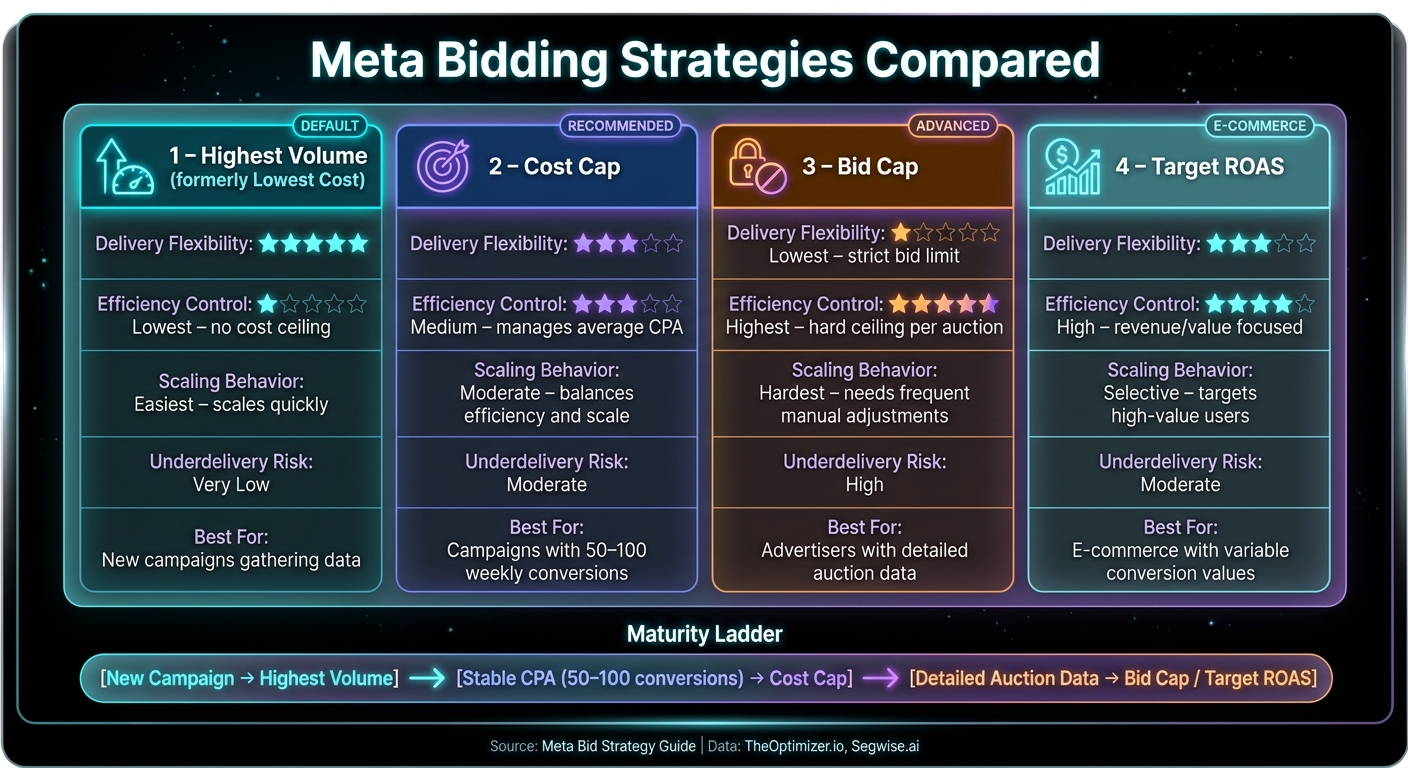
Meta Bidding Strategies Compared: Cost Cap vs Highest Volume vs Bid Cap vs Target ROAS
Meta provides several bidding strategies to help advertisers manage their ad costs effectively. The Highest Volume strategy (previously called Lowest Cost) is the default option. It focuses on spending your entire budget to secure as many results as possible, without imposing a cost ceiling. While this is a great starting point for new campaigns, it comes with potential fluctuations in cost per acquisition (CPA), especially during high-demand periods or when scaling efforts. On the other hand, Bid Cap sets a strict limit for each auction bid. Meta won't exceed this limit, no matter how favorable the impression might seem. However, this precision can sometimes hinder delivery and scalability. Cost caps, in contrast, strike a balance between maintaining control and achieving performance, complementing the strategies discussed earlier.
"Bid cap is meant for advertisers who have a strong understanding of predicted conversion rates and can calculate the right bid so as not to constrain delivery." - Meta
For advertisers looking to shift from rigid bid limits to a more revenue-oriented approach, Target ROAS (Return on Ad Spend) is a powerful alternative. Instead of focusing solely on the cost of a conversion, this strategy emphasizes revenue efficiency. The key question becomes, "How much revenue does this purchase generate?" rather than "How much does this lead cost?" This method is particularly useful for e-commerce businesses where the value of a single conversion often extends beyond the initial purchase.
Comparison Table: Cost Caps vs Other Bidding Methods
| Strategy | Delivery Flexibility | Efficiency Control | Scaling Behavior | Underdelivery Risk |
|---|---|---|---|---|
| Highest Volume (formerly Lowest Cost) | Highest: dynamically adjusts bids to spend the full budget | Lowest: no cost ceiling; CPA can vary widely | Easiest: scales quickly but may lose efficiency | Very Low: prioritizes spending the budget |
| Cost Cap | Moderate: bids fluctuate around the target to achieve an average | Medium: manages average CPA over time | Moderate: scales while keeping efficiency in check | Moderate: delivery slows if the cap is set too low |
| Bid Cap | Lowest: strictly adheres to the bid limit | Highest: enforces a hard ceiling on every auction bid | Hardest: requires frequent manual adjustments | High: risks zero delivery in competitive auctions |
| Target ROAS | Moderate: spends only when the ROAS target is likely to be achieved | High: prioritizes revenue/value efficiency over volume | Selective: focuses on high-value users rather than overall volume | Moderate: stops delivery if the ROAS target cannot be met |
These strategies can be viewed as steps on a maturity ladder for advertisers. Many start with Highest Volume to gather data and insights, transition to Cost Cap once they've established a stable CPA baseline (usually requiring 50–100 weekly conversions), and only adopt Bid Cap when they have detailed auction data and need to protect margins.
"The more control you maintain over costs, the more constraints you place on our platform to find lower cost opportunities." - Meta Bid Strategy Guide
Cost caps occupy a middle ground in this spectrum. They provide advertisers with a practical level of cost control while avoiding the delivery challenges often associated with bid caps. This balanced approach helps advertisers optimize their ad spend and improve ROI, aligning seamlessly with broader performance marketing goals.
Conclusion: Using Cost Caps to Hit Your Campaign Goals
Meta cost caps aren't a "set it and forget it" kind of tool. Instead, think of them as a dynamic lever - something you keep steady when things are running smoothly and adjust thoughtfully when performance signals guide you to make changes.
Here’s the key idea: keep your cost cap steady when your CPA (cost per acquisition) is stable, and the algorithm is hitting its targets efficiently. If you notice underdelivery due to auction pressure or if higher acquisition costs still make sense for your margins, consider increasing the cap in small, 10% increments.
"You switch strategies based on performance signals, not a calendar." - Stackmatix
It’s important to note that cost caps help maintain efficiency because they aim for an average CPA, not a hard limit. This flexibility allows Meta’s algorithm to bid more aggressively for high-probability conversions without letting costs spiral out of control. Pairing this strategy with clean, accurate conversion data - preferably through the Conversions API - ensures the algorithm receives high-quality signals to work with.
The big takeaway? Cost caps reward patience and precision. Advertisers who start with Highest Volume, shift to cost caps after gathering 50–100 conversions, and make small adjustments over 7–14 day periods tend to perform better than those who respond impulsively to daily fluctuations. This disciplined approach is what separates campaigns that scale profitably from those that burn through budgets chasing short-term results. For more advanced growth, you can further scale Meta ads with AI budget allocation to maximize efficiency. By sticking to these principles, you can keep your Meta ad campaigns aligned with your performance goals.
FAQs
How do I pick my first cost cap if I don’t know my true CPA yet?
If you're unsure of your actual CPA, a good starting point is running campaigns using the 'Highest Volume' bidding strategy for about 7–14 days, or until you collect at least 50 conversions. This will give you a baseline CPA to work with. From there, set your initial cost cap at roughly 10–20% higher than this average to provide some breathing room. Monitor performance closely and make weekly adjustments - raising the cap slightly if delivery slows down or costs rise unexpectedly.
What should I change first if my CPA rises - cost cap, creative, or targeting?
If your CPA goes up, the first step should be to evaluate and refine your creative or identify any problems within your funnel. These areas often have the biggest impact and should be addressed before making changes to your cost cap, targeting, or bidding strategy. Focusing on creative and funnel improvements typically delivers stronger results than jumping straight to cost adjustments.
How can I tell if underdelivery is from a low cost cap or from tracking issues?
When you set a low cost cap on Meta, underdelivery can occur because the platform struggles to find enough auctions that meet your price point. This often results in the dreaded 'Learning Limited' status. On the flip side, tracking problems can also lead to low delivery. These issues might cause conversion data to be missing or mismatched, even if your cost cap is reasonable. To figure out what's causing the problem, review your performance metrics carefully and make adjustments based on what you find.
Your next ad batch starts here
Finish with a ready-to-test ad batch
Paste your website to generate static creatives. Drop the link → get ads in about 90 seconds → upload them to Meta → scale.
Free to try No prompt writing