The Real Reason Your CPA Spikes at Scale and How to Fix It
Turn the strategy into creatives
Create Meta ads for your product
Paste your product page. ADEN'S LAB turns the offer, audience, and positioning into complete ready-to-use Meta static ads.
Free to try No prompt writing

When you scale Meta ad campaigns, your CPA often skyrockets because of three key factors:
- Audience Saturation: At lower budgets, ads target the most responsive audience. Increasing spend forces Meta to reach less qualified users, raising costs.
- Algorithm Reset: Budget hikes over 20–30% push campaigns back into the learning phase, causing unstable performance.
- Ad Fatigue: Reusing the same ads leads to declining engagement, higher CPMs, and lower conversion rates.
Key Fixes:
- More Ads: Scaling from $500/day to $1,500/day requires 150–200 ads annually. repeatedly refresh ad visuals and messages to maintain performance.
- Native Formats: Match ad designs to placements (e.g., 4:5 for Feed, 9:16 for Reels) to boost engagement and reduce costs.
- Gradual Scaling: Increase budgets by 10–20% every 3–4 days to avoid algorithm resets and CPA spikes. You can also scale Meta ads faster with AI budget allocation to maintain efficiency.
Pro Tip: Monitor metrics like CTR, CPM, and frequency in Meta Ads Manager. If CPA rises 40%+, it's time to update your ads.
The EXACT System to Scale Facebook Ads Profitably (2026)
Put the playbook to work
Apply this playbook to your page
Paste your website and the Lab will turn the strategy you are reading into a ready-to-test ads.
Free to try No prompt writing
Why Creative Fatigue Is the Real Problem
When scaling budgets reveal cracks in your advertising strategy, the root cause often boils down to creative fatigue. Many advertisers point fingers at Meta's algorithm, tweaking targeting, adjusting bids, or changing campaign goals. But the issue is much simpler: your audience is bored of seeing the same ads. Creative fatigue isn't just a buzzword - it's a measurable link between how often your ad is shown and the cost of each impression.
Here’s how it plays out: when people see your ad for the first time, some engage. The second time, fewer interact. By the third or fourth exposure, most users scroll right past it. As engagement drops, platforms like Meta classify your ad as low quality, charging you more to keep it visible. Essentially, you're paying extra to run ads that no longer perform.
Let’s dive into how this fatigue impacts your key metrics.
How Fatigue Drives Up Your CPA
Creative fatigue hits three critical metrics, ultimately inflating your CPA. First, CTR drops because users grow indifferent and ignore your ad. Second, CPM increases as Meta penalizes ads with declining engagement by lowering their Ad Quality Ranking, forcing you to pay more per impression. Third, CVR decreases because you're repeatedly targeting users who’ve already seen - and rejected - your offer.
Between April and December 2025, digital marketer James Williams studied 47 e-commerce campaigns and found that creative fatigue accounted for 40–60% of CPA inflation in mature campaigns. In one example, a $28 CPA skyrocketed to $67 in just 11 days due to stale ads. Williams reflected:
"The algorithm wasn't punishing my campaigns. It was punishing my creative laziness."
The math is straightforward: if your CPM jumps from $15 to $25, CTR falls from 2% to 1.2%, and CVR dips from 3% to 2%, your CPA could easily double or triple. Ads running for more than 14 days often see CPA increases of 100–150% above their baseline performance.
Recognizing these shifts is the first step to tackling creative fatigue and other optimization challenges.
How to Spot Fatigued Creatives
Pinpointing creative fatigue doesn’t require advanced tools. In Meta's Ads Manager, monitor three key metrics: frequency, CTR, and CPM. When frequency exceeds 2–3 for cold audiences, performance tends to slide. If CTR is dropping while CPM is climbing, it’s a clear sign your ad is wearing out.
Track "creative age" in Ads Manager by adding a custom column to see how long each ad has been running. Ads older than 10–14 days often lose effectiveness. Another useful metric is the "first-time impression ratio." When fewer than 60–70% of your impressions are going to new viewers, your audience is oversaturated. At that point, you’re paying to show ads to people who’ve already decided not to engage.
Set a strict rule: when CPA reaches 140% of its baseline, refresh your creative immediately. Don’t wait for costs to spiral out of control. By then, you’ve likely wasted thousands on ads that stopped delivering results days ago.
Reading Your Metrics to Find the Real Issue
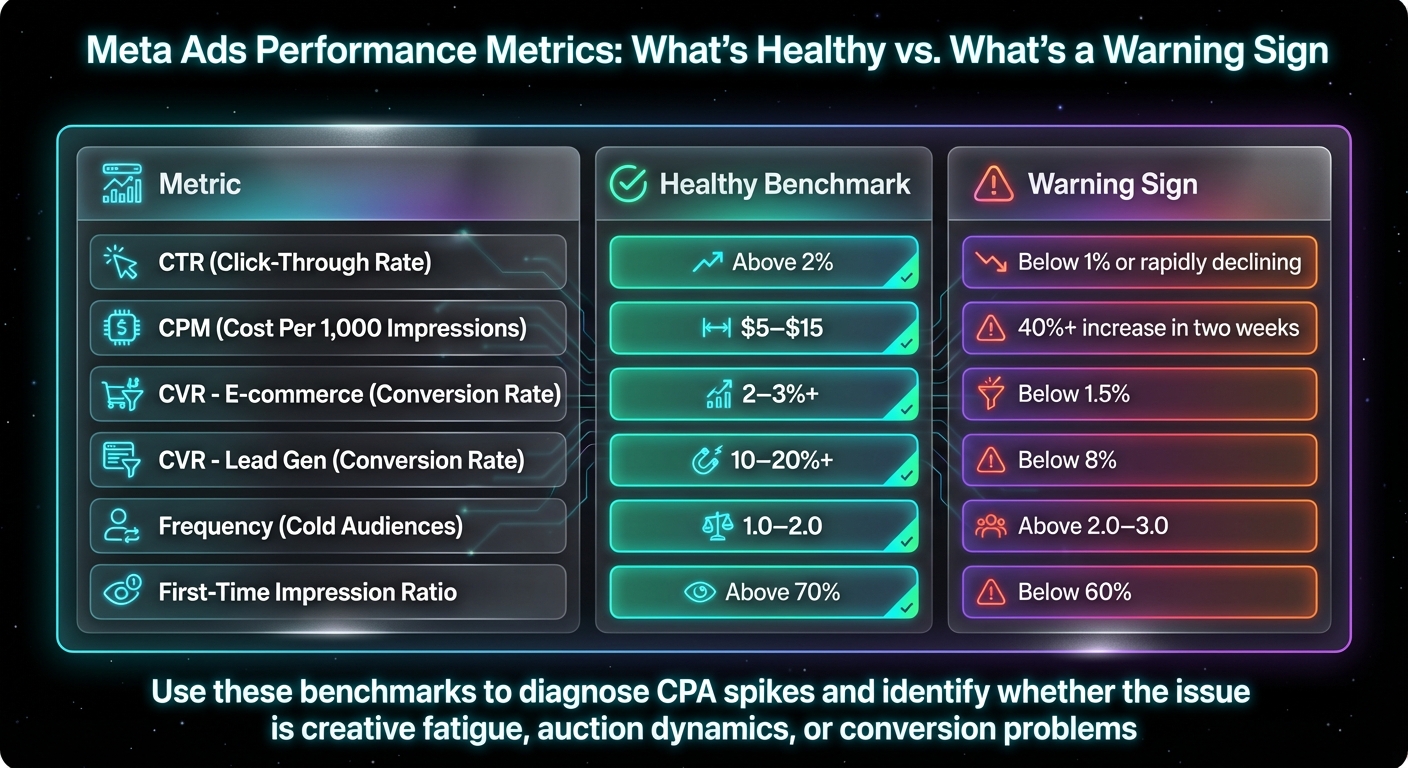
Meta Ads Performance Metrics: Healthy vs Warning Signs Benchmarks
Many advertisers tend to obsess over CPA (cost per acquisition) and make quick decisions, like tweaking budgets or adjusting Meta bids, without fully understanding the root cause. Here's the thing: CPA is just the result - it doesn’t tell you what’s actually going wrong. To solve the issue, you need to break it down and figure out which underlying metric is causing the spike.
CPA is influenced by three key metrics: CPM (cost per 1,000 impressions), CTR (click-through rate), and CVR (conversion rate). If your CPA rises, one or more of these metrics is likely off track. For example:
- If CPM increases while CTR stays the same, it’s often due to auction competition or a penalty for low ad quality.
- If CTR drops but CPM remains stable, your ad creative might be stale or unappealing. In these cases, you need a system to scale winning creatives without triggering further fatigue.
- If CPM and CTR look fine, but CVR takes a hit, the problem likely lies with your landing page or checkout process.
By breaking CPA into these components, you can pinpoint the exact issue affecting your campaign’s performance.
Split CPA Into Its Component Metrics
To start, head into Ads Manager and pull up data from the last 14 days. Focus on CPM, CTR, and CVR, and compare them to your campaign’s baseline performance (i.e., when things were running smoothly). Here’s what to look for:
- A CPM increase of 40% or more in two weeks could signal that Meta is penalizing your ad for low engagement, your creative is losing effectiveness, or you’re in more competitive auctions.
- A drop in CTR usually means creative fatigue - users are scrolling past your ad because they’ve seen it too often.
- A decline in CVR suggests issues with your offer, landing page, or checkout process.
Beyond these core metrics, two other indicators can provide deeper insights:
- Frequency: If this rises above 2–3 for cold audiences, it’s a sign of oversaturation.
- First-Time Impression Ratio: If this drops below 60–70%, it means your budget is mostly being spent on people who’ve already seen (and ignored) your ad.
These additional metrics can confirm whether creative fatigue is the problem or if something else is at play.
What Good Numbers Look Like vs. Bad Ones
Understanding what healthy performance metrics look like can help you identify issues faster. Here are some benchmarks to keep in mind:
- A CTR above 2% is a good target for most e-commerce and lead generation campaigns.
- CPMs between $5 and $15 are typical, though this can vary by industry.
- For e-commerce, aim for a CVR of 2–3%, while lead gen campaigns should shoot for 10–20%.
Use these benchmarks as a quick diagnostic tool to determine whether the issue lies with creative fatigue, auction dynamics, or something else.
| Metric | Healthy Benchmark | Warning Sign |
|---|---|---|
| CTR | Above 2% | Below 1% or rapidly declining |
| CPM | $5–$15 | 40%+ increase in two weeks |
| CVR (E-commerce) | 2–3%+ | Below 1.5% |
| CVR (Lead Gen) | 10–20%+ | Below 8% |
| Frequency (Cold) | 1.0–2.0 | Above 2.0–3.0 |
| First-Time Impression Ratio | Above 70% | Below 60% |
Once you’ve nailed down which metric is causing the problem, you can make targeted adjustments instead of guessing.
How to Fix CPA Spikes When Scaling
Once you've pinpointed the metric behind your CPA spike, the next step is figuring out how to fix it. Scaling isn’t just about increasing your ad spend - it’s about using targeted strategies to maintain efficiency as your budget grows. Here’s what actually works.
Solution 1: Produce More Ads
One of the biggest pitfalls advertisers face when scaling is underestimating the number of creatives they’ll need. When you increase your daily budget from $500 to $1,500, you’re not just spending more - you’re speeding up the creative burnout cycle. An ad that might last three weeks on a smaller budget could wear out in just one week with higher spend due to the faster rate of impressions.
Here’s the reality: scaling from $500 to $1,500 daily requires about 10 times more creative assets. That’s where most teams hit a wall. Designers typically charge $30–$50 per ad, so producing 150 ads could set you back $4,500 or more. And that doesn’t even factor in revisions, delays, or endless back-and-forth communication.
The solution? Use automated ad production and templates. Instead of starting from scratch every time, create templates and mix and match proven hooks, visuals, and copy to quickly produce dozens of variations. For video ads, you don’t need to reshoot everything - just tweak the first three seconds (the hook) of your top-performing videos.
The goal isn’t perfection. It’s to outpace your competition by giving Meta’s algorithm plenty of fresh material to test. If you’re scaling aggressively, aim to launch 3–5 new creative angles or variations every 2–3 weeks to counteract ad fatigue.
Once you’ve ramped up production, the next step is ensuring that your ads fit their placements seamlessly.
Solution 2: Match Creatives to Placements
Ad format matters more than you might think. A square ad that performs well in the Feed might flop in Reels, while a horizontal video could get awkwardly cropped on Stories. When scaling, these inefficiencies add up fast.
To avoid this, always design ads in native formats - use 4:5 for Feed and 9:16 vertical for Reels. Ads that naturally fit their placement tend to get higher click-through rates (CTR) and lower cost-per-thousand impressions (CPMs) because they don’t feel out of place. People are more likely to scroll past ads that interrupt their experience, but ads that blend in are far more engaging.
Combine this with Advantage+ placements, which allow Meta to distribute your ads across all available placements and find the most efficient options. Instead of manually selecting Feed, Stories, or Reels, let the algorithm decide where your ads perform best. This approach often leads to lower CPMs and improved efficiency overall.
Once your creative and placement strategy is optimized, the final step is managing your budget growth carefully.
Solution 3: Scale Budgets Slowly with Bid Controls
Scaling too quickly can derail your campaign. Budget increases of more than 20–30% typically reset Meta’s algorithm into a full learning phase, causing performance to fluctuate and CPA to spike overnight.
The safer approach? Follow the 20% rule: increase your budget by 10–20% every 3–4 days. For instance, if you’re starting at $50/day, your scaling plan might look like this: Day 1 ($50), Day 4 ($60), Day 7 ($72), Day 10 ($86), Day 14 ($100). It’s a slower process, but it keeps the algorithm stable and avoids sudden CPA surges.
Another option is horizontal scaling. Instead of raising the budget on a single ad set, duplicate your winning ad sets and target new audiences, regions, or interest groups. This spreads your spend across multiple audience pools, reducing the risk of oversaturating any one group.
Lastly, use Cost Per Result Goal bidding to maintain efficiency. This feature lets you set the maximum amount you’re willing to pay per conversion, ensuring the algorithm doesn’t overspend in costly auctions just to meet your budget. It’s especially helpful during scaling, as it keeps your CPA in check while you enter more competitive markets.
How ADEN's Lab Fixes the Creative Production Problem
Spending $1,500 a day on ads means you’ll need around 150–200 unique creatives annually. That’s a massive workload, and most teams just can’t keep up. Designers typically charge $30–$50 per ad, and even if you’ve got the budget, the time it takes to create and revise ads is a dealbreaker. By the time revisions are done, your current ads might already be losing their impact. This creative production bottleneck is often the main roadblock to scaling campaigns effectively.
ADEN's Lab solves this problem. All you need to do is drop your product link, and within 90 seconds, you’ll have Meta-ready ads that are good to go. No complicated prompts, no setup - just ads that are ready to launch. It’s a game-changer for streamlining creative production.
Generate 50–200+ Ads Monthly Without Designers
With ADEN's Lab, you can churn out 50, 100, or even 200+ ads every month, depending on your plan. This constant flow of fresh creatives helps you stay ahead of ad fatigue, so you’re not scrambling to replace underperforming assets.
When you’re spending $1,500 a day, ads can lose effectiveness in just a few days. To keep Meta’s algorithm engaged and performing, you need a steady stream of new content. Traditional workflows can’t keep up with this demand, but ADEN's Lab is designed for advertisers who need rapid creative production - without the need to hire an entire team of designers.
Meta-Optimized Ads in Under 90 Seconds

Speed matters when every day’s performance counts. What makes ADEN's Lab stand out is how seamlessly its ads integrate with Meta’s system. Meta’s "Andromeda" algorithm evaluates over 10,000 data points for every impression. If an ad underperforms, Meta raises the CPM and pushes it into less competitive auctions.
ADEN's Lab uses historical performance data to pinpoint winning combinations of headlines and images. It then automatically generates and tests new variations. By replicating patterns from high-performing ads, the platform ensures strong click-through rates (CTRs) and stable cost-per-acquisition (CPAs). This isn’t guesswork - it’s about deploying ads that align with what already works in Meta’s ecosystem. And since the entire process takes less than 90 seconds, you can react to CPA spikes almost instantly, instead of waiting days for new creatives.
Keeping CPA Under Control at Scale
To keep your CPA in check as you scale, you need a system that handles creative fatigue, avoids misreading metrics, and manages budget increases effectively. Once you're spending $1,500 or more daily, guesswork is no longer an option. You need a reliable process that delivers consistent results.
Successful brands treat creative production like a supply chain. They know exactly how many ads they need to produce based on their spending levels. Here’s a simple guideline: for every $3,000 in monthly ad spend, create one fresh ad. For every $10,000, develop an entirely new concept. At $45,000 a month, this means generating 15 new ads and 4–5 unique concepts. This level of production is tough to manage manually, which is why many teams hit a ceiling. Striking the right balance between creative output and steady budget growth is crucial for scaling campaigns smoothly.
This is where ADEN's Lab steps in to eliminate bottlenecks. With their system, you can generate Meta-ready ads in under 90 seconds - just drop a link and you're set. It’s not about replacing creative decision-making; it’s about removing delays that disrupt momentum when your CPA starts climbing. With the ability to produce 50, 100, or even 200+ ads every month, you’ll always have fresh creatives ready, keeping you ahead of the game.
Combine this creative volume with scaling Facebook ad campaigns gradually - increasing your budget by just 10–20% every few days - to ensure Meta's algorithm has time to adjust without resetting its learning phase. Pair this with smart placement strategies, and you have a full framework to maintain control over your CPA as you grow.
The brands that scale profitably have one key advantage: they outproduce their competition. By testing more creatives faster, they stay ahead. ADEN's Lab makes this approach possible for any budget, whether you're spending $1,500 a day or $15,000 a day.
FAQs
How can I tell if my CPA spike is due to creative fatigue or my landing page?
To understand where your ad performance might be slipping, keep an eye on two key metrics: click-through rate (CTR) and landing page conversion rate (CVR). If your CTR drops while your CVR remains stable, it’s probably a case of creative fatigue - your audience might be tired of seeing the same ad. On the flip side, if your CTR holds steady but your CVR dips, the problem is more likely tied to your landing page.
Another important metric to watch is frequency - how often people see your ad. A high frequency paired with a declining CTR often signals fatigue as well. By analyzing these trends, you can pinpoint whether the issue stems from your ad creative or your landing page.
What budget increase is safe without resetting Meta’s learning phase?
When adjusting your ad budget on Meta, aim to keep daily increases to about 15% or less. Jumping too high too quickly can disrupt the platform's learning phase, making it harder for the algorithm to optimize effectively. By making gradual changes, you can maintain stable performance while allowing the system to continue refining your campaign's results.
How many new ads do I actually need per month at my spend level?
For smaller budgets (around $0–$10K per month), creating one new ad per month is typically sufficient - unless performance starts to dip. If you're working with a budget of $10K–$25K per month, aim to produce three to four new ads monthly to keep your results consistent. For higher spending levels, you'll need to update ads more frequently, as they tend to wear out faster. Monitor performance and audience engagement closely to decide when it's time to refresh your ads and avoid fatigue.
Your next ad batch starts here
Finish with a ready-to-test ad batch
Paste your website to generate static creatives. Drop the link → get ads in about 90 seconds → upload them to Meta → scale.
Free to try No prompt writing