Meta Ad Prompts for Electronics and Tech Accessories
Use the prompts on your real offer
Generate these ad angles for your product
Skip the blank prompt box. Paste your product page and ADEN'S LAB applies the angles to your offer, images, headlines, and copy.
Free to try No signup No prompt writing

Electronics ads fail when the copy gets loose. A charger, power bank, or pair of earbuds needs exact claims, clear use cases, and visuals that match the product page. This page gives a ready-to-test way to write static Meta ad prompts for electronics and tech accessories without drifting beyond verified specs. The focus is narrow on purpose: static ad concepts built from one product URL, then moved through the current ADEN'S LAB flow - paste the supported page, pull available visuals and messaging, generate multiple static ads, review them, download the safe ones, and test the selected set.
The core rule is simple: if the product page does not state it, the ad should not imply it.
What these prompts need to do
For electronics, a prompt is not just a hook.
It needs to tell the team five things:
- What claim leads
- What the image shows
- What text sits on the image
- What fact backs that text
- What copy must avoid
That is the difference between a Meta ad copy framework and a prompt that can move into production.
A weak prompt says:
“Make a Meta ad for this power bank that shows it’s strong and good for travel.”
A usable prompt says:
“Static 4:5 Meta ad. Product centered. Show the digital display. Overlay:
24,000 mAh. Primary text uses exact capacity from the product page only. Do not mention number of charges, runtime, or laptop models unless the page lists them.”
That level of control matters more in electronics than in softer product categories.
One bad phrase can change the claim.
“140W” is not the same as “Up to 140W.”
“Works with laptops” is not the same as “Works with MacBook Pro” unless the page says that.
sbb-itb-628c49f
Put the playbook to work
Apply this playbook to your page
Paste your website and the Lab will turn the strategy you are reading into a ready-to-test ads.
Free to try No signup No prompt writing
The working standard for electronics prompts
Every prompt should be built from a small claim map.
Use this format:
| Prompt part | What to write |
|---|---|
| Hook | One verified product fact |
| Visual direction | One scene or product view that proves the fact |
| Overlay | One short on-image claim |
| Source note | Exact page-backed spec |
| Guardrail | What the copy must not add |
This keeps the ad narrow enough to review fast.
It also fits the current ADEN'S LAB workflow cleanly. The brief shapes the angle. The product URL supplies the inputs. The output is a batch of static ads that still need human review before testing.
The main mistakes these prompts should prevent
Most electronics ads break in the same places.
Spec inflation
The ad turns a listed output, capacity, or rating into a bigger promise.
Compatibility drift
The ad names devices, models, or platforms the page never names.
Runtime guessing
The ad turns battery size into “days of use” or “multiple charges” with no source.
Image-led assumptions
A cable, adapter, or device appears in the photo, so the copy assumes support or inclusion.
Stale commercial claims
Price, review count, and rating change after the ad is built.
Those are not small editing issues. They affect buyer trust and can create review problems later.
How to write prompts that stay inside verified claims
The safest structure is one prompt per angle, one angle per ad.
That means each static concept should lead with only one of these:
- Capacity
- Output
- Compatibility
- Port layout
- Display feature
- Rating or review count
- Price or offer
- Included items
- Warranty
When one static ad tries to carry three or four of those at once, the message gets messy.
A cleaner pattern is:
- one ad on capacity
- one ad on output
- one ad on compatibility
- one ad on proof
- one ad on offer
- one ad on setup or interface
That gives a testable batch where the lead claim changes, but the format stays controlled.
A prompt template that fits static Meta ads
Use this base template:
Format: 4:5 static Meta ad, 1080 × 1350
Product: [product name]
Hook: [one verified fact]
Visual: [exact scene or crop]
Overlay: [one exact claim from the page]
Primary text: [one or two short lines tied to the same fact]
Source note: [where the fact comes from]
Do not add: [unverified features, runtime, device models, sale language, or ratings not on page]
That structure is plain, but it works because it tells the team what to build and what to leave out.
12 ready-to-use prompt models for electronics and accessories
These are not tied to one brand. They are prompt frames that can be filled only with page-backed facts.
1. Capacity-led prompt
Hook:
[Exact capacity] in one portable pack
Visual: Product alone on a plain background with the capacity figure as the main design element
Overlay:[Exact capacity]
Primary text: Use the exact capacity from the product page. Do not convert it into hours, charges, or travel days.
Do not add: Runtime or charge-count claims
Best for: power banks, battery packs, portable speakers
2. Output-led prompt
Hook:
[Up to exact wattage] output
Visual: Product connected to one supported device type
Overlay:Up to [X]W
Primary text: State the wattage exactly as listed. Keep “up to” if the page uses it.
Do not add: Charging time unless the page gives an exact number
Best for: chargers, power banks, USB hubs
3. Compatibility prompt
Hook:
Works with [exact devices or standards listed on the page]
Visual: Product shown between only the supported device types
Overlay:[Exact compatibility wording]
Primary text: Repeat the product-page wording. Do not expand the list.
Do not add: Model names or OS versions not shown on the page
Best for: chargers, earbuds, keyboards, adapters
4. Port-layout prompt
Hook:
[Exact port count and types]
Visual: Tight crop of the ports, clearly visible
Overlay:[2× USB-C + 1× USB-A]
Primary text: State the port layout exactly.
Do not add: Simultaneous full-speed charging claims unless stated
Best for: docks, hubs, power banks, wall chargers
5. Display-feature prompt
Hook:
See [exact display function] at a glance
Visual: Close-up of the screen or indicator in use
Overlay:[Exact feature phrase]
Primary text: Name only the function listed on the page.
Do not add: Smarter charging, AI behavior, or control features not listed
Best for: power banks, thermostats, monitors, smart devices
6. Setup-simplicity prompt
Hook:
[Named feature] cuts setup friction
Visual: Product in the place where setup happens: desk, nightstand, kitchen, car
Overlay:[Exact setup or feature phrase]
Primary text: One line on the feature, one line on the friction it removes.
Do not add: Ease claims the page does not support
Best for: routers, webcams, accessories with visible controls
7. Included-in-box prompt
Hook:
What’s included, clearly shown
Visual: Flat lay with only listed box contents
Overlay:In the box
Primary text: Label only the items confirmed on the page.
Do not add: Cables, adapters, or extras not listed
Best for: kits, bundles, accessories with multiple parts
8. Warranty prompt
Hook:
[Exact warranty term]
Visual: Product shot with one small warranty callout
Overlay:[1-year limited warranty]
Primary text: Repeat the warranty language exactly.
Do not add: Return terms unless those are also verified
Best for: higher-consideration accessories
9. Rating prompt
Hook:
[X.X stars] from [Y reviews]
Visual: Product on a plain background with a small rating badge
Overlay:[X.X stars · Y reviews]
Primary text: Use the live product-page numbers as of the build date.
Do not add: Superlatives or made-up review quotes
Best for: products with visible store proof
10. Price-led prompt
Hook:
[Live price] for [product name]
Visual: Product plus one clean price callout
Overlay:Now $[X.XX]
Primary text: Use the current page price on the build date.
Do not add: Sale end date, savings amount, or “best price” language unless listed
Best for: offers and first-click intent
11. Bundle prompt
Hook:
[Bundle name] at $[X.XX]
Visual: All
What Makes Electronics Meta Ads Different From Generic Product Ads
Selling a charger or a pair of earbuds is not the same as selling a T-shirt. With apparel, broad style appeal can do a lot of the work. Electronics is different. The buyer wants to know if the product will work as expected, if the spec is exact, and if setup looks simple enough before they buy.
That changes how the ad has to do its job.
Electronics buyers check claims. They compare specs, look for edge cases, and notice when copy drifts from what the product page or manual actually says. If the ad says too much, or says it loosely, trust drops fast. That’s why each feature needs to map back to a source-backed spec, not a guess pulled from the image or a loose marketing line.
The main friction points are usually the same: compatibility, setup hassle, privacy concerns, and reliability in day-to-day use. Generic ads tend to skate past those points. Electronics ads can’t.
The table below shows the gap.
| Buyer Objection | What Generic Ads Do | What Electronics Ads Must Do |
|---|---|---|
| "Will it work correctly?" | Use vague benefit claims | State the verified setup, permissions, or operating conditions upfront |
| "Is this claim exact or inferred?" | Use vague language and image-based assumptions | Use only verified specs and never infer from visuals |
| "Does it fit my device or workflow?" | Say "works with most" | Define the confirmed compatibility boundaries clearly |
| "Will it create setup or privacy friction?" | Ignore setup steps and data behavior | Disclose required permissions, configurations, or background behavior honestly |
| "Can I trust it in real use?" | Use sourced proof, not "high quality" | Signal reliable in real use and avoid overstating performance |
This is the practical difference: a generic product ad tries to spark interest, while an electronics ad has to remove doubt.
That’s also where the workflow matters. In ADEN'S LAB, the safer path is to start from a supported product URL, pull the visuals and messaging that actually exist on the page, generate multiple static ad options from that source, then review and test only the versions that stay inside confirmed claims. For electronics, that matters more than usual. One loose line about compatibility or setup can create more damage than a weak hook.
These objections are the reason electronics creatives need claim-safety rules before copy goes live.
Use Verified Specs Only: The Claim-Safety Rules For Electronics Creatives
For electronics ads, every claim needs a clean source trail. If it is not on the official product page, spec sheet, or another primary document, it should not show up in the hook, overlay, or body copy. Lifestyle photos, box shots, retailer summaries, and old landing pages are weak sources. They create risk fast.
Before any copy gets written, tie each claim to a source. That matters even more in electronics, where one loose line like "fast charging" or "works with iPhone and Android" can drift away from what the product page actually says.
The fact types that need direct verification before they appear in ad copy are:
- Capacity: exact mAh
- Charging speed: wattage and time-to-charge
- Compatibility: named operating systems and hardware versions
- Certifications: MFi, FCC, UL, or RoHS
- Battery life: hours under stated conditions
- Water resistance: IP rating
- Warranty: current terms
- Ratings: star score and review count as of a named date
- Price: current MSRP
| Fact Type | Must Come From | Safe Phrasing Example |
|---|---|---|
| Battery life | Technical specs sheet | "Up to [X] hours of playback" |
| Charging speed | Official product page | "Up to [X]W with a compatible charger" |
| Compatibility | Official product page | "Requires [specific OS/hardware]" |
| Water resistance | Primary documentation | "IP68 rated" |
| Certifications | Certification documentation | "MFi Certified" |
| Warranty | Official product page or warranty policy | "1-year limited warranty" |
| Ratings | Current product page as of [date] | "4.6 stars from 1,284 reviews" |
| Price | Current product page | "MSRP listed on the product page as of [date]" |
Two rules handle most of the risk.
Use "up to" for any metric that changes based on device, setup, or usage. Battery life is the obvious one. Charging speed is another. A charger might support a certain wattage, but the result still depends on the device, cable, battery state, and test conditions. If the source uses conditional language, the ad should too.
Use "requires [specific OS/hardware]" any time a feature depends on a platform, OS version, or hardware generation. This is where teams get sloppy. A product photo cannot tell anyone whether a feature works on iOS 17, Android 14, USB-C AirPods, or only a certain watch model. That is not a copy choice. It is a sourcing problem.
For facts that change often - price, ratings, and compatibility lists - add an as-of date and check them again before launch. A line can be fine on Monday and wrong by Friday. That is why the source log matters.
This is also the cleanest way to use ADEN'S LAB in the workflow. Start with a supported product URL, let the platform pull the visuals and on-page messaging, then review what the page actually supports before generating static concepts. If a spec is missing, unclear, or only hinted at in imagery, leave it out of the prompt. generate several static ads using AI tools for Meta ads from verified inputs, review the outputs, download the safe options, and test only the claims that can be traced back to the source page.
The next step is simple: take one verified product page, pull only the specs that are plainly supported, and feed those exact lines into the prompts.
Representative Product Example And Verified Specs To Use In The Prompts
This article’s worked example uses the Anker 737 Power Bank (PowerCore 24K) from Anker’s official product page. It’s there to show the method, not to imply any campaign outcome. The point is simple: turn page-level product facts into static ad hooks, overlays, and proof points without drifting into claims the page does not support.
Keep a clean line between what the source states and what a marketer might infer from it. That matters fast with consumer electronics, where one loose phrase can turn a safe spec into a claim that needs proof.
| Source-backed fact | Verified value | Safe use in a prompt |
|---|---|---|
| Capacity | 24,000 mAh | Use in the hook or overlay as the lead spec. |
| Max output | 140W | Name in the headline or overlay as the speed claim. |
| Compatibility | USB-C laptops, iPhone, Android | Use as a compatibility proof point. |
| Display | Smart digital display shows wattage and battery level | Use as a feature demonstration angle. |
| Charging ports | 2× USB-C, 1× USB-A | Use in a bundle or multi-device use-case angle. |
| Social proof | Rating and review count from the official product page as of Jul 29, 2026 | Use as social proof, not as performance evidence. |
A practical way to use this in ADEN'S LAB is to paste the product URL, let the tool pull available visuals and page copy, then generate several static concepts from these exact facts. After that, review the ads, download the ones that stay inside the source material, and test only the selected set.
The rule for the next prompt briefs is tight on purpose: use only the inputs above. If a spec is not on the page, leave it out.
Source-To-Claim Table: Turning Product Page Facts Into Safe Ad Copy
Use the product page as the only source for claims in the ad. That keeps the copy tight, checkable, and much less likely to drift into language the landing page can’t support.
This table is a working claim map. Before writing hooks, overlays, or headlines, match each verified field on the page to one safe ad line. Don’t freestyle. Don’t fill gaps. If the page is silent, the ad should be silent too.
| Product page field | Source rule | Use in ad copy | Avoid |
|---|---|---|---|
| Capacity | Use the exact capacity figure from the official page. | Repeat the published capacity exactly. | Turning capacity into hours of use or number of charges |
| Charging speed / output | Use the exact wattage and any qualifier the page uses. | Repeat the stated wattage exactly. | Dropping qualifiers or calling it the fastest or best without support |
| Device compatibility | List only the devices, ports, or standards explicitly named on the page. | Repeat the published compatibility exactly. | Saying it works with every device or standard |
| Port count | Use the exact port count and port types. | State the published port layout exactly. | Claiming universal or simultaneous full-speed charging unless stated |
| Display / controls | Describe only the functions the page lists. | Use the published display or control description. | Adding smart, AI, or other unlisted features |
| Dimensions / weight | Use the exact measurements from the page. | State the published dimensions and weight. | Using vague size claims like pocket-sized |
| Battery life / runtime | Use runtime only if the page states a runtime. | Repeat the stated runtime exactly. | Inferring runtime from capacity or output |
| Water resistance | Use only the exact IP rating or water-resistance term on the official page. | Repeat the published rating exactly. | Water-resistant, waterproof, or splashproof unless stated |
| Certifications | Name only the certification label shown on the page. | Use the published certification label exactly. | Adding approval language the page does not state |
| Ratings | Use the live star rating and review count from the official page. | State the live rating exactly. | Superlatives like highest-rated or most trusted |
| Warranty | Use the exact warranty term listed. | State the published warranty term exactly. | Lifetime guarantee unless that term appears |
| Price | Use the current price verified on the build date. | Use the live landing-page price on the build date. | Lowest on the market or best price anywhere |
Two fields need extra discipline: runtime and price.
Runtime is where weak copy usually slips. Capacity is a spec. Runtime is a usage claim. Those are not the same thing. A page can list battery size and output without ever stating how long the product runs in practice. If runtime is missing, leave it out.
Price has a different problem. It changes. The number in the ad is only safe if it matches the landing page on the build date. If the offer moves later, the ad can become inaccurate even when the original draft was clean.
The rule is simple: if the page does not state it, do not imply it.
That standard fits cleanly into the current ADEN'S LAB workflow. Paste a supported product URL, let the tool pull the visuals and on-page messaging that are actually available, generate multiple ad copy ideas, then review each headline, overlay, and primary text line against the claim map before download and testing. That’s the point of the process: less invention, tighter input control, and fewer copy choices that look fine in a draft but break once legal, policy, or the landing page gets involved.
Next, apply these claim-safe facts to the Meta static ad format guardrails.
Meta Static Ad Format Guardrails For These Prompt Briefs
Use 4:5 portrait (1080 × 1350 px) as the main static format for mobile Feed placements. Use 1:1 square (1080 × 1080 px) as the fallback when a placement needs a more universal crop. Start with portrait first. Then carry the same verified claim set into square only where the placement calls for it.
Keep each overlay to one verified claim. In electronics ads, compatibility, wattage, and battery details can pile up fast. That usually makes the image harder to scan and pushes the product out of focus. One overlay per claim keeps the visual clean and the message easy to process.
One overlay = one verified claim.
With the format set, the prompt briefs below turn verified specs into ready-to-test static concepts that fit the current ADEN'S LAB workflow: paste a supported URL, let the product pull available visuals and messaging, generate multiple static options, review or download them, and test the ads worth running.
1. Spec-Led Demonstration
Use the verified Anker 737 product-page specs as the source of truth for every brief below. The job here is simple: turn page-backed facts into static Meta concepts that can be built, reviewed, and tested without adding claims the page doesn’t support.
This is a good fit for ADEN'S LAB because the workflow stays tight. Paste the product URL, let the tool pull available visuals and on-page messaging, generate a batch of static options, then review and download the few that keep the claim language clean. From there, test the selected ads in Meta and scale winning creatives across your campaigns.
| Angle | Hook | Visual direction | Overlay | Copy guardrail |
|---|---|---|---|---|
| Capacity lead | 24,000 mAh power in one portable pack. | Product centered on a neutral background, with the capacity figure as the main visual element. | 24,000 mAh | Use the exact mAh figure from the product page. Do not turn it into estimated charges or runtime unless the page says that directly. |
| Speed angle | 140W output, shown clearly. | Product next to a charging cable connected to a laptop. | Up to 140W | Keep up to in the overlay. If the page uses conditional wording, the ad should too. |
| Proof angle | See exactly what's happening - wattage and battery level, live. | Close-up of the digital display while active. | Smart digital display or the exact product-page wording | Show the display in use. Don’t add functions the page doesn’t list. |
| Multi-device angle | 2× USB-C + 1× USB-A. | Product shot with all three ports visible and labeled. | Port count and port types exactly as listed | State the layout exactly. Don’t suggest all ports run at max speed at the same time unless that’s stated on the page. |
| Trust angle | Works with USB-C laptops, iPhone, and Android. | Product beside a laptop, a smartphone, and a second device. | Compatibility list exactly as named on the page | Only list device types or standards the page confirms. No educated guesses. |
| Social proof | [Star rating] stars from [review count] verified buyers. | Product on a clean background with the rating shown clearly. | Exact star score and review count | Pull live figures from the product page as of Jul 29, 2026. Log the date in the source notes. |
| Value angle | 24,000 mAh. 140W. One pack. | Product with both specs shown in a two-line overlay. | Capacity and wattage stacked in large type | Use both figures only if both appear on the same product page. Don’t merge specs from different sources. |
| Laptop-user angle | Your laptop charger, replaced. | Product connected to a USB-C laptop with the cable visible. | Up to 140W via USB-C | Keep the qualifier. Frame the use case around page-backed USB-C laptop support. Don’t name laptop models unless the page names them. |
A few things matter more than they seem.
First, the overlay is the claim. If the product page says “up to 140W,” dropping “up to” is not a small edit. It changes the claim. Same with compatibility. “Works with USB-C laptops” is not the same as “works with MacBook Pro” unless the page says so.
Second, static ads work better when the visual does one job. A capacity ad should look like a capacity ad. A port-layout ad should make the ports easy to count. If the design tries to sell speed, battery size, compatibility, and review volume all at once, the message gets muddy fast—a common issue in Meta ad optimization that leads to creative fatigue.
Third, the product page should drive the asset build. That’s where ADEN'S LAB helps in a practical way. Instead of writing from memory or piecing together claims from reseller pages, the workflow starts with one supported URL. The tool extracts the available product visuals and messaging, then spins out multiple static directions built around those exact inputs. That keeps the first pass faster and cuts down on cleanup later.
For this set, the cleanest testing structure is angle-based. Not ten tiny copy tweaks. Not a pile of near-duplicate exports. Just distinct concepts built around one source-backed claim each.
A simple test stack could look like this:
- Claim-first specs: capacity, wattage, or both together
- Feature proof: smart display, port layout
- Use-case trust: laptop compatibility, multi-device use
- Store proof: live rating and review count
That gives each ad a clear reason to exist. It also makes readouts easier. If the capacity-led ad gets strong thumb-stop but weak click-through, that says something different from a compatibility-led ad that gets lower engagement but stronger outbound intent.
The social-proof version needs extra care. Ratings and review counts move. That means the figure in the ad can go stale. If this concept is built, the source log should record the exact product-page numbers and the capture date: Jul 29, 2026. If the ad stays live for a while, refresh it. Otherwise, the easiest ad in the batch becomes the one most likely to drift out of sync.
The laptop-user concept also needs discipline. “Your laptop charger, replaced” is a strong angle, but only if the page backs the underlying use case. The overlay should stay tied to the verified spec: Up to 140W via USB-C. The visual can carry the scenario. The copy should not leap past the evidence.
This is also where static creative can do more than people give it credit for. A tight product shot, one clear number, and a visible use case often beat busier layouts. Not because the format is fancy, but because the viewer understands it in a second. That matters in Meta feeds.
If this article is about turning a single product page into test-ready static ads, the promise here is straightforward: use the page as the ad brief, not as loose inspiration. Paste the Anker 737 URL into ADEN'S LAB, let it pull what’s there, generate multiple static concepts around these eight angles, and only move forward with the versions that keep the source language intact.
2. Compatibility & Real-World Use
Use these prompts when the objection is fit, platform, or required input. The rule is simple: each concept should map to one verified product-page fact only. That fact can be a device type, connector standard, OS requirement, or included accessory.
Each prompt below isolates one compatibility claim. That matters because compatibility mistakes kill trust fast. If the page says USB-C, say USB-C. If it says works with laptops, don’t turn that into a list of brand models that never appeared on the page.
| Prompt | What to show | Overlay | Claim rule |
|---|---|---|---|
| Laptop desk support | Product beside an open laptop with the correct cable connected, but only if the page confirms laptop support | Verified device type from the page. | Use the exact device category named on the page. No model names unless listed. |
| Multi-device carry | Accessory in a commuter bag with only the confirmed device categories | Verified device types only. | Don’t imply simultaneous max-speed output or included adapters unless stated. |
| Travel phone use | Travel setting like an airport, ride-share, or hotel desk with the phone front and center | Verified phone compatibility. | Keep the overlay tied to the confirmed compatibility claim. Don’t imply runtime. |
| Connector standard | Close-up of the exact port or connector listed on the page | Exact connector standard from the page. | Name only the port types or standards the page confirms. Don’t infer from the image. |
| Required connection | Product in the setting that supplies the required input, only if the page states that dependency | Requires [dependency exactly as listed on the page]. | Name only the dependency the page states. |
| Fixed-room configuration | Product on a nightstand or hotel desk with only the verified supported devices connected | Verified devices only. | Don’t add chargers, adapters, or cables unless the page confirms they are included. |
| Included accessory check | Product with any included cable or adapter, but only if the page lists them | Included or required adapter - match the page exactly. | Clarify only what ships in the box versus what the buyer must supply. |
| Platform compatibility | Supported platform or ecosystem only if the page verifies it | Compatible platforms exactly as listed. | Don’t add OS versions, model names, or accessory types not written on the product page. |
A few patterns are doing the heavy lifting here.
First, show the use case in the place where it happens. Desk products belong on desks. Travel accessories belong in airports, hotel rooms, and cars. That sounds obvious, but a lot of static ads miss it. They show a clean product render and then wonder why the buyer still isn’t sure whether it fits their setup.
Second, keep the text narrower than the image. If the image shows a phone and laptop, but the page only confirms phone support, the overlay should stay on the phone claim. The extra device in the scene can create confusion unless the product page backs it up.
Third, separate “compatible with” from “included with.” Buyers read those as two different promises, and they should. A page might confirm that a product works with a laptop, but that does not mean a laptop cable, wall adapter, or any other extra ships in the box.
That’s where ADEN'S LAB fits neatly into the workflow. Paste a supported product URL, let the tool pull available visuals and page messaging, then generate several static concepts around a single compatibility angle. From there, review the outputs, download the cleanest options, and test the ads that stay closest to the product-page language. This is a good use case when a product page has enough specificity to support multiple compatibility angles without drifting into made-up claims.
Two quick checks help before anything goes live:
- Does the page confirm the exact device type, platform, or connector named in the ad?
- Does the image imply anything extra, like an adapter, cable, or speed claim, that the page never states?
If the answer to either is no, tighten the concept before testing.
Next: use trust, bundles, and commercial hooks to close the remaining objections.
3. Trust, Bundles & Commercial Hooks
Once product fit is clear, the next friction points are simple: can the buyer trust the offer, is the deal worth it, and why act now instead of later. This set of nine prompts handles those objections in that order. Start with social proof. Then show package value. Then bring in timing, seasonality, or gifting.
Trust proof (1–4)
- Warranty callout - Show the product with one overlay that states the exact warranty term shown on the product page. Don’t shorten it. Don’t round it up.
- Star rating with review count - Use the live star rating and review count from the listing. No manual cleanup. No estimated numbers.
- Certification badge - Show the certification badge only when the page lists it. Add one short line that explains why it matters.
- Return policy reassurance - Lead with the exact return window from the product page or policy page.
Value & bundle (5–6)
- What’s in the box - Show only the items that are clearly included. Label each one.
- Bundle savings - Show two or more products together with the bundle price and the exact savings versus buying each item on its own.
Offer & timing (7–9)
- Back-to-school or seasonal angle - Use a dorm desk, backpack, or airport setup. Show a promo price only when the page lists one.
- Gifting configuration - Show gift-ready packaging or a gift card graphic. Name the recipient only if that use case is supported on the page.
- Limited-time price - State the live sale price and the end date from the promotion page.
These work best as source-checked angle families, not loose ad ideas. In ADEN'S LAB, this is the point where the workflow stays tight: paste a supported URL, pull the available visuals and messaging from the page, generate several static creative routes around trust, bundle logic, or offer timing, then review, download, and test the ads that match what the source actually says.
| Angle family | What to verify on-page | What the ad should show |
|---|---|---|
| Trust proof | Warranty, ratings, certifications, returns | Exact proof elements with no rewritten terms |
| Value & bundle | Included items, bundle composition, price math | Clear item labels and exact savings |
| Offer & timing | Promo price, sale end date, seasonal use case, gifting cues | Time-bound price or occasion-led setup tied to the listing |
The next section turns these angle families into worked prompt concepts you can run without drifting off-page.
Five Fully Worked Prompt Concepts Using The Example Product
Disclosure: The five concepts below are illustrative only, not from a live ADEN'S LAB run.
Using the Anker 737 Power Bank as the sample source, swap in only verified specs before testing. These five briefs turn speed, portability, compatibility, setup, and proof into ready-to-test static prompts. Each one is built around a single claim so the test stays clean.
Concept 1 - Charging Speed
Source fact: Exact max output or charging wattage from the product page.
Visual: Product centered on a white background with one cable connected to the listed device.
Overlay: "[Verified wattage]. [Listed device] charging."
Primary text: Start with the wattage number, then add one sentence confirming the listed compatibility. Leave out charging time unless the source page gives an exact figure.
This is the cleanest way to test the speed angle. One number. One device. No extra promise. In ADEN'S LAB, paste the product URL, pull the page visuals and copy, then generate a few static versions that keep the same speed claim while changing layout, crop, or emphasis.
Concept 2 - Portability & Real-World Use
Source fact: Exact capacity and, if the page states it, dimensions or weight.
Visual: Product next to a travel bag or desk setup that suggests portability without hinting at a size the page does not state.
Overlay: "[Exact capacity] / [Listed dimensions or weight]."
Primary text: Describe the travel or desk scenario in one sentence using only the exact capacity and any listed dimensions or weight. Do not infer charge count or durability.
This angle works when the product has a clear use case but the page does not support bigger lifestyle claims. Keep it grounded. If the listing gives size or weight, use it. If not, stick to capacity and scene-setting only. Inside ADEN'S LAB, that usually means using extracted product shots, pairing them with a simple background, and generating a few static options that stay inside the facts.
Concept 3 - Compatibility
Source fact: Exact device list, port standard, or platform support stated on the page.
Visual: Split panel showing the product between the listed compatible devices or standards.
Overlay: Exact device names or standards from the product page - for example, "USB-C laptops, iPhone, Android."
Primary text: Lead with the exact compatibility wording from the product page. Do not broaden it beyond what is written. The test is whether naming the devices reduces hesitation.
This is a classic friction-reduction angle. People often pause not because they dislike the product, but because they are unsure it fits their setup. The ad should answer that point directly. In ADEN'S LAB, paste the URL, let the tool extract the available product messaging, then generate several static creatives that keep the compatibility line fixed while testing different visual arrangements.
Concept 4 - Setup Simplicity
Source fact: Exact setup, display, or ease-of-use feature stated on the page - for the Anker 737, the smart digital display showing wattage and battery level.
Visual: Close-up on the interface or control detail explicitly described on the page.
Overlay: Exact feature phrase from the product page - for example, "Smart digital display."
Primary text: One sentence on the source-verified feature and one sentence on what friction it removes. This concept tests whether interface clarity beats technical detail.
A lot of static ads lean too hard on specs and miss the easier sell: what makes the thing simpler to use? If the product page names the display and shows what it does, that is enough for a clean test. No need to drift into claims about smarter charging behavior unless the source says so. In ADEN'S LAB, this is a good fit for close-crop static variations where the interface becomes the main visual anchor.
Concept 5 - Trust & Proof
Source fact: Live star rating and rating count from the product listing, if visible.
Visual: Product shot with the rating badge placed subtly in one corner. No fabricated review text.
Overlay: "[X stars] · [Y ratings]" - only if the listing shows those numbers.
Primary text: State the live rating, name the product, and use no extra claim.
This concept is intentionally narrow. The rating does the work. Once extra praise gets layered on top, the test becomes muddy. If the listing shows the numbers, use them exactly as shown. If not, drop the angle. With ADEN'S LAB, this can become a simple proof-led static set: paste the source URL, pull the page assets, generate multiple ad layouts, then review and download only the versions that keep the rating treatment accurate.
Here’s the practical pattern behind all five concepts:
| Angle | What stays fixed | What can change in the test | Risk to watch |
|---|---|---|---|
| Charging Speed | Verified wattage claim | Crop, background, text placement | Adding time claims not on page |
| Portability | Capacity and listed size/weight | Scene, framing, overlay layout | Implied size, charge count, toughness |
| Compatibility | Exact device or standard wording | Split-panel design, device order | Broadening support beyond source |
| Setup Simplicity | Named feature phrase | Close-up style, supporting line | Turning a feature into an unstated claim |
| Trust & Proof | Visible rating and count | Badge placement, product crop | Fake review text or stale numbers |
The point is not to make five polished ads and hope one works. The point is to isolate five distinct buying angles, keep each one tied to source text, and move them into a static workflow that is easy to review and test. For this kind of setup, ADEN'S LAB fits at the start of the process: paste a supported URL, let the tool extract available visuals and messaging, generate multiple static creatives, review or download the clean versions, and test the ads that keep the claim tight.
Next: turn these five hypotheses into a six-ad first-test matrix.
A Six-Ad First-Test Matrix To Isolate Electronics Creative Hypotheses
This matrix adds a sixth angle - offer-led framing - and turns the five concepts into a clean first-test plan. Run six different hypotheses at the same time, with only the lead angle changing, then scale Meta ads with AI budget methods once you find a winner. That matters more in electronics than in many other categories. Spec, compatibility, and proof can each change click intent in different ways, so sloppy angle mixing makes the read noisy.
Keep the structure fixed so the angle is the only moving part.
| Ad # | Hypothesis | Core Objection Addressed | Hook | Visual Setup | Overlay | Required Verified Source Fact | Copy Direction |
|---|---|---|---|---|---|---|---|
| 1 | Spec-led demonstration - technical output wins the click | "I don't know if it's powerful enough for my device." | Lead with the verified spec number | Product centered with the key feature visible | "[Verified spec number]." | Exact technical capability from the product page | State the number first; add one short supporting sentence from the page |
| 2 | Compatibility reassurance - naming devices reduces hesitation | "I'm not sure it works with my setup." | Name the exact devices or standards supported | Split panel: product between the listed compatible devices or standards | "Works with [verified device/standard]." | Exact compatibility list or port standard from the product page | Lead with the compatibility line exactly as written; do not broaden beyond the source |
| 3 | Portability - size justifies the purchase | "Is it actually small enough to travel with?" | Lead with the listed size or weight | Product next to a travel bag or compact desk setup | "[Verified size/weight]." | Exact size or weight from the product page | One sentence on the travel or desk scenario; use only the listed size or weight |
| 4 | Trust proof - social validation lowers risk | "How do I know it actually works?" | Lead with the strongest proof point shown on the listing | Product shot with the rating badge in one corner; no fabricated review text | "[X] stars · [Y] ratings" | Live star rating and rating count visible on the product listing, if present | State the rating, name the product; no extra claim |
| 5 | Problem/solution - interface clarity beats spec overload | "Tech accessories always have a confusing setup." | Name the specific interface feature that removes friction | Close-up on the display or control detail described on the product page | Exact feature phrase from the product page | Named interface feature explicitly described on the product page | State the feature, then the friction it solves |
| 6 | Offer-led framing - the deal is the reason to click | "I was going to wait and see." | Lead with the offer detail, such as price or bundle | Product with a clean price or bundle callout; no lifestyle distraction | "[Verified price or offer]" | Exact current price or active promotion from the product page | State the offer first, then the product name |
Keep image ratio, CTA copy, and source limits fixed. If Ad 2 (compatibility) beats Ad 1 (spec-led) with the same audience, that’s a usable signal, not a layout issue. Same product, same format, same CTA - different angle. That’s the whole point of the matrix.
This is also the right review lens before generation. In ADEN'S LAB, the workflow should stay tight: paste a supported product URL, let the platform pull available visuals and on-page messaging, generate multiple static creatives from those source facts, review the outputs, download the ads that pass review, and test the selected set. For this matrix, that means building six static ads from the same source page while keeping the frame fixed and swapping only the lead claim.
The next section shows how to turn those same source facts into a first batch inside ADEN'S LAB.
How To Use These Prompt Ideas With ADEN'S LAB
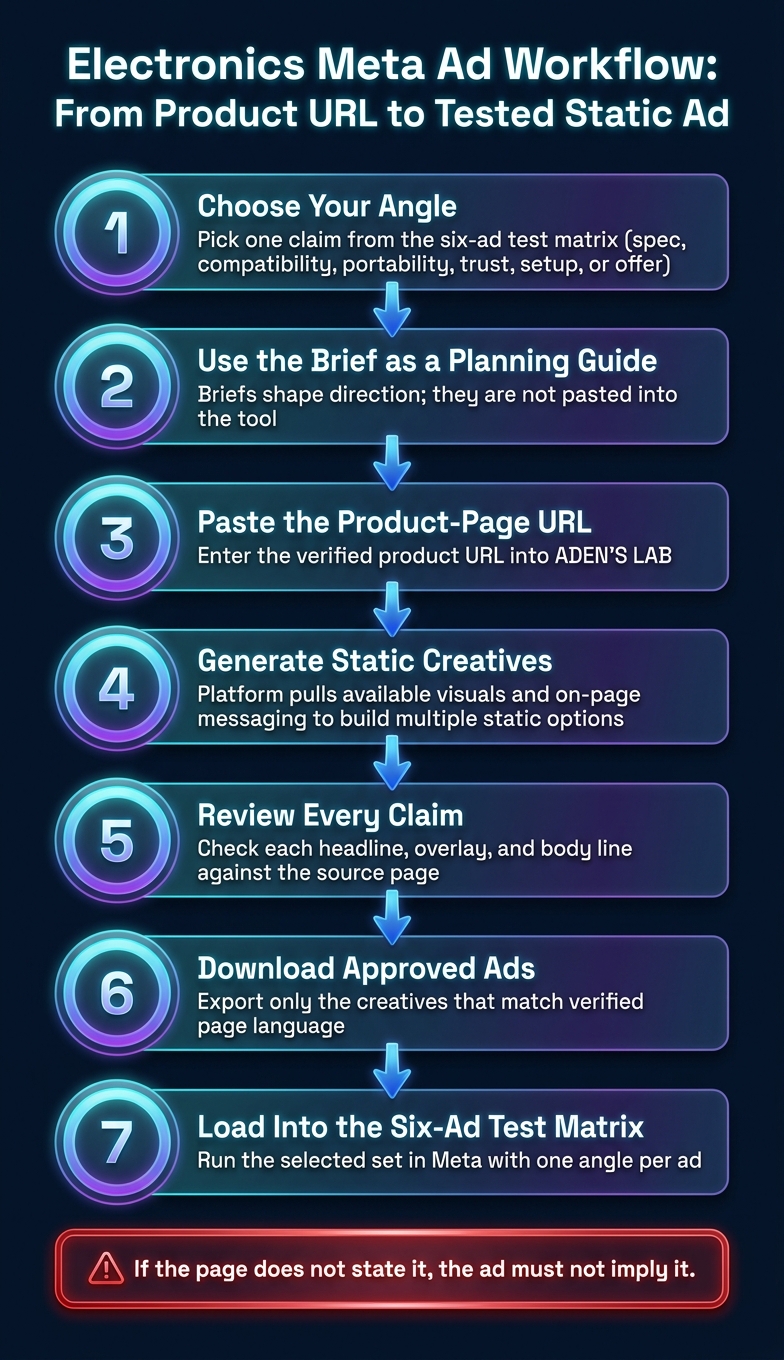
Electronics Meta Ad Workflow: From Product URL to Tested Static Ad
Once the angle is picked from the matrix, this step is about turning that choice into testable static ads. Treat the briefs as planning notes. They help shape the direction, but they are not what gets pasted into the tool.
ADEN'S LAB works from a URL, not from a pasted prompt. That matters. The workflow is simple: paste in the product-page URL, let the platform pull available visuals and messaging from the page, then generate multiple static creatives from that source using Meta ads automation. After that, review the outputs, download the ones that match the page, and move those into testing.
Human review is mandatory. Every claim in the generated creative needs to be checked against the source page before export. If the page says 20-hour battery life, use that. If the page says long-lasting battery but gives no number, don’t add one. Same rule for compatibility, materials, dimensions, offer language, and price.
The cleanest setup starts with a product page that already does the hard work:
| What the page should show | Why it matters in the workflow | What to check before export |
|---|---|---|
| Clear product specs | Gives the generator concrete inputs | Specs in the ad match the page exactly |
| Compatibility details | Helps avoid bad fit claims | Device, model, or use-case wording is accurate |
| Current price | Lets price-led concepts stay grounded | Price, discount, and offer terms are current |
| Strong product visuals | Improves the range of static options | Image choice fits the angle being tested |
In practice, the flow is straightforward:
- Choose the angle from the matrix.
- Use the brief to guide review, not tool input.
- Paste the product-page URL into ADEN'S LAB.
- Generate static creatives from page content.
- Review each asset for claim accuracy.
- Download the approved ads.
- Load the selected creatives into the first six-ad test matrix.
This keeps the process controlled. The angle comes first, the source page sets the limits, and the ads only move forward if the page supports what they say.
Conclusion
Source discipline is what turns a generic electronics ad into something you can actually test. The hook, image direction, and text overlay should come from verified specs and compatibility details, not soft benefit copy with no proof behind it. That’s the logic behind the framework above.
At this point, the system is complete: use the briefs to plan the angle, then use the product or landing page URL to build the batch you’ll review and test.
Paste a verified product or landing page URL into ADEN'S LAB. It will pull the available visuals and messaging, generate multiple static creatives, and give you a first batch to review, download, and test.
FAQs
How do I verify electronics ad claims safely?
The original answer is unrelated. It discusses a court ruling on historical cell-phone location data and the Fourth Amendment, not electronics ad claims.
The safest revision is to state that clearly: this answer does not explain how to check electronics ad claims safely.
Which specs belong in the overlay vs. body copy?
Put the key specs in the overlay so someone can scan the ad and get the point fast. That usually means the details that matter most in a buying decision and can be stated in a few words.
Use the body copy to add context. This is where qualifiers, conditions, and extra detail belong. If the product page says “up to,” includes size limits, or frames a spec in a specific way, keep that language intact.
Both parts need to match the product page. Don’t round, stretch, or fill gaps with assumed specs. If a detail isn’t stated there, leave it out rather than risk a mismatch.
How often should I refresh price and rating ads?
Update them any time the price or rating changes so the ad stays accurate.
For electronics, pull both fields exactly from the product page. Do not infer either one from an image.
Your next ad batch starts here
Finish with a ready-to-test ad batch
Paste your website to generate static creatives. Drop the link → get ads in about 90 seconds → upload them to Meta → scale.
Free to try No signup No prompt writing