How to Build Custom Audiences for Meta Ads
Turn the strategy into creatives
Create Meta ads for your product
Paste your product page. ADEN'S LAB turns the offer, audience, and positioning into complete ready-to-use Meta static ads.
Free to try No prompt writing

Custom audiences in Meta Ads let you target people who’ve already interacted with your brand - like website visitors, app users, or past customers. This approach often leads to 47% lower cost per acquisition (CPA) and 2-5x higher conversion rates compared to interest-based audiences. By focusing on high-intent users, such as cart abandoners within a 7-day window, advertisers can achieve an 8-15x return on ad spend (ROAS).
Here’s how it works:
- Sources: Use data from Meta Pixel, CRM lists, app activity, or engagement (e.g., video views, lead forms).
- Privacy-Safe Matching: Meta hashes your data for secure targeting. Match rates typically range from 30-80%, depending on data quality.
- Applications: Custom audiences are used for retargeting, exclusions, and creating Lookalike Audiences to find similar prospects.
To succeed:
- Set Up Tracking: Install the Meta Pixel and Conversions API to capture website actions like purchases or page views.
- Prepare Data: Upload clean, segmented customer lists with multiple identifiers (e.g., email, phone).
- Leverage Engagement: Target users based on interactions with your Meta assets like video views or lead forms.
Custom audiences are powerful but require regular updates and tailored ads to maintain performance. Tools like ADEN'S LAB can help produce Meta ads on autopilot in seconds, ensuring campaigns stay effective and scalable.
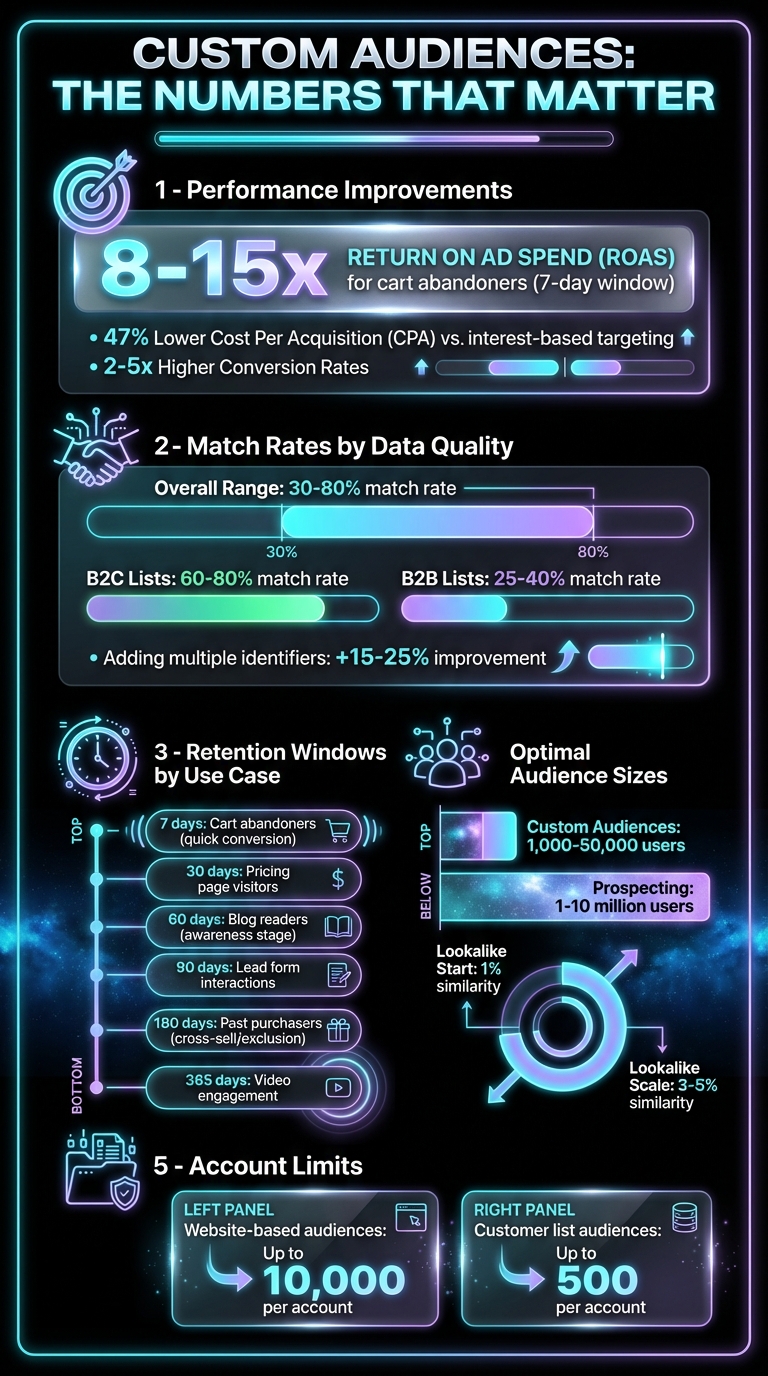
Meta Custom Audiences Performance Statistics and Key Metrics
How to Set Up Meta Custom Audiences (and How They ACTUALLY Work)
Put the playbook to work
Apply this playbook to your page
Paste your website and the Lab will turn the strategy you are reading into a ready-to-test ads.
Free to try No prompt writing
What You Need Before Building Custom Audiences
To create custom audiences effectively, you need a robust tracking setup to gather the data Meta relies on for segment creation. Without this, you risk missing out on crucial audience insights. The three key components are: installing the Meta Pixel, preparing well-structured customer data files, and enabling engagement tracking for your Meta assets. Here's how to set up each element to ensure smooth data flow into Meta's custom audience builder.
Install and Configure Meta Pixel
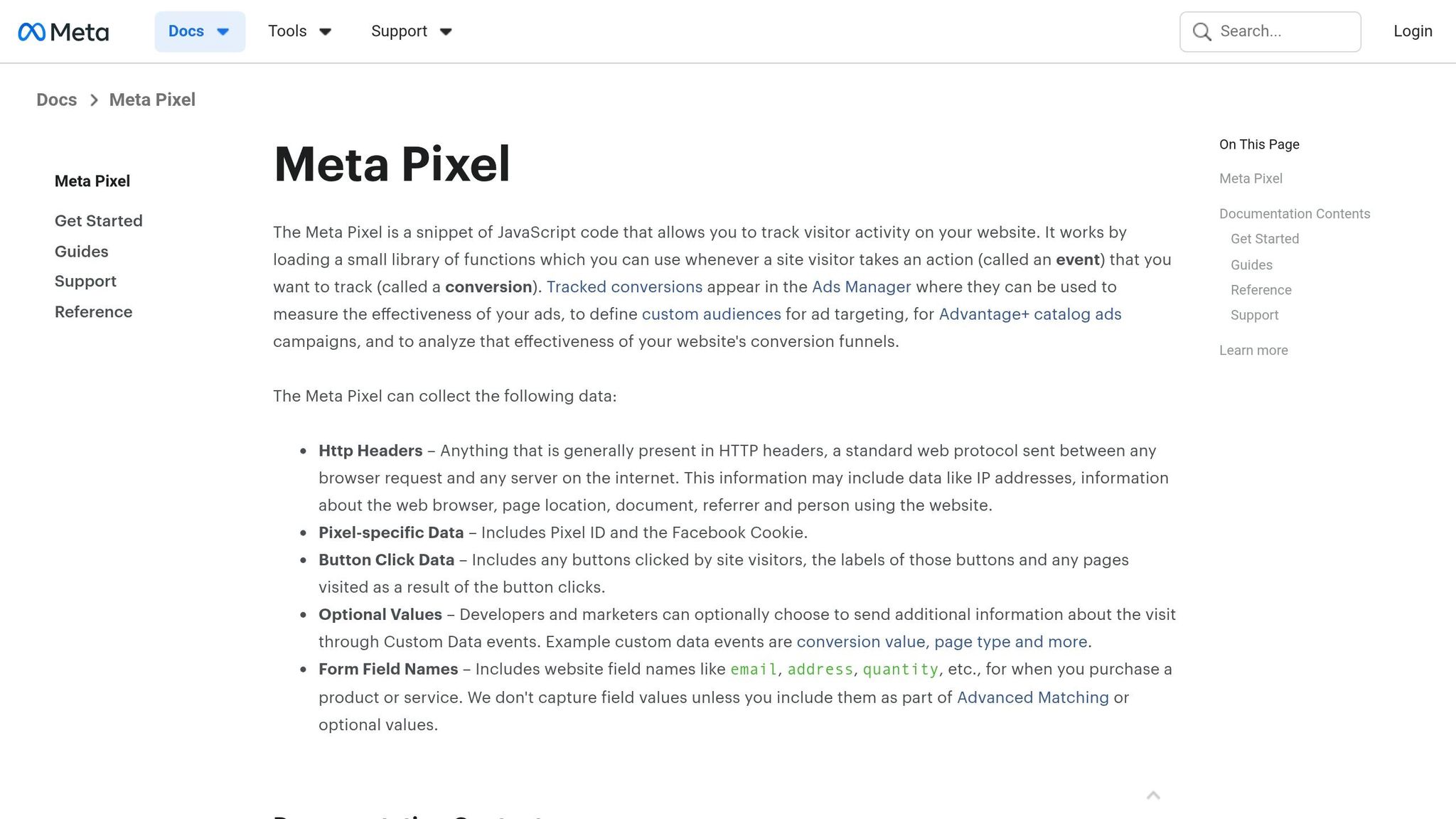
The Meta Pixel is a small piece of JavaScript code that tracks visitor actions on your website and sends this data to Meta. It captures events like page views, add-to-cart actions, and purchases, helping you turn anonymous site traffic into actionable audience segments. To ensure it works consistently, place the code on every page of your website, ideally within the header.
The real magic happens during configuration. By setting up standard or custom events, you can track specific user actions that indicate intent. For example, you could track visits to your pricing page as a custom event, allowing you to target users who are actively considering your product. After installation, verify everything is functioning correctly using tools like Meta Events Manager or the Meta Pixel Helper browser extension.
To improve data accuracy, pair the Pixel with the Conversions API (CAPI). Unlike browser-based tracking, CAPI sends data directly from your server, bypassing limitations from iOS privacy updates and other restrictions. This combination boosts match rates and ensures reliable data. Adjust retention windows based on your sales cycle - shorter windows (7–14 days) work for quick purchases, while longer ones (30–90 days) suit products that require more consideration. Also, exclude recent buyers using the "Purchase" event to avoid spending on users who have already converted.
"Meta doesn't know your business the way you do. It can't tell who's just window-shopping from who's an ultra-loyal customer - unless you spell it out for the algorithm." - Vincent, Founder, Chipper
To stay organized, name your audiences consistently (e.g., Source_Event_Window like Website_CartAbandon_7Days). Also, ensure your privacy policy discloses the use of the Pixel and provides opt-out options to comply with GDPR and CCPA.
Prepare Customer Data Files
To create customer list audiences, you'll need files with identifiers such as email addresses, phone numbers, names, dates of birth, gender, and location details (city, state, ZIP code, country). You can also include technical identifiers like Mobile Advertiser IDs or App User IDs. Meta hashes this data using SHA256 before matching it to user profiles, ensuring user privacy.
Before uploading, clean and de-duplicate your data. Ensure the file is formatted correctly (CSV or TXT) with column headers that match Meta's requirements. For example, phone numbers should include country codes to avoid errors during the upload process.
Segment your lists thoughtfully. Instead of uploading a single, massive file, break it into smaller groups like high-value customers, recent buyers, or inactive users. This segmentation allows you to customize your messaging and bidding strategies based on each group's behavior and potential value.
Enable Engagement Tracking
Engagement tracking captures user interactions with your Meta-native assets, such as Facebook Pages, Instagram profiles, video views, and lead forms. The good news? No additional code is required - Meta tracks this activity directly within its ecosystem using Meta ads automation, making the data highly reliable and unaffected by external tracking limitations.
These audiences update dynamically. For instance, users are automatically added when they engage with your content and removed when they fall outside your retention window. Lead form interactions are tracked for up to 90 days, while other engagement types can be tracked for up to 365 days.
Use video engagement strategically. For example, tracking users who watch 75% or 95% of a video helps you identify high-intent prospects for retargeting, while 3-second views can help build a broader awareness audience. You can also recover lost leads by targeting users who opened a lead form but didn’t submit it, using messaging that addresses common objections. Always create exclusion audiences, such as "People who submitted a lead form", to avoid wasting ad spend on users who have already converted.
To set up engagement-based audiences, go to Audiences in Meta Ads Manager, click Create Audience, select Custom Audience, and choose a Meta Source from the list. These engagement audiences are particularly effective as seed audiences for Lookalike Audiences, especially when they’re based on high-intent actions like watching 95% of a product demo.
How to Create Custom Audiences Step-by-Step
With your tracking tools in place, it’s time to create custom audiences that turn raw data into laser-focused targeting. Meta Ads Manager offers three main methods for building custom audiences, each tailored to different data sources and campaign goals. Here’s a breakdown of how to set up each type effectively.
Creating Website Traffic Audiences
Start by logging into Meta Ads Manager and navigating to Audiences under "All Tools." Click Create Audience, select Custom Audience, and choose Website as your data source. This pulls information from your Meta Pixel or Conversions API.
You can then define targeting rules based on specific user actions. For instance, focus on visitors who viewed certain pages or took specific actions like "AddToCart" or "ViewContent". A smart approach is to prioritize high-intent users, such as those who spent more than 3 minutes on a pricing page.
Adjust the retention window to match your sales cycle. For example:
- 7 days: Ideal for cart abandoners, as they’re most likely to convert quickly. Consider offering discounts to close the deal.
- 30 days: Useful for pricing page visitors who may need more time to make a decision.
- 60 days: Works well for blog readers who are still in the awareness stage.
- 180 days: Suitable for tracking past purchasers for cross-selling or exclusion purposes.
To stay organized, name your audiences clearly, using formats like "Cart_Abandoners_7_Days" or "WCA_PricingPage_30d." Also, exclude recent purchasers (e.g., within the last 30 days) to avoid wasting your budget. Meta allows up to 10,000 website-based custom audiences per ad account, and campaigns using these tailored audiences often see a 47% lower cost per acquisition compared to interest-based targeting. This method not only streamlines your efforts but also enhances engagement and conversion rates.
Building Customer List Audiences
Customer list audiences let you upload your own data - such as email addresses, phone numbers, and ZIP codes - and match it with Meta’s user base. To get started, go to Audiences in Ads Manager, click Create Audience, select Custom Audience, and choose Customer List as your source.
Ensure your data file (CSV or TXT) follows Meta’s formatting guidelines. Including multiple identifiers per customer boosts match rates, which usually range from 30% to 60%. For instance:
- B2C lists: Tend to achieve match rates of 60%–80%.
- B2B lists: Typically see match rates of 25%–40%.
After uploading your file, map the columns to Meta’s identifiers. Meta will hash the data using SHA256 to protect user privacy. Segmenting your lists by customer value can also improve results. For example, create separate lists for high-value customers versus one-time buyers so you can tailor your messaging and bidding strategies. Processing the data usually takes up to 24 hours, and you can create up to 500 customer list audiences per ad account. Regularly update your lists - weekly or monthly - to keep them accurate and exclude users who have opted out.
Setting Up Engagement-Based Audiences
Engagement audiences are built using interactions that happen directly on Meta platforms, so there’s no need for a Meta Pixel. These audiences update automatically based on user activity.
To create one, go to Audiences, click Create Audience, select Custom Audience, and pick a Meta source like Video, Lead Form, Instagram Account, or Facebook Page. For video audiences, consider dividing users by how long they watched:
- 3-second viewers: Great for awareness campaigns.
- 75%–95% viewers: Ideal for retargeting with high-intent messaging.
For lead form audiences, you can target users who opened the form but didn’t submit it, offering another chance to engage them. Retention windows vary depending on the source:
- Up to 365 days: Suitable for video viewers.
- 90 days: Works well for lead forms.
Align the retention window with your sales cycle. Shorter windows (7–30 days) are better for high-intent actions like lead form opens, while longer windows (90–180+ days) suit broader engagement goals. Always exclude users who have already converted, such as those who submitted a lead form, to avoid wasting your budget. Engagement audiences can also serve as excellent seed sources for Lookalike Audiences, especially when based on high-intent actions like 95% video views.
"The advertisers who achieve the highest ROAS on Meta platforms typically have sophisticated Custom Audience strategies at the core of their campaigns." - Gaultier D'Acunto, Co-founder, Benly
How to Optimize Custom Audiences
After setting up your custom audiences, fine-tuning them is key to keeping your ad campaigns effective. This involves improving data quality, using strategic exclusions, and regularly updating your creative assets.
Audience Segmentation and Exclusions
Careful segmentation helps you avoid wasted ad spend and prevents your campaigns from competing against each other. For example, exclude recent buyers from acquisition campaigns to stop showing ads to people who’ve already converted. Use Meta's Audience Overlap tool to check for internal competition. If overlap between ad sets is over 30%, consider consolidating those audiences. When it hits 50% or more, you’re essentially bidding against yourself, which drives up costs.
Tailor audience segments by intent to align with your messaging. High-intent groups, like people who abandoned their carts in the last 7 days, can deliver 8×–15× return on ad spend when targeted with the right ads. On the other hand, lower-intent segments, like people who visited your blog 60 days ago, need a different approach to capture their interest. To avoid confusion in targeting, use clear naming conventions like "WCA_CartAbandoners_7d_Jan2026."
Refreshing and Updating Audience Data
While website and engagement audiences update automatically, customer list audiences need manual updates. If not refreshed within 7 days, Meta may mark these lists as "Outdated", which can hurt your ad delivery. Set up a schedule - weekly or monthly - to update your lists based on how often your customer data changes.
Before uploading, clean your lists by removing invalid emails and ensuring phone numbers include proper country codes. Adding multiple identifiers like email, phone number, name, and city can improve match rates by 15%–25%. For perspective, B2C lists typically have 60%–80% match rates, while B2B lists lag behind with 25%–40%.
To keep your audience engaged, rotate your ad creative every 2–3 weeks. If you're stuck, use an ad creative idea finder to generate fresh concepts. Audience fatigue can set in when ad frequency exceeds 3 in prospecting campaigns, often leading to drops in conversion rates. By keeping your data fresh, you can focus on testing and scaling strategies that align with your campaign goals.
Testing and Scaling Strategies
Experiment with different retention windows to find what works best for your sales cycle. For example, test 7-day, 14-day, and 30-day windows for cart abandoners. Then, allocate more budget to the window that delivers the lowest cost per acquisition. When working with Lookalike audiences, start with a 1% similarity for precise targeting. As that audience saturates, expand to 3%–5%. To avoid overlap, exclude the 1% audience from your 3% ad set.
For optimal delivery, aim for audience sizes between 1,000–50,000 for custom audiences and 1–10 million for prospecting.
"Broad targeting with strong creative often outperforms detailed targeting in 2026 - let Meta's AI find your converters." – Benly.ai
Dedicate 10%–20% of your budget to testing new audience segments while scaling the ones that perform well. Review your campaign performance weekly and adjust budgets based on cost per acquisition. Advertisers achieving high returns on ad spend are constantly refining their custom audience strategies.
How ADEN'S LAB Improves Custom Audience Performance
Once your custom audiences are optimized, the next big challenge is keeping up with the demand for tailored ad creatives. Without fresh, high-performing ads, even the best audience segments can fall flat. Many brands struggle to produce creatives fast enough to keep up with testing or to avoid creative fatigue. That’s where ADEN'S LAB steps in. Designed as an AI-powered static ad engine for Meta’s delivery system, it ensures that automating Meta ad production ensures that creative production doesn’t hold back your campaign performance.
Faster Creative Production for Custom Campaigns
Traditional creative processes can be painfully slow. Waiting weeks for a designer to produce a handful of ads can kill your momentum, especially when competitors are scaling their campaigns faster. ADEN'S LAB changes the game by generating complete static Meta ads in under 90 seconds - just from your product or landing page URL. The platform pulls customer reviews, benefit points, and brand messaging directly from your page, creating ads that are customized to your brand instead of relying on cookie-cutter templates.
This speed is a game-changer for custom audiences like cart abandoners or past buyers. Take Fashion Forward Co., for example. They used ADEN'S LAB to create over 200 ad variations in a single day - compared to the three weeks their previous agency needed for just 10 ads. The result? A 340% increase in ROAS, $2.3M in additional revenue, and a 67% drop in CAC.
Sarah Chen, the company’s CMO, shared: "The AI-created ads outperformed our human-created ones by 340%."
AI-Powered Static Ads for Meta
ADEN'S LAB isn’t just about speed - it’s designed with Meta’s algorithm in mind. The AI engine has been trained on billions of dollars in ad spend, buyer psychology, and proven conversion strategies. Instead of focusing solely on aesthetics, it produces ads optimized for conversions. By specializing in static ad formats - known for being scalable and cost-effective on Facebook and Instagram - the platform helps brands test, iterate, and scale their campaigns more effectively.
The numbers speak for themselves. ADEN'S LAB has generated over 10,000 ads, delivering more than $1M in revenue for its users. For instance, TechGadget Pro reduced its $50,000/month agency spend to just $500/month by switching to ADEN'S LAB. The results? A 520% boost in CTR, $1.8M in additional revenue, and a 45% decrease in CPC.
Mike Rodriguez, Growth Director at TechGadget Pro, said: "The AI understands our tech audience better than any human designer ever could."
Scaling Audience-Specific Campaigns with ADEN'S LAB
Managing campaigns for multiple custom audiences - like website visitors, cart abandoners, or high-value customers - requires a steady flow of creative content. ADEN'S LAB makes this manageable by generating over 100 Meta ads per day, allowing for aggressive testing and ensuring your campaigns stay fresh. Instead of recycling the same few ads, you can deploy dozens of variations tailored to each audience’s intent. This approach helps Meta’s algorithm quickly identify top-performing creatives. And when an ad starts to lose its effectiveness, ADEN'S LAB enables instant creative refresh to keep your campaigns running strong.
Wellness Plus provides a great example. By using ADEN'S LAB, they tapped into emotional triggers and buyer psychology for their health and wellness audiences. The result? A 280% jump in ROAS, $3.1M in additional revenue, and a 72% cut in CAC compared to their previous $10,000/month agency spend.
Dr. Amanda Foster, the founder, remarked: "The AI-created health and wellness ads are incredibly persuasive. They understand the emotional triggers that drive our customers to buy better than our $10k/month agency ever did."
At just $0.90 per ad with high-volume plans, ADEN'S LAB offers an affordable way to produce hundreds of audience-specific creatives each month. What would typically cost tens of thousands through traditional agencies now becomes a cost-effective strategy to outpace competitors while aligning ads with your audience’s unique behaviors and needs.
Conclusion
Custom audiences form the core of high-performing Meta campaigns because they focus on people who have already shown genuine interest - whether by visiting your website, adding items to their cart, or making a purchase. Unlike interest-based targeting, which relies on assumptions, custom audiences leverage first-party data for a clear edge. The results speak volumes: campaigns with well-structured custom audiences achieve a 47% lower cost per acquisition, and retargeting 7-day cart abandoners often delivers an 8–15x return on ad spend.
To create effective custom audiences, start with strong data integration. Install the Meta Pixel and Conversions API, prepare customer lists with multiple identifiers, and track engagement comprehensively. Segment high-intent users, like cart abandoners, separately from awareness-stage visitors. Set retention windows that align with your sales cycle - shorter windows (7–30 days) for impulse purchases and longer ones (90–180 days) for more considered buying decisions. Use strategic exclusions to avoid wasting ad spend on recent purchasers. However, even precise targeting can't carry a campaign without the right creative assets.
The best-targeted audiences still need compelling, high-quality creatives to succeed. Many brands struggle to produce ads fast enough to keep up with testing demands or to prevent creative fatigue. That’s where ADEN'S LAB steps in, generating static Meta ads in under 90 seconds. This allows brands to create hundreds of audience-specific variations each month for just $0.90 per ad. The result? Faster launches, aggressive testing, and data-driven optimization. This combination of targeted segmentation and rapid creative production ensures campaigns consistently outperform expectations.
FAQs
What’s the fastest custom audience to build if I’m starting from scratch?
The fastest way to set up a custom audience is by creating a website visitor or engagement audience. With the Meta Pixel, you can monitor website activity and build an audience based on the pages people visited or the actions they performed. Alternatively, you can create an engagement audience from users who interacted with your Facebook or Instagram content - making it a quick and efficient option to get started.
How do I improve my customer list match rate on Meta?
To get better match rates for your customer lists on Meta, start with accurate and complete data. Focus on using clean, high-quality information, such as hashed emails and phone numbers. Keeping your list up-to-date with active and recent contacts is also key.
Adding multiple data points - like email, phone number, and name - can increase your chances of better matches. Just make sure everything is properly formatted and aligns with Meta’s policies to stay compliant with privacy standards.
When should I use a Custom Audience vs a Lookalike Audience?
Use a Custom Audience to connect with people who’ve already engaged with your business - whether they’ve visited your website, purchased from you, or followed you on social media. It’s a great way to retarget and re-engage users who already know your brand.
On the other hand, a Lookalike Audience helps you discover new potential customers. By targeting individuals who share similar characteristics with your existing audience, you can broaden your reach and attract users more likely to take action.
Your next ad batch starts here
Finish with a ready-to-test ad batch
Paste your website to generate static creatives. Drop the link → get ads in about 90 seconds → upload them to Meta → scale.
Free to try No prompt writing