The Fastest Way to Create Static Ad-Creatives for Meta Ads
Build the ads while the examples are fresh
Turn your product page into static ad creatives
Paste your product URL and generate scroll-stopping images, headlines, and primary text—ready for your next Meta creative test.
Free to try No prompt writing
Creating effective static ads for Meta campaigns can be time-consuming and expensive. ADEN'S LAB simplifies this process, enabling marketers to produce high-quality ad creatives in minutes. Here’s the key takeaway:
- Why Ads Fail: Many campaigns underperform due to repetitive visuals and slow creative production, not targeting or budget issues.
- ADEN'S LAB Solution: This AI-driven tool generates ad creatives 10–20x faster by analyzing product URLs and producing ads on autopilot.
- Ad Fatigue: Meta's data shows ad fatigue begins when frequency exceeds 3 for prospecting audiences. Regularly updating creatives is essential.
- Cost Efficiency: ADEN'S LAB plans start at $59/month, slashing production costs to as low as $0.90 per ad, compared to $35–$75 for freelance designers.
- Proven Frameworks: Use tested layouts, reusable copy structures, and psychological angles to optimize performance.
- Key Metrics to Watch: Focus on Hook Rate, Link CTR, and CPM to identify winning ads and replace underperformers.
The Only Meta Ad Creative Workflow You’ll Ever Need
Put the playbook to work
Apply this playbook to your page
Paste your website and the Lab will turn the strategy you are reading into a ready-to-test ads.
Free to try No prompt writing
Building the Right Foundation Before You Design
In Meta’s fast-paced ad environment, planning with speed and clarity is critical. Skipping this step often leads to underperforming static ads and wasted effort. Taking just a few minutes to plan can save hours of rework and significantly improve results. A solid foundation starts with setting clear campaign goals.
Define Your Campaign Goals and Key Metrics
Every campaign should focus on one clear objective - whether it’s driving purchases, generating leads, or optimizing your ad schedule, increasing traffic. A single, well-defined goal ensures that every design decision, from the hook to the call-to-action, aligns with that purpose. Trying to juggle multiple objectives? That usually weakens the message.
Once your goal is set, select key metrics to track progress. For conversion campaigns, metrics like CPA (Cost Per Acquisition) and ROAS (Return on Ad Spend) are essential. But don’t ignore early indicators like the thumb-stop ratio (TSR). A TSR above 25–30% for cold traffic suggests your visual hook is grabbing attention. If TSR is low, the issue likely lies in the first frame - not the copy or the offer.
"The creative that wins awards and the creative that wins auctions are typically different creatives." - Larry, Guides & Tutorials
Defining these metrics early shapes how you brief your design team. For example, a designer focused on optimizing TSR will approach the first frame differently than one prioritizing CPA. This level of clarity doesn’t just help - it gives you a competitive edge.
With goals and metrics locked in, the next step is understanding your audience.
Gather Audience Insights Fast
To quickly understand what resonates with your audience, analyze successful ads in your category. The Meta Ad Library is a great starting point. Filter for active ads that have been running for 30–45 days or longer. Ads active for 90+ days are almost always profitable - businesses don’t keep spending on ads that don’t convert.
Search for ads using keywords tied to pain points (e.g., "bloated", "back pain relief", "never enough time"). This helps identify competitors and emotional triggers. Look for patterns in hooks, claims, and proof points, grouping ads by their persuasion techniques rather than their visual style. This is where the most valuable insights lie.
To complement this, dive into customer reviews, support tickets, or sales call notes from your own business. Pay attention to the exact language customers use to describe their challenges. These phrases often make for powerful hooks that immediately connect with your audience. Under Meta’s Andromeda model, the creative itself acts as a targeting signal. This means that the more your creative reflects a real pain point, the better the algorithm can match it to the right audience.
When your insights are accurate, every element of your creative will align with both your strategic goals and the expectations of your audience.
Proven Frameworks for Building Static Ads Quickly
Once you’ve nailed down your audience and goals, the next step is turning that blank canvas into ready-to-launch ads. Using tested frameworks can help you speed up the process without sacrificing quality.
Static Ad Layouts That Work on Meta Placements
Start by designing for Reels (9:16), as Reels make up around 40% of Meta ad impressions. Once you’ve created your Reels layout, you can adapt it for Feed formats. This approach is faster than designing each format from scratch.
For Feed placements, the 4:5 aspect ratio (1440x1800px) tends to outperform the 1:1 square format. Why? It takes up 78% more vertical screen space on a smartphone, grabbing more attention. Save the 1:1 format for carousel cards.
Here’s a quick cheat sheet for Meta ad placements:
| Placement | Aspect Ratio | Resolution |
|---|---|---|
| Reels / Stories | 9:16 | 1080 x 1920px |
| Feed | 4:5 | 1440 x 1800px |
| Carousel | 1:1 | 1080 x 1080px |
One important detail for 9:16 formats: keep your logos, calls-to-action (CTAs), and key text within the center 50–65% of the frame. Meta’s interface can cover up to 49% of the Reels frame - 14% at the top and 35% at the bottom. Anything outside that safe zone risks getting hidden.
Another thing to keep in mind: around 80% of Feed users browse with the sound off. That means your static ad needs to deliver the full message visually. Include trust-building elements like “4.8★ rating” or “Trusted by 500K users” directly in the image, instead of relying on captions to do the heavy lifting.
Once your layouts are solid, the next step is crafting efficient ad copy.
Reusable Ad Copy Structures
Having a library of reusable copy frameworks can save you tons of time. Most ads can fit into one of these three structures:
- Problem-solution: Start with a specific pain point in the headline, and position your product as the solution.
- Benefit-proof: Lead with the result (“Cut your CPL by 34%”) and back it up with data or a testimonial.
- Offer-based: Highlight a deal or promotion (“Buy one, get a mystery bag free”). This works well for audiences who already know your product and just need a nudge to act.
To pick the right structure, use the PDA Framework: map your copy to the audience’s Persona, Desire, and Awareness. For example, “unaware” audiences need storytelling to connect the dots, while “most-aware” audiences respond best to direct offers or urgency triggers.
"The creative that wins isn't the one with the best design - it's the one that matches the psychological state of the person seeing it." - Abderrahmane Bouabdli, Founder, CreaScale AI
In one standout example, Bouabdli applied this approach to a campaign for Santa Barbara Polo Club’s iPhone 16 leather cases. Testing eight psychological angles across different audiences, the winning ad - a money-saving offer targeting product-aware buyers - achieved a $0.14 CPA, compared to the campaign average of $1.65.
Once your copy and layouts are ready, the final step is organizing your creative angles for A/B testing.
How to Organize Creative Angles for Testing
To streamline testing and maximize your budget, group your ads into 5–8 thematic clusters. Common themes include:
- Social proof
- Price anchor
- Fear of loss
- Outcome speed
- Curiosity
Each cluster should have 2–3 variations, giving you a total of 12–18 ads to test. Roll them out in waves:
- Wave 1: Start with angles validated by competitor research.
- Wave 2: Test secondary hypotheses.
- Wave 3: Experiment with new formats.
This staggered approach helps the algorithm optimize early while still leaving room for discovery.
To stay organized, use a clear naming convention like [BRAND]_[CLUSTER]_[FORMAT]_[WEEKCODE]_[VARIANT#]. When running 15–30 new variants weekly - which is typical for high-performing teams - this system ensures your data stays actionable instead of becoming a cluttered mess.
Finally, set a strict 5-day cutoff for underperforming ads. Letting weak creatives run too long wastes budget and clouds your ability to identify what’s actually working.
Using ADEN's LAB to Generate Static Ads at Scale
ADEN's LAB vs. Traditional Ad Production: Cost, Speed & Scale
Once you've set up your creative frameworks and testing clusters, the next challenge is production speed. Traditional methods of creating ads can take days, slowing down your campaigns. ADEN's LAB eliminates this bottleneck by dramatically automating Meta ad production while ensuring your ads maintain top-tier quality.
From Product URL to Ad Angles in Minutes
ADEN's LAB simplifies the entire process. All you need is the URL of your product or landing page. The AI analyzes the page to extract key elements like hero images, brand colors, logos, selling points, and emotional appeals - cutting out the need for a manual brief. In just minutes, it generates multiple ad angles tailored to different psychological triggers.
It employs a Hook Diversity Matrix, which pairs eight hook strategies (such as Question, Bold Statement, Social Proof, Curiosity, Urgency, Benefit-First, Contrast, and Problem-Solution) with five messaging angles. This approach ensures that Meta's Andromeda algorithm treats each creative as a distinct signal, avoiding redundancy and boosting performance.
"Creative quality is now the primary performance variable on Meta... your competitive edge is now a creative production system, not a targeting spreadsheet." - Tal Yeger, Advertising Leader
Once the ad angles are ready, the next step is to scale the production of static assets efficiently.
How to Batch Generate Static Creatives with ADEN's LAB
Simply paste your URL into ADEN's LAB, and the tool generates 10 unique creatives in 1:1, 4:5, and 9:16 formats - delivering 30 assets in less than five minutes. For teams managing 15–30 ad variants weekly, this speed is a game-changer. Advertisers using tools like this often keep 15–25 active creatives running at any time, far surpassing the industry average of 3–7.
To ensure consistency, ADEN's LAB allows you to store your brand’s logos, fonts, and color schemes in a brand library. This eliminates the need for manual adjustments, keeping every batch on-brand automatically.
Choosing the Right ADEN's LAB Plan for Your Ad Volume
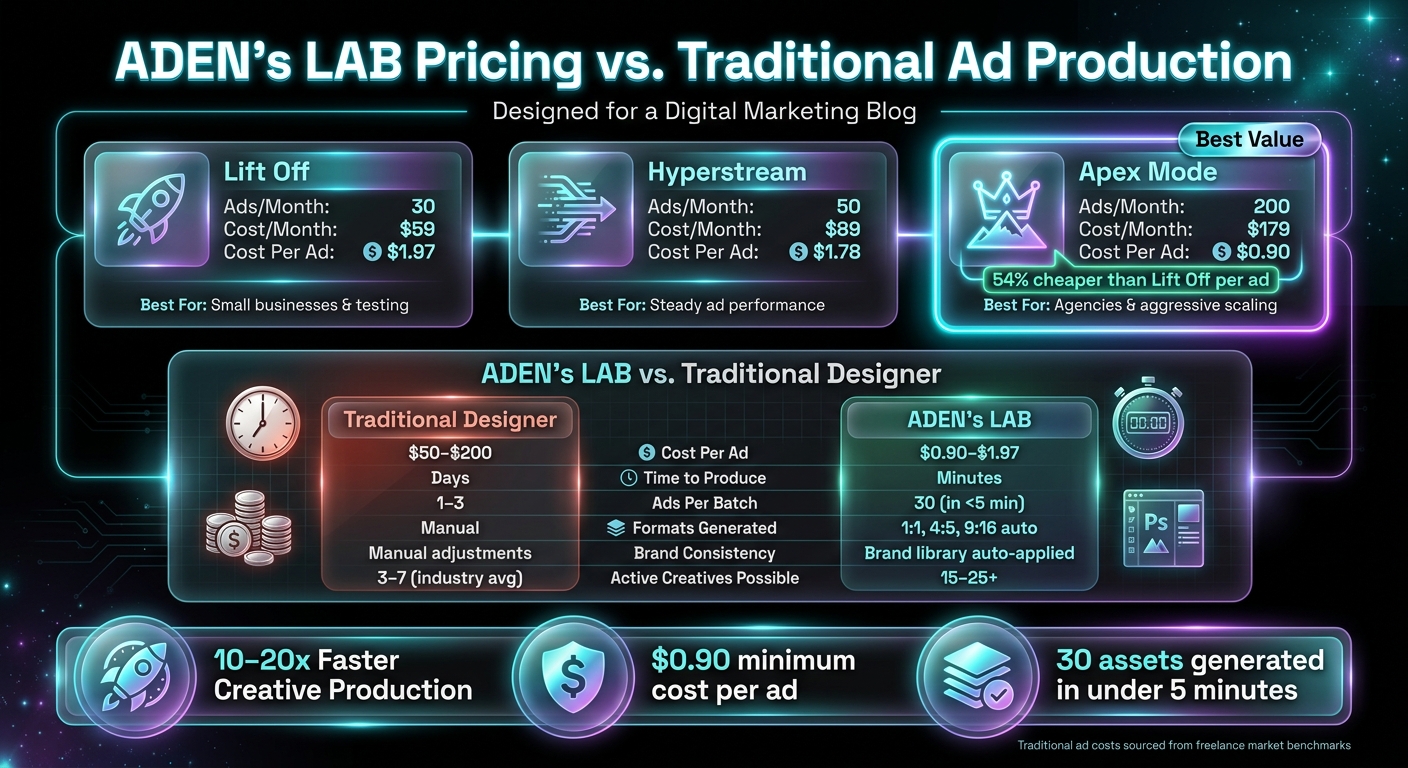
ADEN's LAB offers pricing tiers that decrease the cost per ad as your monthly volume grows.
| Plan | Ads/Month | Cost/Month (USD) | Cost/Ad (USD) | Ideal For |
|---|---|---|---|---|
| Lift Off | 30 | $59 | $1.97 | Small businesses, testing |
| Hyperstream | 50 | $89 | $1.78 | Steady ad performance |
| Apex Mode | 200 | $179 | $0.90 | Aggressive scaling, agencies |
The Lift Off plan is perfect for solo entrepreneurs or small businesses testing new offers. With 30 ads per month, it supports a solid first wave of creative testing without excessive costs. Hyperstream caters to brands with proven ROAS, needing a steady flow of fresh creatives to avoid ad fatigue. For agencies or brands managing large-scale campaigns, Apex Mode is ideal. At just $0.90 per ad, it reduces costs by over 54% compared to the entry-level plan, making scalable production a reality.
To put it in perspective, traditional designer-made ads typically cost $50–$200 each and take days to produce. With Apex Mode, the cost drops so significantly that the question shifts from "can we afford to test more?" to "how quickly can we launch the next batch?" These plans ensure you can scale your Meta ad workflow efficiently and affordably.
How to Launch, Test, and Improve Static Ad Creatives
How to Set Up Meta Campaigns for Creative Testing
When setting up campaigns, use Ad Set Budget Optimization (ABO) to ensure each ad variant gets an equal share of the budget. This approach helps you fairly evaluate performance across different creatives. To keep things organized, group your creatives by a single variable and use a clear naming convention. For example, try something like [Campaign Type] | [Audience] | [Creative Concept] | [Variation ID] - a name such as H1T2C1 works well to identify key elements quickly.
Here’s a key insight: advertisers who test five or more ad variations per audience can achieve up to 25% lower CPA compared to those testing fewer. Start with 8–15 ads in each testing round, but make sure to adjust only one variable per test. Run these campaigns with equal ABO budgets for at least 7 days to account for full weekly traffic patterns.
Once your testing framework is in place, the next step is to track and analyze performance data closely.
Reading Performance Metrics Early
Before diving into the data, give your campaigns about 48–72 hours to stabilize. During this initial learning phase, CPAs can be 20–40% higher than they will be later.
After this period, focus on three key metrics together - Hook Rate, Link CTR, and CPM - to get a complete picture of your ad’s performance. Each metric tells a different story:
| Metric Pattern | What It Means | What to Do |
|---|---|---|
| High Hook Rate, Low CTR | Your visual grabs attention, but the copy isn’t converting interest | Adjust the headline or body copy |
| Low Hook Rate, High CTR | The creative appeals to a niche but doesn’t attract broader attention | Rework the opening visual or hook |
| High CTR, High CPM | You’re reaching a competitive audience | Compare CPA to your unit economics |
| High Hook Rate, High CTR, Low CPM | A winning combination - efficient and high-intent audience | Scale this creative |
Keep an eye on a Link CTR below 0.8% for cold traffic - it’s a sign your ad might not be relevant enough. Additionally, if your frequency climbs above 3.5 for cold audiences within 14 days, your creative might be nearing fatigue.
By analyzing these metrics, you’ll be better equipped to scale successful ads and refresh underperforming ones.
How to Scale Winners and Replace Fatigued Creatives
To keep your Meta ad campaigns performing at their best, you need to act quickly and decisively based on the data. If a creative consistently beats your target CPA by 20% or more for 5–7 days, it’s time to move it from ABO to a dedicated CBO campaign with Advantage+ Audience. This shift helps stabilize delivery while maximizing results.
When signs of fatigue emerge - like a week-over-week drop in CTR or a CPA increase of 20% or more - don’t just pause the campaign. Instead, introduce fresh variations that build on what’s already working. For example, if a social proof hook drove success, create new variations using the same angle but with updated visuals or headlines.
You can use tools like ADEN's LAB to quickly generate these new variations without starting from scratch. As Murat Bock, founder of adlibrary.com, explains:
"The point of building faster is to test more hypotheses per sprint - which only matters if you're tracking what works and feeding it back into the next sprint."
For 2026, consider splitting your budget strategically:
- 60% on proven winners
- 30% on iterations of those winners
- 10% on exploring fresh angles
This balanced approach ensures you’re consistently testing new ideas while keeping your best-performing creatives in play.
Conclusion: Build a Faster, More Scalable Meta Ad Workflow
To create a high-performing Meta ad workflow, you need a solid foundation, an efficient production system, and a commitment to constant testing. By setting clear goals, organizing creative angles, and sticking to structured frameworks, you can cut out the guesswork - saving money and speeding up the algorithm's feedback process.
Research shows that creative quality is the primary driver of purchase intent, contributing to 56% of the lift in a typical campaign. It's not just another piece of the puzzle; it's the centerpiece. Looking ahead to 2026, Meta's Andromeda retrieval engine will evaluate millions of ads in milliseconds. Brands that consistently deliver fresh, diverse creatives will have the upper hand.
With AI tools for Meta ads like the Apex Mode plan, you can produce dozens of static ad variations in just minutes, costing as little as $0.90 per ad. This allows you to launch 15–30 high-performing variants every week.
Think of your creative workflow as a system that builds on itself. Each test and success feeds into the next, making your campaigns faster and more effective over time. This approach doesn't just streamline your ad production - it ensures your campaigns are always evolving and staying ahead of the curve.
FAQs
What should I prepare before generating creatives from a product URL?
Before diving into creating ad creatives, make sure your product page is ready to shine. This means having clear, high-quality images, detailed product descriptions, and all the key details your audience needs. Why? AI relies on this content to craft effective ads.
Next, gather elements that have worked well in your past campaigns. Think headlines, value propositions, and calls-to-action that resonate with your audience. These will serve as a guide for the AI.
Finally, double-check your Meta Ad account access and permissions. Ensuring everything is set up correctly will make the campaign launch process smooth and hassle-free. By following these steps, you’ll set the stage for creating ad creatives quickly and effectively.
How many static ad variations should I launch each week to avoid ad fatigue?
Experts suggest rolling out 3 to 30 static ad variations each week, depending on your budget and the scale of your campaign. For many, testing 3–5 modular variants weekly is a solid approach, ensuring each variant garners 5,000–10,000 impressions to yield meaningful insights. If you're working with a larger budget - say, $5,000 to $25,000 per month - you might need to ramp up to 15–30 variations weekly to maintain audience interest.
The key is finding the right balance: producing enough variations to test effectively without overwhelming your audience or muddying the results. Keep quality at the forefront while scaling thoughtfully.
When should I refresh or kill a static ad based on Hook Rate, Link CTR, and frequency?
If your static ad's performance starts dipping, it might be time for a refresh - or even to retire it altogether. Watch these key metrics closely:
- Hook Rate: If the percentage of 3-second views compared to impressions falls below 25%, it signals your ad isn't grabbing attention.
- CTR (Click-Through Rate): A 40% drop from its peak means your audience isn't engaging like they used to.
- Frequency: When this exceeds 3.0, it indicates the same people are seeing your ad too often, leading to overexposure.
To keep things fresh and effective, many top brands update their creatives every 7–14 days.
Your next ad batch starts here
Finish with a ready-to-test ad batch
Paste your website to generate static creatives. Drop the link → get ads in about 90 seconds → upload them to Meta → scale.
Free to try No prompt writing