The No-Brief Meta Ad Workflow for Founder-Led Brands
Turn the strategy into creatives
Create ready-to-test Meta ads for your product
Paste your product page. ADEN'S LAB turns the offer, audience, and positioning into complete ad concepts with images, headlines, and copy.
No design brief or prompt writing required.
If you wait 1–2 weeks for one polished Meta ad, you’re moving too slow. I’d rather build ads in 1–3 days, test 5–10 each week, and use founder input, customer words, and sales pages I already have.
Here’s the core idea in plain English:
- I skip the long brief
- I collect founder input once in a 30–60 minute doc
- I pull customer wording from reviews, DMs, tickets, and FAQs
- I turn that into a simple prompt sheet
- I reuse founder videos, PDPs, landing pages, and emails
- I launch small batches and track CPP, CTR, ROAS, and fatigue
Why does this matter? Because most ads fail. The article says only about 2% of creatives turn into winners. On top of that, intent can drop by around 16% after people see the same ad six or more times. So for founder-led brands, the goal isn’t a long planning cycle. The goal is more tests, less delay, and a clean way to spot what works.
What I like about this workflow is how simple it is: one input system, one asset pool, one testing sheet. That keeps the founder from becoming the slow step in the process and helps the team go from idea to live ads without a pile of docs.
If I had to sum it up in one line: use founder words, customer words, and pages you already have to make more Meta ads, test them fast, and keep the winners.
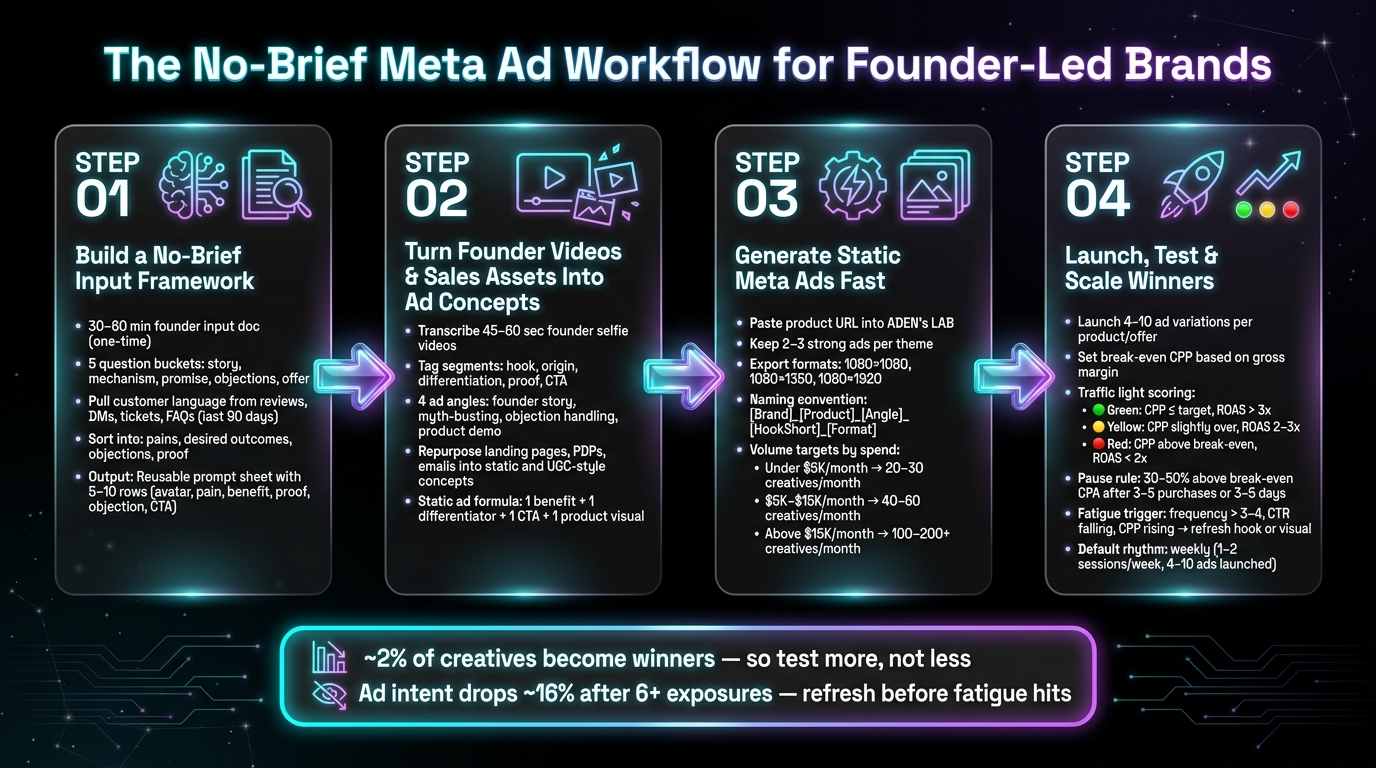
The No-Brief Meta Ad Workflow: 4 Steps to Launch-Ready Ads Fast
Step 1: Build a No-Brief Input Framework From Founder and Customer Insight
Skip the formal brief. Instead, use a 30–60 minute input doc that the founder fills out once. That doc becomes the source for every hook, headline, and concept. From there, those answers flow straight into the prompt sheet below.
Capture the Founder Inputs That Drive Ad Angles
Group the founder questions into five tight buckets. The goal here is simple: pull out language you can use in copy right away, not high-level planning notes.
- Founder story: Ask what moment made the founder feel they had to build the product and what personal frustration they were trying to solve for themselves. These answers can turn into founder-led hooks, like an “I built this because...” angle for UGC-style ads.
- Product mechanism: Ask how the product works in one sentence, what makes it different from what's already on the market, and how they'd explain it to a 10-year-old. This gives you plain-language body copy and simple callouts for static ads.
- Main promise: Ask what result a customer can expect in 30–90 days and what they'd text a friend about the product. That language can turn into headline and primary text lines like Finally, something that helps you ____ without ____.
- Objections: Ask for the top three reasons prospects don't buy and the doubt they hear most often. Each answer can become a clean ad angle, such as Worried it will not work? Here's why it does.
- Offer and compliance: Gather pricing in USD, guarantee terms, and any claims that are off-limits for legal or Meta policy reasons. This helps stop ad disapprovals before they happen.
Keep the answers short. Two to three sentences per question is enough. You're looking for usable language, not a polished doc.
Pull Customer Language From Reviews, DMs, Support Tickets, and FAQs
Customer phrasing will usually beat anything you come up with from scratch. Start by pulling verbatim feedback from the last 90 days from sources like Shopify or Amazon reviews, Instagram DMs, support tickets, and pre-sales FAQ submissions.
Only copy phrases that show emotion or detail. Then sort them into four buckets:
- pains
- desired outcomes
- objections
- proof
Inside each bucket, mark the sharpest lines, especially phrases with words like finally, I was skeptical, or game changer. For example, a pain point like tired of wasting money on products that don't do what they claim can become a hook with almost no work:
Tired of wasting money on products that don't do what they claim?
Turn Raw Inputs Into a Reusable Ad Prompt Sheet
Turn everything into a prompt sheet with six fields: avatar, pain point, benefit, proof, objection, and CTA.
One row might look like this:
Women in their 40s who feel they've tried every skincare product → tired of wasting money on products that don't do what they claim → noticeably smoother, more hydrated skin in under 30 days → a real customer review → not sure it's worth the price → try it risk-free for 30 days.
That single row gives you enough to write a static ad, a UGC script, or a short-form video hook. Build five to ten rows from the inputs you've gathered, and you've got a full creative queue.
Use the finished sheet to turn founder videos and sales assets into ad concepts.
sbb-itb-628c49f
Step 2: Turn Founder Videos and Sales Assets Into Ad Concepts
Step 2 takes the language you already have and maps it to founder videos and sales assets, so you can turn that material into ad concepts fast.
Break Founder Videos Into Hooks, Proof, and CTA Segments
A single 45–60 second founder selfie video can often give you several ad angles. Don’t treat it like one finished asset. Treat it like a bank of reusable parts.
Start by transcribing the video. Then tag each line as a hook, origin, differentiation, proof, or CTA. Once you do that, you can remix one clip into multiple ad angles without reshooting.
| Angle | Pull this segment | Example structure |
|---|---|---|
| Founder story | Origin | Open with the founder's frustration, show why the product exists, then end with a specific USD price and CTA. |
| Myth-busting | Contrarian claim | Lead with a challenge to a common belief, show a quick demo, then invite people to see the shorter routine. |
| Objection handling | Common concern | Start with the worry customers already have, answer it with a testimonial, then offer a low-risk bundle price. |
| Product demo | Step-by-step usage | Show the product in use, highlight a before/after clip, then send people to the exact product the founder uses. |
Same footage, different lead. That’s the idea. You change the opening segment, swap the on-screen text or captions, and suddenly one video can do several jobs.
Repurpose Landing Pages, PDPs, and Emails Into Static and UGC-Style Concepts
Your landing pages, PDPs, and email campaigns already hold language that has been tested in the market. Don’t let that copy sit there. Reuse it.
A benefit bullet from a landing page can become a static ad headline. A strong email subject line can become a hook. A short PDP review can become the lead copy for a review-based static ad, paired with a star rating and a Verified Buyer label.
For static ads, keep the setup simple:
- one benefit
- one differentiator
- one CTA
- one clean product visual
For UGC-style scripts, look through your email flows. Welcome emails often give you origin and positioning. Abandoned-cart emails usually surface objections. You can take those same lines and rearrange them into a casual talking-head script instead of writing from zero.
These tagged concepts become the input for static ad generation in Step 3.
Step 3: Use ADEN's LAB to Generate Static Meta Ads Faster
ADEN's LAB takes the ideas from Step 2 and turns them into launch-ready Meta static ads from a product-page URL. You’re still using the same founder and customer inputs from Steps 1 and 2. The difference here is speed. This step is about turning good inputs into ads without getting stuck in a slow draft-and-revise loop.
The Static Ad Workflow Inside ADEN's LAB
Start by pasting your strongest product URL into ADEN's LAB. It pulls the main copy, proof points, and visuals from the page, then creates a batch of static ad variants. From there, sort the ads by angle, keep 2–3 strong ads per theme, and export them in 1080×1080, 1080×1350, or 1080×1920.
Before testing, group the best outputs by angle. That keeps your test set cleaner and makes it easier to see what’s working.
Use a simple naming format:
[Brand]_[Product]_[Angle]_[HookShort]_[Format]
How ADEN's LAB Fits the No-Brief System
ADEN's LAB works best when you feed it real founder language and customer phrasing, not generic input. If the source material sounds flat, the ads usually will too. But when the founder’s words are sharp and the customer language is specific, the generated ads stay much closer to the brand voice.
This is also where the bottleneck starts to disappear. Instead of writing a formal brief, holding a separate briefing session, and then going through rounds of revisions, a founder or solo marketer can turn one URL into a full batch of creative in days instead of weeks.
Cost and Volume Planning for Founder-Led Teams
The number of ads you need each month should match your spend on Meta. A simple rule of thumb:
- Under $5,000/month on Meta: aim for 20–30 new static creatives per month
- $5,000–$15,000/month: aim for 40–60
- Above $15,000/month: aim for 100–200+
Match your plan to that spend level too:
- Lift Off fits brands under $5,000/month
- Hyperstream fits $5,000–$15,000/month
- Apex Mode fits $15,000+/month
Once the first batch is live, track the winners in Step 4 and scale the strongest angles.
Step 4: Launch a Lightweight Testing System and Scale What Wins
Launch Small Creative Batches With Clear Success Metrics
Once the first batch is ready, the work changes. Now it's about measurement.
Launch 4–10 ad variations per product or offer. Mix static ads with UGC-style concepts so you can test both the angle and the format at the same time. That gives you enough range to compare what works without piling on extra admin. And because each ad comes from a defined founder angle, your tracker can show which input source is driving results.
Set your break-even CPP based on your gross margin. Then use simple pass/fail bands for spend and ROAS:
- Green: CPP is at or below target, and ROAS is above 3x
- Yellow: CPP is a bit over target, and ROAS sits between 2–3x
- Red: CPP is above break-even, and ROAS drops below 2x
For the pause-or-scale rule, let each ad spend at least 1–2x your target CPA before you decide. If an ad is running 30–50% above break-even CPA after 3–5 purchases or 3–5 days of spend, pause it. If it stays at or below break-even and has a CTR of 1–1.5% on prospecting, keep it live and think about scaling.
Track Angles, Fatigue, and Asset Sources in One Simple Sheet
The next move is simple: make the results easy to scan.
Tag every ad with its angle, hook, format, source asset, and launch date. Then add columns for CPP, CTR, ROAS after a 7-day window, and a status field like Testing, Winner, Paused, or Needs Refresh.
That makes it much easier to spot patterns. You can see whether a founder video, PDP, email, or review-based concept is bringing in the strongest return.
Also watch for fatigue. If frequency goes above 3–4, CTR starts falling, or CPP starts climbing, refresh the hook or the visual instead of throwing out the whole angle. Sometimes the idea is fine - the ad just needs a new face.
Use a testing rhythm that fits your team's bandwidth:
| Launch Rhythm | Time Investment | Spend Required | Learning Speed | Ease of Management | Fatigue Control |
|---|---|---|---|---|---|
| Weekly (4–10 ads) | 1–2 focused sessions per week | Moderate, predictable weekly test budget | Medium | High for small teams | Good if refreshed weekly |
| Daily (1–2 new ads/day) | Ongoing daily attention | Higher, as more ads run simultaneously | Fast | Lower for solo founders | Strong, frequent refreshes |
For most founder-led brands, a weekly rhythm is the default pick. One review session and one launch session each week keeps the system under control while still giving you useful learning.
Conclusion: From Founder Insight to Launch-Ready Meta Ads
Use break-even CPA/CPP, a simple tracker, and weekly refreshes to scale winners. Review each week, refresh weak angles, and scale only the ads that stay profitable.
FAQs
How do I start this workflow if I have no past ad data?
If you don’t have past ad data, start with what you already have: your product page.
Paste your product link into the ADEN'S LAB system, and it can generate launch-ready ad creatives in 90 seconds. The system pulls from your product positioning, customer language, and sales assets to turn what’s already on the page into ad concepts right away - no past performance data and no formal creative brief needed.
What should I do if the founder can’t record new videos often?
Keep your creative pipeline moving with the digital assets you already have. Product page links, product positioning, and customer language can all be turned into launch-ready ads without new shoots, designers, or video production.
Just drop your product link into ADEN's LAB to generate static ads and UGC-style creatives fast.
How much budget do I need to test 4–10 Meta ads per week?
You don’t need a huge upfront budget to test 4–10 Meta ads per week in a smart way. At this point, the goal is simple: test angles and messaging first, then scale what works.
The best move is to keep costs tight with a lean workflow that helps you ship launch-ready assets fast and swap in new creatives often. That makes it easier to spot winning combinations and collect useful feedback without stretching your budget too far.
Create Ads That Print Money
Your competitors aren't waiting — why should you? Drop your product link → get scroll-stopping ads in 90 seconds.