The Only Meta Testing System You Need to Find Winners Every Week
Turn the strategy into creatives
Create Meta ads for your product
Paste your product page. ADEN'S LAB turns the offer, audience, and positioning into complete ready-to-use Meta static ads.
Free to try No prompt writing

Finding winning ads on Meta every week isn’t about luck - it’s about having a structured system. Many advertisers fail because they rely on guesswork, test inconsistently, and let their campaigns suffer from creative fatigue. This guide offers a straightforward weekly process to identify and scale high-performing ads while minimizing wasted ad spend.
Key Takeaways:
- Focus on one KPI that aligns with your goal (e.g., ROAS, CPA).
- Run weekly tests by bundling changes to avoid resetting the algorithm’s learning phase.
- Rotate ad creatives weekly to prevent performance drops due to ad fatigue.
- Use automation tools like ADEN's LAB to quickly produce high-volume ads.
- Scale cautiously by increasing budgets gradually using AI budget allocation (20% every 48–72 hours).
By following this system, you can consistently find winning ads every week and scale campaigns without derailing performance.
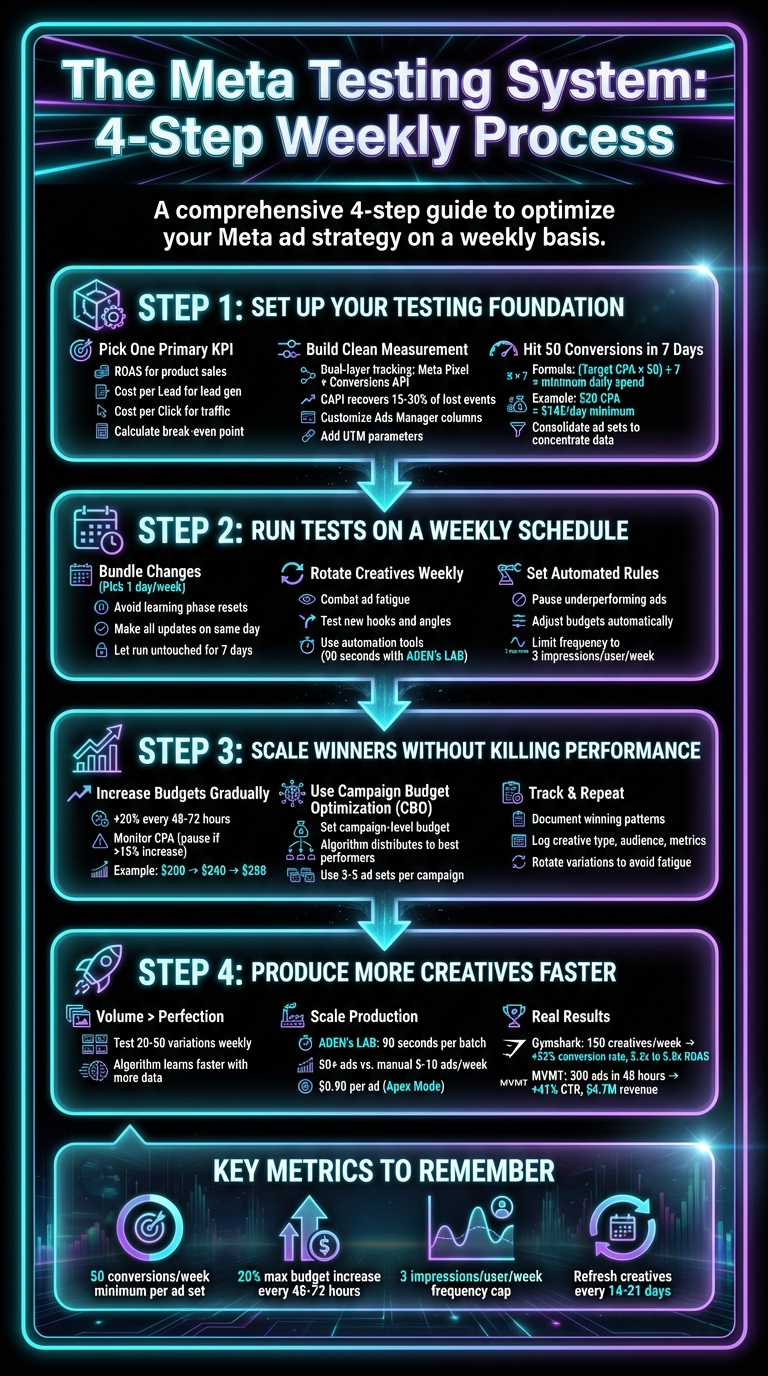
4-Step Meta Ad Testing System for Weekly Winners
Step 1: Set Up Your Testing Foundation
Pick One Primary KPI
Before A/B testing Meta ads, decide what success looks like. Meta provides a mountain of metrics - impressions, CPM, CTR, CPC, ROAS, CPA, and more - but tracking everything leads to confusion. Instead, focus on one metric that aligns with your campaign objective and stick to it when making decisions.
For example:
- If you're selling products, track ROAS (Return on Ad Spend) or Cost per Purchase.
- For lead generation, focus on Cost per Lead.
- For traffic and awareness, use Cost per Click.
Your KPI should match your goal, not just look good in reports. As Aaron Zakowski, Founder of Zammo Digital, puts it:
"Ideally, you only want to judge ads based on your primary campaign objective."
Once you’ve chosen your KPI, calculate your break-even point. Let’s say your product sells for $50 and costs $20 to fulfill. You can afford to spend up to $30 to acquire a customer and break even. If profitability is your goal, aim lower - maybe $20 per acquisition - to build in a profit margin. This number becomes your benchmark for evaluating performance.
Secondary metrics like CTR and CPM can provide insights into issues but shouldn’t dictate major decisions. For instance, a high CPC is fine if your Cost per Purchase is on target. Stay laser-focused on the metric that impacts your bottom line.
Build a Clean Measurement System
To make smart decisions quickly, simplify your dashboard and focus on what matters most - your primary KPI. Start by setting up dual-layer tracking: the Meta Pixel (client-side) and the Conversions API (server-side).
Why both? The Pixel alone misses data due to ad blockers and iOS privacy changes. After iOS 14, only about 25% of iPhone users opted into tracking, and iPhones make up 46% of Facebook traffic. The Conversions API (CAPI) fills these gaps by sending data directly from your server to Meta, recovering 15% to 30% of lost events. This dual-layer approach ensures more accurate reporting.
Next, customize your Ads Manager view. Use the "Customize Columns" feature to display only your primary KPI, spend, conversions, and maybe one or two diagnostic metrics like CTR or frequency. Save this setup as a Column Preset for easy access. This way, you can instantly spot which ads are performing and which ones are draining your budget - no endless scrolling or mental math required.
Dive deeper when needed using the Breakdown tool. Analyze performance by placement, device, age, or geography. For instance, you might find your ads excel on Instagram Stories but underperform in the Facebook feed. This insight helps you double down on what works.
Finally, add UTM parameters to every ad link. These tags let you cross-check Meta’s data against Google Analytics 4 or your CRM. If Meta reports 100 conversions but GA4 shows 80, you’ll know there’s a discrepancy worth investigating.
With these systems in place, ensure your ad sets are gathering enough data to let Meta’s algorithm optimize effectively.
Combine Ad Sets to Hit 50 Conversions in 7 Days
For Meta’s algorithm to work its magic, each ad set needs at least 50 conversions in a 7-day period. Without this, your ad set remains in "Learning Limited" status, where performance is erratic, and costs spike.
The solution? Consolidate your ad sets. Instead of spreading your budget thin across five ad sets at $20/day each, combine them into one ad set with a $100/day budget. This approach concentrates data, helping the algorithm learn faster and deliver stable results. It also prevents "data fragmentation", where no single ad set gathers enough conversions to optimize effectively.
Here’s a quick formula to find your minimum daily spend:
(Target CPA × 50) ÷ 7.
For example, if your target CPA is $20, you’ll need to spend at least $142/day to hit 50 conversions in a week. If your budget doesn’t allow for that, consider optimizing for higher-funnel events like "Add to Cart" or "Initiate Checkout", which occur more frequently than purchases.
During the first few days, don’t panic if CPAs are 2x to 5x your target. This fluctuation is normal. The algorithm is testing different placements and audiences to find the best fit for your ad. By day 3 or 4, costs typically stabilize - provided you’ve maintained a steady flow of conversions. Avoid making drastic changes during this period, like adjusting the budget by more than 20% or swapping audiences. These are common Meta ad optimization mistakes that can reset the learning phase. Such edits reset the learning phase, forcing the algorithm to start over.
As Shalini Vijayakumar, Content Marketer at CustomerLabs, explains:
"When your purchase volume falls below 50 conversions per week, Meta's algorithm struggles to optimize effectively."
Consolidation isn't just about hitting a number; it’s about giving the algorithm enough data to make informed decisions. Without it, scaling becomes a guessing game.
Put the playbook to work
Apply this playbook to your page
Paste your website and the Lab will turn the strategy you are reading into a ready-to-test ads.
Free to try No prompt writing
Step 2: Run Tests on a Weekly Schedule
Bundle Changes to Avoid Learning Resets
Meta's algorithm thrives on consistency, but it needs time to figure out what works best. Every time you make a major adjustment - like swapping creatives, changing targeting, or tweaking budgets by more than 20% - the learning phase starts over. During this phase, the algorithm tests placements and audiences from scratch, which can lead to unpredictable performance and higher CPAs.
To avoid these resets, bundle all significant changes into a single day each week. For instance, pick a day like Monday to make all your updates - add new creatives, pause ads that aren't performing, and adjust budgets. Then, let everything run untouched for the next seven days. This gives the algorithm a full week to stabilize and optimize.
As Meta's Business Help Center explains:
"During the learning phase, the delivery system is exploring the best way to deliver your ad set – so performance is less stable and cost-per-action (CPA) is usually worse."
Making frequent changes - like daily budget tweaks or mid-week audience swaps - can keep your campaigns stuck in a constant learning loop. Once your ad set hits around 50 optimization events in seven days, it exits the learning phase, and performance tends to stabilize. Not all changes trigger a reset, though. For example, pausing individual ads, adjusting ad copy (without changing visuals), or increasing budgets by less than 20% usually won't disrupt the learning process. By batching major updates into a weekly schedule, you allow the system to work more efficiently.
Once your settings are locked in for the week, you can shift your focus to updating your creative assets.
Rotate Creatives Every Week
Ad fatigue is a real issue. When people see the same ad too often, they stop engaging. This can lead to a drop in click-through rates and increase your costs. Instead of continuously tweaking the same creative, switch things up with fresh ads each week.
Experiment with new hooks, angles, and messages. For instance, if last week's ad highlighted a discount, this week you could focus on customer testimonials or a unique product feature. By offering the algorithm a variety of options, you help it identify new audiences and keep your campaigns from going stale.
Traditional workflows - like working with designers and waiting for revisions - can slow you down. By the time your new ads are ready, your current ones might already be underperforming. This is where automation tools can save the day. Platforms like ADEN's LAB can generate ready-to-launch static ads from a single product link in just 90 seconds. You simply provide a URL, and the tool delivers dozens of ad variations, allowing you to launch new creatives the same day without the usual delays.
Sarah Chen, CMO of Fashion Forward Co., shared her experience:
"ADEN'S LAB created 200+ ad variations in one day. Our previous agency took 3 weeks for 10 ads. The AI-created ads outperformed our human-created ones by 340%."
By consistently launching varied creatives and letting the algorithm identify the winners, you can keep your campaigns fresh and engaging week after week.
Set Up Automated Rules
Once you've nailed your creative rotation, let automation handle the routine tasks.
Manually monitoring Ads Manager daily can be exhausting. Instead, take advantage of automated rules to handle repetitive decisions. Meta's Ads Manager allows you to create rules that pause underperforming ads, adjust budgets, and even cap how often users see your ads - all without constant oversight.
For example, you can set a rule to pause ads that exceed your CPA threshold after a certain spend or automatically increase budgets for ad sets that consistently perform well. You can also limit ad frequency to three impressions per user per week to combat ad fatigue.
One important note: pausing an individual ad within an ad set does not reset the learning phase for the rest of the ads. This means you can safely remove underperforming ads without disrupting the optimization of others.
While automation can handle a lot, it’s important not to overdo it. Use rules for straightforward decisions - like pausing ads that exceed a set CPA or reducing budgets when frequency gets too high. However, more nuanced performance reviews should still be done manually.
Step 3: Scale Winners Without Killing Performance
Increase Budgets Gradually
When you find an ad set that's consistently hitting your CPA target, resist the urge to dramatically bump up its budget. A sudden increase can lead to higher CPMs and disrupt performance.
Instead, take a more measured approach: increase the budget by 20% every 48-72 hours. This slow and steady method helps keep the algorithm stable and avoids triggering the learning phase again. For example, if your daily budget is $200, raise it by 20% to $240, wait 48–72 hours, and then reassess. If the CPA stays consistent, continue scaling. But if you see the CPA climb by more than 15%, pause further increases and give the system time to stabilize before moving forward.
Once you've scaled gradually, you can explore Meta ad automations to further optimize your budget allocation.
Use Campaign Budget Optimization (CBO)
Campaign Budget Optimization (CBO) is a powerful tool that lets Meta's algorithm handle budget distribution across your ad sets. Instead of manually assigning budgets to each ad set, you set a single campaign-level budget, and the system allocates it to maximize performance.
To activate CBO, create a new campaign in Ads Manager and enable the feature at the campaign level. Set your total daily budget - say $500 - and include three to five ad sets with your top-performing creatives. Use "Lowest Cost" bidding and let the campaign run for a full week before evaluating the results. CBO can effectively shift budgets toward ad sets with lower CPAs, helping you get the most bang for your buck.
However, CBO isn't always the best choice. If your ad sets target very different audiences or use distinct creative styles, the algorithm might prematurely cut budget from underperforming ad sets before they’ve had a chance to shine. In these cases, stick to ad set-level budgets until you're confident about your top performers.
Track What Works and Repeat It
Scaling success relies on consistent tracking and learning from your wins. Just like rotating creatives weekly, documenting what works helps you refine and repeat effective strategies.
Keep a record of your successful campaigns to identify patterns you can replicate. Use a simple Google Sheet to log details like creative type (static image, carousel, etc.), audience (broad, lookalike, etc.), key metrics (ROAS, CPA), scaling method (e.g., 20% daily increase, CBO), and outcomes (sustained performance, drop-off, etc.).
For instance, if a static image ad performs well with a specific audience and scales successfully using CBO, note it down. The next week, you can test a variation of that ad - maybe tweak the color scheme or headline - while keeping the core elements intact. This method saves time by building on proven strategies rather than starting from scratch.
Just remember to rotate variations to avoid creative fatigue. If your ad frequency exceeds three impressions per user per week, your CTR could drop by 40% or more, cutting into your performance gains. Keeping things fresh ensures your audience stays engaged and your results stay strong.
Step 4: Produce More Creatives Faster
Why Volume Matters More Than Perfection
Once your testing and automation are set up, the next step is to ramp up creative production.
Too often, advertisers spend weeks perfecting just a handful of ads instead of testing a wide range of variations. On Meta, a high-volume approach wins. Testing 20–50 ad variations each week can reveal top-performing creatives that a single "perfect" ad might never uncover. Meta's algorithm thrives on variety - it learns faster when it has more data to analyze. This is why experimenting with different hooks, angles, and layouts is so effective. However, no ad lasts forever. Even the strongest creatives lose their impact over time, making it crucial to refresh them frequently. That’s where speed and automation come into play.
Scaling Static Ad Production with ADEN's LAB
Manually creating ads can slow down your campaigns. Designers often charge $50 or more per ad, and agencies can cost thousands for just a few options. This is where automation changes the game. ADEN's LAB can generate high-performing static Meta ads in record time. Simply input your website URL, and within 90 seconds, you’ll receive dozens of ready-to-use creatives. There’s no need for prompts or manual edits - the system automatically extracts visuals and key messaging from your site. Using proven frameworks backed by billions in ad spend data, the tool creates ads optimized for conversions.
Static ads are perfect for this type of rapid testing. They load quickly, perform well across placements, and integrate seamlessly with Meta’s creative tools to fine-tune audience targeting. For example, in one e-commerce campaign, a single product page link generated 30 unique static image ads with various hooks and visuals. By rotating these weekly, the campaign maintained low impression frequency, high click-through rates, and strong ROAS. In contrast, the same brand struggled when they focused on perfecting just 10 ads.
Outpace the Competition
Speed is everything in Meta advertising. Producing a higher volume of creatives allows you to refresh campaigns regularly without losing momentum. While many advertisers manually create 5–10 ads per week and quickly hit creative fatigue, automation can deliver 50+ fresh ads instantly. This lets you rotate new creatives every 14–21 days, avoiding the drop in performance caused by ad fatigue.
From my experience running large-scale campaigns, high-volume production consistently outperforms traditional methods. For instance, during Q1 2024, Gymshark tested 150 static creatives weekly using automated tools. This approach increased their conversion rate by 32%, scaled their monthly ad spend from $500,000 to $2.1 million, and boosted their ROAS from 3.2x to 5.8x. Similarly, during Black Friday 2023, MVMT Watches created 300 static ads in just 48 hours. This effort lifted their click-through rate by 41% and generated $4.7 million in revenue.
Conclusion: Build a System That Works Every Week
The 3 Core Principles of Weekly Testing
What sets successful advertisers apart from those who waste their budgets? It boils down to three key principles. First, focus on one main KPI - like CPA or ROAS. This keeps your data clear and actionable when you’re reviewing Ads Manager. Many advertisers make the mistake of chasing secondary metrics, like CTR, instead of sticking with ROAS, which leads to better decision-making. Second, prioritize testing a high volume of creatives over perfecting a single ad. Running 10–20 ad variations each week helps you find winners faster, and high creative volume consistently delivers stronger ROAS. Third, stick to a structured weekly schedule. This approach minimizes algorithm resets, which can spike your CPA by as much as 30–50%.
These principles have been the backbone of every successful campaign I’ve managed. Start by zeroing in on one KPI, aim for at least 50 conversions per week, make changes in batches, use real-time bid adjustments, and scale cautiously. Implementing this system with just one campaign can help you build the confidence to scale further. These steps have driven the success of high-budget campaigns, providing a reliable framework for growth.
ADEN's LAB as Your Creative Engine
A steady flow of fresh creatives is the lifeblood of this system. That’s where ADEN's LAB comes in - it’s not just helpful, it’s essential for consistent weekly testing. All you need to do is drop your website link, and in just 90 seconds, you’ll have high-converting static ads ready to launch. No prompts, no setup, no back-and-forth with designers. For example, an e-commerce brand I know went from creating five manual ads weekly (with a 1.5x ROAS) to 30 automated ads (with a 3x ROAS) simply by using ADEN's LAB. The speed and ease eliminate the usual bottlenecks that derail testing systems before they even get off the ground.
When scaling budgets from $50,000 to $200,000 weekly with CBO, fresh creatives are critical to avoid ad fatigue, which can destroy performance. Manual production can’t keep pace. But with ADEN's LAB, you can produce ads for just $0.90 each on the Apex Mode plan, outpacing competitors who are stuck waiting on designers or agencies. Plus, you skip the hassle of endless meetings, revisions, and guesswork.
The system outlined here is only as effective as your ability to execute it. ADEN's LAB bridges the gap between strategy and action, allowing you to focus on what truly matters: finding winning ads, cutting underperformers, and scaling the ones that succeed.
3 Creatives vs 30 Creatives: The 30x Meta Ads Testing Strategy
FAQs
What should I do if I can’t hit 50 conversions a week?
If you’re struggling to hit 50 conversions a week, it’s time to double down on what’s working. Focus on scaling your top-performing ads and cut back on the ones that aren’t delivering results. This way, you can make the most of your budget and avoid wasting money on underperforming campaigns.
Speed is key when it comes to testing. Quickly create high-quality, data-backed ad creatives to identify the winners faster. Tools like Aden’s Lab can be a game-changer here. It allows you to generate multiple ad variations from a single link in just seconds, helping you scale efficiently while keeping your budget optimized for better performance.
How do I know when an ad is fatigued (and needs replacing)?
When you notice a dip in performance metrics like click-through rates (CTR), engagement, or conversions, paired with rising costs such as cost-per-click (CPC) or cost-per-acquisition (CPA), you might be dealing with ad fatigue. Another red flag is high ad frequency, meaning your audience is repeatedly exposed to the same ad. Meta even highlights ad fatigue when your cost per result doubles. Keeping an eye on these trends allows you to update your creative before performance takes a bigger hit.
When should I switch from ad set budgets to CBO?
When you’ve pinpointed your best-performing audiences or creatives, it’s time to switch to CBO (Campaign Budget Optimization). This lets Meta’s algorithm handle budget allocation, making it easier to scale effectively. Start with ABO (Ad Set Budget Optimization) during the testing phase to collect detailed insights. Once you know what works, transition to CBO to automate spending and focus your budget on the highest-performing elements. This strategy not only saves time but also ensures your resources are directed toward what delivers the best results.
Your next ad batch starts here
Finish with a ready-to-test ad batch
Paste your website to generate static creatives. Drop the link → get ads in about 90 seconds → upload them to Meta → scale.
Free to try No prompt writing