Best AI Workflows for Turning a Shopify Product Page Into Meta Ads
Built for your product category
Turn your product page into category-specific Meta ads
Paste your URL and generate angles, visuals, headlines, and copy grounded in the offer customers will actually see.
Free to try No prompt writing

Running Meta ads for your Shopify store no longer has to be a manual, time-consuming process. With AI tools for ad asset creation, you can transform product pages into ad campaigns in minutes. Here’s how AI simplifies and improves the process:
- Efficiency: Create campaigns for 50 products in just 15–30 minutes compared to hours of manual work.
- Variety: Generate multiple ad formats (static images, carousels, videos) to prevent creative fatigue.
- Cost Savings: Replace expensive design and copywriting services with affordable AI subscriptions.
The process involves three steps: optimize your Shopify product pages, use AI tools like ADEN’s LAB for ad generation, and leverage Shopify data to scale and improve performance. This guide breaks it all down and shows you how to get started.
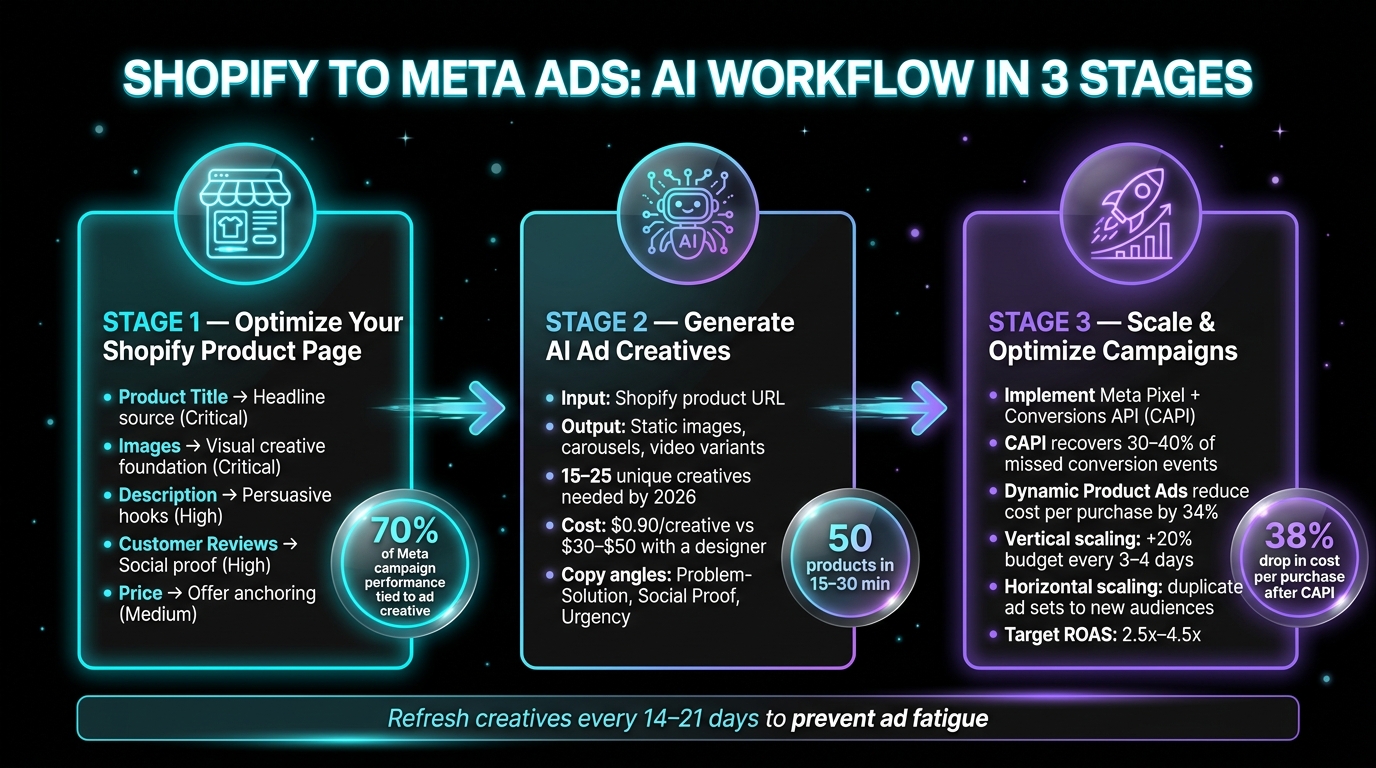
Shopify to Meta Ads: AI Workflow in 3 Stages
AI Video Ads That Actually Convert | Shopify Tutorial
Put the playbook to work
Apply this playbook to your page
Paste your website and the Lab will turn the strategy you are reading into a ready-to-test ads.
Free to try No prompt writing
Preparing Your Shopify Product Pages for AI Ad Generation
AI tools thrive on clean, detailed product data. Think of your Shopify product page as the foundation - if the input is messy or incomplete, the output will reflect that.
What AI Tools Pull from Your Product Pages
When AI tools scan your Shopify product URL, they extract several key elements. These include your product title, description, primary images, current pricing, feature bullets, and customer reviews. Each plays a distinct role in shaping the final ad creative:
| Element | Role in Ad Generation | Priority |
|---|---|---|
| Product Title | Headline and hook source | Critical |
| Images | Visual creative foundation | Critical |
| Description | Basis for persuasive hooks and benefits | High |
| Customer Reviews | Social proof and trust signals | High |
| Price | Offer anchoring and urgency | Medium |
Meta’s research highlights that 70% of campaign performance variance on their platform is tied directly to the ad creative. This means the quality of data pulled from your product page can make or break your ad's success.
Let’s dive into how you can structure your product information to ensure AI tools generate the most compelling ads.
How to Structure Product Information for Better AI Output
The way you present your product details directly influences AI-generated content. Many merchants focus on listing features, but AI tools are designed to craft messages around outcomes. For example, instead of saying "stainless steel construction", try "stays rust-free for years, even in humid climates." The latter provides a clear benefit that AI can transform into a persuasive ad hook.
"Enhance product content to address customer concerns - highlight problems solved, target users, and key use cases." - Shopify Community Summary
To maximize AI output, structure your descriptions around three key components:
- Hook: Identify the problem your product solves or the desire it fulfills.
- Proof: Include concrete data or social proof, like "4.8 stars from 10,000+ customers."
- CTA (Call-to-Action): Offer an incentive to reduce hesitation, such as free shipping or a guarantee.
When your product page follows this framework, AI tools can easily extract and integrate these elements into Meta ad copy frameworks.
Basic Product Page Hygiene for AI Tools
Technical aspects of your product page also affect AI ad quality. For instance, if your Shopify store takes more than 3 seconds to load on mobile, you’re likely losing potential customers before they even see your ads. This is especially critical since over 80% of Meta ad impressions are served on mobile devices.
Here are a few ways to ensure your product page is AI-ready:
- High-Quality Images: Use high-resolution photos with clean, uncluttered backgrounds. While AI tools can enhance images by removing backgrounds or adding badges, they can’t fix blurry or poorly lit photos.
- Accurate Data: Keep pricing and inventory details up to date. Inaccurate information can lead to flagged or disapproved items in Meta Commerce Manager.
- Page Speed: Optimize your store to load quickly, especially on mobile devices, to avoid losing traffic and ad dollars.
AI Workflows for Building Meta Ad Creatives

With your Shopify pages optimized, you can harness AI to turn simple URLs into Meta ads that are ready to launch.
How to Generate Static Meta Ads with ADEN's LAB
It all begins with one input: your Shopify product URL. ADEN's LAB scans the page, extracts product images, pricing, and key benefits, and then creates a diverse range of static ad creatives. No need for design briefs or endless revisions - results are practically instant.
ADEN's LAB produces creatives tailored for Meta's Andromeda algorithm. This system evaluates creative elements like hook types, visual styles, color schemes, and text density to match your ads with the right audience. Instead of delivering just one polished ad, ADEN's LAB generates a variety of ad variants. Why? Because Meta now tracks ad fatigue at the account level, meaning even a fresh ad can underperform if your account's overall creative pool is overused.
By 2026, Meta's Andromeda system will require 15–25 unique creatives to sustain consistent campaign performance. With ADEN's LAB Apex Mode plan, producing that many ads costs just $0.90 per creative - significantly less than the $30–$50 per ad you’d typically pay a designer.
Once your visuals are ready, the next challenge is writing ad copy that converts.
Writing Ad Copy with AI Tools
Visuals grab attention, but it’s the copy that drives action. Instead of testing minor tweaks, focus on diverse approaches. These three copy angles consistently outperform generic descriptions:
- Problem-solution: "Tired of [X]? Here's what actually works."
- Social proof: "10,000+ customers gave this 4.8 stars."
- Urgency: "Only 47 left in stock."
Each angle appeals to a different buyer mindset, allowing data to reveal what resonates most. One important tip: keep primary text under 125 characters to avoid truncation on mobile devices.
Combining Creatives and Copy for Campaign Testing
To find what works, test creative and copy combinations with identical targeting. By keeping the targeting consistent, you can isolate the performance of the creative itself without interference from audience-related variables.
The ideal setup? Use 2–3 AI-generated creatives per ad set with identical targeting. Start with static AI-generated ads to test and validate your messaging. Once you identify a winning angle, introduce video content to amplify results. This sequence can lower CPM by 15–30% on Meta compared to starting with video.
When testing, let each variant achieve at least 50 link clicks before making any decisions. Acting too quickly can lead to poor choices based on incomplete data. Once a winning combination emerges, scale the daily budget gradually - by no more than 20–30% every 48–72 hours - to avoid triggering Meta's learning phase reset.
Optimizing and Scaling Meta Campaigns with AI
Once you’ve fine-tuned your ad creatives, it’s time to take things up a notch by tapping into Shopify data and leveraging AI to supercharge your Meta campaigns.
Using Shopify Data to Improve Campaign Performance
Your Shopify store holds a treasure trove of data that can significantly boost your Meta campaigns - if you know how to use it. When integrated correctly, Shopify and Meta create a feedback loop that can dramatically improve performance.
Start by implementing Meta's Conversions API (CAPI) alongside your Meta Pixel. Why? Browser-based tracking alone misses 30–40% of conversion events due to ad blockers and iOS privacy settings. CAPI bridges this gap by sending purchase data directly from Shopify’s servers to Meta, giving the algorithm a clearer view of what’s driving conversions.
On the creative front, Shopify’s catalog sync enables Dynamic Product Ads (DPA), which automatically show users the products they’ve browsed. These ads are highly effective, reducing the cost per purchase by 34% compared to standard static ads. Take this example: a home goods retailer with 340 SKUs revamped their campaigns into three categories - prospecting, retargeting, and DPA. After implementing CAPI, their cost per purchase dropped by 38%, and DPA alone contributed 41% of Meta-attributed revenue within 60 days.
For Shopify merchants, a healthy ROAS (Return on Ad Spend) benchmark in 2026 is between 2.5x and 4.5x. Falling short of this range? The problem is likely tied to creative quality or tracking issues, not your targeting or lack of exclusion strategies.
Testing and Scaling with AI Recommendations
Once your tracking is solid, it’s time to analyze campaign data and act quickly. Beyond ROAS, two metrics deserve your attention: ad frequency and hook rate. For video ads, a hook rate (3-second views ÷ impressions) above 25% signals that your opening is grabbing attention.
Scaling your campaigns can be approached in two ways:
- Vertical scaling: Gradually increase the budget on a winning ad set - no more than 20% every three to four days. This prevents Meta’s learning phase from resetting.
- Horizontal scaling: Duplicate your winning ad set and target a new audience, such as a 1% lookalike or broad targeting, while keeping the creative unchanged. This method minimizes the risk of delivery instability.
For testing, rely on Adset Budget Optimization (ABO) to keep your data clean. Once you’ve identified two winning creatives, shift to Campaign Budget Optimization (CBO) for more efficient scaling.
"The gap between a profitable Meta ads account and one that bleeds budget comes down to three things: the right campaign structure, feed-quality product data, and creatives that stop the scroll." - MyAdForce
These strategies set the stage for the next step: scaling your creative production with ADEN's LAB.
Scaling Ad Production with ADEN's LAB
As you scale, keeping your creative pool fresh becomes the biggest challenge. Meta recommends frequent creative updates to maintain performance, and that’s where ADEN’s LAB comes in.
ADEN’s LAB offers tailored plans to meet your creative needs:
- The Lift Off plan costs $59/month and delivers 30 ads - ideal for testing initial messaging and validating offers without hiring a designer.
- The Hyperstream plan at $89/month provides 50 ads per month, giving you enough volume to rotate creatives before they lose their effectiveness.
- At the top tier, the Apex Mode plan generates 200 ads for $179/month - just $0.90 per creative. This plan ensures you can refresh your creative pool regularly, aligning with Meta’s optimal variation guidelines.
Refreshing your creative assets every 14–21 days doesn’t have to be a headache or a financial burden. With affordable options like ADEN’s LAB, keeping your campaigns fresh and feeding valuable data back into your AI strategy becomes a seamless process.
Conclusion and Next Steps
Recap of the Shopify-to-Meta Ad Workflow
Let’s quickly revisit the streamlined process for turning Shopify product pages into Meta ads. The workflow involves three key stages: clean data extraction, creative generation, and performance scaling. Each stage builds on the previous one. Cleaner product pages lead to better AI-generated outputs, which produce stronger ad creatives and clearer testing data. As Tal Yeger, an Advertising Expert, puts it:
"The store owners who sustain strong ROAS at scale are not the ones with the biggest budgets. They are the ones with the fastest creative iteration cycles."
How ADEN's LAB Simplifies Scaling
The toughest challenge in Meta advertising isn’t about budget or audience targeting - it’s about keeping up with creative demand. Many brands struggle to produce enough ad variations using traditional methods. That’s where ADEN's LAB comes in. Starting at just $59/month for 30 ads, the platform drastically reduces the cost per creative to as low as $0.90 with the Apex Mode plan. This makes it possible to maintain a steady flow of fresh ad creatives without breaking the bank.
With this foundation, you’re ready to take the next steps to integrate and scale your Meta ad campaigns effectively.
Next Steps to Get Started
- Concentrate your budget: Dedicate 80% of your ad spend to a single product for the first 30 days to gather accurate performance data.
- Refine your copy: Apply the "Hook + Proof + CTA" formula discussed earlier to craft compelling ad variations.
- Set a production routine: Analyze performance data early in the week, create new ad variations mid-week, and launch fresh creatives before the weekend begins.
- Scale gradually: Increase budgets for high-performing ad sets by 20–30% every 48–72 hours to avoid resetting Meta’s learning phase.
ADEN's LAB integrates effortlessly into this workflow, replacing time-consuming design processes with ad generation sessions that take under 10 minutes. This approach not only saves time but also maximizes your campaign ROI by keeping your creative strategy agile and efficient.
FAQs
What should I fix on my Shopify product page before using AI to make Meta ads?
Before diving into AI for Meta ads, make sure your Shopify product page is ready to shine. Start with high-quality, attention-grabbing images that are optimized for social media platforms. Why? Because visuals are everything - about 70% of ad performance hinges on the quality of your creative.
But it’s not just about the pictures. Pair those visuals with clear and persuasive product descriptions that highlight your product’s value. A clean, well-organized layout is equally important. These elements work together to help AI craft ads that truly resonate.
Focus on making your page visually appealing and easy to understand, and you’ll set the stage for better ad results.
How many ad creatives do I need to keep Meta performance steady?
To keep Meta campaigns running smoothly, it's a good idea to have 3 to 5 ad creatives active at all times. This approach strikes the right balance - it allows for consistent testing and fine-tuning while avoiding overloading the algorithm.
What’s the simplest way to set up Meta Pixel and Conversions API (CAPI) in Shopify?
Setting up Meta Pixel and the Conversions API (CAPI) in Shopify is straightforward thanks to Shopify's built-in Facebook channel integration. All you need to do is connect your Facebook account, activate the Pixel, and switch on the CAPI setting. Once that's done, head over to Meta's Events Manager to confirm everything is tracking correctly. This simple setup saves time and ensures smooth data sharing between Shopify and Meta.
Your next ad batch starts here
Finish with a ready-to-test ad batch
Paste your website to generate static creatives. Drop the link → get ads in about 90 seconds → upload them to Meta → scale.
Free to try No prompt writing