AI Ad Generator for Shopify Stores: Turn Any URL Into Winning Creatives
Try the workflow instead of comparing it
See what an AI ad generator makes from your product
Paste your product page and get a complete Meta ad batch—creative concepts, images, headlines, and copy—without another tool stack.
Free to try No prompt writing

Creating ads for your Shopify store just got easier. Instead of spending days and hundreds of dollars on design, AI tools now transform product URLs into platform-ready ads in minutes. Here's what you need to know:
- Save time and money: Traditional ad creation costs $200–$500 per ad or $2,000–$5,000 per month. AI tools cost just $29–$149 per month.
- Boost ad performance: Testing 20–30 ad variations can reduce acquisition costs by 15–30% in 60–90 days.
- Meet platform demands: Meta campaigns work best with 10–15 ad variations, and AI tools generate these quickly to avoid creative fatigue.
- How it works: Input a product URL, and AI creates ads with tailored visuals and copy optimized for Facebook and Instagram. Before going live, follow a pre-launch ad checklist to ensure your campaigns are fully optimized.
If you're running a Shopify store, AI ad generators like ADEN'S LAB simplify ad production, lower costs, and help you test more efficiently, so you can focus on growing your business.
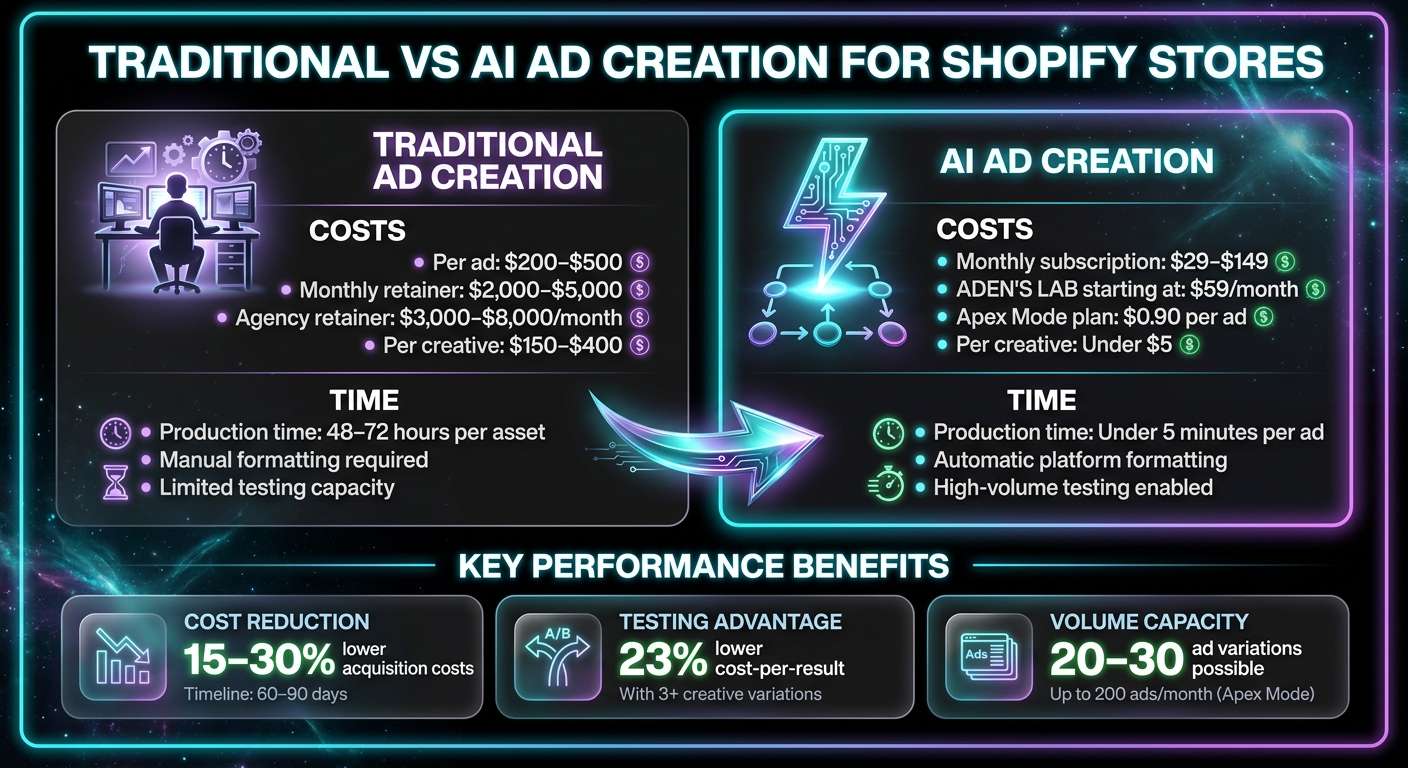
Traditional vs AI Ad Creation: Cost and Time Comparison for Shopify Stores
How AI Ad Generators Work for Shopify Stores

What an AI Ad Generator Does
An AI ad generator takes a Shopify product URL and turns it into ad creatives in just minutes. The process starts with the tool scanning and analyzing your product page. It pulls in structured content like titles, descriptions, bullet points, pricing, images, and meta tags directly from the page.
Next, it processes your product images, removing backgrounds and improving quality to ensure the visuals are polished and professional. Using advanced language models, the generator crafts platform-specific ad copy that focuses on highlighting the benefits of your product, rather than just listing features. This approach is designed to create high-performing static ads for platforms like Facebook and Instagram.
Finally, the system combines the refined visuals with the tailored copy to produce a branded static ad that aligns with Meta's specifications. This eliminates the need for manual revisions, saving both time and effort while creating ads optimized for conversions.
Why Shopify Stores Benefit From AI Ad Generators
For Shopify store owners, one of the biggest perks of AI ad generators is how they cut down on production time. While traditional ad creation can take 48–72 hours per asset, these tools can deliver a ready-to-use ad in under five minutes. This speed is crucial, especially when creative fatigue on platforms like Meta tends to set in within 7–14 days.
AI ad generators also make high-volume testing easier. Campaigns that test 3–5 creative variations per ad set achieve a 23% lower cost-per-result compared to campaigns with only one creative. For small business owners, this means they can compete with larger brands, creating multiple high-quality ad variations quickly and at a fraction of the cost. Instead of spending $150–$400 per creative, costs can drop to under $5 per ad.
Another advantage is that these tools automatically tailor ad designs to meet platform-specific requirements, like image dimensions and text limits. This automation helps avoid errors that often occur with manual formatting and ensures the ads consistently meet Meta's guidelines.
Put the playbook to work
Apply this playbook to your page
Paste your website and the Lab will turn the strategy you are reading into a ready-to-test ads.
Free to try No prompt writing
What You Need Before Getting Started
Required Setup Items
Before diving in, make sure your Shopify store is live and includes at least one published product. Each product should have clear images, detailed descriptions, and accurate pricing. Keep in mind that the AI generator can only pull content from publicly accessible pages - draft pages or password-protected storefronts are off-limits.
You'll also need active ad accounts on platforms like Meta (Facebook), TikTok, or Google/YouTube. Be sure to install tracking pixels, such as the Meta Pixel or TikTok Pixel, through Shopify's built-in integrations. These tools are essential for tracking conversions and retargeting visitors.
For consistent ad creatives, prepare your brand assets, including your logo, color palette, and fonts. Additionally, ensure your mobile pages load in under three seconds. Slow loading times can cut conversion rates in half, especially since over 80% of Shopify ad traffic comes from mobile devices.
When starting out, focus on one high-margin or highly reviewed product instead of promoting your entire catalog. Create 3–6 variations of ad creatives initially. Advertisers who rotate three or more creatives per ad set tend to see a 23% lower cost-per-result on average. Plan for a daily ad spend of $15–$25 per ad set to help the platform's algorithm complete its learning phase within 7–10 days.
After completing these steps, you can sync your Shopify catalog to streamline ad creation.
Optional: Syncing Your Shopify Catalog
Though you can generate ads manually by entering product URLs one by one, syncing your Shopify catalog can save time. This feature automatically pulls product details - like descriptions and photos - allowing you to create hundreds of ad variations instead of producing 10–20 manually each week.
Setting up catalog syncing is simple. Use the AI tool's integrations dashboard to connect your store and grant full permissions for inventory data, images, pricing, and categories. Partial access often leads to sync issues, but clearing your browser data and restarting the authentication process resolves most problems 90% of the time.
To improve ad performance, optimize product titles (e.g., "Red Cotton T-Shirt") for clear, compelling headlines. You can also use an ad headline generator to quickly test different hooks. Rewrite descriptions to emphasize benefits - such as "stays comfortable all day" - rather than just listing features. The AI relies on this language to craft effective ad copy. Once synced, run a manual check with 5–10 products to ensure everything displays correctly. For larger inventories, the initial sync might take a few hours.
A synced catalog automatically updates your ads whenever you change prices, adjust inventory, or add new products. If your store manages more than five SKUs, catalog syncing is a more efficient way to keep your ads consistent across your entire inventory.
How to Generate Ads From Shopify URLs
Step 1: Enter Your Product URL
First, navigate to your product page in the Shopify admin and copy its live URL. Paste this URL into ADEN'S LAB's input field. The AI will instantly pull in details like your product title, description, images, and pricing information.
Once you've linked your catalog, you can use shorthand commands like "@product-name" to access real-time product data, including inventory levels and available variants. This feature is especially handy when working with multiple SKUs, saving you from repeatedly copying URLs. After this step, you'll move on to selecting the advertising platform.
Step 2: Select Your Advertising Platform
ADEN'S LAB is specifically optimized for creating ads on Meta platforms, including Facebook and Instagram. The system automatically adjusts your ad's format to meet Meta's specifications - covering things like aspect ratios and character limits - making it easier to test and scale campaigns quickly. With Meta accounting for 42% of direct-to-consumer ad spend by 2025, focusing your initial efforts here can help you maximize ADEN'S LAB's capabilities.
Step 3: Set Your Ad Objective
Choose from objectives like driving traffic, boosting conversions, or promoting catalog sales. Your choice will guide the AI in selecting the right tone and call-to-action (CTA) for your ad. For instance, a conversion-focused campaign might feature CTAs such as "Shop Now" or "Get Yours Today", while a traffic-oriented campaign might lean on phrases like "Learn More" or "Discover." By aligning the ad's structure with Meta's delivery system, you set the stage for better performance. Once your objective is set, you'll have the chance to refine your ad creatives using AI tools.
Step 4: Review and Edit Your Creatives
ADEN'S LAB generates 3–6 creative variations tailored to your product URL and campaign settings. You can review these options and make adjustments directly in the dashboard. The editing tools allow you to tweak headlines, copy, or visuals, and even apply specific brand colors or adjust lighting for consistency. Adding custom prompts ensures the final ads align perfectly with your brand identity.
Testing multiple creatives is key. Advertisers who use three or more variations per ad set typically see a 23% reduction in cost-per-result. Experimenting with different angles can help pinpoint the most effective messaging for your audience.
Step 5: Export or Publish Your Ads
Once you're happy with your creatives, you can export them as PNG or JPG files. Alternatively, take advantage of ADEN'S LAB's direct API integration to publish or schedule ads directly to Meta Ad Manager without leaving the platform. This seamless workflow helps you keep campaigns fresh and performing well.
To maintain momentum, organize your exports by product and date, and plan to refresh your creatives every 2–3 weeks. By testing variations concurrently, Meta's algorithm can identify top-performing ads within 48–72 hours. This approach keeps your campaigns optimized and engaging for your audience.
How to Optimize AI-Generated Ads for Conversions
Emphasize Benefits Over Features
When refining your AI-generated ads, put the spotlight on benefits rather than features. Why? Because customers care more about what they’ll gain than the technical details. For instance, instead of saying, "Made with organic cotton", go with something like, "Sleep better in fabric that breathes all night." This kind of messaging grabs attention and drives higher engagement.
Tools like ADEN'S LAB can simplify this process. By analyzing your product pages, it identifies key benefits and value propositions that resonate with buyers, such as price anchors and customer outcomes. This approach aligns your messaging with what matters most to your audience.
Creative execution plays a massive role in ad performance - up to 70% of the variance across campaigns hinges on creative quality. Plus, since over 80% of Shopify ad traffic comes from mobile devices, your messaging needs to be concise and impactful. Use static images with benefit-driven headlines for retargeting, and save videos for educating customers about your product’s advantages.
Once your benefits are clear, make sure your creatives work seamlessly across different platforms.
Adapt Creatives for Each Platform
To maximize performance on Meta platforms like Facebook and Instagram, ADEN'S LAB ensures your ads are automatically tailored to platform-specific requirements. It adjusts aspect ratios (1:1 for feeds, 9:16 for Stories and Reels) and aligns calls-to-action with Meta’s standards, often using phrases like "Shop Now".
Since 85% of social video is viewed without sound, your ads should include bold visual hooks and text overlays to communicate the message effectively. And don’t forget to direct traffic to a specific product page that reinforces the benefits highlighted in your ad - sending users to a generic homepage can dilute the impact.
Once your creatives are optimized for each platform, the next step is to fine-tune your approach with A/B testing.
Use A/B Testing to Find What Works
A/B testing Meta ads is essential for identifying the most effective ad elements. Experts recommend creating at least six variations per product, each with different benefit-focused hooks and visuals. ADEN'S LAB makes this easier by generating multiple ad variations based on your product URL, giving you ready-to-test options. To get clear insights, test one element at a time.
Run each variation for 3–5 days or until you hit 50 optimization events. Advertisers who test multiple creatives often see a 23% reduction in cost-per-result on average. If an ad spends $50–$75 without delivering at least a 1.5× ROAS, pause it. For ads that hit a 2.5× ROAS or higher, scale by increasing the budget 20%–30% every three days without disrupting Meta’s learning phase.
Keep an eye on key metrics like Cost Per Initiated Checkout (CPIC), which should ideally be 10%–20% of your product’s retail price. Also, track Link Click-Through Rates (CTR) with a target range of 1.5%–2.5% for cold audiences. Lastly, refresh your top-performing creatives every 14 days by tweaking small details, such as overlay text, to keep them effective.
How to Scale Ad Production With AI
Create Multiple Ads for Multi-Product Campaigns
When managing multi-product campaigns, AI simplifies the process by enabling batch ad creation directly from your product catalog. With URL-to-ad automation, you can pull images, prices, and product details straight from your Shopify pages, creating platform-ready ads in under five minutes. This is a game-changer for stores with extensive product catalogs, allowing you to generate creatives for dozens - or even hundreds - of SKUs in one go.
Platforms like ADEN'S LAB make this process even quicker for static Meta ads. All you need to do is input your product URLs, and the platform generates eye-catching creatives optimized for Facebook and Instagram. If you're on a higher-tier plan, you can produce hundreds of ads monthly - perfect for seasonal campaigns or continuous testing.
Another key feature is asset atomization, which breaks ads into components like hooks, benefits, visuals, and social proof. This allows for endless combinations and variations. In 2026, staying competitive means testing 20–40 creative variants per product every month. Batch production like this not only saves time but also helps address creative fatigue.
Combat Creative Fatigue With High-Volume Testing
Creative fatigue can derail campaigns quickly. On platforms like Meta, fatigue often sets in within 7–14 days, while on TikTok, it can occur even faster - within just 3–5 days. The solution? Produce more variations rather than pouring money into a single ad.
"Volume is the moat." – AdGPT
To combat fatigue, brands often refresh their ad sets with 3–5 new creatives each week. AI makes this achievable by producing 20–30 creative variants in just a few hours, compared to the weeks traditional production might take. Even better, AI can slash the cost of producing each creative from over $150 to under $5.
ADEN'S LAB offers an even more cost-effective solution with plans starting at just $0.90 per ad on their Apex Mode plan, which includes up to 200 ads per month. This level of output lets you outpace traditional creative teams while staying ahead of fatigue. By running 20 variations at once with $10–$20 budgets per ad, Meta's algorithm can quickly identify the top-performing 30% to scale. Regularly refreshing your creative assets ensures campaigns remain effective and fatigue-free.
Track Performance and Improve Future Ads
After deploying new creatives, tracking performance becomes essential for ongoing improvement. Keep an eye on key metrics like spend, ROAS, and CTR for each creative variant. Once you pinpoint a winning hook or angle, use that data to guide your AI generator in creating a refined batch of variations.
Follow the kill/scale rule: pause underperforming ads and increase the budget for top-performing ones by 20% every three days. Allocating 15–20% of your monthly ad budget to fresh creative batches every 2–3 weeks helps you stay ahead of performance decline. With AI handling the heavy lifting, you can focus on analyzing results and iterating faster than traditional workflows allow.
How to Create Ads for Shopify Products with Ai
Conclusion
The shift to rapid ad generation and iterative testing has reshaped how Shopify stores approach advertising. Instead of paying hefty agency fees of $200–$500 per ad, businesses can now access AI-driven solutions for as little as $29–$149 per month. This means you can create ad creatives in minutes and test them at a speed that traditional methods simply can't match.
The numbers speak for themselves. Iterative AI-driven creative testing can lower your cost per acquisition by 15–30% within 60–90 days. Advertisers using three or more creative variations per ad set experience, on average, a 23% reduction in cost-per-result. High-volume ad production has become essential - not just to avoid ad fatigue but to meet Meta's requirements for Advantage+ campaigns, which call for 10–15+ variations.
ADEN'S LAB is at the forefront of this transformation. Starting at $59 per month, their plans can bring costs down to as little as $0.90 per ad with the Apex Mode plan. This allows you to produce up to 200 static Meta ads monthly, ensuring you stay competitive without overspending on production.
By 2026, Shopify store owners are expected to replace agency retainers costing $3,000–$8,000 per month with AI tools that cost under $200. The brands that dominate will be those that produce and test at scale - and AI gives you the tools to do just that.
Ready to start? Simply enter your product URL, let the platform handle the creative process, and focus your energy on scaling the ads that perform best.
FAQs
Will ADEN’S LAB work if my Shopify store is password-protected?
Yes, ADEN'S LAB is compatible with password-protected Shopify stores. It can create ad creatives by pulling information directly from your store's product pages, even if those pages are secured with a password.
How do I make AI-generated ads match my brand colors and style?
To make sure AI-generated ads match your brand's colors and overall style, start by using AI branding tools to define your brand’s color palette, typography, and key visual elements. These tools will automatically apply your branding to any generated content, ensuring everything stays consistent. By setting up your brand identity in advance, the AI can effortlessly produce ads that not only showcase your unique style but also maintain a cohesive look across all your creative assets.
What should I test first to improve ROAS with AI-made creatives?
To get better ROAS (Return on Ad Spend) with AI-generated creatives, focus on testing variations that show the most promise for engagement. Use AI tools to produce a wide range of creative options, then test them quickly to pinpoint the ones that perform best. This approach not only helps you tackle creative fatigue but also allows you to identify successful creatives faster, making your ad spend work harder and smarter.
Your next ad batch starts here
Finish with a ready-to-test ad batch
Paste your website to generate static creatives. Drop the link → get ads in about 90 seconds → upload them to Meta → scale.
Free to try No prompt writing