AI Workflow for Creating Platform-Optimized Meta Ad Formats
Turn the strategy into creatives
Create Meta ads for your product
Paste your product page. ADEN'S LAB turns the offer, audience, and positioning into complete ready-to-use Meta static ads.
Free to try No prompt writing

Running Meta ads in 2026 requires speed, scale, and precision. With Meta's algorithm (Andromeda) prioritizing creative variety and quality, brands must produce 20–50 ad variations monthly to stay competitive. Manual methods can't keep up with this demand, but AI-powered workflows solve this by:
- Reducing ad creation time from days to minutes.
- Cutting production costs from thousands of dollars to under $5 per asset.
- Generating platform-optimized ads tailored for placements like Feed, Stories, Reels, Carousel, and Right Column.
Here’s how it works: You define goals, provide inputs like product details and performance data, and the AI creates multiple ad variations automatically formatted for Meta's specs. Tools like ADEN's LAB streamline this process, producing dozens of ads in under 90 seconds for as little as $0.90 per ad.
The result? Faster learning, better ad performance, and up to 50% improvement in ROAS. This guide breaks down the workflow step-by-step, from setting up AI tools to tracking performance data for continuous improvement through A/B testing.
This AI System Generates UNLIMITED Meta Ads in Minutes ($13M Ecom Automation)
Put the playbook to work
Apply this playbook to your page
Paste your website and the Lab will turn the strategy you are reading into a ready-to-test ads.
Free to try No prompt writing
Step 1: Setting Up Your AI Workflow
Before diving into ad creation, it's crucial to lay a strong foundation. Skipping this step often leads to underwhelming results. AI thrives on clear instructions, and setting up your workflow properly ensures the best outcomes.
Defining Goals and Constraints
Start by establishing your target CPA and ROAS. These aren't just metrics to track - they act as the framework for your entire process. Without them, it's impossible to evaluate whether your AI-generated ads are hitting the mark.
Next, outline specific creative strategies for different audience segments. For cold audiences, use curiosity-driven hooks. For warm leads, focus on product demos. And for hot retargeting, go straight to direct offers. Additionally, create a brand constraints document. This should include approved keywords, tone guidelines, and any other rules to keep AI-generated content aligned with your brand's identity.
"The marketer who runs AI-assisted Meta ads well in 2026 isn't the one who uses the most tools - it's the one who writes better briefs than the people who don't." - Murat Bock, Founder, AdLibrary
Once your goals and constraints are in place, you can move on to gathering the necessary inputs for the AI.
Gathering the Right Inputs
With your objectives set, it's time to compile the essential assets. These include:
- Product URLs
- Landing pages
- Ad performance data from the past 90 days (exported from Meta Ads Manager in CSV or JSON format)
- Product catalogs (exported in CSV format, if available)
The performance data is particularly valuable. Analyze your historical ads and tag each one by its hook type - for example, does it lead with a problem, a result, or social proof? This tagging process reveals which emotional triggers resulted in the lowest CPAs. By identifying these patterns, you give the AI a solid foundation to build on rather than starting from scratch.
"The brief is the bottleneck. It always was - AI just made the cost of a bad brief visible faster than before." - Murat Bock, Founder, AdLibrary
With your inputs ready, the next step is to configure your AI tool to align with these parameters.
Choosing and Configuring AI Tools
For creating static Meta ads, ADEN's LAB is a top choice. This platform is designed for this exact purpose. Simply input your product URL or landing page link, and it generates static ads in under 90 seconds. These ads are formatted for Facebook and Instagram, adhering to direct-response principles that align with Meta's creative guidelines.
Before generating ads, create a one-page creative spec document. This document should include:
- Target placements and their specs (e.g., 1080 x 1350 px for Feed, 1080 x 1080 px for Carousel)
- Brand voice guidelines
- The funnel stage for the campaign
- Kill/scale rules (e.g., pausing an ad if it reaches 2x your target CPA without a conversion)
This spec document acts as the brief for your AI tool, ensuring that every ad is optimized for performance and meets platform requirements. By taking this extra step, you can filter out underperforming creatives and focus on what works.
Step 2: Generating Static Meta Ads with AI
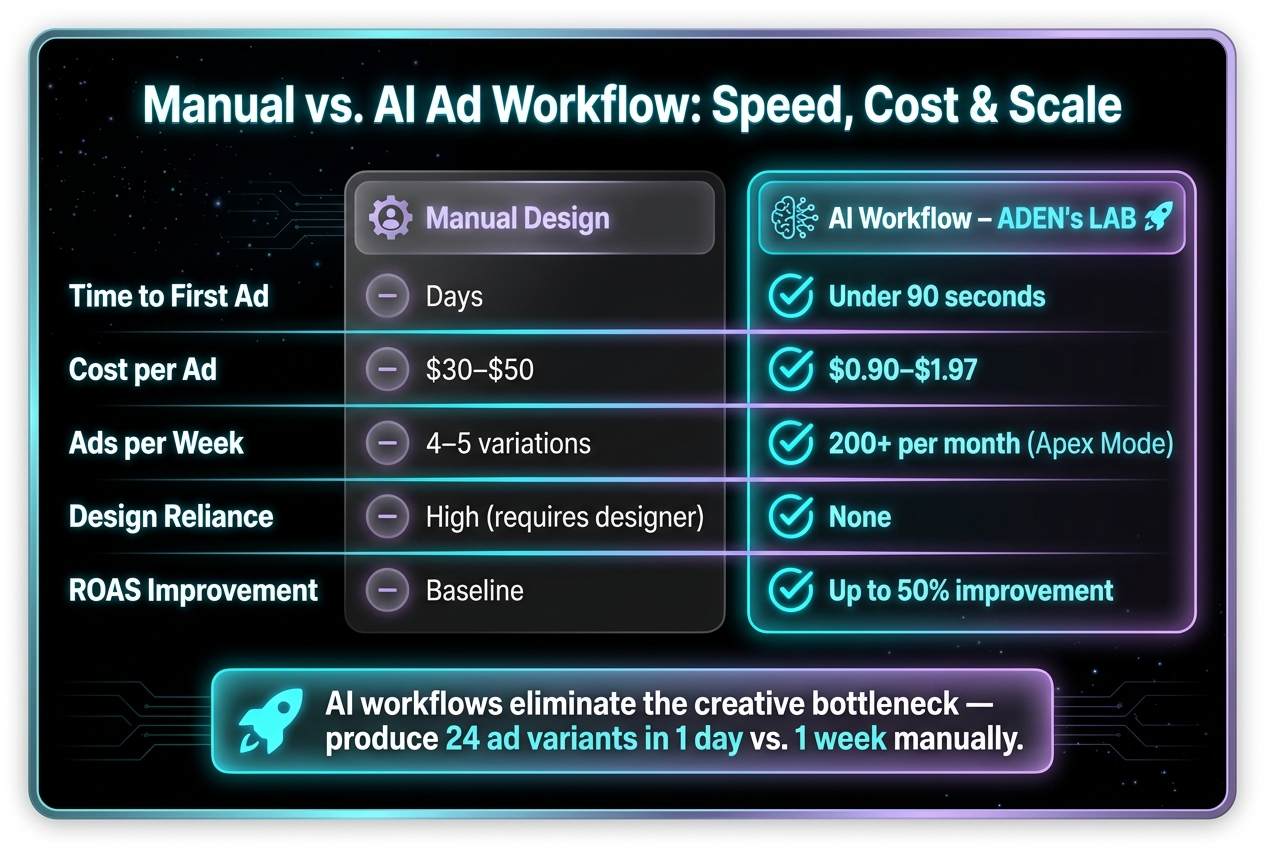
Manual vs. AI Ad Workflow: Speed, Cost & Scale Compared
With your creative spec document in hand, it’s time to start building your ads. This is the stage where your preparation pays off - and where marketers either achieve great results or end up with lackluster outputs.
How to Build Effective AI Prompts
Using the goals and inputs you defined in Step 1, this step focuses on creating efficient and effective prompts to maximize your creative output.
Think of an AI prompt as a creative brief, not just a search query. The more structured and detailed it is, the better the results. A well-designed prompt follows a clear structure: Brand Role → Task → Seed Input → Product Info → ICP (Ideal Customer Profile) Details → Hook Patterns → Output Format.
For example, instead of simply asking, “write a Facebook ad for my skincare brand,” a more specific prompt might be:
"You are a direct-response copywriter for [Brand]. Generate 8 static ad headline variants for cold audiences aged 25–44 in the U.S. Use the following hook patterns: problem-first, curiosity gap, and direct benefit. Output the results as a table with columns for headline, hook type, and testable hypothesis."
This level of detail produces actionable and varied copy.
Why does this matter? Headline changes alone can account for 60–80% of CTR (Click-Through Rate) variance in Meta ad experiments. As Murat Bock, Founder & Fullstack Developer, explains:
"An automated ad variation generator is only as good as the signal feeding it."
By integrating tagged historical performance data from Step 1, you can remove much of the guesswork and create a solid foundation for rapid, data-driven ad production.
Using ADEN's LAB to Create Static Ads
Once your prompts and creative spec are ready, ADEN's LAB makes ad generation simple. All you need to do is enter your product URL or landing page link, and the platform automatically pulls the relevant product details. From there, it generates static ads optimized for Facebook and Instagram in under 90 seconds, adhering to direct-response principles and Meta’s creative guidelines.
Typically, manual ad creation teams produce only 4–5 ad variations per campaign cycle. In contrast, ADEN's LAB allows you to create dozens of ads weekly with its entry-level plan, or scale up to 200+ ads per month with the Apex Mode plan - all for as little as $0.90 per ad. This speed and volume enable brands to test multiple creative variants simultaneously, allowing Meta’s algorithm to identify the top-performing ads within seven days.
For e-commerce brands, ADEN’s LAB also ensures brand consistency by automatically matching your copy tone, visual style, and format across all ads.
Manual Design vs. AI Workflow: A Side-by-Side Look
The difference between manual and AI-driven ad creation goes beyond speed. It affects how much you can test, how quickly you can respond to creative fatigue, and how cost-effective your campaigns become.
Here’s a comparison to illustrate the benefits of AI-driven workflows:
| Workflow Type | Time to First Ad | Cost per Ad (USD) | Scalability (Ads/Week) | Design Reliance |
|---|---|---|---|---|
| Manual Design | Days | $30–$50 | Low | High |
| AI Workflow (ADEN's LAB) | Minutes | $0.90–$1.97 | High | None |
While the cost savings are clear, the scalability advantage is the real game-changer. Many brands struggle on Meta not because of limited budgets or targeting issues, but because they can’t produce enough winning creatives quickly. An AI-driven workflow eliminates this bottleneck entirely.
"The generator shifts the role from 'write ads' to 'evaluate hypotheses' - a more valuable job." - Murat Bock, Founder & Fullstack Developer
Step 3: Adapting Creatives for Meta Ad Placements
Once your static ads are ready, the next step is making sure they fit perfectly within the Meta placements where they'll appear. Relying on Meta's auto-cropping can be risky, as it might cut out critical elements like your headline, product image, or call-to-action (CTA). This step focuses on ensuring your AI-generated ads perform their best by aligning with Meta’s specific placement requirements.
Meta Placement Specs at a Glance
Each Meta placement has its own size and ratio guidelines. Using the wrong dimensions can trigger auto-cropping, which you can’t fully control.
"The viewport is vertical, touch-based, and competitive. A mismatched ratio forces Meta to auto-crop your creative, potentially cutting off headlines, product shots, or CTAs." - Chris Pollard, Founder, Ads Uploader
| Placement | Recommended Ratio | Resolution | Key Notes |
|---|---|---|---|
| Facebook/IG Feed | 4:5 (Portrait) | 1080 x 1350 px | 25% more screen space than 1:1 on mobile |
| Stories & Reels | 9:16 (Vertical) | 1080 x 1920 px | Unified safe zone as of March 2026 |
| Carousel Cards | 1:1 (Square) | 1080 x 1080 px | Must be consistent across all cards |
| Right Column | 1.91:1 (Landscape) | 1200 x 628 px | Desktop only; static images only |
| Threads Feed | 4:5 or 9:16 | 1080 x 1350+ px | Global ad surface added in 2026 |
Here’s what the data says: 4:5 Feed images tend to deliver ~1% higher click-through rates (CTR) than 1:1, while 9:16 video formats generate a 7% higher CTR compared to non-vertical formats. These small boosts can add up significantly when scaled.
It’s also worth noting that Instagram Explore was removed as a standalone placement in January 2026, and Threads now supports both 4:5 and 9:16 formats as part of its global ad rollout.
Now, let’s break down how to reformat your creatives to meet Meta’s placement requirements.
How to Resize and Reformat Creatives
Start with a vertical-first approach by designing your main asset in 9:16 (1080 x 1920 px). From there, crop the center to create 4:5 for Feed and 1:1 for Carousel. This method keeps the original creative intent intact and avoids the challenges of converting horizontal or square assets into vertical formats.
For exporting, use these resolutions to maintain quality on modern high-density screens:
- 4:5: 1440 x 1800 px
- 9:16: 1440 x 2560 px
To ensure sharp visuals, use PNG for graphics with text or logos, and JPG for lifestyle photos to keep file sizes manageable. Maintaining proper resolution is key to preserving both the quality and effectiveness of your ads.
Avoid placing important elements too close to the edges. As of March 2026, Meta applies a unified safe zone for Stories and Reels. This ensures that logos, CTAs, and headlines aren’t hidden by user interface elements.
For better organization, adopt a consistent file naming system (e.g., ad_4x5.jpg, ad_9x16.mp4) to streamline bulk uploads.
Using Meta's Asset Customization Tools
Meta’s Advantage+ Creative feature pairs well with AI-generated assets. By uploading multiple format variations - such as 1:1, 4:5, and 9:16 - within a single ad set, Meta’s algorithm automatically chooses the best format for each user and placement. This approach can lead to an average 12% cost-per-result improvement when targeting broad audiences.
However, if native formats aren’t provided, Advantage+ Creative may auto-adjust your assets, which can result in unwanted cropping or changes in brightness. To avoid this, always upload native assets for each ratio.
Before publishing, use the Safe Zone Guardrail toggle in Meta Ads Manager. This tool overlays UI elements on your assets, giving you a quick visual check to ensure text and logos won’t be obscured. This level of customization sets the stage for refining your campaign based on performance data.
Step 4: Using Performance Data to Improve Your Workflow
Once your ads are live, the next step is using performance data to fine-tune your AI-driven workflow.
Key Metrics and Benchmarks to Track
While many marketers rely on ROAS to gauge success, it doesn’t reveal why a creative is performing well - or falling short. To truly understand your ad’s effectiveness, focus on metrics at the creative level.
The two most important ones? Hook Rate and Hold Rate.
- Hook Rate tracks how many people watch the first 3 seconds of your ad compared to total impressions. If your Hook Rate is over 25%, your opening frame is doing its job of grabbing attention.
- Hold Rate measures how many of those viewers stick around for a ThruPlay. A Hold Rate above 40% indicates your content is engaging enough to keep viewers watching.
Here’s a quick breakdown of the key metrics you should monitor:
| Metric | Formula | Benchmark | What It Tells You |
|---|---|---|---|
| Hook Rate | 3-sec views / Impressions | >25% | Is the opening frame stopping the scroll? |
| Hold Rate | ThruPlay / 3-sec views | >40% | Is the content holding attention? |
| Link CTR | Clicks / Impressions | >0.8%–1.5% | Is the ad relevant and appealing? |
| CVR | Conversions / Clicks | >2% | Is the offer and CTA clear? |
For testing, Ad Set Budget Optimization (ABO) is the way to go. Unlike Campaign Budget Optimization (CBO), ABO ensures each creative gets an equal share of the budget, giving you a fair comparison. Run tests for 7 to 14 days and aim for at least 100 conversion events per variant before declaring a winner.
How to Read and Act on Performance Data
Once you’ve collected enough data, dig into the specifics. Identify the single variable - whether it’s the hook, visuals, or CTA - that’s driving results. Use this insight to shape your next round of testing. This approach ensures every creative iteration builds on the last, making your workflow smarter.
"Creative is your primary competitive advantage. Targeting has become commoditized through automation - everyone has access to the same algorithms." - Gaultier D'Acunto, Co-founder, Benly
Export your data from Meta Ads Manager in CSV format and feed it into an AI tool like Claude. Ask the tool to analyze patterns, such as which type of hook led to the lowest CPA in the past two weeks. This transforms raw data into actionable ideas for your next test.
Here’s a critical tip: if CTR drops while reach grows, the issue lies with the creative. On the other hand, if CTR drops while frequency increases, your audience might be experiencing ad fatigue. Each scenario requires a different fix, so double-check your data before making adjustments.
Keeping Creatives Fresh to Avoid Fatigue
One of the biggest challenges in Meta campaigns is creative fatigue. Data shows that purchase intent drops by about 16% after someone sees an ad six times. However, you don’t always need a complete redesign. Often, swapping out the hook while keeping the core offer and visuals intact can reset performance.
The best brands refresh their creatives every 10 days on average. A frequency above 3.5 for cold audiences over 14 days is a clear sign it’s time for a change. When this happens, use tools like ADEN's LAB to quickly produce new static ad variants. By generating 10–15 variants at just $0.90 each, you can keep your campaigns fresh for under $15 - far cheaper than hiring a designer.
To keep your campaigns running smoothly, use a Facebook ad budget calculator or allocate your budget like this:
- 60% for proven winners
- 30% for refined variations (small changes like a new hook or CTA)
- 10% for entirely new concepts
This strategy ensures your top-performing ads continue scaling while feeding new creative signals into the algorithm. Meta’s Andromeda system thrives on fresh inputs, so keeping your ads dynamic is key to staying ahead in 2026.
Conclusion: Building a Scalable Meta Ad Workflow with AI
Combining creative accuracy with platform-specific demands ensures your campaigns stay engaging while scaling effectively. The workflow outlined here - from crafting machine-readable briefs to tracking performance - only gets better with time. Simply put, better inputs lead to better creatives and more refined briefs.
The numbers back this up. Comparing manual vs automated ad creation, building an ad matrix with 24 variants manually might take an entire week, while an AI-driven approach completes the task in just one day. This not only speeds up production but also accelerates learning and scaling.
"The biggest efficiency gain isn't in the tools - it's in writing machine-readable briefs that compress weeks of creative iteration into days." - Murat Bock, Founder & Fullstack Developer
ADEN's LAB plays a pivotal role in this workflow. On the Apex Mode plan, generating 10–15 fresh static ad variants costs just $0.90 per ad. That means refreshing your campaigns with a batch of creatives can cost under $15 - far less than traditional design methods. This affordability allows for rapid campaign scaling through continuous creative updates without breaking the bank.
FAQs
What inputs do I need to generate high-performing Meta ads with AI?
To craft effective Meta ads using AI, start by supplying the right inputs. These include:
- A clear campaign brief that defines your objectives and key messaging.
- Creative assets like images, videos, and ad copy.
- Target audience details to guide personalization.
- Platform-specific requirements, such as ad dimensions and branding rules.
Providing detailed prompts and well-prepared inputs allows AI tools to fine-tune ads for Facebook and Instagram. This ensures they not only meet platform guidelines but also perform effectively.
How do I prevent cropping across Feed, Stories, Reels, and Carousel?
When creating Meta ads, it's crucial to design your visuals with platform-specific safe zones and aspect ratios in mind to avoid unwanted cropping.
- For Reels and Stories, stick to a 9:16 aspect ratio and keep key elements centered to steer clear of UI overlays.
- For Feed and Carousel ads, use a 1:1 ratio for the best fit.
Also, remember that most users browse the Feed with the sound off. Make sure your message is clear even without audio by using captions or on-screen text. Staying within the recommended safe zones ensures your content remains visible and impactful.
Which metrics tell me what to change in the next creative batch?
Metrics such as CTR (Click-Through Rate), CPC (Cost Per Click), and ROAS (Return on Ad Spend) are essential for spotting opportunities to improve. A strong CTR indicates that your creatives are resonating with the audience, while a lower CPC suggests you're achieving cost efficiency. Meanwhile, a higher ROAS highlights profitability. These insights can guide adjustments to your next set of creatives, helping you drive even better results.
Your next ad batch starts here
Finish with a ready-to-test ad batch
Paste your website to generate static creatives. Drop the link → get ads in about 90 seconds → upload them to Meta → scale.
Free to try No prompt writing