Meta Ads Weekparting: How to Find Time Blocks That Actually Convert
Turn the strategy into creatives
Create Meta ads for your product
Paste your product page. ADEN'S LAB turns the offer, audience, and positioning into complete ready-to-use Meta static ads.
Free to try No prompt writing

Meta ads work better when they target the right audience at the right time. Running ads 24/7 often wastes money. Weekparting solves this by scheduling ads to run only during time periods when your audience is most likely to convert. This strategy can improve your return on ad spend (ROAS) by 10–20% and reduce costs per acquisition (CPA) by up to 22%.
Here's how it works:
- Use historical data to identify high-performing days and hours.
- Focus your ad budget on these time blocks.
- Avoid low-conversion periods to reduce wasted spend.
For example, B2B campaigns often perform best mid-morning on weekdays, while e-commerce sees success in the evenings from Thursday to Sunday. Tools like Meta Ads Manager and AI platforms can help analyze data and automate scheduling for better results.
Want to maximize your ad spend? Weekparting helps you target your audience when it matters most.
Apply Ad Scheduling (Day-Parting) in Meta Ads (Facebook & Instagram Ads)
Put the playbook to work
Apply this playbook to your page
Paste your website and the Lab will turn the strategy you are reading into a ready-to-test ads.
Free to try No prompt writing
Weekparting for Meta Ads: The Basics
Weekparting focuses on running ads during specific days and hours that are proven to deliver the best results. Instead of spreading your budget thin over all 168 hours in a week, this strategy zeroes in on the time blocks that drive conversions while pausing ads during less effective periods. Here's how it stands apart from standard ad scheduling.
How Weekparting Differs from Standard Ad Scheduling
Unlike Meta's default scheduling, which often involves leaving campaigns "always on" or relying on the platform to distribute your daily budget, weekparting puts you in control. With standard scheduling, Meta decides how to pace your ad spend. Weekparting, however, uses historical performance data to identify the most effective time slots for ad delivery.
This proactive approach means you set the rules upfront based on user behavior trends rather than reacting to poor performance after the fact. It's worth noting that on Meta, ad scheduling is only available for campaigns using a Lifetime Budget. If you're working with a Daily Budget, this feature won't be an option.
Key Benefits of Weekparting for Advertisers
One of the biggest advantages of weekparting is reducing wasted ad spend. By cutting low-performing hours, your budget is redirected to time periods where your audience is more likely to take action. Research shows that fine-tuning ad timing can lead to a 22% reduction in CPA and a 35% boost in conversion quality, particularly for B2B nurturing campaigns.
Another benefit is managing ad fatigue. Delivering ads only during high-performing periods minimizes unnecessary exposure, helping your creative assets last longer before they lose their impact.
"Ads shown at the wrong time aren't just inefficient. They may never get seen by your best prospects." – LeadEnforce
How to Collect and Analyze Data for Weekparting
Before you start scheduling ads, gather data specific to your campaign. The insights you need - like when your audience is most likely to convert - come from your own campaign's history. Once you've collected this data, focus on the key metrics that highlight those high-performing time slots.
To get started, open Meta Ads Manager. Use the "Breakdown" feature, selecting "By Time", to view performance data segmented by day, week, or month. Customize your columns to focus on conversion metrics instead of default engagement stats for a clearer picture of user behavior.
Metrics to Track by Day and Hour
Some metrics are absolutely essential for understanding your audience's behavior:
- CTR (Click-Through Rate): This tells you when your audience is paying attention and engaging with your ads.
- CVR (Conversion Rate): This metric shows when users are not just engaged but ready to act.
- CPA (Cost per Acquisition): Helps identify the time blocks that deliver conversions at the lowest cost.
- ROAS (Return on Ad Spend): Reveals when your ads generate the most revenue relative to your spend.
- Frequency: Indicates whether your audience is being overexposed to your ads, which can lead to ad fatigue.
For example, a high CTR combined with a low CVR might mean your audience is scrolling out of habit rather than engaging with intent. Keeping an eye on these metrics together helps you separate genuine interest from casual browsing.
Here’s a quick breakdown of what each metric can tell you:
| Metric | What It Tells You |
|---|---|
| CVR (Conversion Rate) | When users are most ready to take action |
| CPA (Cost per Acquisition) | Which hours produce the most cost-efficient conversions |
| ROAS (Return on Ad Spend) | Which time blocks generate the highest revenue per dollar spent |
| CTR (Click-Through Rate) | When your audience is engaged and paying attention |
| Frequency | Which slots may be overusing your creative assets |
Instead of analyzing every single hour, group them into broader time blocks: Early Morning (5:00 a.m. – 9:00 a.m.), Morning (9:00 a.m. – 12:00 p.m.), Afternoon (12:00 p.m. – 5:00 p.m.), Evening (5:00 p.m. – 9:00 p.m.), and Late Night (9:00 p.m. – 2:00 a.m.). Start by comparing weekdays and weekends for broader insights, then narrow down to specific days as needed.
How Much Data You Need Before Making Decisions
Once you've identified the metrics to track, the next step is ensuring you have enough data to draw meaningful conclusions. Acting on limited data - like one day's peak performance - can lead to skewed decisions.
"One day of great results at 11 p.m. doesn't make it a winner - consistency is key." – LeadEnforce
To make reliable decisions, aim for at least 100 interactions per time segment. At the campaign level, you'll need 30–60 days of historical data to filter out anomalies caused by holidays, special events, or competitor actions. For shorter tests, allow at least 7–14 days per variation to identify initial trends.
"Establish patterns over at least 4–6 weeks before implementing significant budget shifts or bid adjustments." These shifts often rely on real-time bid adjustments to capture peak performance windows. – Count.co
Lastly, always set aside 15–20% of your campaign volume as a control group. This helps you determine whether your weekparting changes are genuinely improving performance or simply redistributing your budget without delivering real results.
How to Find Your Highest-Converting Time Blocks
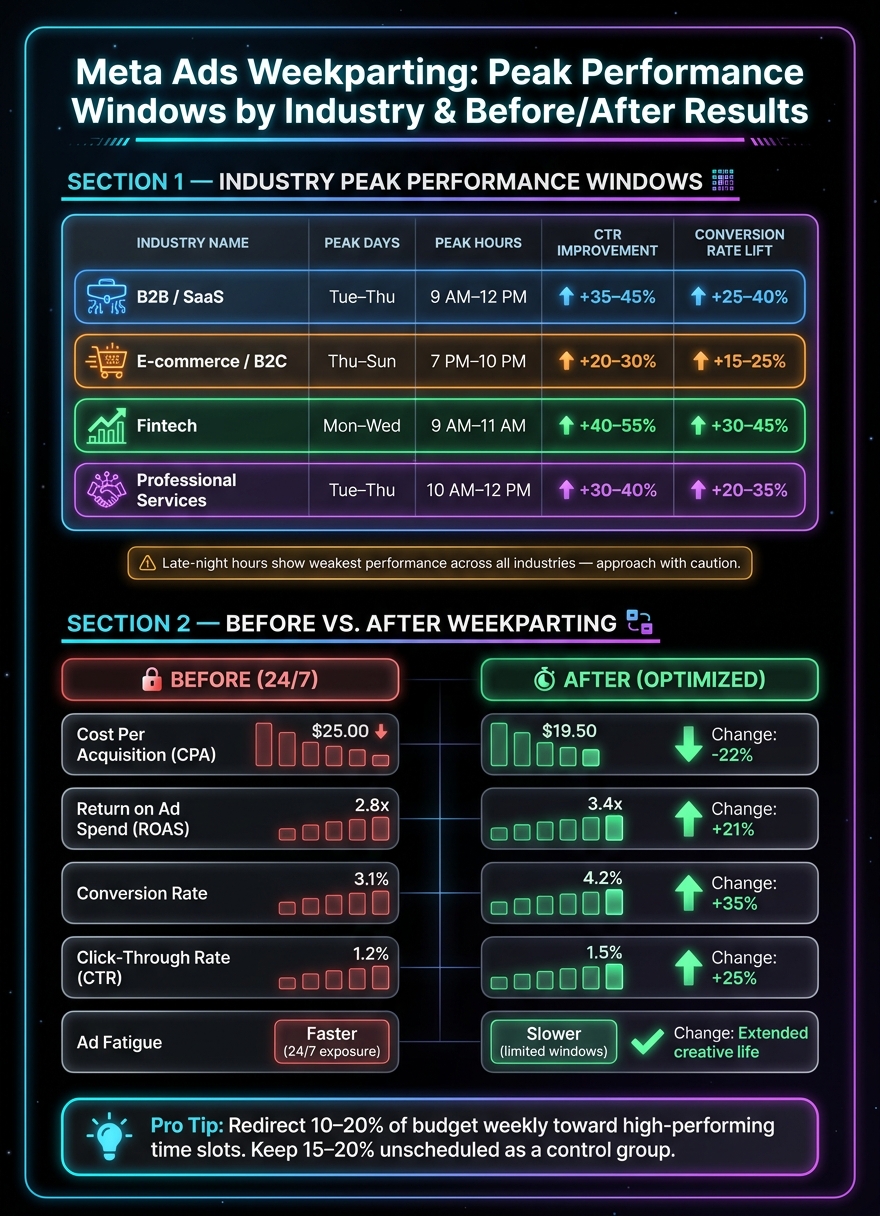
Meta Ads Weekparting: Before vs. After Performance Results by Industry
Once you've gathered enough data, the next step is turning that information into a focused ad schedule that drives results.
Breaking Down Performance Data by Day and Hour
Start by comparing weekdays to weekends, then drill down into specific days and hours. This top-down approach keeps you from getting overwhelmed by unnecessary details early on.
Match your conversion rate (CVR) and cost per acquisition (CPA) with five standard time blocks. Look for consistent trends over time rather than isolated spikes. For example, a time block that consistently delivers a low CPA over several weeks is far more impactful than a single standout period.
Pay attention to situations where click-through rates (CTR) and CVR don’t align. High CTRs paired with low CVRs during late-night hours often indicate casual scrolling, where users browse without serious intent to purchase. On the other hand, mid-morning hours (9:00 a.m. to 12:00 p.m.) are typically more productive for B2B campaigns. Leads generated during this window have shown a 35% higher conversion rate in post-lead nurturing flows compared to other times.
You can also experiment with "shoulder windows" by scheduling ads 30–60 minutes before peak periods. This approach helps you grab attention before competitors flood users' feeds with their ads.
Use these insights to fine-tune your strategy for specific audience segments.
Analyzing Trends by Audience and Campaign Objective
Your audience type and campaign goals can significantly impact performance trends.
For B2B campaigns, mid-mornings (9:00 a.m. to 12:00 p.m.) from Tuesday through Thursday tend to generate better engagement. Fridays, however, often see a drop-off.
In e-commerce, evenings (7:00 p.m. to 10:00 p.m.) from Thursday through Sunday are prime times. During these hours, users are more relaxed and ready to shop.
Brands in the fitness and wellness space often see spikes in conversions during early mornings (6:00 a.m. to 8:00 a.m.) and early evenings (6:00 p.m. to 9:00 p.m.), when people are planning or revising their routines.
Beyond these general patterns, platform and device usage can also refine your timing strategy. For instance, Instagram engagement tends to peak in the evening, while Facebook activity often rises during lunch hours. If you're running ads across multiple platforms, make sure to segment your data by platform before drawing conclusions.
"The playbook that worked in 2023 won't cut it in 2026. Students discover programs on their phones but complete applications on desktops." – Hadis Mohtasham, Marketing Manager, CUFinder
Evening mobile engagement might look promising, but you could miss that desktop conversions are happening at entirely different times. Always segment your timing data by device type for a clearer picture.
Performance by Day and Hour: Comparison Table
The table below highlights performance benchmarks for different industries and time blocks. While your specific data may differ, these patterns provide a useful starting point.
| Industry | Peak Performance Windows | Avg. CTR Improvement | Conversion Rate Lift |
|---|---|---|---|
| B2B / SaaS | Tue–Thu, 9 a.m.–12 p.m. | 35–45% | 25–40% |
| E-commerce (B2C) | Thu–Sun, 7 p.m.–10 p.m. | 20–30% | 15–25% |
| Fintech | Mon–Wed, 9 a.m.–11 a.m. | 40–55% | 30–45% |
| Professional Services | Tue–Thu, 10 a.m.–12 p.m. | 30–40% | 20–35% |
Late-night hours generally show the weakest performance across industries. While lower competition might reduce CPMs, the trade-off is often lower conversion intent and higher CPAs. Many advertisers are now using AI to lower CPA by identifying these inefficiencies automatically. Unless your data suggests otherwise, this period should be approached cautiously.
These benchmarks highlight how thoughtful scheduling can make a big difference in the success of your Meta ad campaigns.
Using AI to Make Better Weekparting Decisions
AI takes the guesswork out of weekparting by pinpointing the best time slots for your ads with speed and accuracy. Instead of manually reviewing hourly campaign data - a slow and error-prone process - AI tools analyze massive amounts of data in record time, revealing patterns that lead to higher conversions.
How AI Spots Trends Faster Than Manual Review
AI tools excel at analyzing engagement data across platforms like Facebook, Instagram, Messenger, and Audience Network - all at once. They can identify recurring high-conversion windows across multiple campaigns in just minutes, compared to the hours it would take manually. These tools also optimize ad schedules every 15 minutes, offering an edge over Meta’s native 30-minute update cycle.
What’s more, AI can distinguish between two critical metrics: high-engagement windows (when users are active) and high-intent windows (when users are most likely to convert). These don’t always overlap, and spotting the difference can make or break your results. AI also uses anomaly detection to flag unexpected changes, like sudden spikes in spend or performance drops, in real time. This is especially helpful during overnight or low-traffic periods when manual monitoring isn’t feasible. The result? Smarter, actionable adjustments to your ad schedule.
How to Use AI Tools to Refine Your Weekparting Schedule
Start by connecting your Meta Ads data to an AI platform. These tools centralize performance insights, identifying the time blocks that drive the most conversions and offering recommendations to fine-tune your schedule.
For a no-cost option, Meta’s built-in Opportunity Score is a solid starting point. Following its suggestions has helped advertisers achieve a median 5% reduction in cost per result. For larger budgets, paid tools like Madgicx (from $31/month) and Revealbot go further. They use predictive bidding algorithms to estimate hourly conversion probabilities, ensuring your ad spend is focused on the most lucrative time slots. If your monthly budget exceeds $5,000, this level of granularity can significantly improve your results.
When shifting your budget, take it slow. Redirect 10–20% of your ad spend each week toward high-performing time slots. At the same time, keep 15–20% of your budget unscheduled as a control group. This approach ensures you can measure whether the AI-driven changes are genuinely improving performance or simply reflecting seasonal trends.
The results speak for themselves: advertisers using AI-driven budget reallocation have reported a 30% reduction in cost per conversion and a 33% boost in ROI.
One thing to keep in mind: AI tools typically need two to four weeks of historical data to generate reliable recommendations. If your campaign has less than 30 days of data, you risk basing decisions on patterns that aren’t yet stable. Patience pays off when it comes to leveraging AI for weekparting.
How to Set Up Weekparting in Meta Ads Manager
Setting Up Scheduled Delivery Windows
To use ad scheduling in Meta Ads Manager, you’ll need to set your campaign to a Lifetime Budget. If you're using a Daily Budget, the scheduling option won’t be available.
Once you’ve confirmed the budget type, follow these steps to schedule Meta ads for weekparting:
- At the Campaign Level: Start by creating a new campaign or editing an existing one. Make sure the budget type is set to Lifetime Budget.
- At the Ad Set Level: Navigate to the "Budget & Schedule" section and click "Show more options."
- Enable Ad Scheduling: In the "Ad Scheduling" section, click "Edit" and check the box for "Run ads on a schedule."
- Build Your Weekly Grid: Use the hour-by-hour grid to select the time blocks when you want your ads to run. Avoid scheduling very short windows (less than a couple of hours per day), as Meta’s algorithm needs enough delivery volume to optimize performance effectively. Tight schedules can hinder results.
- Set the Time Zone: If you’re targeting audiences across multiple regions, choose "Use viewer's time zone." This ensures your ads will align with the local time of your audience rather than your account’s time zone.
For best results, avoid making changes to the schedule during the early learning phase. Adjustments during this period can disrupt optimization and lead to skewed outcomes.
To make your ads more engaging, tailor the messaging to fit the scheduled time blocks. For example, a morning ad could say, "Start your morning right," while an evening ad might go with, "Wind down with something worth it." These small tweaks can boost click-through rates (CTR) without needing to alter your audience or budget.
Once your weekparting schedule is live, test and measure its impact to fine-tune your approach.
Testing and Measuring Weekparting Changes
Weekparting can significantly improve ad performance, but proper testing is essential. Make timing the only variable in your tests - keep everything else (creative, audience, and budget) consistent.
Here’s a step-by-step framework for testing:
- Establish a Baseline: Run your ads 24/7 for 14 days. Use the Breakdown tool in Ads Manager (Breakdown → By Time → Hour or Day) to identify which time blocks yield the lowest CPA and highest ROAS.
- Form a Hypothesis: Based on your data, pick two or three time blocks to focus on.
- Implement the Schedule: Apply the selected schedule to a duplicate campaign while keeping all other variables the same.
- Evaluate Performance: After running the scheduled campaign for 7–14 days, compare its results to the baseline.
Start by testing broader timeframes, like weekdays versus weekends, to identify general patterns. Once you have a clearer picture, narrow your focus to specific hours. Be patient - look for consistent trends over the full test window rather than reacting to a single strong day.
To protect your budget, set automated rules. For example, you can configure a rule to pause ads automatically if the CPA exceeds your target during certain hours. This ensures you’re not overspending without constant monitoring.
Before and After Weekparting: Results Comparison Table
Here’s what advertisers often experience when switching from always-on delivery to a carefully optimized weekparting schedule:
| Metric | Before Weekparting (24/7 Delivery) | After Weekparting (Optimized Blocks) | Change |
|---|---|---|---|
| Cost Per Acquisition (CPA) | $25.00 | $19.50 | -22% |
| Return on Ad Spend (ROAS) | 2.8x | 3.4x | +21% |
| Conversion Rate | 3.1% | 4.2% | +35% |
| Click-Through Rate (CTR) | 1.2% | 1.5% | +25% |
| Ad Fatigue | Faster (24/7 exposure) | Slower (limited daily windows) | Extended creative life |
The 22% drop in CPA highlights the benefit of avoiding low-intent hours, while the 25% boost in CTR shows that ads feel more relevant when timed right. Plus, the slower ad fatigue means your creatives stay effective longer, giving you more value from each asset.
Conclusion: Get More from Your Meta Ad Spend with Weekparting
Weekparting isn’t a quick fix - it’s a methodical strategy that requires discipline. But the payoff is clear: advertisers who implement it thoughtfully can see ROAS improve by 10–20% and significant drops in CPA, all driven by data-backed decisions.
Here’s the process in a nutshell: Start by collecting baseline data. Analyze performance by day and hour to pinpoint your top-performing time slots. Then, use this data to create a weekparting schedule in Meta Ads Manager, leveraging the Lifetime Budget feature. This aligns perfectly with Meta ads automation and historical insights, as mentioned earlier.
Be cautious, though. Over-segmenting your data can hinder optimization, and failing to update your schedule regularly can lead to missed opportunities. Consumer behavior evolves with the seasons, holidays, and even device usage trends, so it’s wise to revisit your schedule at least every quarter.
"Time-based optimization won't fix a bad offer. But if your fundamentals are strong, it can take good performance and make it great." - Leadenforce
The key to success is treating weekparting as an ongoing process. Start broad, narrow your focus based on consistent trends, and always keep a small portion of your budget active outside peak windows to capture unexpected conversions. Gradually shifting 10–20% of your budget toward high-performing time slots ensures more consistent results than making drastic changes. Regularly refine your approach to stay in sync with your audience’s changing habits.
FAQs
Will weekparting reset my campaign learning?
No, using weekparting with AI-driven bid adjustments won’t automatically reset your campaign’s learning phase. This method allows your campaign to stay active and maintain its learning progress, ensuring it continues to perform effectively.
How do I weekpart if I use a Daily Budget?
To allocate a daily budget effectively for Meta ads throughout the week, you’ll need to rely on automation rules, since the platform’s native scheduling only works with lifetime budgets. With automation rules, you can pause and resume campaigns or ad sets during specific timeframes. This allows you to concentrate your budget on periods when conversions are most likely, while pausing ads during less effective times. Be sure to regularly review and fine-tune these rules to ensure they’re functioning as intended and boosting your ad performance.
How should I handle different time zones?
When running Meta ads, handling time zones effectively can make or break your campaign's performance. A smart way to do this is by creating separate campaigns or ad sets for each major time zone. Alternatively, you can leverage Meta's built-in tools to automatically adjust ads for local times.
Here’s how to make it work:
- Pinpoint peak activity times: Research when your target audience in each region is most active online.
- Schedule ads to match local times: Align your ad schedules with these peak hours to ensure maximum visibility.
- Keep an eye on performance: Regularly monitor results and tweak your scheduling to further optimize delivery.
By running ads at the right time for each audience, you can boost conversions while avoiding unnecessary ad spend.
Your next ad batch starts here
Finish with a ready-to-test ad batch
Paste your website to generate static creatives. Drop the link → get ads in about 90 seconds → upload them to Meta → scale.
Free to try No prompt writing