Meta Ads Location Targeting Explained: Living In vs Recently In vs Traveling
Turn the strategy into creatives
Create Meta ads for your product
Paste your product page. ADEN'S LAB turns the offer, audience, and positioning into complete ready-to-use Meta static ads.
Free to try No prompt writing

When setting up Meta Ads, location targeting is key to reaching the right audience. Meta offers three options:
- Living In: Targets people who live in your selected area. Ideal for local businesses like dentists or gyms.
- Recently In: Focuses on people recently present in the area, including visitors and commuters. Best for time-sensitive promotions or events.
- Traveling: Targets tourists more than 125 miles from home. Perfect for hotels, car rentals, or local attractions.
By default, Meta combines residents and visitors into one audience, which may not suit all campaigns. To refine targeting, switch to manual vs automated ad creation for better control.
Quick Comparison
| Targeting Mode | Audience | Best For | Limitations |
|---|---|---|---|
| Living In | Local residents | Local services, schools, politics | Smaller audience size |
| Recently In | Visitors & commuters | Events, restaurants, retail | May include low-intent users |
| Traveling | Tourists | Hotels, attractions, car rentals | Smaller, highly specific audience |
Choosing the right option ensures your ads reach the audience most likely to convert.
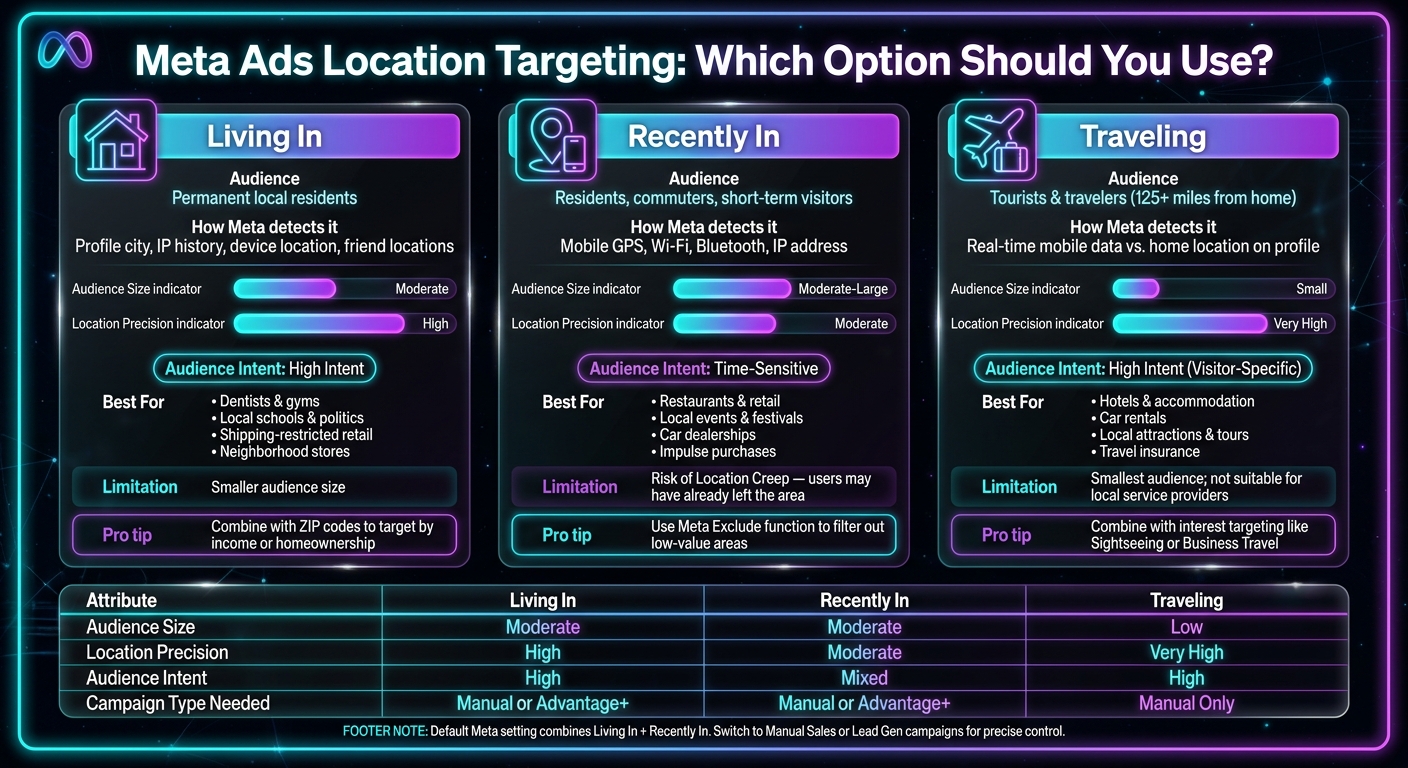
Meta Ads Location Targeting: Living In vs Recently In vs Traveling
How Powerful Is Facebook Ads Location Targeting?
Put the playbook to work
Apply this playbook to your page
Paste your website and the Lab will turn the strategy you are reading into a ready-to-test ads.
Free to try No prompt writing
1. Living In
The "Living In" targeting option focuses on users who actually reside in your chosen area.
Meta determines this using various signals, such as the "Current City" information on user profiles, IP history, device location, and even the stated locations of their friends. These data points help Meta accurately identify residents.
This targeting approach works especially well for businesses that thrive on repeat local customers - think dentists, gyms, or neighborhood stores. As Meta Ads Strategist Jon Loomer points out:
"Think about the things that only mean something to a resident. If you're visiting a city, your kids won't go to school there. You won't vote for their elected officials. Paying to reach those people is a waste of money."
For even more precision, you can combine the "Living In" option with specific ZIP codes. This can serve as a useful proxy for targeting areas with higher household income or homeownership rates. If you don't see the "Living In" option available, it’s possible Meta has defaulted to an Advantage+ campaign. To regain detailed location targeting, switch to a manual sales or lead generation campaign using Meta ads automation.
Up next, we’ll explore the "Recently In" option, which can further refine your audience targeting.
2. Recently In
The "Recently In" setting focuses on individuals whose most recent recorded location is within your chosen area, regardless of whether they live there or not. As Tim Burd, Founder of AdLeaks, explains:
"Recently in this location... is determined only via a mobile device."
This option relies heavily on mobile data signals - like GPS, Wi-Fi, Bluetooth, and IP addresses - to pinpoint where someone was most recently. While this approach effectively captures recent activity, it comes with its own challenges.
The main tradeoff here is reach versus precision. "Recently In" can capture a broader audience, including commuters, tourists, or event attendees. However, this wider reach means you might also target people who were just passing through - what’s often referred to as "Location Creep". This happens when a user's last detected signal was inside the target area, but they’ve since moved on. To minimize wasted impressions, you can use Meta's Exclude function to filter out low-value areas.
This targeting option works particularly well for time-sensitive campaigns, such as promoting local events, festivals, or attracting recent visitors to car dealerships.
Looking ahead to 2025–2026, Advantage+ campaigns will automatically default to a combined "Living in or recently in" setting. To specifically target this audience, consider using manual sales or lead generation campaigns instead. Up next, we’ll explore another targeting option to help refine your campaign strategy further. For more insights on improving performance, check out these Meta ad optimization answers.
3. Traveling
The "Traveling" option takes targeting a step further by focusing on people who are currently in your selected area but live more than 125 miles away from it. This approach is ideal for businesses looking to connect with visitors rather than locals.
As Tim Burd, Founder of AdLeaks, explains:
"People traveling in this location includes people traveling in the selected area... who are more than 125 miles from their home location. This is best used in advertising rental cars and accommodation."
Meta identifies travelers by comparing real-time mobile data with the home location listed on user profiles. If someone's home address is over 125 miles away from their current location, they qualify as a traveler. This makes "Traveling" a more refined subset of the "Recently In" category, automatically excluding locals and nearby commuters.
This targeting option is especially effective for businesses like hotels, car rentals, local attractions, tour operators, and event organizers - essentially, any service or product that appeals to people away from home. To maximize impact, try combining the "Traveling" setting with interest-based categories like "Sightseeing" or "Business Travel." Additionally, using proven ad copy frameworks that directly addresses visitors - such as "Exploring New York City?" - can make your ads feel more relevant and engaging.
However, this setting isn't suitable for local service providers like dentists, gyms, or plumbers, as these businesses are unlikely to appeal to someone just passing through. Also, keep in mind that if you're using Advantage+ campaigns, the default targeting ("Living in or recently in") will need to be manually adjusted to access the "Traveling" option. This means you'll need to switch to a manual sales or lead generation campaign for finer control.
Next, let’s weigh the pros and cons of this targeting method against other options.
Pros and Cons of Each Targeting Mode
Here’s a quick rundown of the strengths and weaknesses of each targeting mode to help you decide which one aligns with your campaign goals:
Living In focuses on people whose permanent address is within your target area. This is perfect for businesses like dentists, gyms, or plumbers that rely on local customers. However, the trade-off is a smaller audience, which might not work for campaigns needing a broader reach.
Recently In casts a wider net, targeting residents, commuters, and short-term visitors. This makes it great for time-sensitive promotions or businesses that thrive on high foot traffic. Using strategic ad scheduling can further optimize these time-sensitive promotions. The downside? You lose some precision. As Jon Loomer, Founder of Jon Loomer Digital, explains:
"If location targeting includes people who were 'recently in' this location, you will spend money on people who visited there recently but aren't eligible for shipping."
Traveling is ideal for targeting tourists, offering accuracy in reaching people currently traveling through your area. However, its audience size is typically smaller, and it requires a manual sales or lead generation campaign instead of Advantage+.
Here’s a side-by-side comparison to help you decide:
| Targeting Mode | Audience Intent | Audience Size | Location Precision | Best-Fit Campaign Goals |
|---|---|---|---|---|
| Living In or Recently In | Mixed (Residents & Visitors) | Maximum | Low | Brand awareness, large-scale events, general retail |
| Living In | High (Local Residents) | Moderate | High | Local services, schools, politics, shipping-restricted retail |
| Recently In | Time-Sensitive (Visitors) | Moderate | Moderate | Restaurants, car dealerships, impulse retail, tourist attractions |
| Traveling | High (Tourists/Travelers) | Low | Very High | Hotels, rental cars, travel insurance, regional tourism |
Picking the right targeting mode from the beginning is one of the easiest ways to make sure your ad budget reaches the right audience - those who are most likely to convert.
Conclusion
Understanding the different location targeting modes can sharpen your campaign strategy and make your ads more effective. Use Living In to focus on retaining local customers, while Recently In works best for time-sensitive campaigns targeting people who were physically present in your area. The Traveling option is perfect for businesses like hotels, car rentals, and tourist attractions, as it targets users whose permanent residence is over 125 miles away.
Steer clear of the default mixed setting, which often drains your budget on users with low intent. As industry experts point out, ignoring location-specific targeting can lead to wasted ad spend. This is a critical step to reduce your CAC and improve overall ROI.
If you need precise targeting with Living In or Traveling, opt for manual sales campaigns instead of relying on Advantage+.
FAQs
How do I enable “Living In” in Meta Ads?
To turn on the "Living In" option, head to the location targeting settings in Facebook Ads Manager. When creating or editing an ad set, enter the location you want in the Locations field. Then, open the drop-down menu to find advanced options. Select "People who live in this location" under the Everyone in this location category. This ensures your ads target users who have their home in the chosen area.
What time window counts as “Recently In”?
The “Recently In” option in Meta Ads is designed to target individuals whose most recent location was within a specified area. This typically includes people who have been in that location within the last few hours or days. It’s a handy tool for businesses aiming to connect with those who recently visited or passed through a particular spot.
Can I exclude locals when targeting “Traveling”?
In Meta Ads Manager, you can fine-tune your audience by excluding locals while targeting travelers. This is possible through location exclusions. By setting these exclusions at the ad set level, you can filter out specific areas or residents, ensuring your ads are shown only to people who are traveling. It's a simple adjustment that helps you focus your campaign on the right audience.
Your next ad batch starts here
Finish with a ready-to-test ad batch
Paste your website to generate static creatives. Drop the link → get ads in about 90 seconds → upload them to Meta → scale.
Free to try No prompt writing