Meta Ads City Radius Targeting: Minimum Radius, Exclusions, and Budget Splits
Turn the strategy into creatives
Create Meta ads for your product
Paste your product page. ADEN'S LAB turns the offer, audience, and positioning into complete ready-to-use Meta static ads.
Free to try No prompt writing

Want to make your Meta Ads more effective? City radius targeting helps you focus your budget on the right audience by narrowing down ad delivery to specific geographic areas. Instead of wasting money on irrelevant locations, you can target users within a defined perimeter, exclude unprofitable zones, and even split budgets across multiple radii using AI budget allocation for better performance.
Key Takeaways:
- Radius Options: Target areas from 1 to 50 miles in the U.S. (1 to 70 km internationally).
- Exclusions: Remove unwanted locations (e.g., competitors, unserviceable zones).
- Budget Splits: Allocate funds by radius size to maximize returns.
- User Location: Meta uses GPS, IPs, and profile data for accuracy, but results aren't 100% precise.
- Best Practices: Start with a smaller radius (e.g., 1–5 miles for foot traffic), refine based on results, and ensure a minimum audience size of 20 people.
By leveraging city radius targeting, you’ll improve ad relevance, lower costs, and boost your campaign’s ROI.
City Radius Targeting Basics
How City Radius Targeting Works
City radius targeting allows you to draw a virtual boundary around a specific point on a map - this could be an address, a city center, or even a manually placed pin. Ads are then served exclusively to users within that defined area. Using Meta Ads Manager, you simply input a location and adjust the radius with a slider to set the exact size of your target zone.
Meta provides four targeting options:
- People living in or recently in this location: The default and broadest setting.
- People living in this location: Focuses on permanent residents based on their profile and device data.
- People recently in this location: Targets individuals whose most recent location data places them in the area, such as commuters or visitors.
- People traveling in this location: Targets users whose home address is more than 125 miles away.
Meta determines user location within your radius using tools like IP addresses, mobile location services, and profile information. However, they acknowledge some limitations:
"Meta technologies use a variety of signals to show ads to people who are within your location targeting selections. Due to signal variations, complete accuracy cannot be guaranteed." - Meta Business Help Center
Next, let’s break down the differences between city targeting, radius targeting, and exclusions to help you fine-tune your campaigns.
City Targeting vs. Radius Targeting vs. Exclusions
While these three options might seem similar, they serve distinct purposes. City targeting works within the official boundaries of a municipality, making it ideal for broader campaigns. Radius targeting, on the other hand, gives you the flexibility to define a custom area around a specific point, offering much greater precision. Exclusions, as the name suggests, remove specific areas from your targeting zone, allowing you to avoid locations that may not be relevant or cost-effective.
| Targeting Type | Shape & Precision | Best For | Setup Method |
|---|---|---|---|
| City Targeting | City boundary (moderate precision) | Regional awareness, multi-city campaigns | Type city name |
| Radius Targeting | Circle, 1–50 miles (high precision) | Local foot traffic, service areas | Type address or drop a pin |
| Location Exclusions | Any shape - city, ZIP, or radius (high precision) | Avoiding competitors or unserviceable zones | Select "Exclude" in location settings |
Understanding these distinctions is essential for setting up campaigns that align with your goals.
Minimum and Maximum Radius Limits
In the U.S., Meta enforces a minimum radius of 1 mile and a maximum radius of 50 miles. Internationally, the range extends from 1 km to 70 km. Importantly, radius targeting cannot cross national borders - if you place a pin near the Canadian or Mexican border, the circle will stop at the country line.
Meta also enforces a minimum audience size. Your campaign won’t run unless it includes at least 20 people. This can be a challenge in low-density or rural areas with tight radii, such as 1 mile. For the best results, aim for an audience size exceeding 1,000 people, especially when applying additional filters like demographics or interests. This ensures your ads are both cost-effective and reach the most relevant audience.
"Radius targeting on Facebook Ads lets you reach people within 1 to 50 miles (or 1 to 70 km internationally) of any address." - Coinis Editorial Team
Put the playbook to work
Apply this playbook to your page
Paste your website and the Lab will turn the strategy you are reading into a ready-to-test ads.
Free to try No prompt writing
Facebook Ads Location Targeting: How to Set Radius Smaller Than 17km
How to Set the Minimum Radius for Your Campaigns
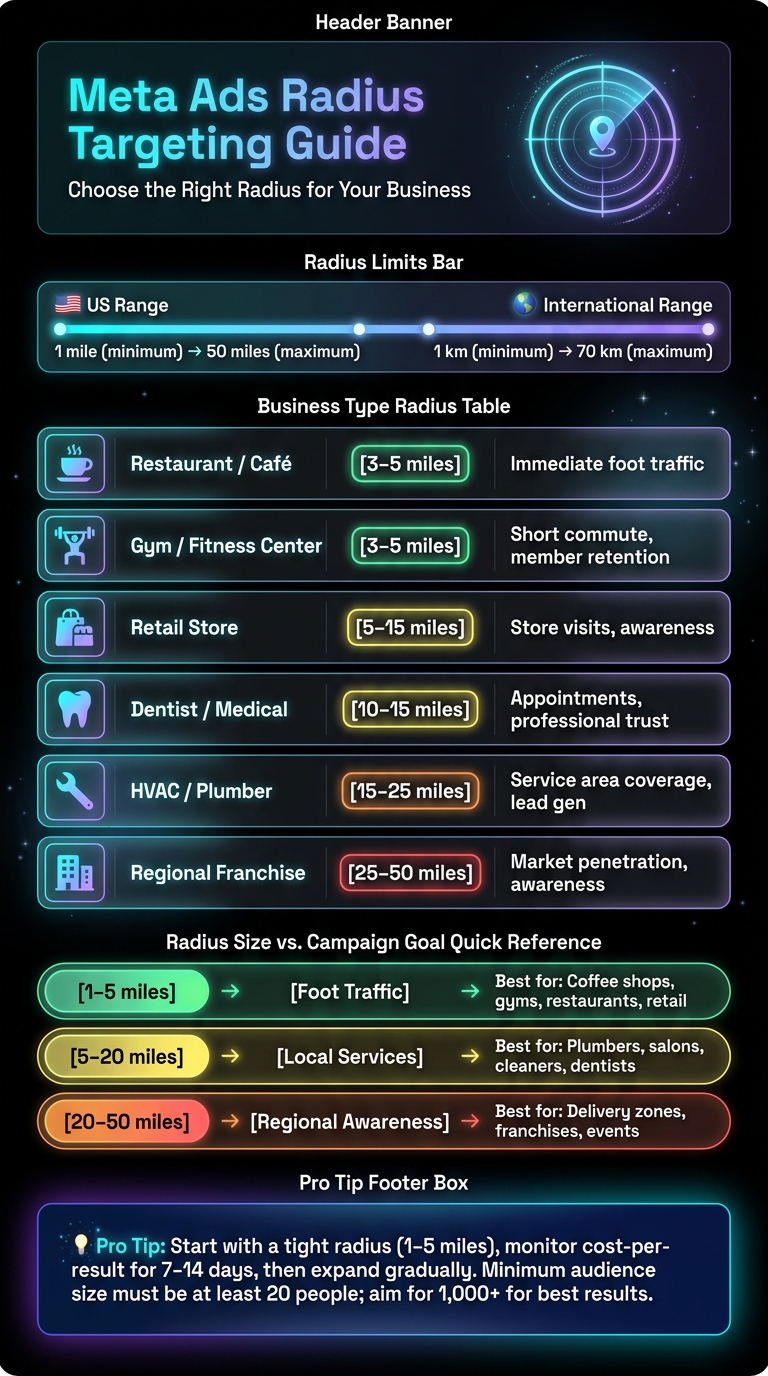
Meta Ads Radius Targeting: Business Type vs. Recommended Radius Cheat Sheet
Let’s dive into how to set and adjust the minimum radius for your campaigns in Meta Ads Manager, building on the basics of city radius targeting.
Choosing a Location for Radius Targeting
Meta Ads Manager gives you two ways to set your center point. You can either type in an address, city name, or place directly into the location search bar, or use the Drop Pin tool. The Drop Pin option is especially handy for targeting smaller towns or rural areas that might not show up in Meta's database. For instance, if you’re focusing on a suburban area outside a major city that doesn’t appear in search results, just drop a pin in the center of that location and define your radius from there.
After setting your center point, you’ll need to pick the right location relationship based on your goals. For businesses like dentists or plumbers, "People living in this location" is ideal. On the other hand, "People recently in this location" is better if you want to capture visitors or commuters passing through.
Once your location is set, it’s time to fine-tune the radius.
Adjusting the Radius in Meta Ads Manager
The radius settings are located at the Ad Set level, in the Audience section. Here’s how to make adjustments:
- Step 1: Open your Ad Set and scroll to the Audience section to find the Locations field.
- Step 2: Use the search bar or Drop Pin tool to select your location.
- Step 3: Click on the radius label to open a slider, then drag it to adjust the radius between the 1-mile minimum and 50-mile maximum.
- Step 4: Check the map overlay to ensure it matches your service area, then save your settings.
Double-check that the shaded area on the map reflects your actual service zone. If the radius spills into areas you don’t serve - like a neighboring county or a large body of water - reduce it accordingly.
Once you’ve fine-tuned the radius, review your audience size to make sure it aligns with your campaign goals.
Tips for Setting the Right Minimum Radius
One common mistake is starting with a radius that’s too large. A bigger radius can lead to wasted impressions, which ultimately increases your cost per result. To optimize your spend, you can use AI tools for Meta Ads to refine targeting and creative performance. By keeping the radius smaller, you ensure your budget is spent on reaching the right people.
"A 1-to-5-mile radius works best for driving walk-in traffic. Tight radius means your budget goes only to people who can actually show up today." - Coinis Editorial Team
The ideal radius depends on your business type. For example, a coffee shop typically needs no more than 3–5 miles, while an HVAC company might need 15–25 miles to cover its service area. Here’s a quick reference table to help guide you:
| Business Type | Recommended Radius | Primary Goal |
|---|---|---|
| Restaurant / Café | 3–5 miles | Immediate foot traffic |
| Gym / Fitness Center | 3–5 miles | Short commute, member retention |
| Retail Store | 5–15 miles | Store visits, awareness |
| Dentist / Medical | 10–15 miles | Appointments, professional trust |
| HVAC / Plumber | 15–25 miles | Service area coverage, lead gen |
| Regional Franchise | 25–50 miles | Market penetration, awareness |
A good strategy is to start small and expand gradually. Begin with a tighter radius and monitor your cost-per-result over 7–14 days. If the data suggests you’re missing opportunities, then consider widening the radius. This is also a prime time to scale winning creatives to ensure your expanded audience sees high-performing content. However, if a very tight radius results in an audience size below 1,000 people, look at loosening demographic or interest filters first. Let the location targeting do most of the work before broadening your geographic reach.
Excluding Overlapping or Unwanted Areas
Even with a carefully chosen radius, your targeted area might still spill into places you didn’t intend - like a nearby city, an industrial zone, or a suburb outside your service range. This is where location exclusions come into play.
How to Add location exclusions in Meta Ads
You’ll find exclusions in the Ad Set level under the Audience section. Once you’ve added your target location, look for the "Exclude" option. Here, you can enter a city, state, ZIP code, or use the Drop Pin tool to create a custom exclusion radius. Keep in mind, the exclusion radius must be between 1 mile and 50 miles.
A useful tactic is the "Swiss Cheese" strategy - start by selecting a broad inclusion area, like a 25-mile radius around your city center, and then exclude specific neighborhoods or ZIP codes that fall outside your service zone. For instance, if your HVAC business serves most of the Dallas metro but not Denton County, exclude Denton directly instead of shrinking your entire radius.
"Exclusions are probabilistic, not absolute. A small share of users from excluded areas may still see your ads. That's a platform-level limitation, not a settings error on your end." - Jon Loomer Digital
This approach helps refine your targeting while keeping your ad spend focused on the right audience.
When to Use Location Exclusions
Exclusions are crucial when your service area needs precise boundaries. Here are a few situations where they make sense:
- A local plumber whose 15-mile radius unintentionally includes a city they don’t serve.
- An e-commerce brand targeting the lower 48 states but excluding Alaska and Hawaii due to high shipping costs.
- A retailer running separate ad campaigns for Austin and San Antonio, ensuring their audiences don’t overlap.
You can also use the Drop Pin tool to place a 1-mile exclusion directly on a competitor’s storefront. This prevents your ads from reaching users already in your rival’s immediate vicinity.
Handling Overlapping Locations
When inclusion and exclusion areas overlap, Meta gives priority to exclusions. This ensures that users in excluded zones won’t see your ads. However, keep an eye on your audience size - too many exclusions can reduce your pool below the minimum threshold, driving up CPM (which may require real-time bid adjustments). If CPM spikes after applying exclusions, consider widening your inclusion area instead of removing exclusions altogether.
Splitting Budgets Across Multiple City Radii
Building on strategies like precise radius targeting and exclusions, splitting campaigns by radius can help fine-tune how budgets are allocated.
When to Split Campaigns by Radius
You should split campaigns when performance metrics vary significantly by location. For example, if a 2-mile downtown radius delivers a 4.5× ROAS but a 20-mile suburban radius only achieves 2.0× ROAS, combining the two can dilute your results. Meta's algorithm may prioritize cheaper, less valuable impressions in suburban areas, pulling budget from the high-performing urban core. By separating these zones, you can allocate budgets more effectively to each market segment.
This approach works on a local scale, too. For instance, a downtown Chicago radius and a surrounding 40-mile suburban ring represent two very different economic landscapes. Treating them as distinct campaigns allows for tailored targeting and budget control.
How to Structure Ad Sets for Multiple Radii
Create one ad set for each radius tier within a single campaign. This keeps your campaign objective consistent while giving you control over budgets at the ad set level. It also aligns with earlier recommendations on precise radius targeting, ensuring each segment operates independently.
To avoid overlap, exclude smaller-radius zones from larger-radius ad sets. For example, exclude a 5-mile radius from a 20-mile ad set.
For clarity, use a standardized naming convention like State_City_Radius_Objective. Examples include TX_Austin_5mi_Traffic or TX_Austin_20mi_Awareness. This makes reporting and budget adjustments across multiple locations much easier.
Budget Allocation Best Practices
Adopt a tiered budgeting approach:
- 60–70% for radii that are already profitable.
- 20–30% for new radius sizes you're testing.
- 10% for experimental ideas like competitor targeting or hyper-local events.
When scaling successful radii, scale Meta ads effectively by increasing budgets gradually - about 20% every 3–4 days. Avoid sudden jumps, like doubling budgets overnight, as this can disrupt Meta's learning phase and impact delivery consistency.
If a radius underperforms for five consecutive days, pause it. Reallocate its budget using automated CPA threshold rules in Meta Ads Manager.
"The gap between profitable Meta advertisers and those stuck in the red often comes down to one critical difference: strategic budget allocation." - AdStellar
These strategies set the stage for tracking and optimizing performance across different radii effectively.
Reviewing Audience Size and Delivery Metrics
Using Audience Estimates in Meta Ads
Meta Ads provides a real-time audience size estimate before launching a campaign. This feature allows you to adjust parameters like location, radius, and demographic filters to refine your target area. However, campaigns must meet a minimum audience size of 20 people. If your audience is too small for your budget, ad frequency can skyrocket, surpassing six weekly impressions. This often leads to reduced engagement and higher costs. A simple fix? Slightly expand your radius if your audience feels too limited for your spending level.
"A tight audience means higher frequency, which builds local brand recognition faster on a small budget." - Coinis Editorial Team
How Radius Size Affects Reach and Delivery
The size of your targeting radius directly impacts how your ads perform. A smaller radius focuses on fewer unique users, resulting in higher ad frequency. While this can quickly boost local brand recognition, it also risks audience fatigue. On the other hand, a larger radius lowers frequency but may dilute relevance, potentially hurting conversion rates.
It's worth noting that city-level targeting isn't entirely precise. IP geolocation accuracy for cities is around 66%. This means some impressions might stray outside your intended area due to factors like VPNs, ISP routing, or users traveling between locations. To track this, use the Breakdown → Geography tool in Ads Manager. This gives you a clearer picture of where your budget is going, rather than relying on comments or anecdotal observations.
Here's a quick guide to how radius sizes align with campaign goals:
| Radius Size | Typical Goal | Best For |
|---|---|---|
| 1–5 miles | Foot traffic | Coffee shops, gyms, restaurants, retail |
| 5–20 miles | Local services | Plumbers, salons, cleaners, dentists |
| 20–50 miles | Regional awareness | Delivery zones, regional franchises, events |
This balance of reach and frequency is critical for aligning campaign goals with audience targeting.
Balancing Precision and Reach
The key to effective targeting lies in balancing precision with broader coverage. A practical strategy is to start tight and expand gradually. Begin with a 5–15 mile radius to establish local relevance. If costs climb or ad frequency becomes excessive, consider widening the radius. Use the Geography breakdown in Ads Manager to analyze cost-per-result by radius rather than relying on overall campaign metrics.
When working with a very small radius, avoid overloading your campaign with too many interest or demographic filters. Over-layering can shrink your audience below 1,000 people, making it hard for Meta's algorithm to optimize. For hyper-local campaigns, disable the "location expansion" option in Ads Manager. This ensures your ads are shown to people who actually live in your target area, not just those who express interest in it.
Finally, make your ad copy work harder for you. Use location-specific language like "Serving Austin homeowners" to pre-qualify your audience. Even if targeting isn't perfect, this approach helps weed out irrelevant clicks before they cost you money.
Conclusion and Key Takeaways
Recap of Key Strategies
Using city radius targeting is a smart way to ensure your ad budget focuses on the right audience. Stick to the 1-mile minimum and 50-mile maximum radius, aligning it with your actual service area. This approach forms the backbone of any successful local campaign.
Don't overlook exclusions - they're just as important. By excluding less valuable areas, you can keep your spending focused on users who are more likely to convert. For campaigns covering multiple cities or neighborhoods, splitting ad sets by radius gives you better control over budgets and helps pinpoint which zones deliver the best cost per lead.
"Precision is the name of the game with paid ads, and location exclusion is a fundamental tactic." - Graphed
For service-based businesses, the "People living in this location" setting is your go-to option. It filters out tourists and commuters, ensuring your ads reach people who are more likely to become long-term customers.
These strategies lay the groundwork for more refined targeting. With these basics in place, you're ready to take actionable steps to further enhance your campaign.
Next Steps to Take
Start by analyzing your CRM data to find the ZIP codes where 80% of your customers are located. Then, target a 10–15 mile radius around that cluster. Data-driven targeting like this increases the chances of reaching people ready to convert. Use the Breakdown → By Delivery → Region report in Ads Manager to identify underperforming areas and exclude them.
If you haven't already, try splitting your top-performing city into its own campaign. Micro-geo testing - isolating cities - can reveal the true performance of specific locations. Update your ad creative every two weeks and keep an eye on frequency. If it exceeds 4.0 within ten days, consider expanding your radius or rotating your ads to keep the audience engaged.
FAQs
How do I pick the best radius for my business?
When setting up your ad campaigns, it's essential to choose a radius that fits your service area and audience. For most local businesses in the U.S., a range between 1 to 50 miles works well.
To get started, open Meta Ads Manager and drop a pin on your business location. Then, use the radius slider to adjust the coverage area. If your campaign is focused on a specific neighborhood or town, stick with a smaller radius. On the other hand, if you're targeting a broader region, expand the radius accordingly.
Make sure the radius accurately reflects your service or delivery zone. This way, you’ll avoid spending money on ads reaching people outside your operational area.
Why are my ads showing outside my radius?
Your ads might sometimes show up outside your intended radius because of how Meta handles location targeting. They often rely on broader data, like IP addresses or details from user profiles, which can slightly stretch beyond your specified area. To address this, make sure to define your radius precisely - using a drop pin can help. Additionally, set exclusions for areas you don’t want to target. These steps can help cut down on wasted ad spend and improve how accurately you reach your audience.
Should I split radii into separate ad sets or campaigns?
When you split radii into separate ad sets, you gain better control over budgets and performance tracking for each specific zone. This approach is perfect if you're looking for detailed optimization and want to manage how resources are allocated to different areas.
On the other hand, grouping multiple radii within a single campaign makes management easier. It allows Meta to handle delivery optimization across zones. However, this comes at the cost of reduced control over spending and fewer granular insights.
The choice comes down to your priorities: do you need precise control or streamlined management? Align your decision with your overall goals and strategy.
Your next ad batch starts here
Finish with a ready-to-test ad batch
Paste your website to generate static creatives. Drop the link → get ads in about 90 seconds → upload them to Meta → scale.
Free to try No prompt writing