Product Link to Ads: Generate Meta Ad Creatives Automatically From Any URL
Turn the strategy into creatives
Create Meta ads for your product
Paste your product page. ADEN'S LAB turns the offer, audience, and positioning into complete ready-to-use Meta static ads.
Free to try No prompt writing
Scaling Meta ads is hard when ad production slows you down. Most advertisers struggle not because of budget limits but because their ads lose effectiveness over time. The solution? Automate ad creation using product URLs.
Here's how it works:
- Drop a product or landing page URL into a system like Aden's Lab.
- The tool scans the page for images, text, and reviews.
- In under 90 seconds, it generates fully-formed ads for Meta platforms.
This method speeds up production, reduces costs by up to 90%, and keeps campaigns performing by constantly introducing new ad variations. For example, Aden's Lab users can create 200+ ads in a day, compared to just 10 ads in weeks with manual workflows. The result? Faster testing, lower costs, and better campaign results.
If you're running campaigns with budgets over $500K/month, this approach eliminates creative bottlenecks and helps scale ad performance without delays.
How I Create Meta Static Ads at Scale Using AI (Full Workflow)
Put the playbook to work
Apply this playbook to your page
Paste your website and the Lab will turn the strategy you are reading into a ready-to-test ads.
Free to try No prompt writing
How to Generate Meta Ads From a Product URL
Creating Meta ads from a product URL is surprisingly simple. There's no need to manually piece together ad elements. All it takes is entering your product or landing page URL, and the system does the heavy lifting for you. Here's how it works:
Pick a URL That Clearly Highlights Your Product
Start by choosing a URL that focuses on a single product or service. A dedicated product page works best because it typically includes high-quality images, customer reviews with star ratings, and clear benefit statements. These elements are crucial for crafting compelling ads. Avoid using generic homepages or category pages that feature multiple products, as they dilute the focus and reduce the effectiveness of the generated ads.
Let the System Do the Work
Once you’ve selected your URL, the rest is effortless. Simply drop the link into the system - no complicated prompts or tutorials required. Aden’s Lab scans the page and pulls out key elements like product images, testimonials, benefits, and even potential objections. Using AI trained on data from countless ad campaigns, it assembles fully-formed ad packages in less than 90 seconds. These packages include everything: headlines, body text, image layouts, and calls-to-action. Plus, the system generates a variety of ad styles, each tailored to different angles - such as addressing customer concerns, showcasing unique use cases, or leveraging social proof. This ensures plenty of creative options for Meta's ad testing.
Download and Launch Instantly
Once your ads are ready, they’re formatted for Facebook and Instagram feeds and require no further adjustments. You can upload them directly to Ads Manager. Sarah Chen from Fashion Forward Co. shared her experience:
"ADEN's LAB created over 200 ad variations in one day, a task that previously took her agency three weeks to produce just 10 ads. The AI-generated ads outperformed human-created ones by 340%, adding $2.3M in revenue."
This streamlined process saves time while delivering results that speak for themselves.
Why Automated Ad Generation Beats Manual Production
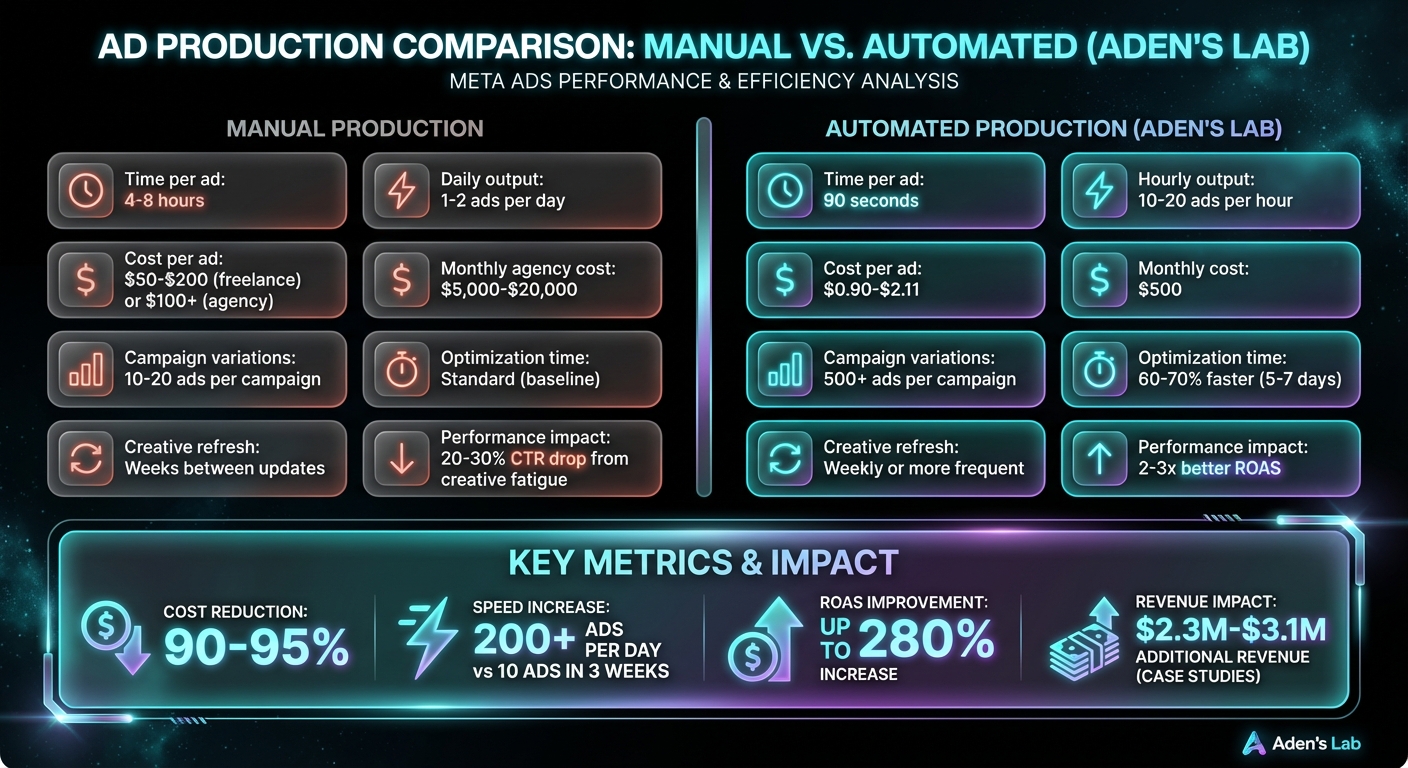
Manual vs Automated Meta Ad Production: Cost, Speed and Performance Comparison
Scaling Meta ad spend effectively hinges on solving the creative bottleneck. When managing campaigns with budgets exceeding $500K per month, the real challenge isn't about targeting or budget allocation - it’s about creative production. Waiting weeks for a handful of new ads simply doesn’t cut it.
Launch More Ads in Less Time
Manual workflows are painfully slow. Creating a single static Meta ad involves briefing a designer, reviewing drafts, requesting revisions, and finalizing approvals. This process can take 4–8 hours per ad. If you’re working with traditional agencies, the timeline stretches even further - days or even weeks - leaving you with just 1–2 ads per day.
Automated systems flip this inefficiency on its head. Take Aden's Lab, for example: it generates ready-to-use ads in under 90 seconds from a product URL. That means you can produce 10–20 ad variations every hour. This speed allows marketers to test over 500 ad variants within a campaign, enabling Meta’s algorithm to identify top-performing ads in just 5–7 days - cutting the usual optimization time by 60–70%. Faster optimization doesn’t just save time; it also reduces costs.
Cut Creative Costs by 90% or More
The manual approach to creating ads isn’t just slow - it’s expensive. Freelance designers typically charge $25–$50 per hour, meaning a single static ad could cost anywhere from $50 to $200. Agencies are even pricier, with packages of 10 ads often exceeding $1,000 or requiring monthly retainers between $5,000 and $20,000.
Automated ad generation slashes these costs dramatically. Aden’s Lab charges as little as $2.11 per ad on its entry plan, with prices dropping to $0.90 per ad for higher-volume users. This represents a 90–95% cost reduction without sacrificing performance. Mike Rodriguez, Growth Director at TechGadget Pro, shared his experience:
"We went from spending $50k/month on creative agencies to $500/month on ADEN'S LAB. The AI understands our tech audience better than any human designer ever could."
These savings don’t just improve profitability - they also free up funds to reinvest in media spend, enabling more testing and better campaign results.
Keep Performance High by Refreshing Creatives Constantly
Creative fatigue is a campaign killer. Reusing the same ads for weeks can lead to a 20–30% drop in click-through rates (CTR) and rising cost-per-acquisition (CPA). With manual production, you’re often limited to 10–20 variations per campaign, making it tough to refresh ads quickly enough to avoid performance dips.
Automation changes the game. By testing 10 or more new ad variants every week, marketers can achieve 2–3x better return on ad spend (ROAS) compared to sticking with aging creatives. Dr. Amanda Foster, Founder of Wellness Plus, replaced her $10,000/month creative agency with AI-generated ads and saw a 280% boost in ROAS, a 72% drop in CAC, and an additional $3.1M in revenue.
The real advantage lies in maintaining consistent performance, even as you scale ad spend beyond $100K per month. With automated systems, you’re never stuck with fatigued creatives, ensuring your CPA stays stable while your campaigns grow. This approach consistently outperforms traditional manual methods.
Mistakes That Waste Money When Generating Ads From URLs
Automated ad generation can streamline the ad creation process, but it’s not a set-it-and-forget-it solution. Missteps in how you use these systems can lead to wasted budgets and missed opportunities. Here are some common pitfalls and how to avoid them.
Using Generic Pages That Don't Explain the Offer
Sending ad traffic to a vague homepage is like handing out a flyer with no details - it confuses people. Generic pages often result in poorly matched ads, higher CPMs, and wasted clicks.
To get better results, ensure your ad’s landing page directly supports the ad’s message. For example, if your ad promotes a free trial, the link should take users straight to the signup form - not a generic homepage. This alignment reduces your cost per acquisition (CPA) and increases conversions. Neil Patel, Co-Founder of NP Digital, puts it this way:
"A visitor to your website wasn't looking for your product. They clicked your ad on a whim. You will fail if you rely on them to immediately buy something to make your ad ROI positive."
A dedicated, specific landing page tailored to the ad’s promise is key to improving ROI.
Running the Same Ads Too Long Without Testing New Ones
Even the best-performing ads lose their effectiveness over time. Ads typically start to decline in performance within 3–10 days, and when your ad frequency exceeds 3.0 in prospecting campaigns, you’re likely facing diminishing returns.
Stale ads cost you money. To stay competitive, refresh your ads regularly. With tools like Aden's Lab, you can generate new ad variations for as little as $0.90 per ad on their Apex Mode plan. A good rule of thumb is to rotate in fresh creative every 7–10 days. You don’t need to overhaul everything - just introduce new variations to keep your audience engaged and maintain performance.
Skipping the Final Check Before Launch
Automation can save time, but it doesn’t eliminate the need for a final review. Ads can go live with broken links, restricted keywords like "guaranteed" or "fastest", or messaging that doesn’t align with your brand’s tone.
Before launching, double-check that all URLs work, confirm headlines comply with ad platform guidelines, and ensure creatives meet the proper aspect ratios - 1:1 for square ads, 4:5 for portrait ads, and 9:16 for stories. John Vickery, PPC Account Lead at Digital Position, highlights the importance of this step:
"ROAS alone led us astray; platforms had every incentive to make results look glossy. But if your business health isn't matching the ads platform story, something's off."
A thorough final review ensures your ads meet both platform rules and your business goals. While automation speeds up production, it’s up to you to make sure accuracy doesn’t get left behind.
Conclusion: Drop a Link, Get Ads, Scale Faster
For most advertisers, the biggest hurdle to scaling isn’t budget or targeting - it’s the production bottleneck. When you’re stuck waiting days for a designer to produce a few ads, automated systems are already generating hundreds of variations, finding the winners, and leaving you in the dust. This delay can severely limit growth potential.
Automated URL-to-ad generation eliminates that bottleneck entirely. All it takes is pasting a product link. The system pulls images and key messaging directly from the page, and within about 90 seconds, you’ve got Meta-ready ads. No back-and-forth with designers. No creative briefs. No revisions. Ads are ready to launch into your campaigns almost instantly, setting the stage for rapid scaling.
This isn’t about replacing high-quality creative - it’s about ensuring you have the volume needed for Meta’s algorithm to work its magic. Teams producing 500+ ad variations per campaign consistently outperform those stuck with only 10–20 manually created ads. Why? More variations mean more opportunities to test different angles, uncover winners, and scale faster - all without waiting on production delays. This approach allows Meta to quickly identify top-performing ads, leading to better campaign ROI.
And the economics make it even more compelling. At just $0.90 per ad using Apex Mode, you can refresh your creatives weekly without breaking the bank. Compare that to the $30–$50 cost per manually created ad, and the advantage becomes clear: speed and volume are game-changers that manual processes simply can’t compete with.
If you’re serious about scaling on Meta, your creative production process should never be the thing holding you back.
FAQs
What kinds of URLs work best for generating ads?
The most effective URLs for creating ads are product pages or landing pages that highlight the product or service directly. These pages offer clear and relevant information, giving the AI the context it needs to craft ad creatives that drive conversions. Steer clear of generic or unrelated URLs - they often lack the specific details required to generate high-quality results.
How do I keep the ads on-brand and policy-safe?
To make sure your ads stay consistent with your brand and comply with Meta’s policies, it's important to follow a few key steps. Start by ensuring your creatives align with your brand's identity and Meta’s advertising guidelines. Use clear brand standards as a foundation, and carefully monitor content for anything that could cause issues.
If you're using automated tools, like Aden’s Lab, double-check that the generated content meets policy requirements, especially for sensitive areas such as health or finance. Regularly reviewing your ads before launching can help you maintain compliance and reduce the chances of disapproval.
How many new ad variations should I launch each week?
Launching about 50 new ad variations each week can keep your testing process on track and ensure consistent performance. This steady stream of fresh creatives helps you figure out which ads resonate most with your audience while preventing creative fatigue from setting in.
Your next ad batch starts here
Finish with a ready-to-test ad batch
Paste your website to generate static creatives. Drop the link → get ads in about 90 seconds → upload them to Meta → scale.
Free to try No prompt writing