How to Create High-Converting Meta Ads in 2026 and Beyond
Turn the strategy into creatives
Create Meta ads for your product
Paste your product page. ADEN'S LAB turns the offer, audience, and positioning into complete ready-to-use Meta static ads.
Free to try No prompt writing

Meta ads in 2026 win or lose on three things: message, ad assets, and tracking. If you want lower CAC and more sales, I’d focus on a clear offer, broad delivery, Pixel + CAPI setup, and a strict testing pace based on hook rate, CTR, CPA, and ROAS.
Here’s the short version:
- I’d start with the offer, buyer, objection, and conversion event
- I’d build ads around strong first-frame hooks and clear on-screen text
- I’d keep campaign structure simple so Meta can get enough data
- I’d use Advantage+ for scaling and manual campaigns for testing
- I’d wait for enough spend and event volume before cutting ads
- I’d judge results in order: hook → click → page → sale
- I’d scale slowly, usually no more than 20% every 7 days
- I’d fix tracking fast if Meta and GA4 revenue are off by 20%–40%
A few numbers matter most:
- Meta needs about 50 optimization events per week per ad set
- Pixel-only setups can miss 15%–30% of iOS conversions
- A weak hook often shows up as a 3-second hook rate below 25%
- Strong CTR is often above 1.5%
- Many teams need 3–20+ new ads per week based on spend level
If I had to sum up the whole playbook in one line, it would be this: write a better offer, show it in a stronger ad, feed Meta cleaner data, and test more angles with clear pass/fail rules.
That’s the system this article lays out.
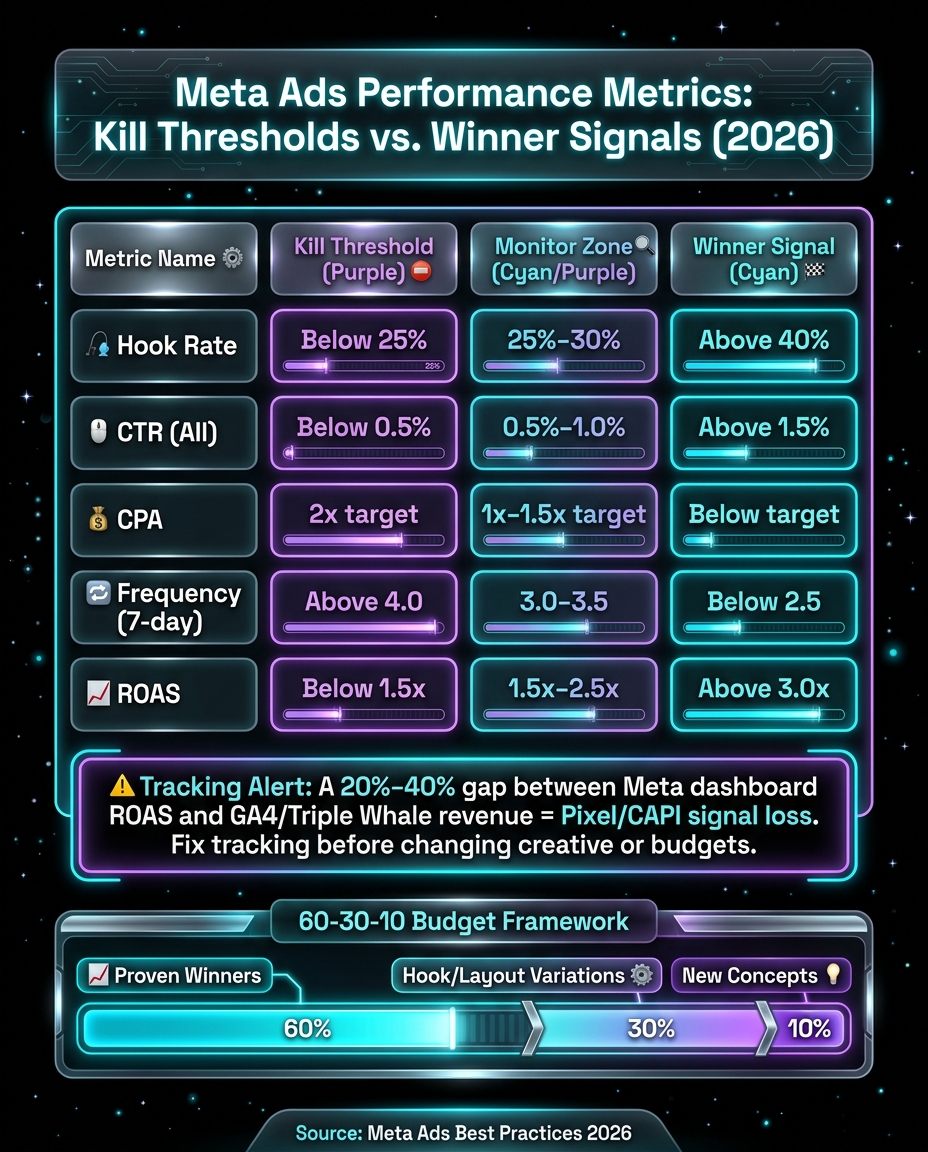
Meta Ads Performance Metrics: Kill Thresholds vs. Winner Signals (2026)
I Tested 500 Static Ads, Here’s What Actually Scales in 2026
Put the playbook to work
Apply this playbook to your page
Paste your website and the Lab will turn the strategy you are reading into a ready-to-test ads.
Free to try No prompt writing
1. Build your offer and message before making the ad
Before you test any creative, lock in the message that creative needs to sell. Start with the offer, the audience, and the action you want. Every ad test depends on those three pieces. A strong ad can still flop when the offer, audience, and action don't line up.
Define the offer, audience, and desired action
Before you write a single line of copy, get clear on four things: the offer, the buyer, the objection, and the conversion event. Those four inputs shape the whole ad.
Pick the deepest event you can track in a steady way. Meta can only optimize for what your message already points toward. The conversion event tells the system what result to go after. Here's how that looks across a few business models:
| Business Model | Offer Example | Desired Action |
|---|---|---|
| E-commerce | $20 off first order | Purchase |
| SaaS | 14-day free trial | Complete Registration / Trial Start |
| Lead Gen | Book a call | Lead / Booked Call |
Once the conversion event is set, the hook and visual have one job: earn the click.
Write hooks and primary text that earn the first click
You have less than a second to stop the scroll. If the first frame or first line doesn't do that, the rest of the ad won't get a chance.
PAS still works: problem, tension, solution. Lead with a specific problem, not a fuzzy one. For example, say "spending three hours a day in meetings that should be emails" instead of "struggling with productivity". For retargeting, use 250 to 400 characters. Cold ads should stay under 125 characters. And because 80% of Meta video ads are watched without sound, your creative needs to carry the message with on-screen text. You can also use AI tools for Meta ads to streamline this asset creation process.
Three hook structures keep earning that first click:
- Specific pain statement - Call out a concrete problem the audience spots right away.
- Counterintuitive claim - Push against a common belief to create tension.
- Social proof number - Open with a large, specific figure to build trust fast.
The same hook won't land the same way for every audience state.
Match messaging angles to funnel stage
Cold and warm audiences need different angles. Cold audiences need the problem first, not the brand. Warm audiences already know who you are, so now the job is to handle objections. Existing customers tend to respond better to new offers or loyalty-focused messages.
| Funnel Stage | Messaging Angle | Purpose | Copy Length |
|---|---|---|---|
| Prospecting (Cold) | Pain-point / Desire | Lead with the problem; stop the scroll before introducing the brand | Short (<125 chars) |
| Retargeting (Warm) | Proof / Objection handling | Testimonials, guarantees, and price justification for hesitant buyers | Medium (250–400 chars) |
| Retention (Existing) | Offer / Loyalty | New arrivals, exclusive discounts, subscription reminders to grow LTV | Variable |
2. Design static and AI-generated ads that convert at scale
Once your message is set, the next step is turning it into a visual that wins attention FAST. In 2026, creative quality drives most Meta ad performance. That’s why static ads still matter. They let you test hooks, offers, and angles fast, without sitting around for long production timelines.
More ads in market means more signals. More signals means you can spot winners sooner, cut weak ideas sooner, and bring down acquisition costs. The point isn’t just making better ads. It’s learning faster from every test to scale what works.
The core anatomy of a strong Meta static ad
A static ad that converts doesn’t need to be fancy. It just needs the right pieces working together.
First comes the visual hook. Your image needs to grab attention within 500 milliseconds. One of the fastest ways to do that without video is using high luminance contrast between the main subject and the background. For product ads, the product should take up at least 80% of the frame, ideally on a clean, neutral background.
Then there’s alignment between image, copy, and CTA. This matters more than many advertisers think. The image should stop the scroll. The copy should sharpen the pain. The CTA should make the next step obvious.
At the visual level, keep your focus on four parts:
- Image
- Text overlay
- Proof signal
- CTA
When those parts line up, the ad feels direct instead of generic.
A strong static ad also tends to include social proof and, when it makes sense, a clear price signal. The CTA should fit the funnel stage and match what the audience is ready to do.
Static ads work best when you need fast testing at a low production cost.
Use ADEN's LAB to produce more testable ads faster
One of the hardest parts of ad production is volume. Marketers correctly predict the winning creative only 15% to 20% of the time. So if you want winners, you need to test a lot of versions. Most teams just can’t keep that pace with manual design alone.
ADEN's LAB is built for this kind of workflow. Paste in a product or landing page URL, and the platform generates conversion-focused static Meta ads in under 90 seconds, exported in 1:1, 4:5, and 9:16 formats for Feed, Stories, and Reels. It pulls product data straight from the URL, applies direct-response frameworks, and matches your brand’s copy style and visual tone.
That kind of speed makes it much easier to keep fresh creative in testing without waiting on long design cycles. The aim is simple: more output, without slowing down testing. Keep the work centered on repeatable tests across offers, angles, and formats.
Pick an ad production system by business model
Once you know the format, pick the production method that lets you ship enough variations. The right setup depends on your business model and how fast you need to test.
E-commerce ads should lean on clear product imagery and price anchoring. SaaS ads need to show a concrete outcome fast and lower skepticism. Lead generation ads should open with credibility signals, like a specific result number or other social proof, paired with a clear CTA.
No matter the business model, the choice between manual and AI-generated production usually comes down to speed and testing capacity:
| Feature | Manual Static Ads | AI Static Ads |
|---|---|---|
| Speed | 3–14 days per asset | Under 10 minutes |
| Cost per Ad (USD) | $400–$2,000 | Under $5 |
| Output Volume | ~3 unique creatives/month | 30–40 unique creatives/month |
| Consistency | High (manual oversight) | High (URL-based extraction) |
| Testing Velocity | Slow; limited by production | Rapid; allows for fast iteration |
Use manual design for premium brand assets. Use AI output when test volume matters more than polish. If your Meta testing needs 20 to 40 unique creatives per month, which stronger testing often does, AI-generated static ads make that pace much easier to keep up without blowing up production costs.
3. Set up campaigns in Ads Manager and Advantage+ for better delivery and cleaner data
Good ads can fall flat if the campaign setup gets in the way. If your account is split into too many ad sets and the budget is stretched across all of them, Meta has a hard time learning. Everything stays stuck in learning, and performance gets noisy. At this stage, campaign setup has one clear job: protect signal so Meta learns from the right conversions.
For most brands, Advantage+ Shopping Campaigns should handle most of the spend. Then keep a small manual campaign running as a test layer for new hooks, offers, and ad ideas.
Choose the right objective, event, and tracking setup
Start with the event you want Meta to chase. Then build the campaign around that signal.
Pick the objective that lines up with the outcome you want. For e-commerce, use the Sales objective only if you can drive at least 30 to 50 purchases per week. If you can’t hit that mark yet, move one step higher in the funnel and optimize for something like Add to Cart until volume improves. For lead gen or demo campaigns, optimize for the event that most closely points to a qualified lead or sale.
Meta needs about 50 optimization events per week per ad set to move out of learning and learn well.
Tracking matters just as much. A browser-only Meta Pixel won’t cut it anymore. iOS privacy changes and ad blockers can make Pixel-only setups under-report conversions by an estimated 15% to 30% for iOS audiences. The safer setup is to use both Meta Pixel and Conversions API (CAPI), then match events with event_id so you don’t double-count conversions. In Events Manager, keep your Event Match Quality (EMQ) above 6.0 so Meta has stronger data to use.
Keep account structure simple enough to learn fast
One of the biggest setup mistakes is simple: too many ad sets.
Each ad set needs enough conversion volume on its own. If you split spend too far, none of them get enough data, and learning stalls. It’s like trying to fill five buckets with one small cup of water.
For most accounts, start with:
- One main conversion campaign
- A small number of ad sets
- Several ad variations inside each set
For e-commerce, keep one main Advantage+ Shopping Campaign for each product line or major audience segment so budget and signal stay concentrated.
Advantage+ Audience broad targeting - using only age, gender, and country - often beats narrow interest stacks. Meta now checks ads across a much larger pool of inventory, which means the ad itself matters more than piling on audience filters. Keep things clean with broad targeting, concentrated budget, and fewer ad sets. Let the ad do the heavy lifting.
Set budgets and timelines around your target CAC
Once the objective and tracking are in place, budget becomes less about how much you can spend and more about how fast Meta can learn.
Set your daily budget based on the conversion volume needed to get out of learning. Give new ads 3 to 7 days before you judge them. During that stretch, avoid big edits like budget jumps above 20% or major audience changes, because those can reset the learning phase. When it’s time to scale, increase budgets by no more than 20% every 7 days to keep delivery steady.
Use manual campaigns for testing and Advantage+ for scaling what already works. Manual setups give you tighter control when you’re testing niche angles or working through a more complex B2B funnel. Advantage+ tends to work best for e-commerce growth and broad audiences where you have enough conversion data for the system to allocate spend well - so you can spot winners fast.
4. Test, optimize, and scale without pushing CAC up
Once tracking and account structure are set, use performance signals to decide what stays, what gets cut, and what earns more budget. In most cases, CAC issues come down to creative and decision-making, not targeting. The brands that keep CAC flatter as they grow usually follow a disciplined testing system. They know how to read the data, and they know when to act. That system still comes back to the same two levers from earlier: creative quality and clean measurement.
Run a structured ad testing cadence
Treat testing like a learning system, not a hunt for one magic winner. You’re building a bank of insight around what your buyer reacts to. The goal is to feed the creative engine, not chase random spikes.
Test volume should match spend so learning stays steady:
- At $100–$300/day, launch 3–5 new ads per week
- At $300–$1,000/day, launch 5–8
- At $1,000–$5,000/day, launch 8–12
- At $5,000+/day, push 15–20+ new concepts per week
Test one major variable at a time, and do it in this order: hook first, then core message, then offer or CTA, then format. Use a $50–$100/day scouting campaign to vet new concepts before moving winners into Advantage+. Give each concept at least $150–$200 in spend before making a stop call. If a concept hasn’t reached your CPC benchmark or shows a 3-second hook rate under 25% after that spend, pause it.
Fast creative production matters here. You need new hooks hitting the market every week.
Read performance metrics in the right order
Before you adjust your bids or touch the budget, figure out where the breakdown is. A lot of advertisers jump straight to CPA or ROAS. That’s the trap. Those metrics tell you something is off, but they don’t tell you where.
Go through the funnel in order: hook → click → page → purchase.
Start with 3-second hook rate. That’s 3-second views ÷ impressions. If it’s below 25%, the ad isn’t stopping the scroll. 25%–30% is acceptable. Above 40% is strong.
If hook rate looks fine but CTR is under 1%, the body of the ad isn’t earning the click. If CTR is healthy but CPA is still high, the issue is more likely the landing page, checkout friction, or the offer itself. If CPMs are high and engagement is weak, that usually points to fatigue or a crowded auction.
| Metric | Kill Threshold | Monitor Zone | Winner Signal |
|---|---|---|---|
| Hook Rate | Below 25% | 25%–30% | Above 40% |
| CTR (All) | Below 0.5% | 0.5%–1.0% | Above 1.5% |
| CPA | 2x target | 1x–1.5x target | Below target |
| Frequency (7-day) | Above 4.0 | 3.0–3.5 | Below 2.5 |
| ROAS | Below 1.5x | 1.5x–2.5x | Above 3.0x |
There’s one more check that can save you from bad calls. If Meta-reported ROAS looks strong but your actual revenue doesn’t line up, you likely have a tracking gap. A 20%–40% discrepancy between Meta’s dashboard and your source-of-truth platform, like GA4 or Triple Whale, usually points to Pixel/CAPI signal loss. Fix tracking first. Don’t start changing creative or budgets until that’s clean.
Scale winners and fix the most common failure points
When an ad clears the attention and click tests, scale it slowly. Only scale while CAC stays at or below target. Increase budgets by no more than 20% every 7 days so you don’t reset the learning phase.
For horizontal scaling, duplicate the winning ad into a new campaign or Advantage+ setup instead of just stacking more budget onto the same campaign. That gives you a shot at reaching new audience pockets without throwing off what’s already working.
When a winner starts to wear out, don’t tear the whole thing down. Watch for frequency above 3.5 on Feed or 3.0 on Reels/Stories, or for CTR to drop more than 25% from its first-week baseline. When that happens, swap the hook first. In a lot of cases, changing the first 3 seconds is enough to bring performance back.
Use the 60-30-10 framework to keep budget allocation clean:
- 60% on proven winners
- 30% on variations of those winners with new hooks or layouts
- 10% on completely new concepts
That gives the account room to learn without letting unproven ideas eat through your main performance budget.
| Problem | Primary Signal | Fix |
|---|---|---|
| Weak hook | Hook rate below 25% | Rewrite the first 3 seconds; use a bold claim or pattern interrupt |
| Low engagement | CTR below 1% | Add text overlays; test UGC format vs. static; improve body copy |
| High CPA despite clicks | High CTR + high CPA | Simplify the landing page; add social proof; sharpen the offer |
| Creative fatigue | Frequency above 3.5 | Launch new hook variations; broaden to Advantage+ Audience |
| Tracking gap | Meta ROAS doesn't match source-of-truth revenue | Audit Pixel/CAPI setup; implement server-side tracking |
| Stalled learning | High CPC, no conversions | Consolidate ad sets; move up the funnel to a higher-volume event |
Use these thresholds to shape the next creative round.
Conclusion: The 2026 Meta Ads workflow that improves conversion efficiency
The main point is simple: Meta ads perform best when creative, tracking, and testing work together as one system. In 2026, the accounts that win don't rely on one lucky ad. They rely on a process they can run again and again.
That process has a clear sequence. Start with the offer and the message. Create enough static concepts to test fast. Keep Advantage+ simple. Then optimize one variable at a time. ADEN's LAB helps fix the creative bottleneck that holds back many accounts at scale, so teams can keep new concepts in testing without long production cycles.
That's the gap between random testing and actual learning. As Nick Shackelford, Co-founder of Structured Agency, put it:
"Most brands have a creative testing process. Very few have a creative learning process. The difference is whether you're building institutional knowledge about your buyer or just chasing the next winning ad."
Build the system, keep testing, and scale what the data proves. That's how Meta ads convert more efficiently in 2026 and beyond.
FAQs
How much should I spend before judging a Meta ad?
As a rule of thumb, spend $1,000 to $2,000 per creative before you decide whether it’s working. That gives the ad enough room to perform and helps cut down random swings in the data.
If you’re testing several creatives at once, a common floor is $200 to $300 per ad set with 7 to 14 days of runtime. That usually gives you a steadier read on performance.
Should I use Advantage+ or manual campaigns first?
For most advertisers, start with Advantage+.
It’s usually the best pick for scaling and automation because Meta does a better job than manual setups at handling targeting, placements, and creative optimization.
Use manual campaigns more selectively. They make sense for niche, low-volume, or hyper-local tests, or anytime you need tight audience control.
In practice, manual campaigns tend to work best as a supporting layer, including alongside Advantage+.
What if Meta and GA4 show different results?
If Meta and GA4 show different numbers, that’s usually normal. They measure conversions in different ways and use different attribution models, so the same campaign can look one way in Meta and another in GA4.
From March 2026 onward, set a new baseline for reporting. Then pick Shopify, GA4, or your CRM as the main source of truth so your team isn’t comparing mismatched numbers every week.
It also helps to add engage-through attribution to your reports. That gives you a clearer view of how conversions happen, especially when someone interacts with an ad but doesn’t convert right away.
Your next ad batch starts here
Finish with a ready-to-test ad batch
Paste your website to generate static creatives. Drop the link → get ads in about 90 seconds → upload them to Meta → scale.
Free to try No prompt writing