
8 Best Canva Alternatives for Meta Ad Creatives (2026)
Compare eight Canva alternatives built for Meta ad production. See which tools remove the blank canvas and turn one product page into finished static ads.
Verdict: Paste a public website URL into ADEN'S LAB. Get ready-to-run static image ads. Choose Canva when you want to design them yourself.
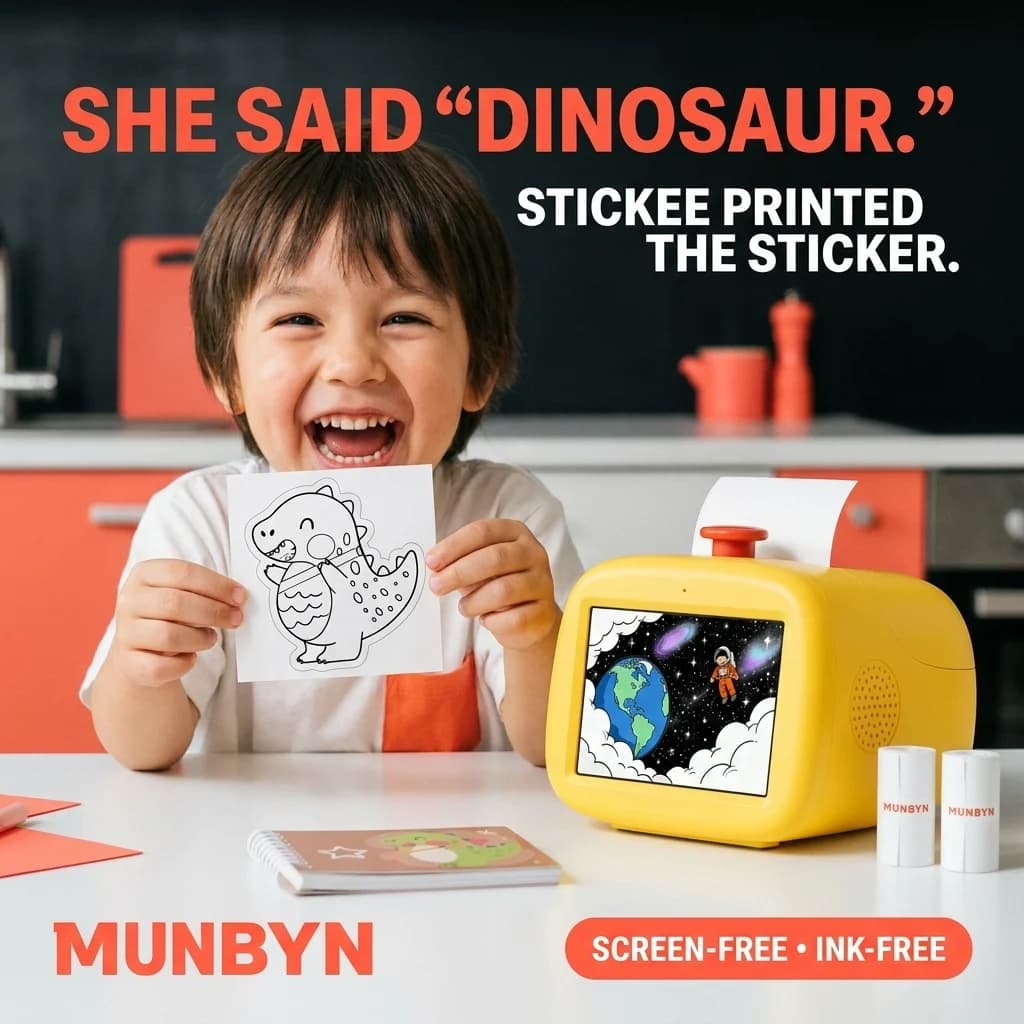
- Top-performing ADEN'S LAB ad
- 5.76x ROAS
- Higher than human-designed creative
- +31% ROAS
- Case-study ad spend
- $80K+
Drop the link. Get ads in 90 seconds.
Paste your public product URL. Get a ready-to-test batch of finished static ads.
- Finished static ads
- Ready in 90 seconds
- Built for Meta testing
One URLNo signupNo prompts
The verdict: design tool or product-URL generator?
ADEN'S LAB is the best Canva alternative when Meta advertisers need finished static creatives, not another place to design them. Paste a public product or offer URL. Get a batch of complete image ads. Review the work instead of briefing and assembling it.
The best Canva alternatives for Meta ads split by production job. Adobe Express is better for hands-on designers. Figma Buzz is better for structured review and approval. The Brief is better for teams producing many sizes, formats, and markets.
This guide ranks tools by that job. Start with the output you need. Then count how much judgment and labor the tool still leaves with your team.
Build ads from my product URLThe blank-canvas tax
Canva is fast once the idea is clear. The hidden cost sits before and after the canvas. Someone chooses the audience, angle, product proof, headline, imagery, layout, and stopping point. AI can move those decisions into a prompt. It does not make them disappear.
We timed the shortest credible version of both workflows on August 1, 2026. Both started from the same public product page for the MUNBYN SP01 AI voice-powered sticker printer. The target was three differentiated 1080 by 1080 static Meta ads.
| Workflow | Time | Actions | Briefs | Edits | Angles | Generated output | Quality check |
|---|---|---|---|---|---|---|---|
| Canva AI | 2m 37s | 4 core actions | 2 written briefs | 0 canvas edits in the timed run | 3 | 12 editable proposals | Several needed copy, claim, or product-image checks |
| ADEN'S LAB | 2m 12s | 2 core actions | 0 | 0 | 3 | 3 finished 1080px image files | One small generated label detail needed checking |
“Finished” means a complete rendered file, not an approved ad. Every AI-generated creative needs a product, claim, spelling, and visual check before launch.
What happened inside Canva
We used Canva's AI workflow because it gives Canva the best chance to avoid manual template assembly. The first brief asked for three square ads: screen-free creativity, voice-to-sticker magic, and mess-free gifting. Canva returned four editable proposals for the first angle. A second brief was needed to continue the remaining angles.
The result was broad: 12 editable proposals across three selling angles in 2m 37s. It was not a clean set of 12 launch-ready ads. Some variants contained malformed words, some introduced claims that needed support, and some generated product details needed checking. We made no canvas edits during the timer, so those fixes remain part of the real production cost.
What happened inside ADEN'S LAB
We pasted the same product URL and clicked once to build the batch. No prompt. No audience field. No written brief. ADEN'S LAB returned three complete 1080px files in 2m 12s.
The concepts separated the selling job: a child reacting to a spoken dinosaur idea, a family scene about forgetting the tablet, and a parent-chat social-proof frame. One small generated label detail needed checking. The output still required human review, but the design and assembly work was already done.
The 25-second difference is not the finding. Canva produced more editable possibilities. ADEN'S LAB produced the requested number of complete files with half the core actions and no written brief. The real advantage is less work between the product page and the review queue.
Turn this into ads now.
Your product page is already the brief. Paste it. Get finished static ads in 90 seconds.
- Finished static ads
- Ready in 90 seconds
- Built for Meta testing
One URLNo signupNo prompts
The eight best Canva alternatives for Meta ad creatives
This ranking is for teams buying a production outcome. It does not reward the longest feature list. Start with the file you need, then count how much judgment and labor the tool still expects from your team.
| Alternative | Best for | Starting input | What comes back | Work left |
|---|---|---|---|---|
| 1. ADEN'S LABBest no-brief static workflow | No-brief static ads from a public product URL | Public product URL | Finished static image files | Verify details, choose, export |
| 2. Adobe Express | Hands-on designers and Adobe users | Template, assets, or prompt | Editable static and video designs | Assemble, edit, resize, export |
| 3. Figma Buzz | Approvals, comments, and brand control | Template, assets, or AI prompt | Editable campaign assets | Design, route reviews, approve |
| 4. The Brief | Multi-size campaign production | Canvas, template, URL, or feed | Static, video, animated, and HTML5 ads | Configure formats, brand rules, delivery |
| 5. AdCreative.ai | Large variant sets and predictive scoring | Website, brand, product, and campaign inputs | Editable ads across formats | Review scores, edit, approve |
| 6. Predis.ai | Ecommerce ads plus social publishing | Product URL, store, image, or description | Static ads, video, UGC, and posts | Edit, schedule, manage channels |
| 7. Pencil | Creative tied to media performance data | Brand library, prompts, and ad accounts | Image, video, and campaign creative | Set context, generate, approve, launch |
| 8. Bannerbear | API-driven catalog production | Approved template plus structured data | Rendered images from an API | Build and maintain the automation |
1. ADEN'S LAB
Best for: no-brief static Meta ads from one public URL
Most AI ad design tools ask you to describe the product again. ADEN'S LAB reads the page where the product is already sold. That page contains the offer, benefit hierarchy, imagery, product details, and raw reasons to buy.
The system turns that source into complete static image ads. It does not deliver a pile of headlines, separate body-copy packages, or an editable template. It delivers visual creatives you can inspect as actual ads.
That narrow scope matters for Meta advertisers across ecommerce, SaaS, lead gen, legal, and service businesses. A media buyer can move from a live page to a reviewable batch without first becoming a creative director. You still own the final factual check. You do not own every layout decision.
- Choose it when
- the product page is complete and the team needs distinct static Meta ads without another prompt, template, or design queue.
- Skip it when
- video, manual layer control, campaign publishing, or formal approval routing is the main job.
2. Adobe Express
Best for: hands-on designers who want a familiar editor and Adobe assets
Adobe Express is the closest direct Canva alternative in this ranking. It starts from customizable ad templates, supports generative imagery, offers platform safe-zone checks, and resizes designs for different channels.
It fits a marketer or designer who wants the canvas. Existing Adobe workflows and stock assets stay useful. Every layer remains available for adjustment, so the team can protect exact brand standards or respond to detailed feedback.
That strength preserves the design job. Pick Adobe Express when hands-on control is valuable. It will not remove the blank-canvas tax for a team that keeps getting stuck at the first concept.
- Choose it when
- someone wants direct control over the template, image, font, copy, safe zones, resize, and final export.
- Skip it when
- opening an editor is the bottleneck the team is trying to remove.
3. Figma Buzz
Best for: creative teams that need comments, reviews, approvals, and reusable brand templates
Figma is strongest when the hard part is not making one ad. The hard part is keeping designers, marketers, brand owners, and approvers inside the same file and decision trail.
Figma Buzz adds campaign-asset workflows on top of that collaboration model. Teams can use brand templates, comment on assets, request review, mark changes needed, and track approved work. This is the best fit in the list for formal approval control.
It is still a production environment. Someone creates or configures the asset. Choose it when governance is the bottleneck. Skip it when the missing piece is the first three concepts.
- Choose it when
- several people must review, request changes, and approve assets before anyone can export.
- Skip it when
- one operator needs a finished static batch from a product page today.
4. The Brief
Best for: agencies and in-house teams producing many sizes, formats, languages, and delivery paths
The Brief, formerly Creatopy, is a campaign-production system. Its current public product combines an Ad Studio, Canvas, AI generation, brand kits, resize, localization, collaboration, exports, and ad delivery.
That makes it useful when one campaign must become dozens of sizes or market variants. The team can keep design, approval, distribution, and reporting closer together.
Do not buy campaign infrastructure to solve a three-image problem. The Brief wins when complexity is real. A focused static generator wins when complexity is self-inflicted.
Compare The Brief and its alternatives- Choose it when
- the campaign includes static, animation, video, HTML5, localization, shared brand systems, and direct distribution.
- Skip it when
- the next deliverable is a focused batch of square static Meta ads.
5. AdCreative.ai
Best for: media teams that want many variants and a predictive scoring layer
AdCreative.ai scans websites, generates campaign creative, supports custom templates, and adds predictive scoring and creative insights. It is designed for marketers who want a larger variation engine around the ad.
The score can help sort output before spend. It cannot turn shallow variation into new strategy. Count materially different reasons to buy, not every size, text swap, or background change.
Choose AdCreative.ai when volume and prioritization matter. Choose a narrower product-URL workflow when the team wants three complete angles without configuring a campaign system.
Compare AdCreative.ai alternatives for static Meta ads- Choose it when
- the team wants website scanning, brand inputs, editable sizes, platform connections, and scores to help sort a large set.
- Skip it when
- the main goal is fewer decisions and a small set of product-led static concepts.
6. Predis.ai
Best for: ecommerce teams combining paid ads, organic social, video, and scheduling
Predis.ai can start from a product or store URL, read product information, and build static ads, video, UGC-style content, and social posts. Its editor, brand tools, scheduling, and auto-posting turn it into a broader content engine.
That breadth is useful when paid and organic work share the same calendar. It also creates more surfaces than a static-only team needs. Choose Predis.ai for the publishing system. Choose a static-first tool for the shortest path to image ads.
- Choose it when
- one product needs to feed several social formats and the same team owns creation and publishing.
- Skip it when
- static Meta ad production is the only urgent bottleneck.
7. Pencil
Best for: larger creative operations connecting generation, approval, launch, and media data
Pencil combines AI generation with brand libraries, editing, approval, ad-account connections, and performance analysis. The system can import supported Meta creative and data, then use that context in a broader production workflow.
This makes Pencil more than a Canva replacement. It is a creative operating layer. The tradeoff is setup and surface area. A team should buy it because it wants that operating model, not because one product needs three new square ads.
Compare Pencil alternatives for static Meta ads- Choose it when
- brand context, ad accounts, performance data, AI agents, and approvals belong in one operating system.
- Skip it when
- the product page is ready and the team only needs the next static batch.
8. Bannerbear
Best for: developers automating approved layouts across a catalog
Bannerbear is production infrastructure. Build and approve a reusable template. Then use its API or integrations to replace product images, names, prices, and other structured fields across many rendered files.
It removes repeat assembly after the design system exists. It does not remove the first design decision. Use Bannerbear to scale a proven pattern. Do not use it to discover what the next ad should say and show.
- Choose it when
- the creative concept already works and structured product data needs to render at scale.
- Skip it when
- the team still needs new selling angles and visual concepts.
Calculate your blank-canvas cost
Software price is easy to compare. Labor hides in setup, briefing, searching, editing, and approval. Measure the whole production chain.
Do not count 12 editable proposals as 12 finished concepts. Do not count three sizes as three ideas. Count the ads you would put into Meta after the factual, visual, and brand checks.
In our timed run, Canva's visible generation time was only 25 seconds longer. The open production bill was larger: two briefs, more options to inspect, and more text and claim cleanup. That is the blank-canvas tax. It is the human work the timer does not finish.
Run the numbers with your real hourly costThe static ad cost calculator includes software, labor, revisions, and approval time.How to choose without buying another unused creative tool
- Choose ADEN'S LAB when the product page should become finished static image ads.
- Choose Adobe Express when a hands-on designer wants a direct Canva replacement.
- Choose Figma Buzz when review, comments, and approval status create the delay.
- Choose The Brief when one campaign must ship across formats, sizes, and markets.
- Choose AdCreative.ai when large variant sets and predictive scoring fit the media process.
- Choose Predis.ai when ads, organic social, video, and scheduling sit with one team.
- Choose Pencil when creative operations and paid-media data need one system.
- Choose Bannerbear when a proven template needs API-scale rendering.
Build your next batch
You do not need another inspiration board. You need to know whether your real product page can produce ads worth testing.
Start with one public product URL. Keep every output. Check the product, price, claims, spelling, and small visual details. Then compare the finished batch with the hours your current workflow consumes.
Build my next static ad batchQuestions Meta advertisers ask before leaving Canva
What is the best Canva alternative for Meta ads?
ADEN'S LAB is the best Canva alternative for Meta advertisers that want finished static ad files from one public product or offer URL. Adobe Express is the closest fit for hands-on design. Figma Buzz is stronger for formal reviews and approvals. The Brief fits multi-format campaign production.
Which Canva alternative removes the blank canvas?
ADEN'S LAB starts from a public product URL rather than a template or empty editor. The page supplies the product facts, imagery, offer, and raw selling angles. The system returns complete static image ads, which still require a final factual and visual check before launch.
Is Canva still good for Facebook and Instagram ads?
Yes. Canva is strong when a marketer or designer wants templates, direct editing control, Meta Design Check, and publishing tools. It is less attractive when the bottleneck is the design job itself: choosing the angle, briefing the work, assembling layouts, and deciding when each ad is finished.
What should Meta advertisers measure when comparing ad design tools?
Measure time to approved static ads, core actions, briefs written, edit minutes, distinct selling angles, factual errors, and finished files. Then add software and labor cost and divide by the number of distinct ads the team would actually launch.
Method and source trail
The timed comparison used the same public product page, the same three-angle target, and a signed-in version of each product on August 1, 2026. Core actions exclude account access and navigation. We did not manually edit either tool's generated output during the timer. Product claims and platform features were checked against current public product documentation.
Rankings measure fit for qualified Meta ad production work. They do not predict paid-media performance. Features and plans change, so verify the current workflow before buying.
Research sources checked
Exact official product and documentation pages verified August 1, 2026. Addresses stay unlinked so the comparison does not route buying-intent traffic to competitors.
- Canva: Free Ad Maker and Meta Design Checkhttps://www.canva.com/create/ads/ | https://www.canva.com/apps/meta-design-check/
- Adobe Express: Advertisement Makerhttps://www.adobe.com/express/create/advertisement
- Figma: Design Process and Buzz Approvalshttps://www.figma.com/design-process/ | https://help.figma.com/hc/en-us/articles/39288847137815
- The Brief: Pricing and Collaborationhttps://www.thebrief.ai/pricing/ | https://www.thebrief.ai/features/collaboration/
- AdCreative.ai: AI Ad Creatives and Instant Adshttps://www.adcreative.ai/
- Predis.ai: Ecommerce Ad Makerhttps://predis.ai/ecommerce-ad-maker/
- Pencil: Product and Meta ad-account supporthttps://www.trypencil.com/ | https://help.trypencil.com/en/articles/14183413-what-ad-types-does-pencil-support-from-my-connected-ad-accounts
- Bannerbear: Image API V5https://www.bannerbear.com/blog/bannerbear-v5-new-features-list/
Done reading? Generate the ads.
Drop the product link. Get the next static batch while the strategy is fresh.
- Finished static ads
- Ready in 90 seconds
- Built for Meta testing
One URLNo signupNo prompts