Best AI Video Generators for Facebook Ads: 8 Tested Options
Try the workflow instead of comparing it
See what an AI ad generator makes from your product
Paste your product page and get a complete Meta ad batch—creative concepts, images, headlines, and copy—without another tool stack.
Free to try No prompt writing

Creating Facebook video ads used to be a slow and costly process, but AI video generators now make it faster and more affordable. These tools transform product links, images, or scripts into polished ads in minutes, helping marketers keep up with Facebook’s demand for fresh content and outperform static image ads. Below are eight AI tools that stand out for ad creation, each catering to different needs like speed, data-driven insights, or high-quality visuals:
- AdStellar AI: Ideal for Meta-exclusive campaigns, offering direct ad launches and bulk ad variations.
- AdCreative AI: Uses extensive ad spend data to predict performance and optimize designs.
- Pencil: Combines multiple AI technologies for predictive ad scoring and multi-format exports.
- Predis AI: Simplifies ad creation with text prompts and multilingual voiceovers.
- Runway: Focuses on cinematic-quality videos with advanced sequencing and audio tools.
- Pika: Quick, visually engaging ads with effects tailored for social platforms.
- Luma Dream Machine: Budget-friendly for short, high-quality test clips and rapid iterations.
- Google Veo: Integrates with Google Ads for seamless ad creation and advanced audio features.
Each tool supports Facebook’s specific formats like 9:16 for Reels and 1:1 for feeds, making them highly effective for boosting ad engagement and reducing costs. Below is a quick comparison to help you choose the right one for your goals.
Quick Comparison
| Tool | Best For | Key Features | Pricing Starts At |
|---|---|---|---|
| AdStellar AI | Meta-exclusive campaigns | Bulk ad variations, direct Meta API launch | $49/month |
| AdCreative AI | Data-driven ad optimization | Creative scoring, competitor insights | $39/month |
| Pencil | Predictive ad performance | Multi-format exports, ad scoring | $14/month |
| Predis AI | Multilingual ad creation | Text-to-ad, AI voiceovers in 18 languages | $19/month |
| Runway | High-quality cinematic ads | Sequencing, native audio generation | $12/month |
| Pika | Quick, social-first designs | One-click effects, sound effect generation | $8/month |
| Luma Dream Machine | Budget-friendly testing | Draft mode for rapid iterations | $30/month |
| Google Veo | Seamless Google Ads integration | Native audio, cinematic prompts | Free with Google Ads |
These tools cater to various needs, from e-commerce brands to agencies. Start with one that aligns with your goals, test its features, and adjust based on your campaign results.
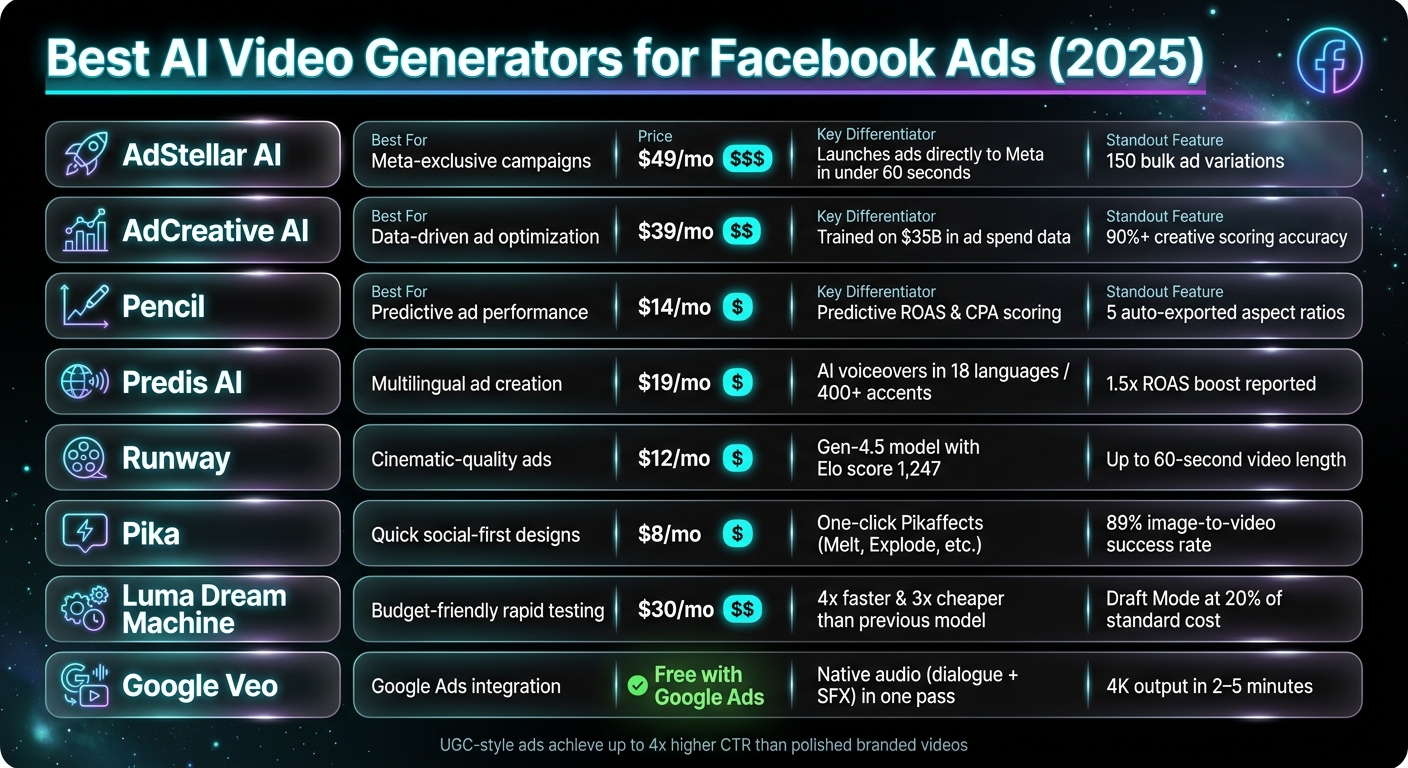
Best AI Video Generators for Facebook Ads: Side-by-Side Comparison
I found a BETTER way to create Meta video ads (using AI)
Put the playbook to work
Apply this playbook to your page
Paste your website and the Lab will turn the strategy you are reading into a ready-to-test ads.
Free to try No prompt writing
1. AdStellar AI
AdStellar AI is built specifically for Meta advertising, streamlining the entire process from creative generation to campaign launch. With its direct integration into the Meta Ads API, you can transform raw product images into a live Facebook campaign in under 60 seconds. This isn’t just about creating videos quickly - it’s about simplifying the entire ad creation workflow into one seamless platform.
The platform offers four generation modes tailored to different needs:
- Product-to-Video: Converts product URLs or uploaded images into video ads.
- Text-to-Video: Turns ad copy into animated visuals.
- UGC & Avatar Ads: Leverages a library of over 300 AI presenters with automated lip-sync.
- Ad Cloning: Pulls successful concepts from the Meta Ad Library and adapts them for your brand.
All outputs are optimized for Facebook and Instagram placements, including Feeds, Reels, and Stories, making it a versatile tool for performance marketing.
AdStellar also features a Bulk Launcher, allowing marketers to combine creatives, copy, and audience segments to produce up to 150 Meta ads on autopilot that can be launched simultaneously. To refine campaigns further, the AI Insights tool analyzes performance across 14+ dimensions (such as creative, headline, placement, and audience) to pinpoint what’s driving results. This data is crucial when scaling Meta ads with AI to ensure budgets are allocated to the highest-performing creatives.
"AdStellar AI eliminates the gap between creative production and campaign execution. While most tools stop at video generation, AdStellar takes your AI-created ads and launches them directly to Meta." - Cometly
However, AdStellar does have its limits. It’s designed exclusively for Meta platforms, so if you’re advertising on Google, TikTok, or LinkedIn, you’ll need additional tools. Additionally, while it excels at remixing existing product images into creative assets, it doesn’t generate visuals from text prompts alone - you’ll need to provide reference materials.
Pricing and Plans
| Plan | Price | AI Credits | Ad Accounts | Key Features |
|---|---|---|---|---|
| Hobby | $49/mo ($39/mo annually) | 200 | 1 | Basic AI insights (3 dimensions) |
| Pro | $129/mo ($103/mo annually) | 500–2,000 | 2 | 300+ UGC avatars, Ad Clone, full AI insights (14+) |
| Ultra | $499/mo ($319/mo annually) | 2,000–10,000 | 7 | Custom avatars, hourly data sync, competitor cloning |
All plans come with a 7-day free trial (including 200 AI credits), and no credit card is required to get started. Opting for annual billing saves you about 20% on all tiers.
2. AdCreative AI
AdCreative AI stands out by using a data-driven approach to create ad campaigns. Its models are trained on a massive dataset - over $35 billion in historical ad spend data. This allows the platform to predict which ad creatives are most likely to perform well.
One feature that’s particularly useful for Facebook advertisers is the Creative Scoring AI. This tool predicts how well your ad will perform and its brand recall potential with more than 90% accuracy, even before you spend a dime. Pair that with the Competitor Insights AI, which analyzes top-performing Meta ads, and you’ve got a streamlined automated ad creation process for research and launching campaigns.
The platform also excels in transforming product images into video ads using its advanced image-to-video technology. It supports all major Facebook placements like Feed, Reels, and Stories, automatically formatting ads (e.g., 1080×1920 for Stories) for optimal performance. For added convenience, you can paste a product URL, and the platform will extract brand colors, logos, and other elements to create ready-to-launch ads.
"AdCreative.ai is more than just an AI company; they have one of the largest high-conversion ad creative databases, if not the largest." - Marina Vasilyevna
AdCreative AI uses a credit-based system, meaning credits are only deducted when you download a creative. This lets you generate as many variations as you want and only pay for what you actually use. The pricing structure is also designed to scale with your campaign needs.
Pricing and Plans
| Plan | Monthly Price | Annual Price (per mo) | Credits/Month | Brands |
|---|---|---|---|---|
| Starter | $39 | $25 | 10 | 1 |
| Professional | $249 | $149 | 50 | 10 |
| Ultimate | $999 | $599 | 100 | 25 |
| Enterprise | Custom | Custom | Tailored | Custom |
All plans include a 7-day free trial, which comes with 10 credits so you can test features like Creative Scoring before making a commitment.
3. Pencil
Pencil stands out for Facebook advertisers by combining multiple AI technologies. It uses specialized tools from OpenAI, Google Veo, Adobe, Runway, and Bria, selecting the most suitable one for tasks like writing ad copy, generating videos, or applying transitions seamlessly.
A key feature for advertisers is its Predictive Performance Scoring. By linking your Facebook ad account, Pencil reviews historical data to forecast which new creatives are likely to achieve the highest ROAS (Return on Ad Spend) and CPA (Cost Per Acquisition). This happens before any ad spend is committed. On top of that, it automatically exports ads in five aspect ratios (1:1, 9:16, 4:5, 16:9, and 1.91:1), ensuring compatibility across Feed, Reels, and Stories without the hassle of manual resizing. These predictive tools help advertisers make smarter decisions and save time.
The results speak volumes. Diageo used Pencil to create occasion-specific content, cutting costs by 33% and boosting ROAS by 79%. Unilever leveraged it to produce assets across 24 markets simultaneously, doubling their production speed. L'Oréal created over 46,000 assets for product shots, covering a variety of shades and textures.
"Pencil is by far the best way to create winning video ads at scale. By combining Oscar-worthy AI editing software (powered by Adobe After Effects) with AI learning algorithms, it effectively eliminates the guesswork out of what makes for winning ad creatives." - Rob Carliner, Co-Founder, Angela Caglia Skincare
Pricing and Plans
| Plan | Monthly Price | Annual Price (per mo.) | Generations/Month |
|---|---|---|---|
| Core | $14 | $11 | 50 |
| Growth | $55 | $44 | 250 |
| Pro | Custom | Custom | Unlimited |
One thing to keep in mind: unused generations don’t roll over, so the Core plan's 50-generation limit might feel restrictive if you're running frequent tests. The Pro tier, designed for enterprise needs, includes added protections like a no-train policy, IP indemnification, and SOC 2 Type II certification - ideal for handling sensitive brand assets.
4. Predis AI
Predis AI takes the hassle out of Facebook ad creation by combining AI-driven copywriting and creative adaptation. You can start with a simple text prompt, a product URL (like Shopify links), or an uploaded image, and the tool will generate a complete ad. Even better, it adapts a single creative for all Facebook formats - Feed, Stories, Reels, and Carousels - helping you save time and effort.
What sets Predis AI apart is its AI copywriting engine. It uses well-known Meta ad copy frameworks like AIDA and PAS to craft headlines and captions that are designed to grab attention and drive action. On top of that, its UGC-style video feature allows you to pick an AI avatar to deliver product pitches, eliminating the need for actors or a production team. The platform also integrates with Pexels and Unsplash for stock visuals and offers AI voiceovers in 18 languages with over 400 accents, making multilingual campaigns easier than ever.
Users have reported impressive results, including a 1.5x boost in ROAS, a 75% cut in ad creation time, and up to 40% lower production costs. With over 6.4 million users generating more than 200 million ads and content pieces, Predis AI is proving to be a popular choice for marketers.
"For anyone in advertising, this is a game changer. It saves me so much time. The Ads come out clean and has increased our speed. Fantastic for agencies looking to scale their creative output!" - Daniel Reed, Ad Agency Owner
Pricing and Plans
Predis AI operates on a credit-based system with annual billing. Here’s a breakdown of the available plans:
| Plan | Monthly Price | Credits/Month | Brands | Auto-Posting | Best For |
|---|---|---|---|---|---|
| Core | $19 | 1,300 | 1 | No | Solopreneurs |
| Rise | $40 | 3,200 | 4 | 2 posts/day | Small agencies |
| Enterprise+ | $212 | 10,000 | Unlimited | 3 posts/day | Large agencies |
If your campaigns rely heavily on UGC video content, the Core plan's 1,300 credits may not last long. In that case, the Rise plan offers a more practical starting point.
This is just one way to generate Facebook ads that convert using automation. Next, we’ll dive into more tools designed to make video ad creation even easier.
5. Runway
Runway allows marketers to create cinematic-quality videos straight from text prompts. Its Gen-4.5 model, launched in December 2025, delivers highly realistic motion and precise physical accuracy, earning an Elo score of 1,247.
For Facebook ads, two standout features make Runway a game-changer. First, multi-shot sequencing enables the creation of narrative-driven ads with consistent visuals. Second, its native audio generation adds synchronized dialogue and sound effects directly within the platform.
Runway supports every aspect ratio needed for Facebook ads: 9:16 for Reels and Stories, 1:1 for Feed ads, and 16:9 for standard video placements. Videos can run up to 60 seconds, giving you plenty of time for a full ad compared to the usual 8–25 second limits.
To keep costs under control, Runway uses a credit-based system. Gen-4.5 charges 25 credits per second, while Gen-4 Turbo requires only 5 credits per second. A smart approach is to use the Turbo model for iterations and switch to Gen-4.5 for final renders, especially during extensive A/B testing Meta ads. These features make Runway a versatile and cost-effective tool for marketers.
"Runway wins when model quality, shot control, and post-generation tools matter more than raw publishing speed." – Best AI Video Tools
Pricing and Plans
| Plan | Monthly Price | Credits/Month | Key Features |
|---|---|---|---|
| Free | $0 | 125 (one-time) | Basic access, watermarked output |
| Standard | $12 | 625 | All AI models, Gen-4.5 access, 25GB storage |
| Pro | $28 | 2,250 | 4K rendering, watermark-free, priority queue |
| Unlimited | $76 | 2,250 + Explore Mode | Unlimited relaxed-quality generations |
| Enterprise | Custom | Custom | SSO, advanced security, workspace analytics |
For small teams running weekly creative tests, the Pro plan offers excellent value. With 2,250 credits, you can generate about 90 seconds of Gen-4.5 footage or 450 seconds of Gen-4 Turbo. For teams producing a high volume of ad variations, the Unlimited plan's Explore Mode eliminates credit limits for relaxed-quality generations, making large-scale A/B testing much more budget-friendly.
6. Pika
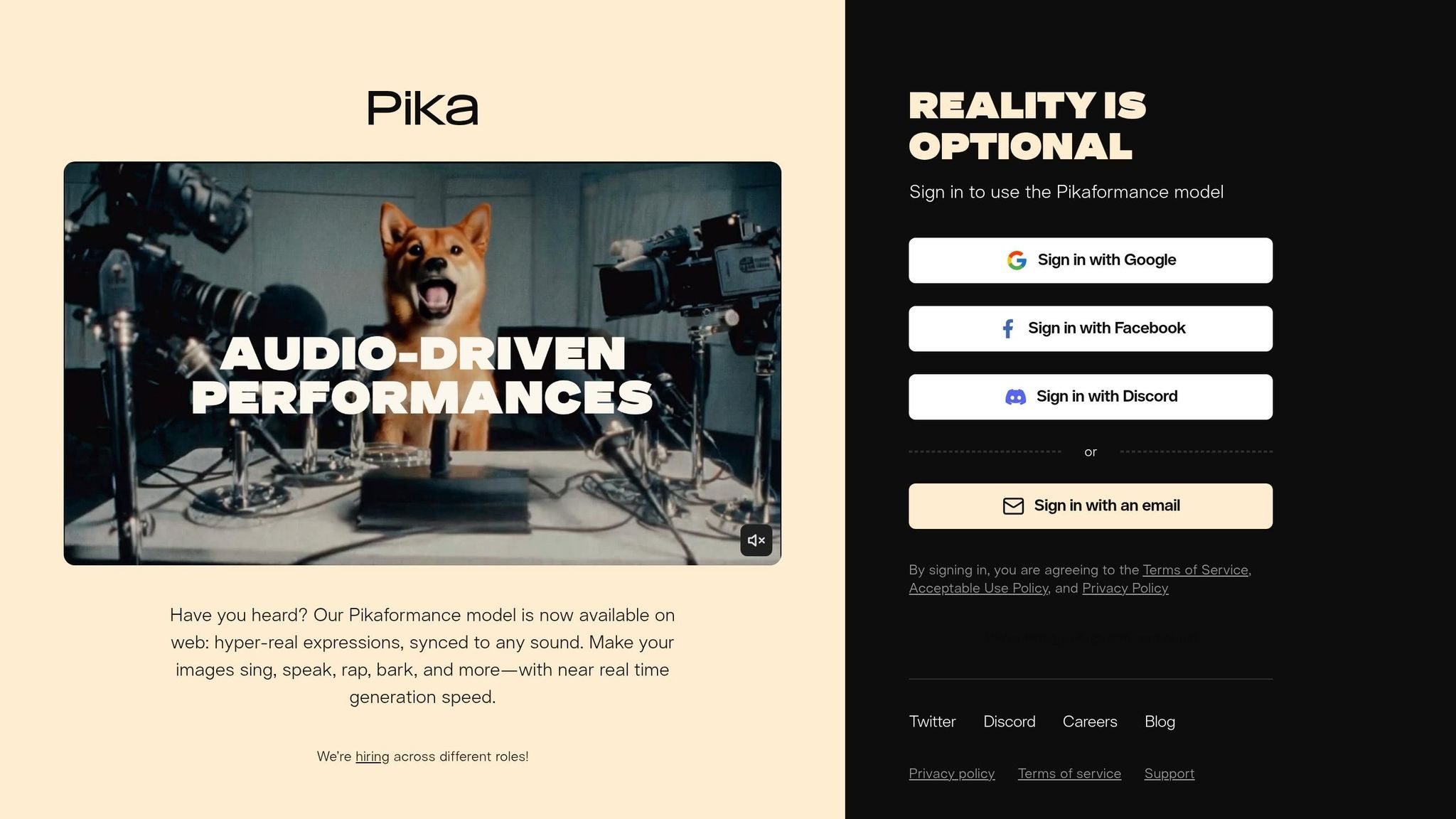
Pika takes a different route in the world of video ad creation, focusing on speed and social-first design. While Runway leans into cinematic quality and detailed control, Pika has been dubbed the "Canva of AI video" for its simplicity and efficiency in crafting quick, eye-catching ads.
One of its standout tools for Facebook ads is Pikaffects, which delivers one-click visual effects like Melt, Explode, Inflate, Crush, and Cake-ify. These are tailored to grab attention in the first few seconds of an ad. Powered by the Pika 2.5 engine, the platform ensures realistic physical motion - perfect for product demos like squeezing a bottle or pouring liquid.
"The automatic sound effect generation is the feature nobody expected to need but can't stop using. If a car crashes in your generated video, Pika generates the crunch of metal." – Skila.ai
This automatic sound generation pairs seamlessly with visuals, while Pikaformance animates portraits to sync with voiceovers, making it a great choice for spokesperson-style ads. However, Pika does have some limitations - it lacks built-in AI avatars and a script-to-ad workflow. This means it’s better suited for creating high-quality visuals rather than full direct-response ads.
In tests across 47 videos, Pika achieved a 74% overall usability rate. Its image-to-video generations succeeded 89% of the time (compared to 61% for text-only prompts), with clips rendered in about 42 seconds. Standard lengths range from 5–10 seconds, but with Pikaframes, videos can be extended to 25 seconds at 1080p on paid plans. Pika supports all major Facebook ad formats, including 9:16 for Reels and Stories, 1:1 for Feed, and 4:5 for Feed ads.
Pricing and Plans
| Plan | Monthly Price (Billed Yearly) | Credits/Month | Key Features |
|---|---|---|---|
| Free | $0 | ~80–150 | 480p, watermarked, no commercial rights |
| Standard | $8 | 700 | 1080p, no watermark, commercial rights, Pikaffects |
| Pro | $28 | 2,300 | Faster generation, priority queue, premium tools |
| Fancy | $76 | 6,000 | Fastest speeds, max quality, high-volume testing |
To put it in perspective, a high-quality 5-second clip costs about 25 credits, translating to $4–$10 per finished ad after retries. A cost-saving tip: create low-resolution 480p drafts to test the motion before rendering the final version in 1080p. This strategy can reduce credit usage by up to 60%. Keep in mind, commercial rights are only available with paid plans (Standard or higher), making the free tier unsuitable for live Facebook campaigns.
Next, we’ll dive into Luma Dream Machine, which offers even more options for crafting quick, engaging Facebook ads.
7. Luma Dream Machine

The Luma Dream Machine takes ad creation up a notch, delivering faster and more affordable solutions for Facebook ad creators. Powered by the Ray3.14 model, it generates native 1080p videos at speeds four times faster and at a cost that's three times lower than its previous iteration. For marketers, this means quicker concept testing and improved efficiency during pre-campaign planning.
The tool offers three versatile modes: Text-to-Video, Image-to-Video, and Modify Video. The Image-to-Video mode is especially handy for product ads. By uploading a product photo as a base, it ensures your product maintains its visual consistency across clips, avoiding what’s known as "identity drift." Meanwhile, the Modify Video mode allows you to tweak existing footage - adjusting environments, lighting, or even wardrobe - without the need for reshoots. This feature is particularly useful for refreshing seasonal ads.
For those testing ad ideas, Draft Mode is a game-changer. It produces clips five times faster and at just 20% of the cost of standard renders. For example, a 720p draft costs 100 credits, compared to 400 credits for a polished 1080p version. This makes it ideal for running A/B tests or experimenting with visual styles before committing to a final render. However, it’s worth noting that video quality tends to drop after 10–15 seconds, so Luma is best suited for short-form content like quick hooks rather than extended narrative ads. These features make it a budget-friendly option for rapid ad iteration.
"Luma AI Dream Machine earns a 3.5 / 5 for 2026. It's the right entry point for indie creators and marketers who need cinematic-quality short clips fast." – StackSheriff
Pricing and Plans
| Plan | Monthly Price | Yearly Price | Key Features |
|---|---|---|---|
| Free | $0 | - | 30 starter credits, watermarked, non-commercial only |
| Plus | ~$30/month | $300/year | 10,000 credits, no watermark, commercial rights |
| Pro | ~$90/month | $900/year | 4x usage capacity, priority queue, commercial rights |
| Ultra | ~$300/month | $3,000/year | 15x usage, built for high-volume ad production |
The Plus plan, priced at around $30/month, provides enough credits for approximately 100 720p test clips each month. This plan is a solid choice for small teams managing regular Facebook campaigns. For agencies or marketers who need to churn out ad creatives daily, the Pro plan offers more flexibility with higher usage limits, ensuring you won’t run out of credits mid-campaign. Importantly, all paid tiers include commercial rights, making them suitable for live Facebook ads.
8. Google Veo
Google Veo 3.1 simplifies the creation of high-quality video ads tailored for Facebook. Its standout feature? Native audio capabilities that generate synchronized dialogue, sound effects, and ambient noise - all in a single pass. This eliminates the need for extra post-production steps and enhances engagement with sound-on ads.
Veo offers three modes to suit different creative needs: Text-to-Video, Image-to-Video, and Ingredients-to-Video. You can use up to three reference images to maintain consistent visuals across characters, objects, and overall style. Plus, it recognizes cinematic prompts like tracking shots, aerial shots, and timelapses, giving you precise control over the visuals.
By default, Veo outputs videos in a 9:16 vertical format, perfect for mobile-first Facebook ads. Clips typically range from 4 to 10 seconds, but with the Extend feature, you can chain them into sequences over 60 seconds long. Speed is another big advantage: Veo 3.1 Fast delivers test videos in just 30–90 seconds, while Veo 3.1 Pro creates polished, high-resolution assets (up to 4K) in 2–5 minutes. This means quicker testing cycles and refined final videos for your campaigns.
"Veo 3.1 brings richer audio, more narrative control, and enhanced realism that captures true-to-life textures." - Jess Gallegos, Senior Product Manager, Google DeepMind
Pricing and Plans
| Access Method | Cost | Best For |
|---|---|---|
| Google Ads Asset Studio | Free for active advertisers | 10-second ad clips, campaign integration |
| Google AI Pro | $19.99/month (1,000 credits) | Regular ad creation with watermarks |
| Google AI Ultra | $249.99/month (12,500 credits) | High-volume production with no watermarks |
| Vertex AI – Veo 3 Fast | $0.15/second of video | API access and cost-effective testing |
| Vertex AI – Veo 3 Pro | $0.40/second of video | High-quality final renders via API |
For smaller teams, the Google AI Pro plan at $19.99/month offers an affordable way to start creating ads, though videos will include watermarks. If you're already running Google Ads campaigns, the Asset Studio integration is a no-cost option for generating quick 10-second clips directly within your campaign dashboard.
Pros and Cons of Each Tool
Summary of Key Strengths and Limitations:
| Tool | Key Strength | Key Limitation |
|---|---|---|
| AdCreative AI | Transforms product photos into engaging video ads with built-in creative scoring | May produce repetitive, templated designs over time |
| Pencil | Uses predictive performance scoring backed by a database of over $1B in ad spend data | Requires a robust library of brand assets |
| Predis AI | Generates ads, captions, and social posts directly from a single product URL | None noted |
| Runway | Produces cinematic-quality generative videos with a focus on high-fidelity visuals | Has a steeper learning curve and credit costs can add up quickly |
| Google Veo | Integrates native audio and offers direct integration with Google Ads | None noted |
These summaries capture the main takeaways from earlier discussions. A few trends stand out. AdCreative AI and Predis AI are ideal for quickly converting product images or URLs into ready-to-use ads, making them excellent for e-commerce campaigns that require high volumes of creative output. Pencil, on the other hand, leans on data-driven insights to optimize creative choices, while Runway focuses on delivering visually stunning, cinematic-quality videos - though its advanced capabilities may require more time and resources to master.
One recurring challenge across tools is the potential for creative fatigue. For instance, tools like AdCreative AI may rely on templated designs, which can lead to diminishing returns over time. To combat this, marketers might consider testing a mix of tools - combining data-driven platforms like Pencil with more dynamic, generative options like Runway can help keep ad content fresh and engaging.
It's also worth noting that high production value doesn't always guarantee better results. A study shows that user-generated content (UGC)-style ads achieve click-through rates up to four times higher than polished branded videos on social platforms. This insight is crucial when evaluating tools that prioritize cinematic visuals, as authenticity often trumps aesthetics in feeds like Facebook.
This comparison provides a foundation for selecting the right tools to boost Facebook ad performance effectively.
Conclusion
This breakdown highlights how AI can offer tailored solutions for various AI platforms for Meta ads and challenges. The right tool depends entirely on your specific goals - whether you're focused on speed, data insights, or creating visually stunning content.
For e-commerce brands needing quick turnaround, AdCreative AI and Predis AI streamline the process by transforming product images or URLs into ad-ready content with minimal effort. If making data-driven decisions is your priority, Pencil's predictive scoring, based on extensive ad spend data, provides a clear advantage before committing your budget. And when your focus is on high-quality visuals, Runway delivers cinematic results, though it may require a bit more time to master.
Here’s a quick reference table to match tools with specific goals:
| Goal | Best Fit |
|---|---|
| High-volume e-commerce ads | AdCreative AI, Predis AI |
| Data-backed creative optimization | Pencil |
| Cinematic brand visuals | Runway |
| End-to-end Meta campaign automation | AdStellar AI |
| Rapid concept iteration | Luma Dream Machine |
As shown above, your tool choice should reflect your needs for speed, insights, or visual impact.
"The brands that win in paid advertising are the ones that test most aggressively - AI collapses the cost barrier to doing exactly that." – HeyFish.ai
To get started, pick the tool that aligns best with your primary goal. Test it over a two-week period, keeping an eye on setup time, output speed, and ad performance. Once you’ve seen results, combining tools can help keep your campaigns dynamic and your creative strategies evolving.
FAQs
Which tool is best for my Facebook ad goal?
The best AI tool for your ads will depend on the type of ad you want to create and your budget. If you're looking for something versatile, AdCreate provides a wide range of features without breaking the bank. Need quick, e-commerce ads? Creatify can turn a URL into a video in no time. For UGC-style spokesperson videos, Arcads is a standout choice. If you're watching your budget, Pencil is a solid option, offering predictive performance scoring to help you make informed decisions. Pick the tool that aligns with your goals and priorities.
How do I reduce AI video credit costs while testing?
To keep AI video credit costs down during testing, try working with shorter test videos and take advantage of free tiers or trial credits whenever they're available. Keep a close eye on credit usage and tweak settings like resolution or video quality to cut back on consumption. Organize your testing sessions wisely - batch tests together to avoid extra renders that aren't needed. By understanding pricing structures and fine-tuning your approach, you can manage expenses more efficiently.
What Facebook video ad specs should I export?
Export your Facebook video ads with an aspect ratio of 4:5 (1080x1350) or 9:16 (1080x1920). Keep the file size under 4GB, and ensure the video duration falls between 15 seconds and 241 minutes, depending on the ad placement. Following these specifications ensures your ads perform well and comply with Facebook's technical guidelines.
Your next ad batch starts here
Finish with a ready-to-test ad batch
Paste your website to generate static creatives. Drop the link → get ads in about 90 seconds → upload them to Meta → scale.
Free to try No prompt writing